How Kinetiq Helps You Ship On-Brand Video, Fast
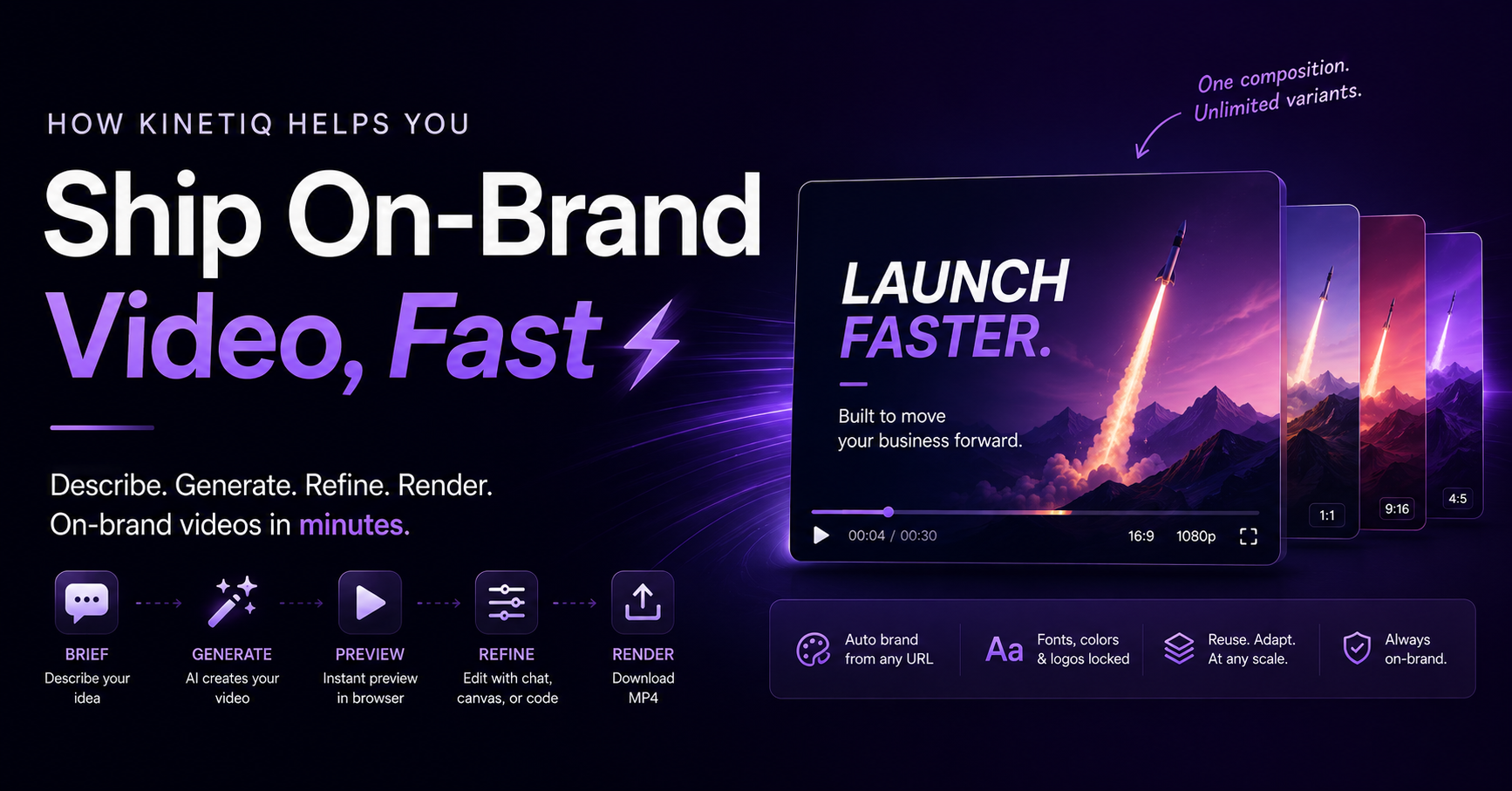
How Kinetiq Helps: A Complete Guide to Shipping On-Brand Video, Fast
Summary. Kinetiq is an AI video studio that turns a plain-language description, a script, or a URL into a finished, on-brand video rendered to MP4 in minutes. It replaces the traditional video stack — a timeline editor, a motion designer, an agency, or a template tool — with one flow: brief, generate, preview, refine, render. Brand capture is automatic from a URL, editing happens by chat, canvas, properties, or code, audio and VFX are built in from the first cut, and the same composition scales into unlimited on-brand variants. This guide walks through exactly how each part of Kinetiq helps, who it helps most, and where it fits against the traditional alternatives.
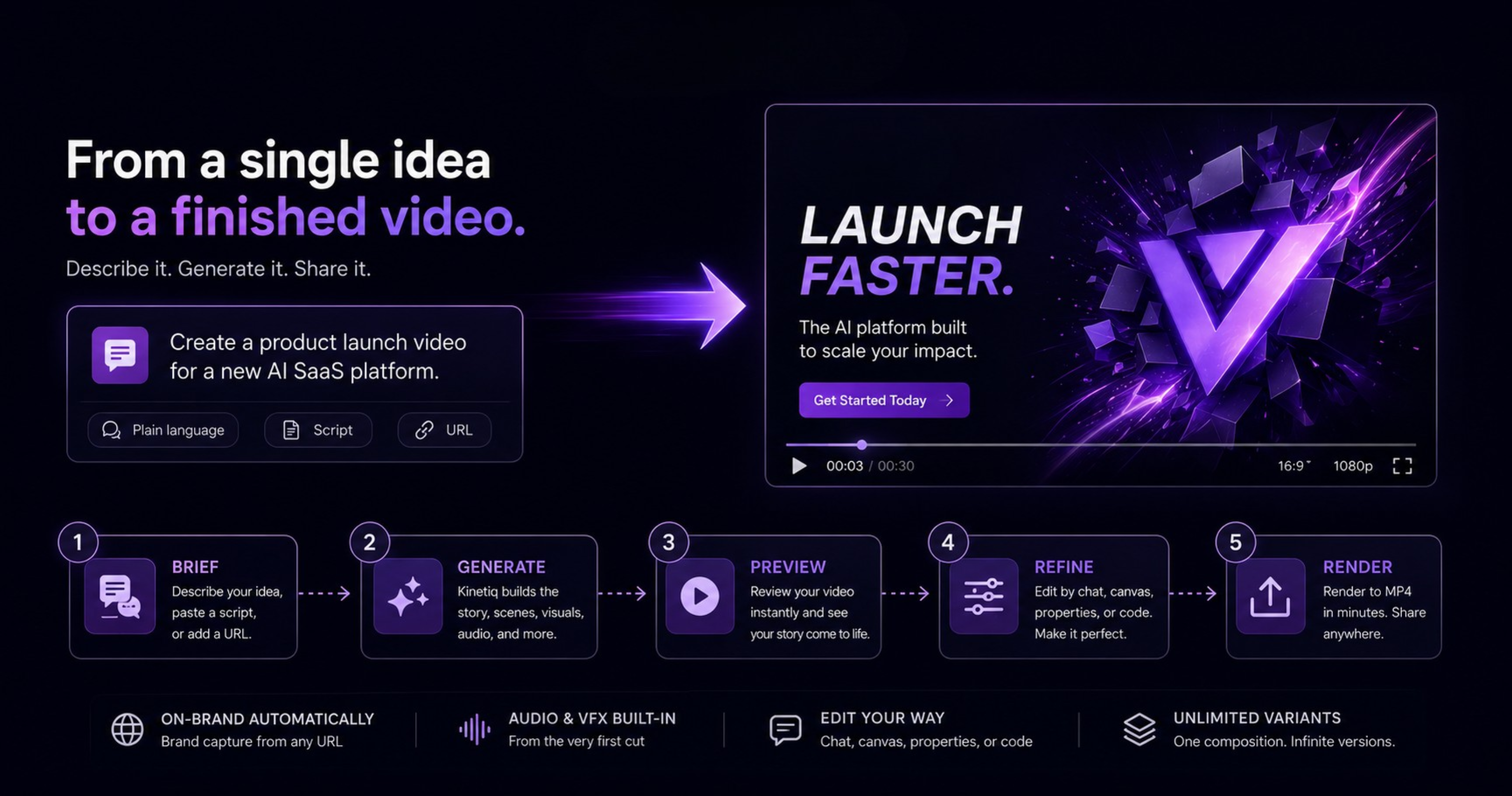
The problem Kinetiq exists to solve
Video is the most persuasive format most teams have access to, and it is also the format most teams quietly give up on. The traditional paths to a finished video all carry the same structural cost, just distributed differently: motion design software takes months to become genuinely fluent in, an agency takes weeks and a real budget for even a single deliverable, and template tools are fast but produce something that looks like every other template tool's output, brand consistency held together by whoever remembers the hex code that week.
The result, across almost every team not staffed with a dedicated motion designer, is the same quiet compromise: the video that actually gets made is the video that was affordable and fast, not the video the moment actually called for. A launch ships without a video because there wasn't time. A weekly update stays a text post because nobody has three hours to cut it. A campaign runs with one static ad because a dozen video variants were never realistically in budget.
Kinetiq is built specifically to remove that bottleneck rather than to make any single step of the old process marginally faster. The premise is direct: if describing a video in plain language is genuinely enough to produce a broadcast-quality, on-brand result, then the actual constraint most teams have been living with — time, budget, skill — stops being the reason a video doesn't get made.
What Kinetiq actually is
Kinetiq's own framing is the clearest way to understand it: Kinetiq is to video what a word processor is to writing. A word processor did not teach anyone to write better sentences; it removed everything that used to sit between having something to say and getting it onto a page — the typesetting, the layout, the physical mechanics of production. Kinetiq applies the same logic to video. The intent is expressed in plain language; the studio writes the video, animates it, and renders a broadcast-quality result, entirely in the browser.
Concretely, that means:
No learning curve. There is no motion design software to master before a first video can be produced.
No timeline scrubbing. The traditional editing interface — a horizontal timeline, keyframes, a playhead — is not the starting point; a description is.
No editing software, no After Effects. Kinetiq runs in the browser; nothing is installed.
No code required, though code remains available for anyone who wants it, which matters more than it might first appear (more on this below).
This matters because it changes who can realistically be the person making a video. In the traditional stack, "who makes the video" is a narrow question with a narrow answer: a trained designer, or whoever the team can afford to hire for it. In Kinetiq's model, the question becomes "who can describe what they need," which is a far larger group — a founder, a marketer, a support lead writing a changelog video, a growth team member testing ten ad variants in an afternoon.
How it works: from a sentence to a rendered video, in one flow
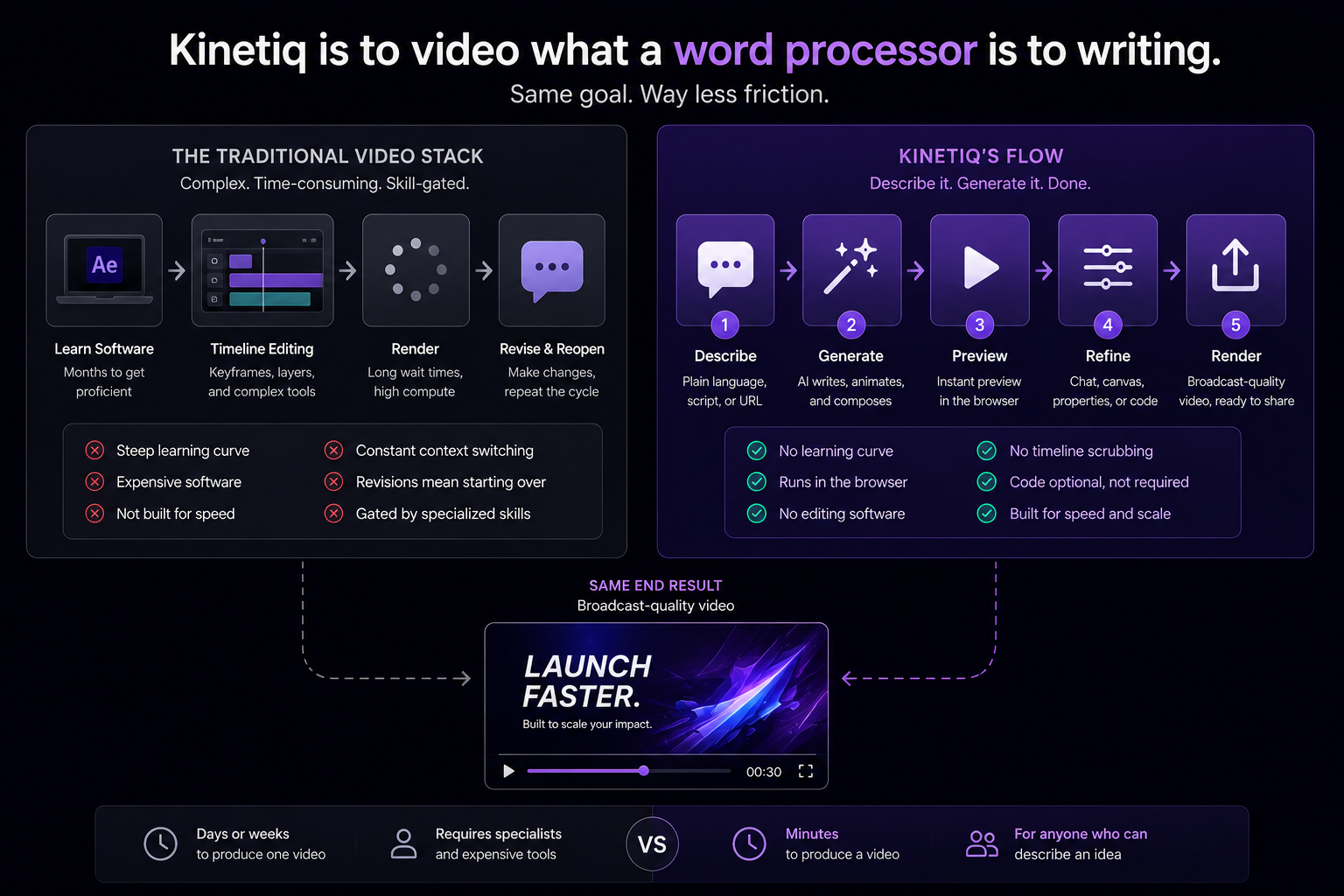
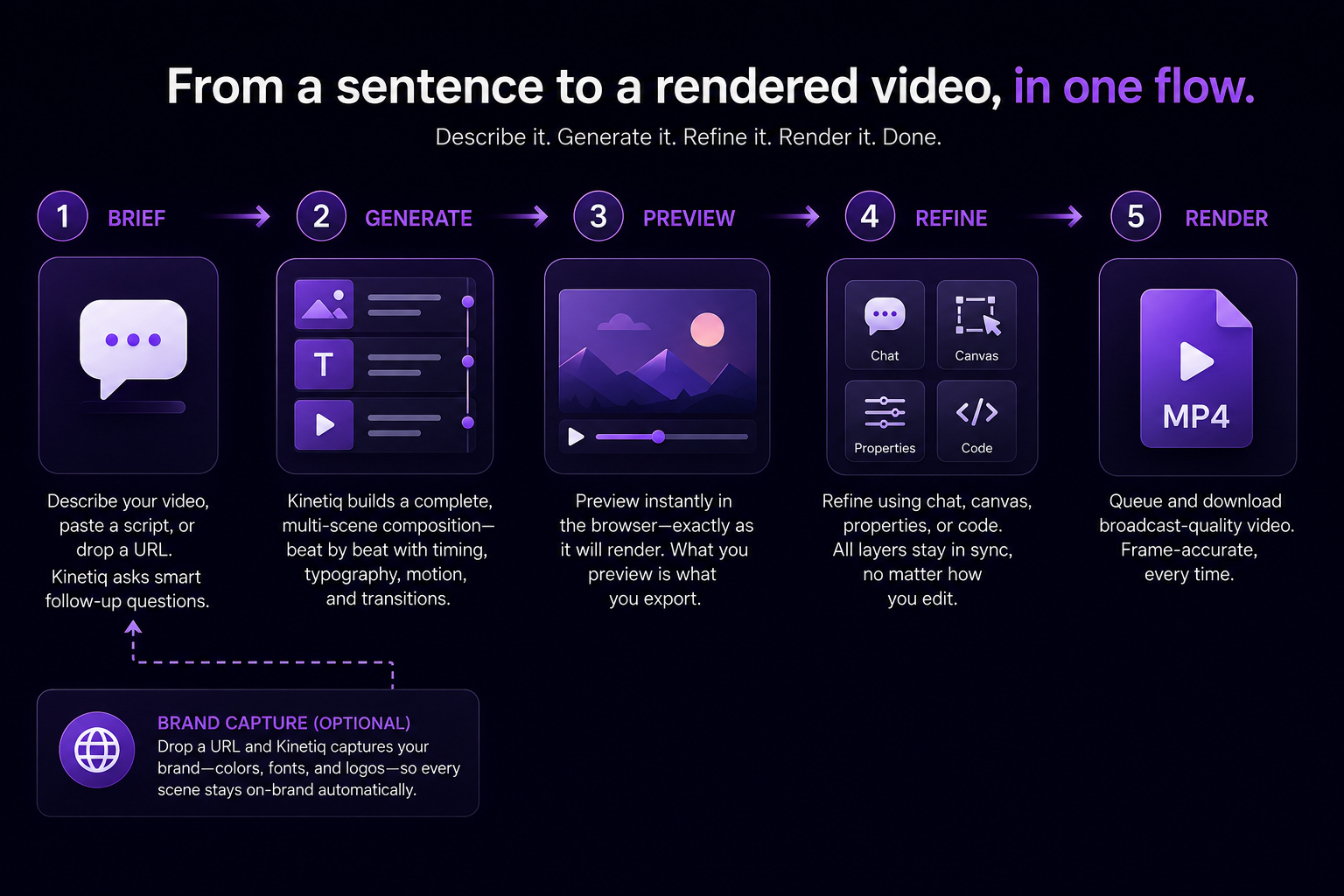
Kinetiq's production flow runs in five steps, and understanding each one is the fastest way to understand what the tool is actually doing underneath the plain-language interface.
Step 1 — Brief
A video starts as a description in chat, a pasted script, or a URL dropped directly into the interface. Kinetiq asks smart follow-up questions where the brief is ambiguous, rather than silently guessing and producing something the brief-writer has to correct from scratch. This matters in practice: the quality of a first draft tracks the specificity of the brief far more than it tracks any setting inside the tool, and a system that asks a clarifying question instead of filling a gap with an assumption produces meaningfully better first drafts.
Step 2 — Generate
From the brief, Kinetiq writes a complete, multi-scene composition, planned beat by beat rather than generated as one undifferentiated block. This is the step where the plain-language intent becomes a structured, authored artifact — a real composition with scenes, timing, typography, and motion logic — not a single image or clip.
Step 3 — Preview
The composition plays instantly in the browser, exactly as it will render. This is a meaningfully different experience from traditional editing tools, where a preview often approximates the final render and diverges from it in small but frustrating ways; what is previewed in Kinetiq is what gets exported, because the preview and the render both come from the same underlying composition rather than a lightweight stand-in and a separate render engine.
Step 4 — Refine
Adjustments happen through whichever of four interfaces suits the person making them — chat, canvas, properties, or code — and every layer stays in sync regardless of which interface made the change. This step is where most of the actual creative decision-making happens in practice: the first draft establishes the shape of the video, and refinement is where it becomes the specific video the brief-writer actually wanted.
Step 5 — Render
The finished composition is queued and downloaded as a broadcast-quality file, frame-accurate every time. Because the composition is structured rather than a generated clip, rendering the same approved composition twice produces frame-for-frame identical output — a property that matters enormously the moment a video needs to be re-exported in a different format or re-rendered after a small correction.
One detail worth calling out specifically: brand capture is optional and happens at the brief stage. Point Kinetiq at a URL, and every scene in the resulting composition honours the captured brand automatically, without a separate brand-setup step interrupting the flow.
What it makes: one studio, eight jobs
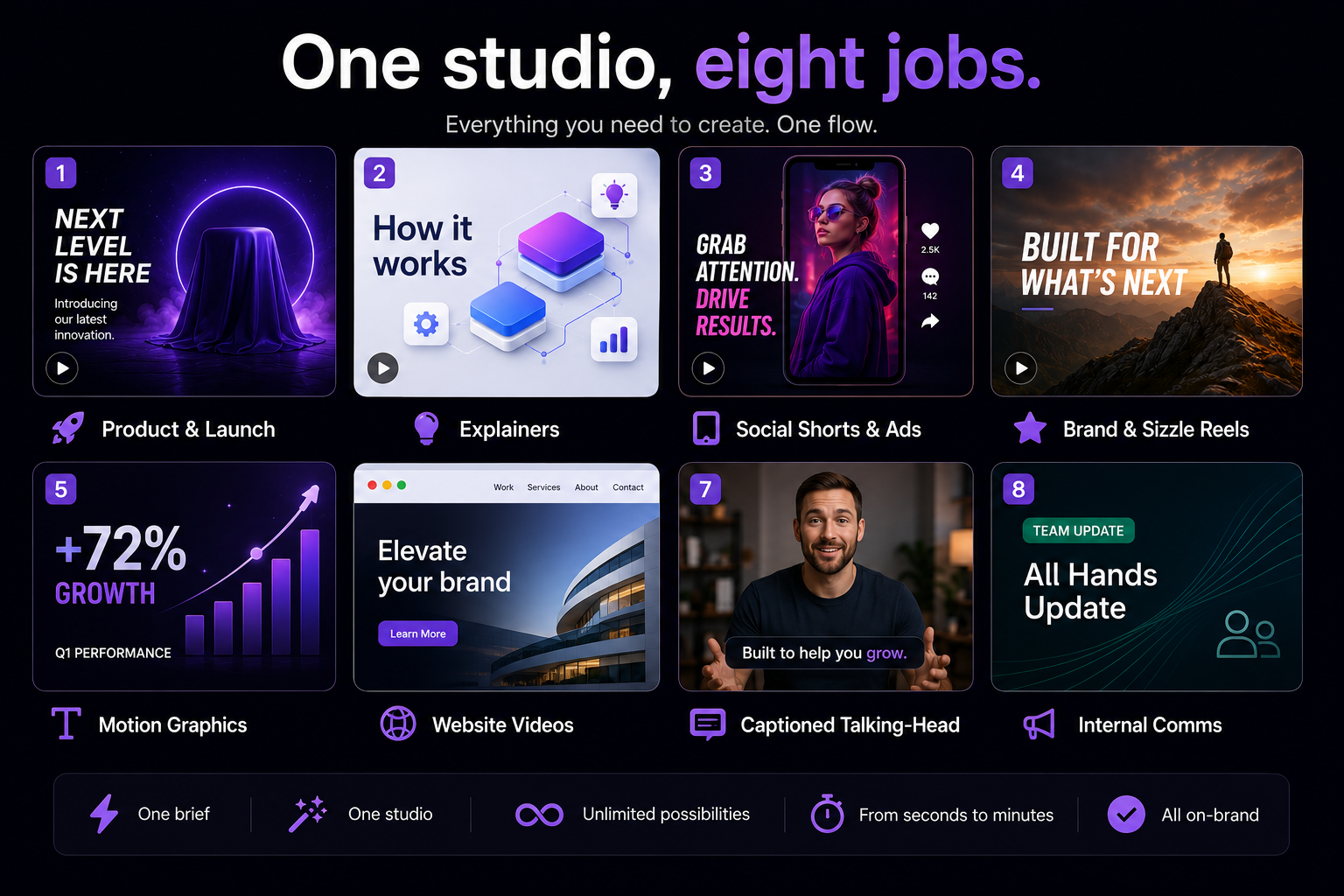
A meaningful part of how Kinetiq helps is refusing to be a single-purpose tool. The same studio, the same underlying brief-to-video flow, produces everything from a five-second logo sting to a three-minute explainer, which means a team does not need a different tool for each video job on its calendar.
Product & launch videos. Feature reveals and launch films that land on-brand from the first frame, built for exactly the moment described earlier in this guide — the launch that would otherwise ship without a video because there wasn't time to produce one properly.
Explainers. An idea, an article, or a set of release notes becomes a clear, narrated AI explainer video, planned beat by beat so the pacing matches the video's actual intended length rather than inheriting a generic rhythm.
Social shorts & ads. Vertical hooks and A/B ad variants produced in minutes rather than as separate productions, which is what makes testing eight or ten creative directions in a single campaign realistic instead of aspirational.
Brand & sizzle reels. High-energy reels built to capture a brand's voice at its most expressive, for the moments a brand wants to make an impression rather than explain a feature.
Motion graphics. Kinetic typography, stat pops, logo stings, and lower thirds — the granular motion-design vocabulary that used to require a specialist tool, now produced from the same brief-to-video flow as anything else in the studio.
Website videos. Point Kinetiq at a site, and it turns that site into a moving showcase automatically, using the site's own content and captured brand rather than requiring a separate creative brief to describe what the site already contains.
Captioned talking-head video. Designed caption packages synced to the actual words spoken, turning raw camera footage into something built for feed-first, sound-off viewing.
Internal comms. Branded updates and announcements at the volume an organisation actually needs — the weekly update, the policy change, the team announcement — produced at a pace that makes "just write an email instead" no longer the only realistic option.
One source, four ways to edit
Perhaps the single most practically important design decision in Kinetiq is this: every video is one source, and everyone touching it works at the level they personally prefer, with all four editing modes staying perfectly in sync.
Chat. Intent-level changes — make the headline bigger, slow the intro, swap the accent color — described in plain language, the same register as the original brief. This is the mode that keeps a non-technical brief-writer able to correct their own video without needing anyone else's help.
Canvas. Click to drag, resize, and rotate, with snap-to-grid and alignment guides — the direct-manipulation mode for anyone who thinks visually and wants to see and touch the exact element they're adjusting.
Properties. Fine-tune color, gradient, type, scale, and per-element motion with precision — the mode for a brand or design lead who wants exact control over a specific value rather than a described intent.
Code. Drop into the HTML source at any point; changes round-trip back to the canvas. This is the mode that matters most for a technical team, and it is also the detail that most clearly distinguishes Kinetiq's "video as code" approach from a typical no-code tool: nothing about using chat or canvas locks a team out of the underlying code, and nothing about editing the code breaks the no-code interfaces for whoever touches the video next.
This matters beyond convenience. A marketing team, a brand lead, and a developer working on the same video traditionally require entirely separate tools and a handoff process between them; Kinetiq's one-source model removes the handoff, because a change made in code and a change made by chat are changes to the same underlying object, not two divergent files that need to be reconciled.
Brand-aware by construction, not by reminder
A brand kit captured once from a URL — palette, typography, tone — applies automatically across every generation, template, and variant a team produces afterward. This is worth understanding as an architectural property rather than a feature checkbox: the exact hex value, the actual licensed typeface, the correct logo geometry render because they are properties of the composition itself, not because whoever is producing a given video happened to remember the brand guidelines correctly under deadline pressure.
The practical benefit compounds specifically at volume and under time pressure — precisely the two conditions where brand drift traditionally happens most. A rushed Friday-afternoon social post and a carefully reviewed flagship launch video draw from the same captured brand kit, so neither one is more likely than the other to drift off-brand; the enforcement does not depend on who is under pressure that day.
[ILLUSTRATION PLACEHOLDER: a URL entering a brand-capture panel on one side, a library of differently-formatted videos — a launch film, a social short, an internal update — all rendering the same exact palette and typeface on the other.]
Audio and VFX, built in from the first cut
Voiceover, music, and sound effects are composed into a video's first draft, not bolted on as a separate downstream task. Natural voices are generated directly from the script, or an uploaded speaker's own voice can be kept intact, with captions synced to the actual words spoken. Background music, generated tracks, and timed sound effects are automatically ducked under narration, so a first cut arrives with a properly balanced soundtrack rather than a silent draft waiting for an audio pass.
VFX — shader transitions, particles, 3D elements, and kinetic effects — are composed to the beat of the piece rather than applied as a generic overlay, which is the difference between motion that looks considered and motion that looks decorative.
The reason this matters more than it might initially seem: audio and VFX have traditionally been separate production stages, each with its own specialist and its own handoff, and each stage historically added days to a production timeline even after the visual cut was finished. Producing all of it in the same generation pass is a meaningful part of what makes a same-day video schedule realistic rather than aspirational.
Reuse and scale: the economics that actually change
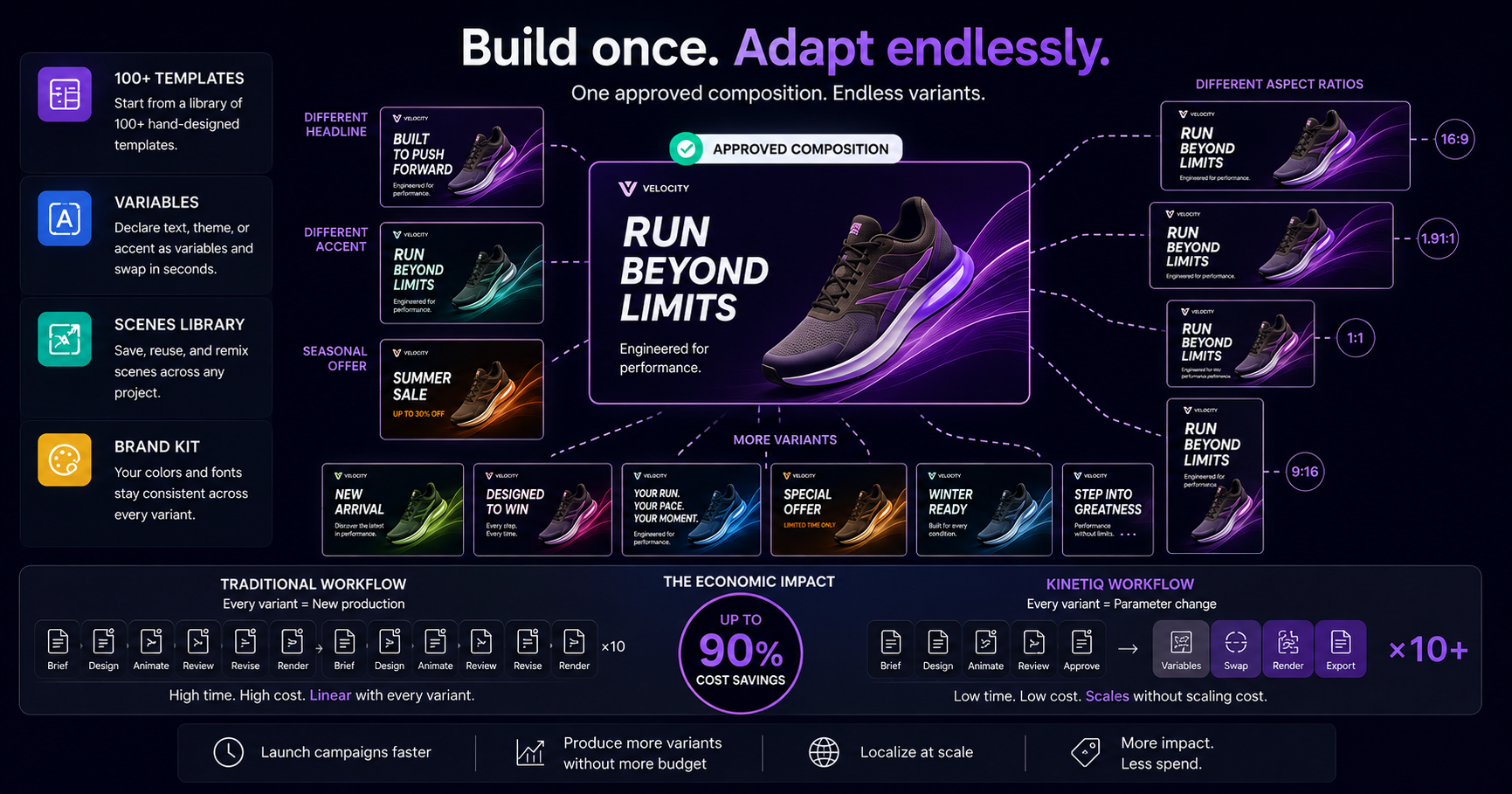
Build once. Adapt endlessly. This is arguably Kinetiq's most consequential capability for any team producing video at a real cadence, because it is the one that changes the shape of a video budget rather than just its speed.
Templates. Kinetiq starts from over 100 hand-designed templates, and any video — starting from a template or generated from scratch — can be saved, cloned, and adapted while keeping its underlying motion DNA intact, rather than starting the creative decision-making over from nothing each time.
Variables. A title, a theme, or an accent can be declared as a variable on an approved composition, and the same underlying video re-renders with different content plugged in — a headline swap, a new customer name, a market-specific offer — rather than requiring a fresh production for each variant.
Scenes library. Individual, self-contained scenes can be saved and remixed across entirely different projects, so a strong transition or a well-built data-viz scene built for one video does not have to be rebuilt from nothing the next time a similar moment is needed elsewhere.
Brand kit. The captured palette and fonts keep the entire library on-brand automatically, across every template, every variable swap, and every remix.
The economic argument this unlocks is the one that shows up across almost every serious video budget conversation: the first video in a campaign carries most of the actual cost — the brief, the review, the approval — and every subsequent variant, rendered from the same approved composition with new variables, costs a fraction of that. A campaign that needed six formats and four headline variants traditionally multiplied labor linearly with each new asset; on Kinetiq, it multiplies close to not at all, since the marginal video is a parameter change rather than a new production.
Export: one composition, every platform's size and shape
A video generated once exports to every platform and shape a team actually needs, up to 4K, from 480p through ultra-HD, at any aspect ratio.
Formats: MP4, WebM, MOV, and PNG sequence, covering universal delivery, web-native playback, professional compositing hand-off, and transparency needs respectively.
Aspect ratios: 16:9, 9:16, 1:1, 4:5, 21:9, or a fully custom ratio — the landscape web and YouTube shape, the vertical Reels and Shorts shape, the square and near-square feed shapes, the cinematic wide shape, and anything a specific placement requires beyond the standard set.
This means the same underlying composition produces the website's hero video and the Reels cut and the LinkedIn square post without being rebuilt or manually reformatted for each, which is a meaningful part of what collapses the traditional "one master, several exports" workflow from a week of separate cut-downs into a single render queue.
What only Kinetiq does, together
Several individual capabilities described above exist elsewhere in the market in isolation — some tools generate video from text, some tools capture a brand kit, some tools expose an API. What Kinetiq argues distinguishes it is the combination, held together as one coherent system rather than assembled from separate products:
A real video from a sentence, not a template fill-in. The output is an authored composition built for the specific brief, not a pre-built template with blanks filled in from a form.
Video as code. The composition is reproducible, versioned, auditable, and editable by both people and agents — a fundamentally different guarantee than a generated clip, which cannot be reopened and precisely corrected the way a structured composition can.
Unique every time, exact on render. Each new brief yields a fresh, considered composition; a saved, approved video renders to the exact same frames every single time it is exported, which is the property that makes an audit trail and a brand guarantee meaningful rather than aspirational.
No-code and code, genuinely both. Chat or canvas for a non-technical brief-writer, raw HTML for a power user — with both working against the same underlying source rather than two disconnected products stitched together under one brand.
Agent-native. A model-agnostic skills system means Kinetiq is drivable by any capable AI agent, not only by a human operating a browser — a meaningfully different architecture from a tool built purely for direct human interaction and then retrofitted with an API afterward.
Provider-neutral, cost-safe. Teams can bring their own preferred AI providers and keys, with a hard allowlist capping spend, rather than being locked to one vendor's model and one vendor's pricing with no visibility into where the cost is actually going.
Who Kinetiq is built for
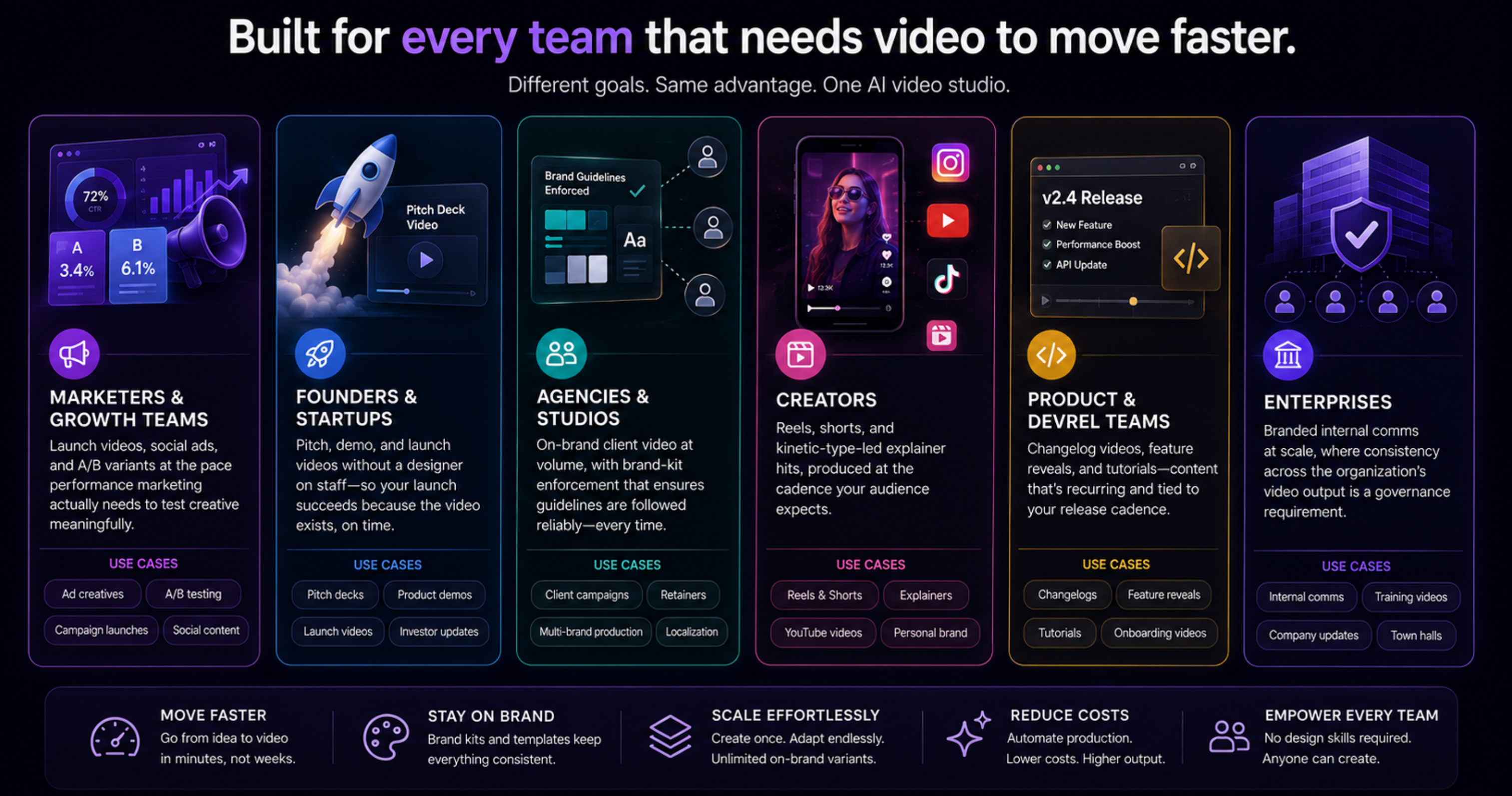
Marketers & growth teams. Launch videos, social ads, and A/B variants at the pace performance marketing actually needs to test creative meaningfully, rather than the pace a traditional production pipeline can support.
Founders & startups. Pitch, demo, and launch videos without a designer on staff — closing exactly the gap described earlier in this guide, where a launch's success depends on a video existing at all, on time, more than it depends on that video winning an award.
Agencies & studios. On-brand client video at volume, with the brand-kit enforcement layer solving the specific problem agencies have always had with external brand consistency — a client's guidelines followed reliably regardless of which team member is producing a given asset.
Creators. Reels, shorts, and kinetic-type-led explainer hits, produced at the cadence a creator's actual publishing schedule demands rather than the cadence a traditional editing workflow allows.
Product & DevRel teams. Changelog videos, feature reveals, and tutorials — content that is inherently recurring and inherently tied to a release cadence a human editing queue struggles to keep pace with.
Enterprises. Branded internal comms at scale, where consistency across a large organisation's internal video output is a governance requirement as much as a creative preference.
The shift, stated plainly
Kinetiq's own framing of the before-and-after is worth stating directly, because it captures the argument of this entire guide in six lines:
The old way The Kinetiq way Video needs a specialist Anyone describes it; the studio authors it Weeks of production and revisions Minutes to first cut; revise by chat or drag Expensive per asset Pay per generation; reuse compounds Templates look generic and off-brand Bespoke, brand-captured compositions A locked file, not reproducible Video as code: versioned and auditable The video gets skipped The video ships, the same day
That last row is, in practice, the row that matters most across every persona listed above. The comparison most teams should be running is rarely "Kinetiq versus a full traditional production," because a full traditional production was frequently never going to happen for that specific video in the first place. The real comparison is "Kinetiq versus no video at all" — and against that baseline, the case is considerably less about production quality and considerably more about whether the message gets made and shipped while it still matters.
A worked example: idea to published video, same day
Consider the pattern this flow is built around directly. A founder has a feature to announce and, as of nine in the morning, no video and no time to commission one. The brief is written directly into Kinetiq: a sentence naming the feature and its sharpest claim, with the company's own URL dropped in alongside it so the brand kit captures automatically.
Kinetiq generates a complete, multi-scene composition within minutes — the feature framed against the problem it solves, the product's own interface carrying the reveal, a proof point drawn from early usage numbers, a closing call to action. The founder previews it exactly as it will render, and makes three corrections: a headline adjustment by chat ("make the claim more specific"), a pacing tweak on the reveal scene dragged directly on the canvas, and a precise color correction to the CTA button through the properties panel, all three changes landing on the same underlying composition without stepping on each other.
Once approved, the video renders to MP4 at 16:9 for the announcement post and 9:16 for the accompanying social clip, both pulled from the same approved source. By early afternoon, a video that would traditionally have needed a week's lead time with an agency, or simply not existed at all, is published — not because the founder became a motion designer overnight, but because the tool removed every step that used to require one.
Frequently asked questions
What is Kinetiq? Kinetiq is an AI video studio. A plain-language description becomes a finished, on-brand video that renders to MP4 in minutes. It treats video as code, so every render is reproducible and frame-accurate.
Do I need editing skills or software to use Kinetiq? No. There is no timeline scrubbing, no editing software, no After Effects, and no code required — describing the video is enough to produce a first draft, though code remains available for anyone who wants it.
How does Kinetiq's brand capture work? Point Kinetiq at a URL and it captures the palette, fonts, and tone into a brand kit, then applies that brand automatically to every scene, template, and variant generated afterward.
What kinds of videos can Kinetiq make? Product and launch videos, explainers, social shorts and ads, brand and sizzle reels, motion graphics, website videos, captioned talking-head content, and internal comms — from a five-second logo sting to a three-minute explainer, all from the same studio.
What formats and sizes does Kinetiq export? Up to 4K, from 480p through ultra-HD, at any aspect ratio including 16:9, 9:16, 1:1, 4:5, 21:9, or a custom ratio, exported as MP4, WebM, MOV, or a PNG sequence.
Is audio built into the generated video? Yes. Voiceover, music, and sound effects are composed into the first cut and automatically ducked under narration; an uploaded speaker's own voice can also be kept intact, with captions synced to the words spoken.
Can AI agents drive Kinetiq directly? Yes. Kinetiq is agent-native, available over a headless video API and an MCP server, so any capable agent can brief, generate, edit, and render a video without a person operating the browser interface directly.
Is Kinetiq an alternative to After Effects, Jitter, or Remotion? Yes, though the approach is different: instead of a timeline, a browser template library, or writing React by hand, a description becomes a real, brand-captured composition, revised afterward by chat, canvas, or code, with every render staying frame-accurate.
How fast can a video actually go from idea to published? Minutes to a first cut, with same-day publication realistic once brief-writing, review, and export are accounted for — fast enough to react to a launch, a trend, or a news moment while it is still current.