
5 AI Motion Design Features That Set Kinetiq Apart
Artificial intelligence has fundamentally changed how marketing teams, creative agencies, and businesses approach video production. Tasks that once required days of planning, scripting, designing, animating, and rendering can now be completed in a fraction of the time with AI-powered creative tools.
As demand for video content continues to grow across websites, social media, digital advertising, and product marketing, organizations are searching for platforms that can help them produce high-quality content faster without compromising creativity or brand consistency. This has led to a surge in AI-powered video generators, motion graphics tools, and creative automation platforms.
However, generating a video is only one part of the creative process.
Modern marketing teams need solutions that integrate seamlessly into their existing workflows, support collaboration between designers and developers, maintain brand identity across campaigns, and provide the governance required for enterprise-scale operations. Relying on multiple disconnected applications often introduces unnecessary complexity, slows production, and creates inconsistencies that affect both quality and efficiency.
This is where Kinetiq AI Motion Design Studio takes a different approach.
Rather than functioning as a standalone AI video generator, Kinetiq provides a unified environment where marketers, designers, developers, and AI agents can work together throughout the entire creative lifecycle. From concept development and storyboarding to animation, editing, branding, rendering, and publishing, every stage of production is brought together within a single workspace.
The result is a more connected, collaborative, and scalable approach to AI-powered motion design.
In this article, we'll explore five standout capabilities that differentiate Kinetiq from traditional AI creative tools and explain why these features matter for organizations looking to modernize their content production workflows.
Why Modern AI Motion Design Requires More Than Video Generation
AI has significantly reduced the time and effort required to create motion graphics, promotional videos, product demonstrations, and social media content. With just a text prompt or a collection of brand assets, many AI tools can generate impressive visual content within minutes.
Yet many organizations quickly discover that producing a video is only the beginning.
Marketing campaigns often involve multiple stakeholders, including creative directors, designers, developers, copywriters, brand managers, and marketing operations teams. Each contributor typically works with different tools, creating disconnected workflows that require constant exporting, importing, reviewing, and revision.
These fragmented processes introduce several common challenges:
Maintaining consistent branding across projects
Coordinating edits across multiple team members
Switching between separate design, animation, and editing tools
Managing approvals and governance for enterprise teams
Integrating AI-generated assets into broader marketing workflows
Instead of solving these challenges, many AI video generators simply automate one stage of production while leaving the rest of the workflow fragmented.
Kinetiq addresses these limitations by combining AI-assisted creativity, collaboration, automation, developer flexibility, and governance within a single platform. This integrated approach enables organizations to produce content more efficiently while maintaining creative quality and operational control.
1. Edit the Same Project Across Four Different Interfaces
One of Kinetiq's most distinctive innovations is its multi-surface editing experience, which enables different team members to work on the same project using the interface that best matches their expertise.
Traditional creative software typically forces every contributor into a single editing environment. Designers rely on visual canvases, developers work in code editors, and marketers increasingly use AI chat interfaces to make quick adjustments. Unfortunately, these workflows often operate independently, requiring teams to synchronize changes manually or recreate edits across multiple tools.
Kinetiq eliminates these barriers by allowing a single project to be edited through four synchronized interfaces:
AI-powered natural language chat
Visual drag-and-drop canvas
Properties panel
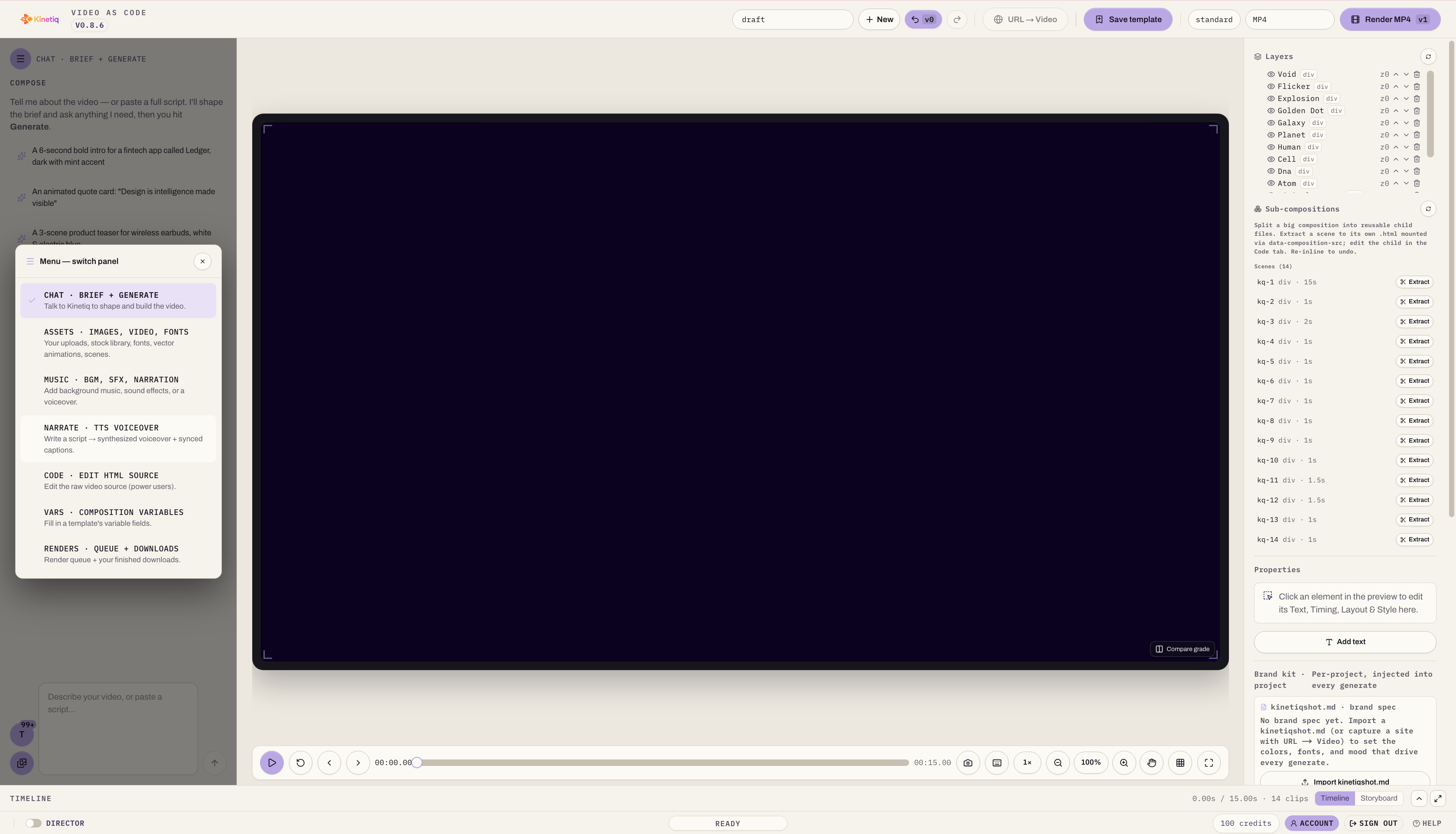
HTML or code editor
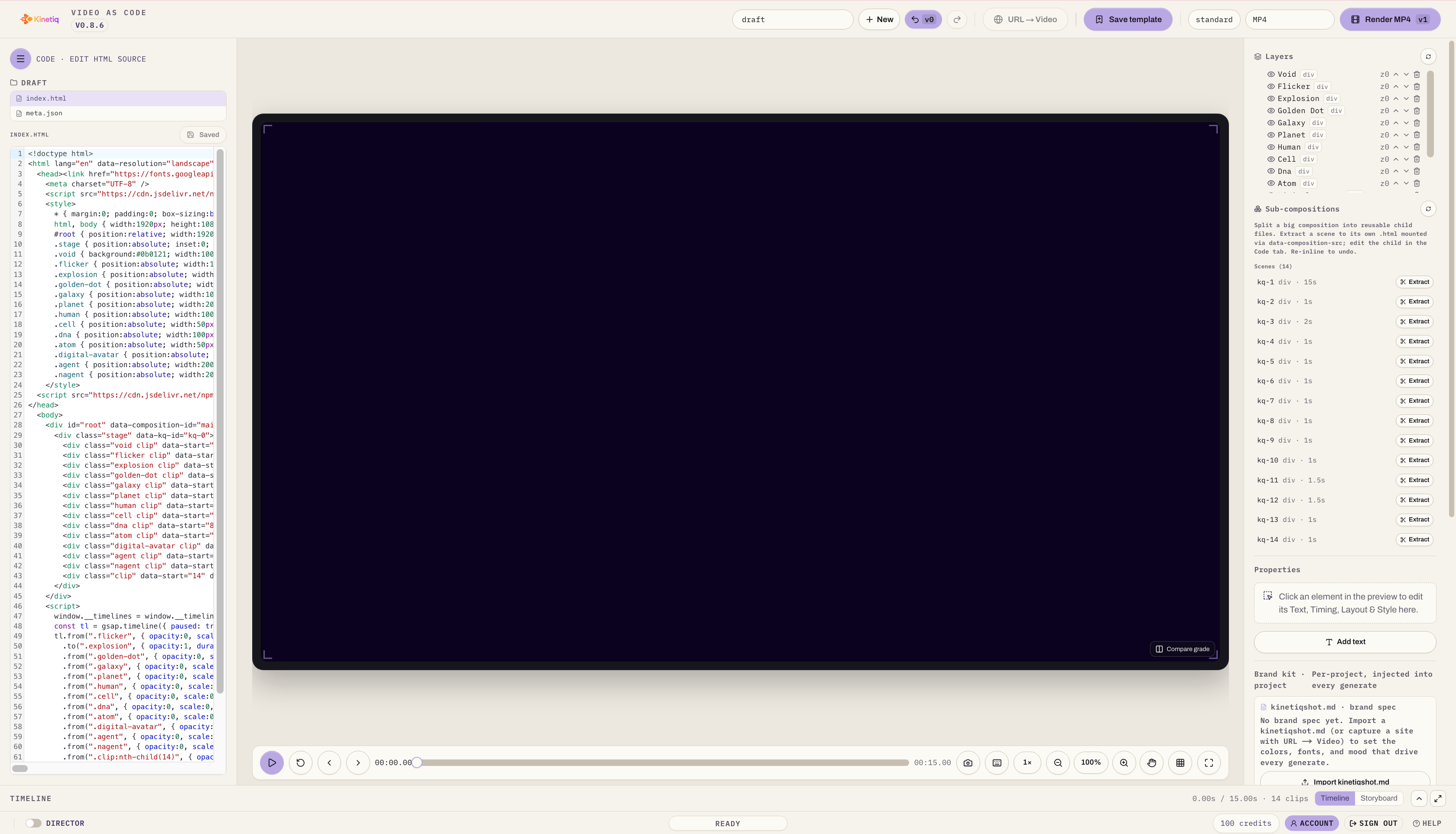
Every modification is automatically reflected across the entire project.
For example, a marketer can ask the AI assistant to rewrite a product headline using natural language. At the same time, a designer can reposition visual elements on the canvas, while a developer fine-tunes responsive layouts through code. Because all interfaces remain synchronized, there is no need to export files, merge versions, or manually replicate changes.
This flexibility creates a collaborative environment where each team member contributes using familiar tools while working on the same creative asset.
Benefits
Eliminates duplicate project versions
Reduces communication bottlenecks
Enables simultaneous collaboration
Supports both technical and non-technical users
Accelerates production without sacrificing creative control
Practical Example
Imagine a product launch campaign requiring multiple versions of a promotional video. The marketing manager updates messaging through AI chat, the designer adjusts animations using the visual editor, and the frontend developer optimizes interactive elements in the code editor. Rather than creating separate project files, everyone contributes to a single synchronized workflow, significantly reducing production time and minimizing revision cycles.
2. Automatic Brand Consistency Across Every Video
Maintaining a consistent visual identity becomes increasingly difficult as organizations produce larger volumes of marketing content. Even experienced creative teams can inadvertently introduce inconsistencies in typography, color palettes, logo placement, and design styles when managing multiple campaigns simultaneously.
These seemingly minor variations can weaken brand recognition, increase approval cycles, and create additional work for designers responsible for reviewing every asset before publication.
Kinetiq simplifies this process through automatic brand inheritance, enabling teams to generate videos that align with established brand guidelines from the very beginning.
Rather than manually configuring each project, users can provide existing brand assets or a company website. The platform intelligently applies core visual elements across newly generated creative projects, helping ensure consistency throughout the production process.
Brand elements that can be reflected automatically include:
Primary and secondary color palettes
Typography and font hierarchy
Logo placement
Visual identity
Overall design language
Creative tone and style
Because branding is incorporated at the start of production, marketing teams spend less time correcting visual inconsistencies and more time refining campaign messaging and creative storytelling.
This capability is especially valuable for organizations producing large volumes of promotional videos, product demonstrations, social media advertisements, onboarding materials, and customer education content.
Benefits
Maintains consistent brand identity
Reduces repetitive design work
Speeds up creative approvals
Improves production efficiency
Enables scalable content creation
Practical Example
A SaaS company launching a new feature may need dozens of localized product videos across different regions. Instead of manually applying brand guidelines to every variation, Kinetiq automatically incorporates the organization's established colors, typography, logos, and design language into each generated asset. Creative teams can then focus on localization and messaging rather than repetitive formatting tasks.
3. Direct Integrations with the AI Tools Your Team Already Uses
One of the biggest barriers to adopting new creative software is the need to change existing workflows. Marketing teams, developers, and designers already work inside AI assistants like Claude, ChatGPT, and Perplexity, or inside AI-native coding environments like Cursor. Introducing another standalone application can add complexity rather than improve efficiency.
Kinetiq addresses this by connecting directly to those tools rather than asking teams to leave them. A dedicated MCP server and API tier let any MCP-capable agent — whether that's Claude, Cursor, ChatGPT, Perplexity, or a custom internal agent — call Kinetiq's motion design capabilities as part of its own workflow. Instead of a human copying prompts between apps, the agent the team already trusts can hand off storyboarding, animation, branding, and rendering work directly to Kinetiq and bring the result back into the same conversation or pipeline.
This means content generation, review, and publishing can become genuinely automated, not just AI-assisted at each individual step.
Why This Matters
Modern creative operations rarely happen in isolation. A single marketing campaign might involve AI-generated concepts, automated copywriting, motion graphics, product screenshots, voice-over generation, brand approvals, and publishing across channels. When these stages are spread across disconnected tools, productivity suffers. Direct MCP-level integration removes the manual hand-off between them.
Benefits
Native support for the AI assistants and agents teams already use
A dedicated MCP server and API tier for programmatic, agent-driven workflows
Reduces reliance on isolated, single-purpose creative tools
Simplifies automation pipelines end to end
Helps developers and marketers collaborate through a shared agent layer
Practical Example
A marketing team using Claude for campaign planning can have the same agent call Kinetiq's MCP server to turn an approved concept directly into a first-pass motion graphic — no manual export, no switching tools, no separate login for a junior team member to babysit the handoff.
4. Enterprise Governance That Lets Agents Operate Safely, Not Just Humans
As AI-generated content becomes central to marketing operations, organizations need more than creative capabilities — they need visibility, accountability, and operational control. This matters even more once AI agents, not just people, are the ones initiating work inside the platform.
Without governance, large teams can quickly encounter inconsistent usage, uncontrolled costs, duplicate assets, and unclear ownership of creative projects. That risk compounds when an agent can trigger generation jobs on its own.
Kinetiq's governance layer is built with this in mind. A hard provider allowlist restricts which models and agents are permitted to connect at all, so access isn't open by default. Per-video cost metering tracks spend at the level of each generated asset, not just at the account level. Together, these let an organization trust an agent to operate Kinetiq within a fixed budget, rather than requiring a human to supervise every generation request.
Key governance capabilities include:
Team management and permission controls
Workspace administration and project visibility
A hard allowlist of approved providers/agents
Per-video cost metering and budget enforcement
Usage monitoring and operational oversight
Why Governance Matters
As organizations scale AI adoption across departments — and increasingly, across autonomous agents — governance becomes the thing that makes delegation safe. Enterprise teams need approval workflows, access controls, usage tracking, and budget management that hold whether a human or an agent is the one pressing "generate."
Benefits
Improved operational transparency, including agent-initiated activity
Cost control at the individual asset level, not just aggregate spend
A defined boundary on which AI providers can touch the platform
Reduced administrative overhead
Enterprise-ready production, safe for agentic workflows
Practical Example
A multinational organization might allow its Claude-based marketing agents to generate localized product videos autonomously, capped by per-video cost metering and restricted to an approved provider allowlist. Administrators get full visibility into what was generated, by which agent, and at what cost — without needing to approve every individual video by hand.
4. One Studio for the Entire Creative Pipeline
Many creative teams still rely on a fragmented production process involving multiple specialized applications.
A typical workflow may include:
One tool for script writing
Another for storyboarding
A separate application for visual design
Software for animation
Voice generation tools
Video editors
Rendering software
Asset management platforms
While each tool performs its specific task well, switching between them introduces unnecessary friction. Teams spend valuable time exporting files, managing versions, coordinating approvals, and ensuring assets remain synchronized.
Kinetiq reimagines this process by bringing the entire creative pipeline into a single workspace.
Instead of moving between disconnected applications, users can manage every stage of production from one centralized environment.
A typical project can include:
AI-powered creative assistance
Script development
Storyboarding
Visual assets
Motion graphics
Voice narration
Music
Variables for personalization
Code editing
Rendering
Asset management
Collaboration
This unified approach reduces production complexity while improving consistency across campaigns.
Why Unified Workflows Matter
Every additional application introduces potential delays:
Files need exporting
Assets require version control
Team members duplicate work
Feedback loops become longer
Creative reviews take more time
Consolidating these processes enables organizations to focus on creativity rather than workflow management.
Benefits
Faster production cycles
Fewer context switches
Simplified project management
Better collaboration across teams
Improved creative consistency
Reduced software complexity
Practical Example
A retail brand preparing a seasonal campaign may need promotional videos, social media advertisements, product explainers, and digital signage. Rather than creating each asset across several platforms, the marketing team can manage ideation, design, animation, revisions, rendering, and approvals within one studio, significantly accelerating campaign delivery.
5. Real-World Applications of Kinetiq AI Motion Design Studio
The flexibility of Kinetiq makes it suitable for a wide range of industries and creative workflows.
Marketing Teams
Marketing departments can rapidly produce:
Product launch videos
Social media campaigns
Promotional advertisements
Brand awareness content
Customer education videos
Event promotions
With AI handling repetitive production tasks, marketers can focus on strategy, messaging, and campaign optimization.
Creative Agencies
Agencies often juggle multiple clients with distinct branding requirements.
Kinetiq helps agencies:
Generate concepts faster
Maintain brand consistency
Reduce production time
Deliver more campaigns simultaneously
Improve collaboration between designers and developers
This enables agencies to increase output without proportionally increasing operational costs.
SaaS Companies
Software businesses frequently require:
Feature announcement videos
Product demonstrations
Customer onboarding tutorials
Release highlights
Educational content
Using AI-assisted motion design, SaaS marketing teams can keep pace with rapid product development cycles while maintaining professional-quality visuals.
Enterprise Organizations
Large enterprises benefit from centralized governance, collaborative workflows, and scalable content production.
Departments across the organization can create:
Internal communications
Employee training
Product marketing
Sales enablement materials
Executive presentations
Corporate announcements
Governance ensures creative quality while supporting collaboration across distributed teams.
Startups
Startups often operate with limited design resources.
Kinetiq enables smaller teams to produce polished motion graphics without maintaining a large in-house production department, helping them compete with larger organizations while controlling costs.
Why AI Motion Design Will Shape the Future of Marketing
The demand for video content continues to grow across every digital channel. Social media platforms prioritize short-form video, websites increasingly rely on product demonstrations, and businesses are using animated explainers to educate customers, onboard users, and strengthen brand awareness.
At the same time, marketing teams are expected to produce more content with the same—or even fewer—resources. Traditional production methods, which often require multiple tools, lengthy review cycles, and significant manual effort, struggle to keep pace with these expectations.
AI motion design is changing this landscape by automating repetitive production tasks while allowing creative professionals to focus on storytelling, strategy, and innovation.
However, speed alone is not enough. Organizations also need solutions that preserve brand identity, support collaboration across departments, and integrate seamlessly with existing workflows. Platforms that combine automation with governance and flexibility are becoming essential for businesses looking to scale content production responsibly.
Kinetiq reflects this shift by bringing together AI-assisted creativity, multi-user collaboration, developer-friendly customization, and enterprise oversight within a single environment. Instead of treating AI as a standalone creative tool, it positions AI as a collaborative partner that works alongside marketers, designers, developers, and content teams.
Best Practices for Implementing AI Motion Design
Adopting AI motion design is about more than introducing a new tool—it requires thoughtful integration into existing creative processes. The following practices can help organizations maximize the value of AI-powered content production.
1. Build a Centralized Brand Library
Maintain a single source of truth for logos, color palettes, typography, imagery, and design guidelines. Centralized assets help AI-generated videos remain consistent across campaigns and reduce the time spent on manual corrections.
2. Combine AI with Human Creativity
Use AI to accelerate repetitive tasks such as scripting, layout generation, animation, and rendering, while allowing designers and marketers to focus on storytelling, creative direction, and audience engagement. The strongest campaigns combine automation with human insight.
3. Encourage Cross-Functional Collaboration
Bring marketers, designers, developers, and product teams into the same workflow early in the creative process. Shared visibility reduces misunderstandings, shortens review cycles, and helps deliver more cohesive campaigns.
4. Establish Governance Policies
As AI adoption grows, define clear roles, permissions, approval workflows, and usage guidelines. Governance ensures that AI-generated content aligns with brand standards and organizational objectives while maintaining accountability.
5. Measure Performance and Continuously Improve
Track engagement, conversions, watch time, and audience feedback for AI-generated videos. Use these insights to refine prompts, creative templates, and production workflows over time. Continuous optimization helps organizations improve both efficiency and content quality.
Frequently Asked Questions
What is an AI Motion Design Studio?
An AI Motion Design Studio is a platform that uses artificial intelligence to assist with creating motion graphics, animations, promotional videos, product demonstrations, and other visual content. It streamlines production by automating tasks such as scripting, storyboarding, editing, animation, and rendering.
How is Kinetiq different from a standard AI video generator?
While many AI video generators focus solely on producing videos from prompts, Kinetiq supports a broader creative workflow. It combines AI-assisted editing, synchronized multi-interface collaboration, brand consistency, enterprise governance, and an end-to-end production environment in a single platform.
Can Kinetiq help maintain brand consistency?
Yes. By automatically applying brand elements such as colors, typography, logos, and visual style, Kinetiq helps teams produce videos that align with established brand guidelines from the first draft, reducing manual revisions and approval cycles.
Is Kinetiq suitable for enterprise teams?
Yes. Kinetiq includes governance features such as workspace management, permissions, team visibility, and usage monitoring, making it suitable for organizations that require scalable collaboration and operational oversight.
Can developers work alongside designers in Kinetiq?
Yes. One of Kinetiq’s distinguishing features is its multi-surface editing environment. Designers can use visual editing tools while developers work with code, and marketers can make changes using AI-powered chat. All edits remain synchronized within the same project.
What types of organizations benefit most from AI motion design?
AI motion design is valuable for marketing teams, creative agencies, SaaS companies, startups, educational institutions, eCommerce businesses, and enterprise organizations that need to produce high-quality video content quickly while maintaining consistency and operational control.
Final Thoughts
AI-powered video creation has moved far beyond simply generating animations from a prompt. Today's organizations need platforms that support collaboration, automate repetitive tasks, protect brand identity, and integrate seamlessly into existing creative and development workflows.
Kinetiq AI Motion Design Studio addresses these evolving needs by bringing together AI-assisted editing, synchronized multi-surface collaboration, automatic branding, enterprise governance, and an end-to-end production pipeline within a unified workspace.
Rather than replacing creative professionals, it empowers them to work more efficiently. Marketers can accelerate campaign production, designers retain creative control, developers gain the flexibility to customize projects, and enterprise teams benefit from governance that supports responsible AI adoption at scale.
As the demand for high-quality video content continues to rise, organizations that embrace connected, AI-driven creative workflows will be better positioned to deliver consistent, engaging experiences across every digital channel. Platforms like Kinetiq demonstrate how AI can become an integral part of modern content production—helping teams create faster, collaborate more effectively, and scale their creative operations without compromising quality.
Whether you're a startup looking to streamline video production, a creative agency managing multiple clients, or an enterprise seeking greater control over AI-generated content, Kinetiq offers a comprehensive environment designed for the future of motion design.
Call to Action
Ready to transform your video production workflow?
Explore Kinetiq AI Motion Design Studio to discover how AI-powered editing, automated branding, enterprise governance, and collaborative workflows can help your team create professional motion graphics faster and more efficiently.