
AI Motion Design for App Onboarding Walkthroughs
Onboarding video is a retention lever, not a nice-to-have
The gap between a user signing up and a user actually reaching the moment your product proves its value is where most software loses people. A clear, well-paced walkthrough video at that exact moment — showing, not just telling, how to complete the first meaningful action — measurably improves activation. The problem is that most product teams treat onboarding video as a one-time launch asset instead of a living part of the product, because keeping it updated has historically required a motion designer's time every time the UI changes.
This matters more than it first appears, because onboarding is one of the few moments where a video genuinely outperforms text. A written help article assumes the reader is patient enough to translate instructions into screen actions themselves; a walkthrough video removes that translation step entirely, which is exactly why activation rates respond to it. But that benefit only holds if the video shown actually matches the product a user is looking at — a walkthrough of last year's UI does more harm than no walkthrough at all, because it actively confuses rather than clarifies.
Why onboarding videos go stale
A typical onboarding walkthrough is recorded once, around a launch, and then quietly drifts out of sync with the actual product as features ship, buttons move, and flows get redesigned. Re-recording and re-editing a walkthrough is real production work — screen capture, voice-over, caption sync, motion graphics for callouts — so it keeps getting deprioritized behind new feature work, and the walkthrough a new user watches is often showing a version of the product that no longer exists.
Product teams know this is happening and mostly accept it as an unavoidable cost, because the alternative — treating onboarding video as something that gets revisited every sprint — has never been realistic given how much production work a re-shoot involves. The result is a slow, invisible tax on activation that nobody owns fixing, because no single UI change feels big enough to justify a new production cycle on its own.
A faster loop: screenshots and product copy in, a finished walkthrough out
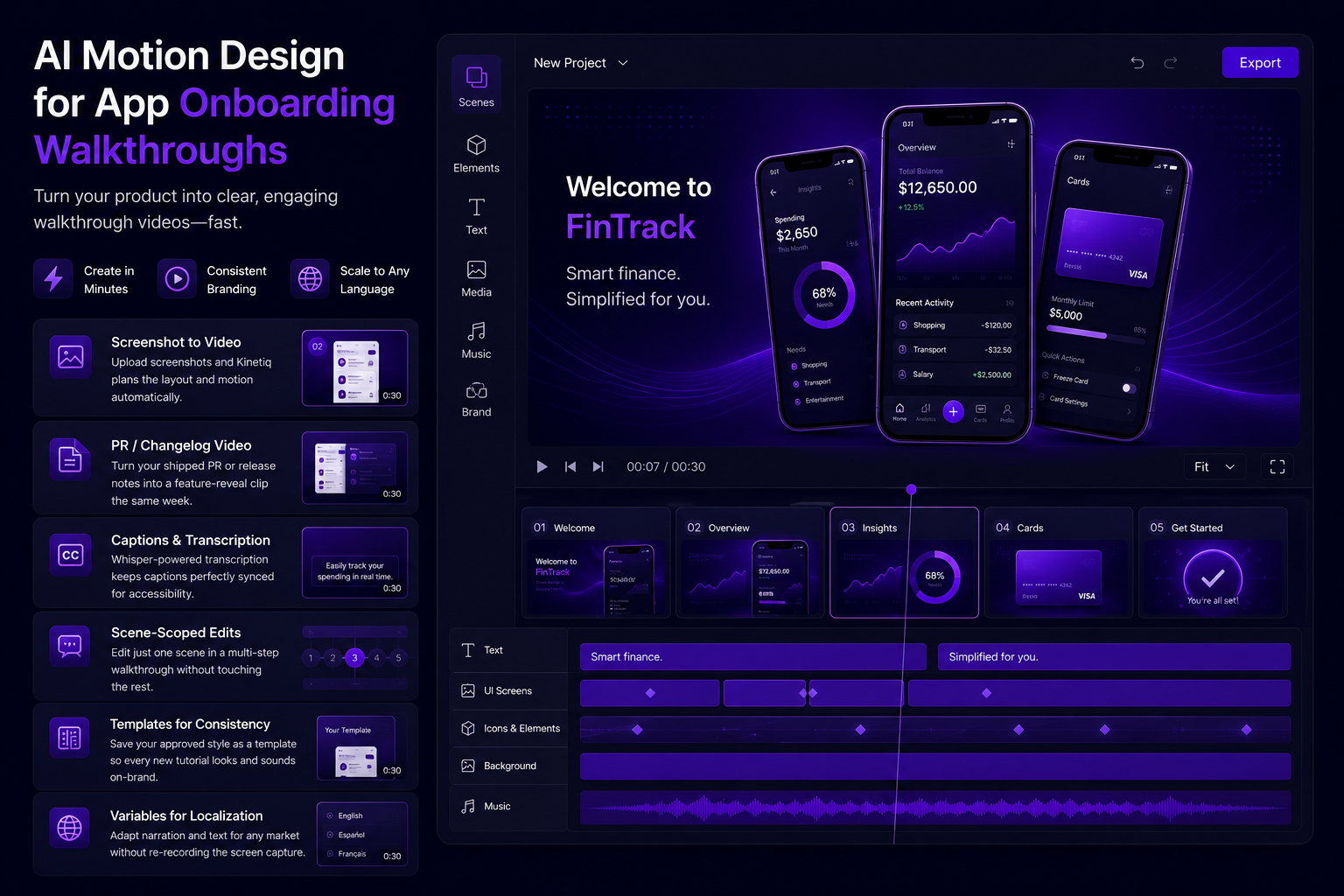
An AI motion design workflow built around a video-as-code engine turns onboarding video into something that can be regenerated as fast as the product changes. A product or growth team uploads current screenshots or a short screen recording, and the system plans layout and motion around the real images — measuring actual dimensions and colors rather than guessing — while writing captions and narration that walk through the flow. Because the underlying composition is structured and editable, updating one screen in a five-step walkthrough after a redesign is a targeted edit to that one scene, not a full re-shoot.
The same approach applies directly to release notes: pointing the system at a shipped PR or a changelog entry can turn a feature update into a short explainer clip automatically, which is exactly the format a "what's new" onboarding moment or an in-app announcement needs — produced the same week the feature ships rather than a quarter later.
Where this shows up across the product lifecycle
● First-run walkthroughs: a short, narrated tour of the first key action a new user needs to complete, kept current as the UI evolves.
● Feature announcements: a thirty-second clip explaining a new capability, generated straight from the release notes that shipped it.
● In-app tooltips and micro-tutorials: short, focused clips for a single feature, rather than one long walkthrough trying to cover everything.
● Help-center video: pair a written help article with a matching short walkthrough clip, produced from the same screenshots already in the doc.
● Localized onboarding: adapt an approved walkthrough's structure and narration for a new market's language without re-recording the screen capture.
Why this shift is happening now, not five years ago
Onboarding video has always faced the same tension: it's most useful when it exactly matches the current product, but keeping it current has always required production work proportional to a full re-shoot, regardless of how small the actual UI change was. What's changed is the arrival of tools that can plan a video's layout and motion directly from real product screenshots — measuring actual dimensions and colors rather than working from a generic mockup — combined with a composition format structured enough that one scene can be updated without touching the rest.
That combination is what specifically breaks the old trade-off between accuracy and maintenance cost. A screen-recorded walkthrough edited in traditional video software has no concept of "this five-second segment is the step-three scene" in a way that's cheap to isolate and regenerate — the editor sees a timeline of frames, not a structured sequence of steps. A video-as-code composition does have that structure built in, which is precisely why a single renamed button can be fixed as a scoped edit instead of a full re-production.
This is also part of a broader move toward treating video the way software teams already treat documentation and code — as something versioned, incrementally updated, and kept in sync with what it describes, rather than a static asset produced once and left to gradually drift out of date.
How Kinetiq keeps an onboarding walkthrough current
This is where Kinetiq at https://kinetiq.nagent.ai fits directly into a product team's release cycle. Kinetiq screenshot / image video mode takes uploaded product screenshots and probes their real dimensions and colors, planning layout and motion around your actual UI rather than a generic mockup. A product manager can describe the flow in chat — "walk through creating a new project, step by step" — and Kinetiq's Director paces the scenes to the number of steps the flow actually has.
For release-driven updates, Kinetiq PR / changelog video mode turns a GitHub PR or a set of release notes directly into a feature-reveal explainer, which is exactly the mechanism a fast-shipping product team needs to keep a "what's new" video current without a separate production request every sprint. And because the whole walkthrough is one editable composition, a single UI change — a button that moved, a renamed setting — is a scene-scoped edit in Kinetiq chat or canvas, not a re-shoot of the entire tour.
Feature by feature: what to reach for in an onboarding workflow
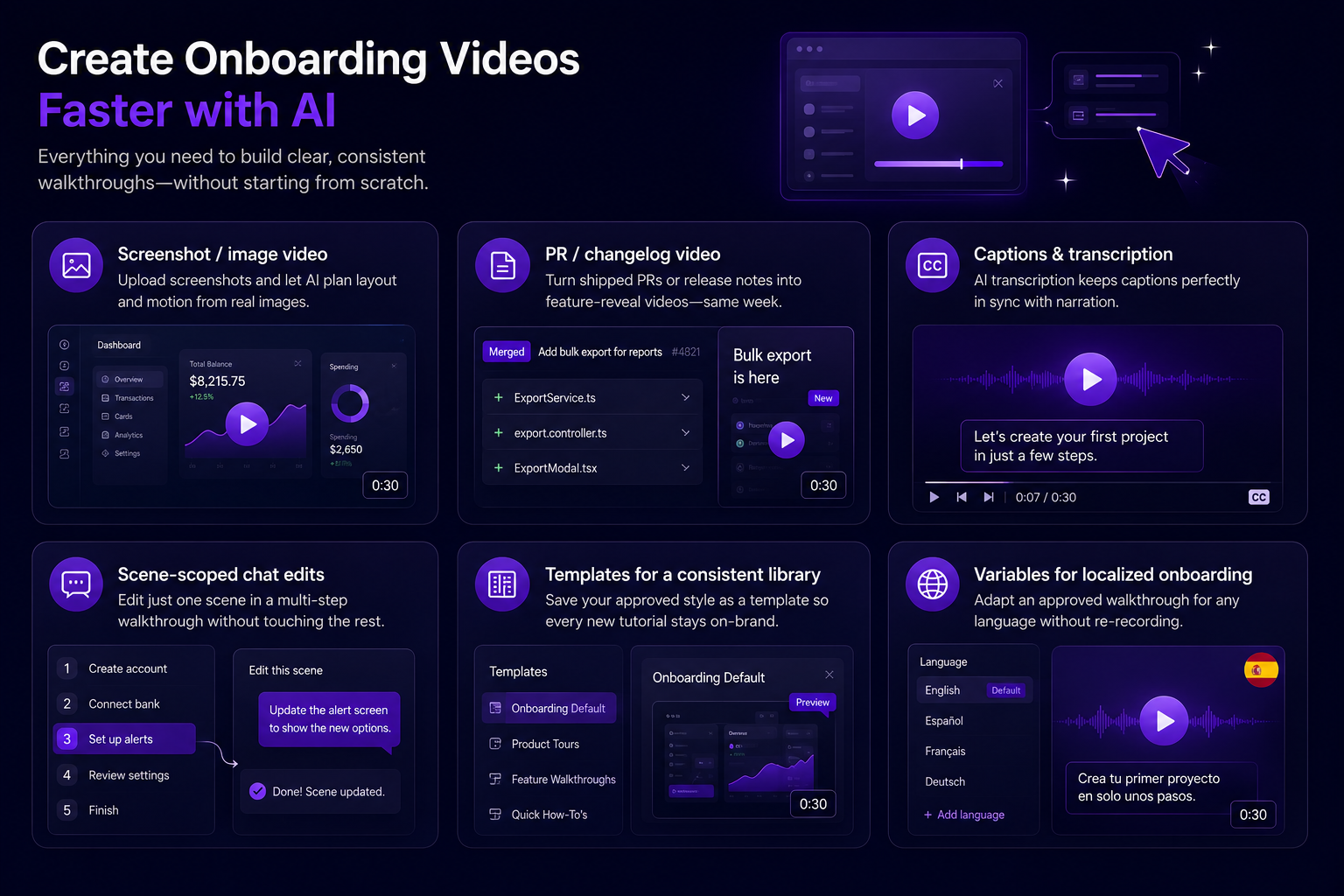
● Screenshot / image video — upload current product screenshots to Kinetiq and let it plan layout and motion from the real images, keeping the walkthrough visually accurate to the actual UI.
● PR / changelog video — point Kinetiq at a shipped PR or release notes to generate a feature-reveal clip the same week the update ships.
● Captions and transcription — Kinetiq's Whisper-based transcription keeps captions synced to narration automatically, which matters for accessibility and for muted-autoplay viewing in-app.
● Scene-scoped chat edits — when one screen in a five-step walkthrough changes, edit just that scene in Kinetiq without touching the rest of the tour.
● Templates for a consistent tutorial library — save your approved walkthrough style as a template in Kinetiq so every new feature clip inherits the same voice, captions, and pacing.
● Variables for localized onboarding — adapt an approved walkthrough's narration for a new market's language inside Kinetiq without re-recording the screen capture.
The pipeline in more detail: why a small UI change stays a small edit
The reason a single changed button doesn't force a full re-shoot comes down to how Kinetiq structures a walkthrough internally. The Brief stage takes the uploaded screenshots or screen recording along with a description of the flow, and the Generate stage produces a scene per step, with the Director pacing the number of scenes to match how many steps the flow genuinely has — a three-click action gets three beats, not five padded ones. Because each step is its own addressable scene in the underlying composition, that structure is exactly what makes a later fix targeted instead of global.
The Audio stage transcribes and narrates each step through Kinetiq's Whisper-based transcription and TTS, and captions are generated synced to that narration automatically — which matters for onboarding video specifically, since a large share of in-app video is watched muted. The Quality pass checks that no step's scene is blank or missing its audio before the draft reaches a reviewer, catching exactly the kind of small defect that makes a walkthrough confusing rather than clarifying.
When the product changes, the fix happens at the Refine stage: a chat instruction identifying which scene needs updating regenerates just that step, while the rest of the composition's scenes stay untouched — the scene-scoped editing model described in Kinetiq's chat interface is what turns a UI change from a production event into a five-minute update.
Common mistakes product teams make with onboarding video
● Building one long walkthrough instead of several short, focused clips — a single six-minute tour has a much higher chance of going stale in one spot and discouraging users from finishing it, compared to a library of short, single-action clips.
● Letting the walkthrough reference features that have since changed — an out-of-date walkthrough is often worse than no walkthrough, because it actively misleads a new user about what they're looking at.
● Not connecting release notes to the onboarding library — a shipped feature and its explainer clip should be produced together, not on separate schedules that let the video lag behind the release.
● Skipping captions — a walkthrough without synced captions loses a large share of its value in-app, where audio is frequently off by default.
● Rebuilding style from scratch for every new clip instead of templating it — without a shared template, a growing library of walkthroughs can end up with inconsistent voice, pacing, and caption style across clips.
How to know it's actually working
The most direct signal for onboarding video is activation rate for the specific flow the walkthrough addresses — whether users who watch the clip complete the first key action at a meaningfully higher rate than users who don't. It's also worth watching how quickly a walkthrough gets updated after a related feature ships; if that gap stays small, the video is staying trustworthy as a reference, and if it starts growing, that's an early sign the update workflow needs attention before users start noticing the mismatch themselves through support tickets referencing a screen that no longer exists.
A sample workflow: refreshing onboarding after a UI redesign
A product team redesigns its project-creation flow, moving two steps and renaming a button. Instead of scheduling a re-shoot of the entire onboarding walkthrough, they open the existing composition in Kinetiq and identify the two scenes that reference the changed steps.
Through a chat instruction — "update this scene to show the renamed button and the new step order" — the two affected scenes regenerate while the rest of the five-step tour stays byte-for-byte untouched. The refreshed walkthrough is ready the same day the redesign ships, instead of waiting for the next quarter's video production cycle, which is exactly the kind of update that used to fall through the cracks.
Frequently asked questions
Can Kinetiq work directly from our current product screenshots?
Yes — Kinetiq's screenshot and image video mode uploads your actual screenshots and plans the video's layout and motion around their real dimensions and colors, rather than forcing them into a generic template.
How do we keep a walkthrough updated after a UI change?
Because a Kinetiq composition is one editable artifact, you can regenerate or hand-edit just the affected scene through chat or the canvas, without re-producing the entire walkthrough.
Can Kinetiq turn our release notes into a video automatically?
Kinetiq's PR and changelog video mode is built specifically for this — point it at a GitHub PR or release notes and it drafts a feature-reveal explainer.
Will every onboarding clip look consistent if different team members make them?
Saving an approved walkthrough as a template in Kinetiq, and adapting it for new flows rather than starting fresh each time, keeps voice, captions, and pacing consistent across the library.
Can we generate onboarding videos automatically as part of our release process?
Kinetiq's public API and MCP server let a generation request be triggered from an existing pipeline, so a feature-reveal or walkthrough clip can be produced as a step in your release process rather than a separate manual task.
How short should an individual onboarding clip be?
There's no fixed rule, but a library of short, single-action clips generally holds attention and stays easier to keep current than one long tour trying to cover an entire product in a single pass.
Rolling this out alongside product and support teams
The easiest starting point for most product teams is the single flow with the biggest known activation drop-off — the step where support tickets or funnel data already show users getting stuck. Building that one walkthrough in Kinetiq and measuring its effect on completion rate gives the team a concrete result before expanding to a full onboarding library, rather than trying to rebuild every tutorial at once.
From there, the natural expansion is tying walkthrough updates directly to the release process — making "update the affected onboarding scene" a checklist item on any PR that changes a flow covered by an existing video, the same way a team might already require a changelog entry. Support teams are often the best early collaborators here, since they see the stale-walkthrough problem first through repeated tickets referencing a screen that no longer matches the video.
A help-center or documentation team can also share directly in the same template and screenshot library, so a written help article and its accompanying short clip stay in sync without duplicating the underlying content twice across two different tools and two different update schedules.
Beyond first-run onboarding: the rest of the lifecycle this covers
First-run onboarding gets most of the attention because it's where activation is won or lost, but the same screenshot-to-video approach applies just as well to the moments after onboarding where users are still learning the product. A power-user feature that's easy to miss — an advanced filter, a bulk-edit option, an integration setting — often needs exactly the same kind of short, focused walkthrough as a first-run flow, just triggered later in the user's lifecycle rather than on day one.
It also covers the re-engagement case: a user who signed up months ago, never activated, and is being brought back with an email campaign benefits from seeing a walkthrough that reflects the product as it exists today, not as it looked when they first signed up. Because the underlying composition can be regenerated as the product changes, that re-engagement walkthrough stays accurate without a separate production effort every time the win-back campaign runs.
A quick checklist before publishing a walkthrough
● Are the screenshots or screen recording pulled from the current, live version of the product, not an older build or a design mockup?
● Does each step get its own clearly paced scene, rather than several actions compressed into one rushed beat?
● Are captions present and synced, given how often in-app video is watched with the sound off?
● Has this flow's walkthrough been linked to the release process, so the next related UI change triggers a review of the affected scene?
● If this is a recurring format — a "what's new" clip, for instance — has it been saved as a template so the next release inherits the same style automatically?
The takeaway
Onboarding video works best when it matches the product exactly as it looks today — and that's only realistic if updating it is cheap. Kinetiq turns onboarding walkthroughs from a one-time launch asset into a living part of the product that can keep pace with every release. Build your first walkthrough at https://kinetiq.nagent.ai.