
AI Motion Graphics for E-Commerce Launches
The problem: e-commerce needs more video than any pipeline can produce
A modern e-commerce calendar doesn't have room for a single hero launch video a quarter. There's a new drop every few weeks, a restock every month, a flash sale every Friday, and a different creative needed for every placement — a square feed post, a vertical Reel, a landscape YouTube pre-roll, a banner for the homepage. Multiply that by every SKU, every market, and every season, and the volume of video a brand needs has quietly grown by an order of magnitude while the size of the creative team hasn't moved at all.
For years, the answer was to ration video. Only the flagship products got a proper launch piece; everything else got a static image and a caption. That rationing is a real cost — it means most of the catalog never gets the motion treatment that actually stops a scroll, and the products that need it most (a new arrival, a limited drop) often ship without it because there wasn't time.
The deeper issue is that video has traditionally been priced and scheduled like a bespoke craft object — one designer, one timeline, one render, days of turnaround — when the actual need at a growing e-commerce brand looks more like a manufacturing problem: the same quality bar, applied to a hundred SKUs a month, on a same-day timeline. No amount of hiring closes that gap cleanly, because adding people adds coordination overhead as fast as it adds output.
Why the old workflow breaks down at e-commerce speed
A traditional launch video runs through a familiar sequence: brief a designer or agency, wait for a first cut, review, request changes, wait again, then finally export the handful of aspect ratios each platform demands. Even when it goes smoothly, that loop takes days to weeks — an eternity when a product drop is measured in hours and a trend cycle is measured in days. And every revision restarts the wait, because the output is a locked render, not something the brand can quickly touch itself.
The other common shortcut — template-based tools — solves the speed problem but reintroduces a different one. Templates fill in fast, but a hundred brands filling in the same template produce a hundred nearly identical videos. On a feed where shoppers scroll past dozens of near-identical product clips a minute, looking like everyone else is its own kind of invisible. Worse, a locked template usually can't take real product photography or an actual brand palette without visibly fighting the design it was built around.
What an AI motion graphics workflow looks like instead
An AI-driven, video-as-code approach changes the shape of the work rather than just speeding up the old steps. A merchandiser describes the drop in plain language — the product, the mood, the offer — or simply points the system at the product page URL and lets it pull in the palette, fonts, and screenshots automatically. From there the system writes a real, animated composition: layout, motion, timing, and a first pass at voice-over or music, generated fresh rather than pulled from a fixed template library.
Because the underlying video is structured code rather than an opaque file, the same brief can become dozens of on-brand variants — different offers, different SKUs, different languages — from one source, and the marginal cost of the next variant approaches zero. And because every element of the composition is addressable, a request like "make the price callout bigger" or "swap the accent color to the seasonal palette" is a precise, surgical edit rather than a full regeneration and a re-roll of the dice.
Where this shows up across the launch calendar
● New arrivals: turn a product photo shoot into a branded showcase video the same afternoon it's shot, instead of waiting on a separate motion pass.
● Flash sales and drops: generate the urgency-driven cut — countdown, price, CTA — in minutes when a sale is decided the same day it runs.
● Seasonal campaigns: one master composition adapted across a whole product line, with variables carrying the title, price, and imagery for each item.
● Every platform, one shoot: export the same story at 9:16 for Reels and TikTok, 1:1 for the feed, and 16:9 for YouTube and the homepage, without re-cutting by hand.
● Restocks and bundles: reuse a template's motion and pacing (its "DNA") and simply swap the copy and imagery for the next item in the line.
Why this shift is happening now, not five years ago
Two things had to be true at the same time for AI motion graphics to become a realistic option for e-commerce, and both only recently arrived together. The first is that generative AI models finally got good enough to author real layout, timing, and motion from a plain-language brief — not just generate a static image or a short, unstructured clip, but actually plan a multi-scene composition with deliberate pacing. The second is a rendering approach that can turn that authored composition into a broadcast-quality file reliably and repeatably, rather than a one-off, non-reproducible generation that looks different every time you press render.
Put those two together and the result is a fundamentally different category from either "a generative video model" or "a template tool." A generative model alone gives you a striking but non-repeatable clip that's hard to make on-brand and hard to revise precisely. A template tool gives you speed and repeatability but caps originality at whatever the template library allows. The video-as-code approach — writing the composition as structured, deterministic code that an AI can author and a human can still touch — is what lets a brand get the speed of generation and the control and consistency of a real production pipeline at the same time.
For e-commerce specifically, this convergence matters because the category's real constraint was never creative ambition — brands have always known what a great launch video looks like. The constraint was throughput: turning that ambition into an actual file, in every size a platform needs, fast enough to matter, for every product that deserved it. That's the specific gap this new generation of tooling closes, and it's why the shift is happening across the category at once rather than through one brand's isolated experiment.
How Kinetiq runs an e-commerce launch, end to end
This is exactly the gap Kinetiq at https://kinetiq.nagent.ai is built to close. Kinetiq turns the same brief-to-video pipeline described above into a browser-based workflow with no software to install and no motion-design background required. A merchandiser or growth marketer opens the studio, describes the launch, and watches a complete, on-brand, animated video get produced in minutes — not as an abstract idea, but as the actual product Kinetiq ships today.
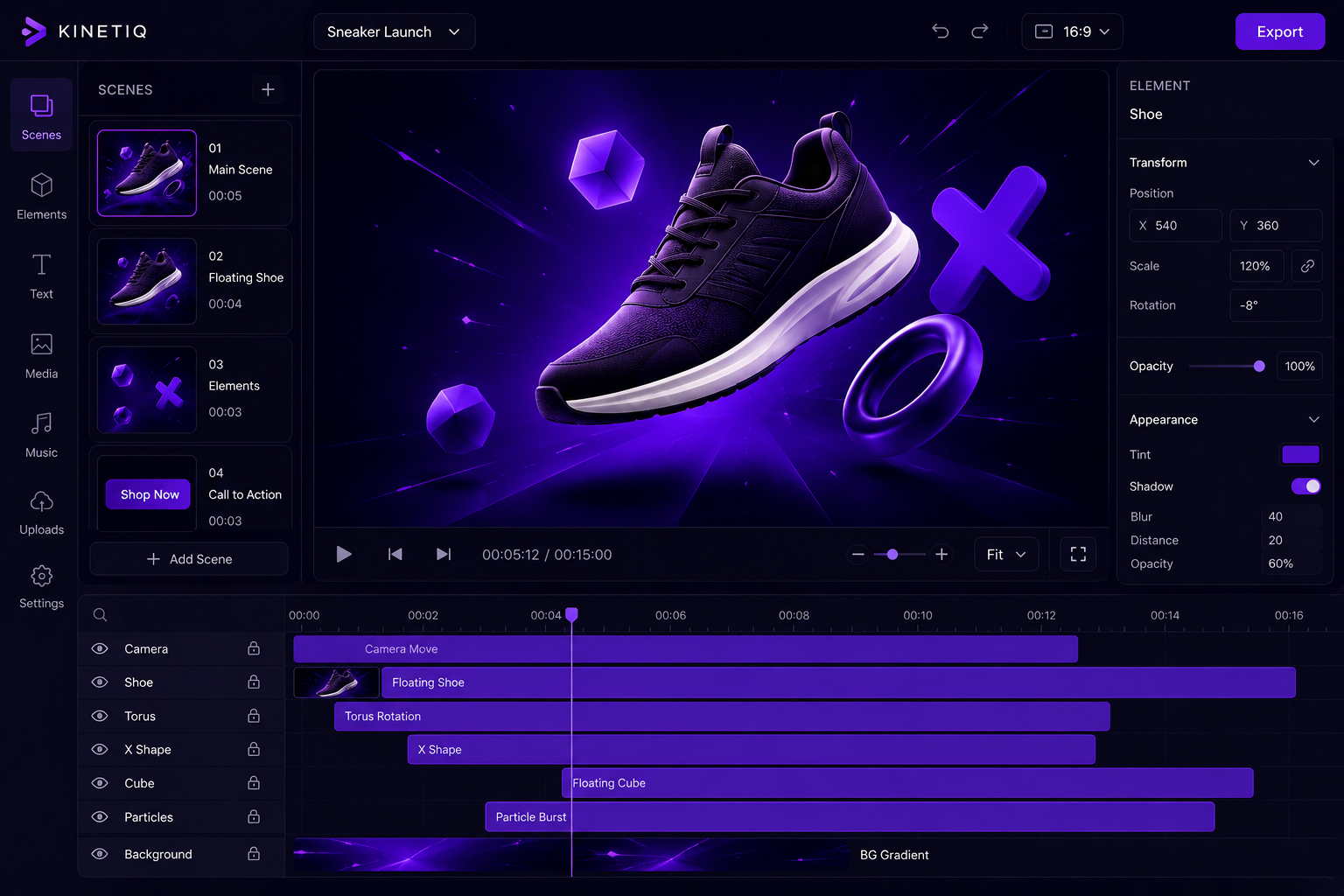
The pipeline runs in a consistent sequence regardless of the product being launched: a brief stage where the team describes the video (or pastes a script, drops a URL, or uploads photos), an optional brand-capture step that reads a URL and pulls in palette, fonts, and tone, a generation stage where a model writes the full HTML-based composition — scenes, layout, animation, and timing — an audio stage that lays in voice-over, music, and sound effects automatically, and a quality pass that checks for blank scenes, dropped audio, and broken opening frames before anything reaches a human. Only then does the team see a preview, refine it, and queue the render.
Feature by feature: what to reach for on each kind of launch
● URL video capture: point Kinetiq at a product page and it pulls the brand palette, fonts, tone, and even screenshots automatically, so a launch video starts on-brand instead of starting from a blank canvas.
● Screenshot / image video mode: upload the actual product photography from a shoot and Kinetiq measures real dimensions and dominant colors to plan layout and motion around your real images, not stock placeholders.
● Templates and variables: save a winning launch format as a template in Kinetiq, then use variables (title, price, hero image) to regenerate it across an entire seasonal line without rebuilding it SKU by SKU.
● Brand kit: capture your palette, fonts, and mood once inside Kinetiq so every generation — whether made by a merchandiser, a freelancer, or an agency partner — stays automatically on-brand.
● Four ways to edit: refine a generated launch video in Kinetiq by chatting ("make the headline bigger"), dragging on the canvas, adjusting the Properties panel, or dropping into the HTML source directly, and all four stay in sync.
● Multi-format export: render the same composition in Kinetiq at every aspect ratio your platforms need — 16:9, 9:16, 1:1, 4:5 — from one source, up to 4K.
● Batch render and the public API: for a brand pushing dozens of SKUs through the same seasonal template, Kinetiq's persistent render queue and API mean a whole catalog can be queued and rendered without a person clicking through each one.
A sample workflow: launching a 12-SKU seasonal drop in an afternoon
Picture a mid-size apparel brand with twelve new items dropping the same week. Instead of briefing an agency for a hero video and letting the other eleven items go out as static photos, the team opens Kinetiq and starts from the brand's site URL, letting it capture the current seasonal palette. They build and approve one master composition for the drop — the motion, the pacing, the brand treatment — using the flagship item's photos.
From there, they declare the title, price, and hero image as variables and feed in the product data for the remaining eleven SKUs. Instead of eleven separate production projects, they get eleven on-brand variants of the same proven format, reviewed on the canvas in minutes, and rendered in every aspect ratio the brand posts to. A single afternoon produces what would have been a multi-week, multi-thousand-dollar agency engagement for just the flagship item alone — with the rest of the line getting the same treatment for close to free.
The pipeline in more detail: what happens between brief and download
It helps to see the actual stages Kinetiq runs through, because each one maps to a specific pain point in the old e-commerce video process. The Brief stage is where a merchandiser describes the launch, pastes a product description, or gives a URL — Kinetiq asks smart follow-up questions about look, feel, and length without ever exposing technical jargon, and confirms anything hard to undo before it builds. The Brand stage, when a URL is supplied, captures palette, fonts, and tone into a design spec that every subsequent scene honors, so the launch video starts on-brand rather than needing a brand pass afterward.
The Generate stage is where a model writes the full composition: scenes, layout, GSAP-driven animation, and timing, with the Director planning multi-scene pieces beat by beat so a thirty-second launch clip doesn't feel rushed and a ninety-second brand story doesn't drag. The Audio stage lays in voice-over, background music, and sound effects automatically once they're confirmed in the brief, ducking music under narration so a price callout is never drowned out. A Quality pass then auto-repairs and scores the draft — catching a blank scene, a dropped audio track, or a broken opening frame — before a human ever sees it, which is exactly the kind of small defect that used to slip through a rushed agency turnaround.
Only after that does Preview happen, playing instantly in-browser exactly as it will render. Refine is where the four editing modes come in — chat, canvas, Properties, or source — and Render queues the final output at draft, standard, or high quality, running in a parallel pool that survives navigation and restarts. Download delivers a deterministic MP4, WebM, MOV, or PNG sequence at up to 4K, in any aspect ratio the campaign needs. Seeing the pipeline broken out this way makes clear why a revision is fast: because the composition is structured at every stage, going back to fix one thing doesn't mean restarting the whole sequence.
Common mistakes brands make when they first try AI motion graphics
● Skipping the brand-capture step and briefing from scratch every time — this throws away the one setup cost that makes every subsequent video faster and more consistent.
● Treating the first draft as final — the fastest path to a generic-looking result is rendering the first pass without a quick canvas or chat review, which is where the small brand-specific touches usually get added.
● Building a new composition for every SKU instead of using variables — this recreates the old one-off production model and gives up the entire point of a parametrized workflow.
● Ignoring the aspect-ratio matrix until after rendering — deciding up front which platforms a launch needs to hit means exporting once instead of manually reformatting a finished video.
● Not saving a strong result as a template — a launch format that performs well should become the starting point for the next drop, not a one-time asset that gets rebuilt from zero next time.
How to know it's actually working
The metrics that matter for an e-commerce motion graphics program are the same ones a merchandising team already tracks, just applied to a wider slice of the catalog: click-through rate on the video creative versus the static image it replaced, watch-through rate by platform, and — most concretely — the number of SKUs that get a launch video at all in a given month. That last number is often the most telling, because it's the one that was previously capped by production capacity rather than by demand. A brand that goes from launching video for two flagship items a month to launching video for the entire monthly drop has changed the shape of its funnel, not just its production cost.
It's also worth tracking production turnaround directly — the time from "photos are in hand" to "video is live" — since compressing that window is often what unlocks same-day and next-day social moments a slower pipeline simply can't participate in, regardless of how good the eventual video would have been.
Frequently asked questions
Do I need design or video editing experience to use Kinetiq for a launch video?
No. Kinetiq is built so a merchandiser or marketer can describe what they want in plain language and get a complete, animated video back. Power users can drop into the HTML source if they want that level of control, but it's never required.
Can Kinetiq use our actual brand colors and fonts, not a generic template look?
Yes. Pointing Kinetiq at your website captures your real palette, fonts, and tone into a brand spec that every generation then honors, so launch videos look like your brand rather than a generic stock template.
How fast can we actually get a launch video out the door?
A first cut typically comes back in minutes once the brief is described, with refinement happening in the same session — a same-day timeline is realistic even for a same-day sale decision.
Can we reuse a launch format across our whole product line?
Yes — save any composition as a template, and use variables to regenerate it with new titles, prices, and imagery across as many SKUs as the line has, without rebuilding the video from scratch each time.
What if we want to hand-tune something a designer would normally fine-tune manually?
Kinetiq's Properties panel exposes color, gradient, transform, fonts, border-radius, blur, shadow, and per-element animation controls, and the HTML source is always open to power users, so nothing about the composition is locked away from manual refinement.
Does the video quality actually hold up at broadcast or ad-platform standards?
Kinetiq renders deterministically through a headless-Chrome and FFmpeg pipeline up to 4K, with quality presets from draft to high, so the same composition that previews in-browser is what actually gets delivered in the final file.
Rolling this out without disrupting the team you already have
Adopting an AI motion graphics workflow doesn't require replacing an existing design or agency relationship overnight, and most brands do better easing into it. A natural starting point is the long tail of the catalog that never got video treatment at all — the SKUs that were always going to be photos-only under the old model. Handing those to a merchandiser or growth marketer inside Kinetiq creates zero conflict with an in-house designer or agency still producing the flagship hero pieces, while immediately closing the gap on everything that used to be rationed out.
As confidence builds, teams typically move the fast-turnaround, high-frequency work — flash sales, restocks, quick seasonal refreshes — onto the new workflow first, since those are exactly the assets where a multi-day agency turnaround was already the biggest source of friction. The flagship, once-a-quarter hero video can stay with whichever process currently produces the best result for that single asset; the two approaches aren't mutually exclusive, and many brands run both indefinitely, reserving hand-crafted work for the handful of pieces where the last ten percent of manual polish is worth the extra time.
For a brand ready to go further, the same brand kit and templates that speed up an in-house marketer's work can be shared with an agency partner or freelancer, so external collaborators start from the same on-brand foundation instead of rebuilding brand guidelines into every engagement from scratch. That shared starting point is often where the time savings compound the most, because it removes the recurring "get everyone back up to brand" step that eats the first days of every new campaign.
The takeaway
E-commerce doesn't have a shortage of products worth showing off — it has a shortage of time and hands to make the video for all of them. Kinetiq closes that gap by turning a single brief into a fast, on-brand, endlessly variant-able launch asset, so the calendar stops deciding which products get a real video and which don't. Start a launch video at https://kinetiq.nagent.ai.