
Kinetiq vs Traditional After Effects Workflows
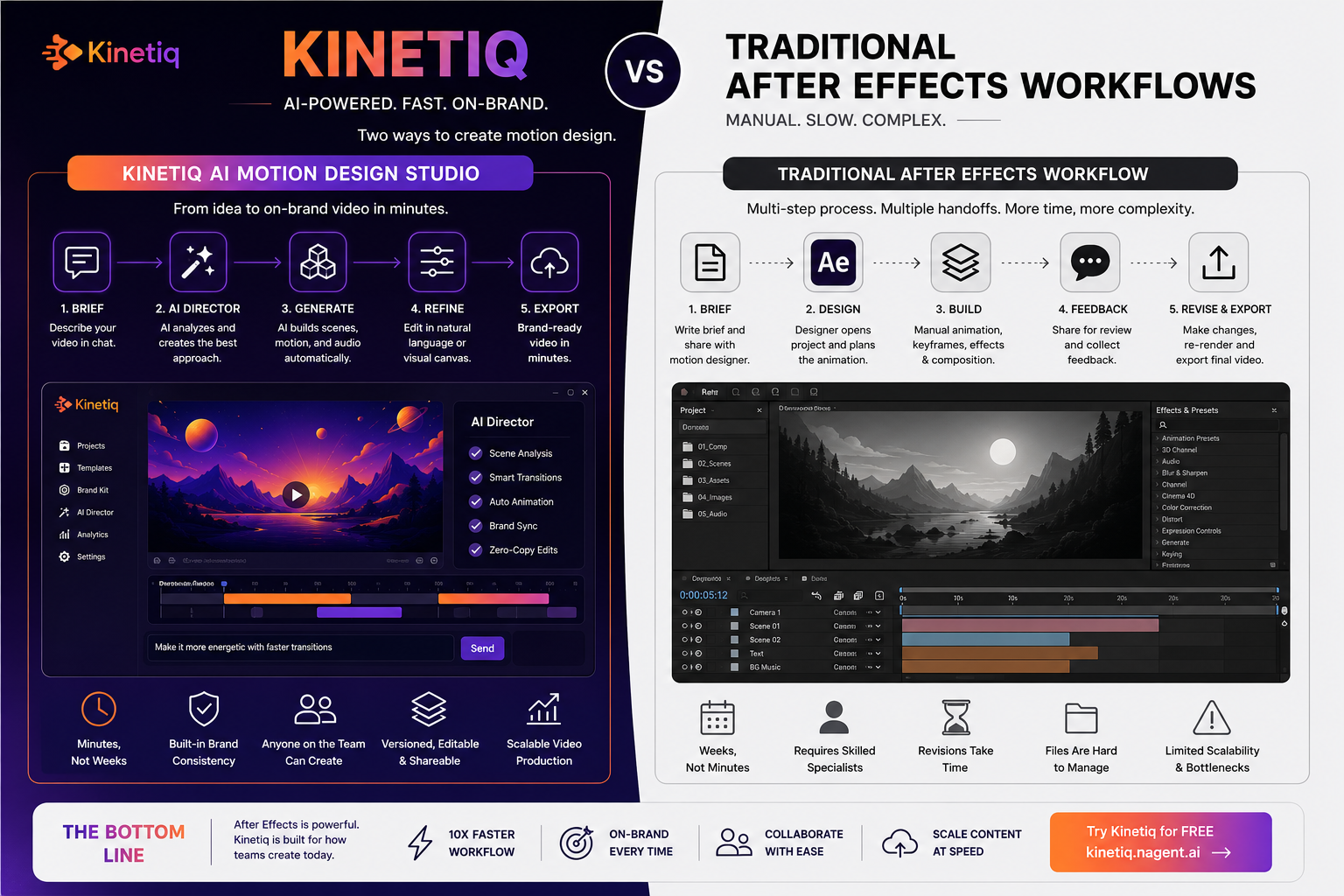
After Effects remains the professional ceiling for hand-tuned, frame-level motion control, and nothing in this piece argues otherwise — the comparison that matters is about workflow shape, not raw creative capability.
The real cost of an AE workflow isn't the license. It's the weeks-to-months learning curve, the opaque binary project files, and the fact that every revision, resize, and rebrand routes back through whichever specialist owns that file.
Kinetiq represents every video as a deterministic, inspectable composition rather than a locked project file, which is what makes it diffable, versionable, and editable by a person or an agent — properties an AE .aep file structurally cannot offer.
The honest dividing line: use After Effects when a senior motion designer needs absolute, bespoke control of one hero piece. Use Kinetiq when the requirement is volume, brand consistency, and speed across many on-brand videos.
The two aren't mutually exclusive for a real production team — many of the workflow problems described here are solved by moving repeatable, high-volume work to Kinetiq while keeping AE for the handful of pieces that genuinely need a specialist's full manual control.
Adobe After Effects has been the professional standard for motion graphics for more than two decades, and that status is earned. It offers a depth of frame-level control that nothing else in the category fully matches: hand-tuned easing curves, precise compositing, expression-driven rigs, a plugin ecosystem built by and for people who think about motion for a living. Any comparison that starts by dismissing After Effects isn't a serious comparison, and this one doesn't.
What this piece is actually about is workflow — not whether After Effects can produce excellent motion design, which it plainly can, but what it costs in time, money, and organizational bottleneck to produce that motion design repeatedly, on brand, across a real production calendar. That's a different question, and it's the one that actually determines whether a marketing team, a growth-stage startup, or an agency managing several client accounts can sustain a motion design practice at the volume modern demand requires. Kinetiq, the AI motion design studio built by Nagent, was built specifically to answer that second question, and comparing the two head-to-head on workflow, rather than on raw capability, is where the real decision for most teams actually lives.
See the workflow difference on a real brief
Bring a brief you'd normally build in After Effects and watch how far Kinetiq gets before you touch a timeline.
The Learning Curve: Weeks to Months vs. Minutes
The first cost of an After Effects workflow is paid before any video ever gets made: the time it takes a person to become productive in the software at all. After Effects has a well-documented learning curve measured in weeks to months even for someone with a general design background, and true fluency — the kind that lets a designer move fast under deadline pressure — typically takes years of ongoing practice. That learning curve is a real cost, whether it shows up as onboarding time for a new hire, training budget, or the simple fact that most people on a marketing or growth team will never be able to touch the tool at all.
Kinetiq's onboarding path is structurally different because the entry point isn't a timeline and a layers panel — it's a chat window that invites a written brief immediately, with example prompts visible on first load and no separate tutorial required to produce a first draft. This isn't a claim that Kinetiq eliminates the need for motion design judgment; it's a claim that a non-specialist — a marketer, a founder, an account lead — can go from zero to a usable first cut in minutes rather than needing to either learn After Effects themselves or route the request through someone who already has.
The Workflow, Step by Step
Abstractions about workflow are easier to evaluate side by side, so it's worth walking through what actually happens, stage by stage, under each model for a common request: a ninety-second product launch video.
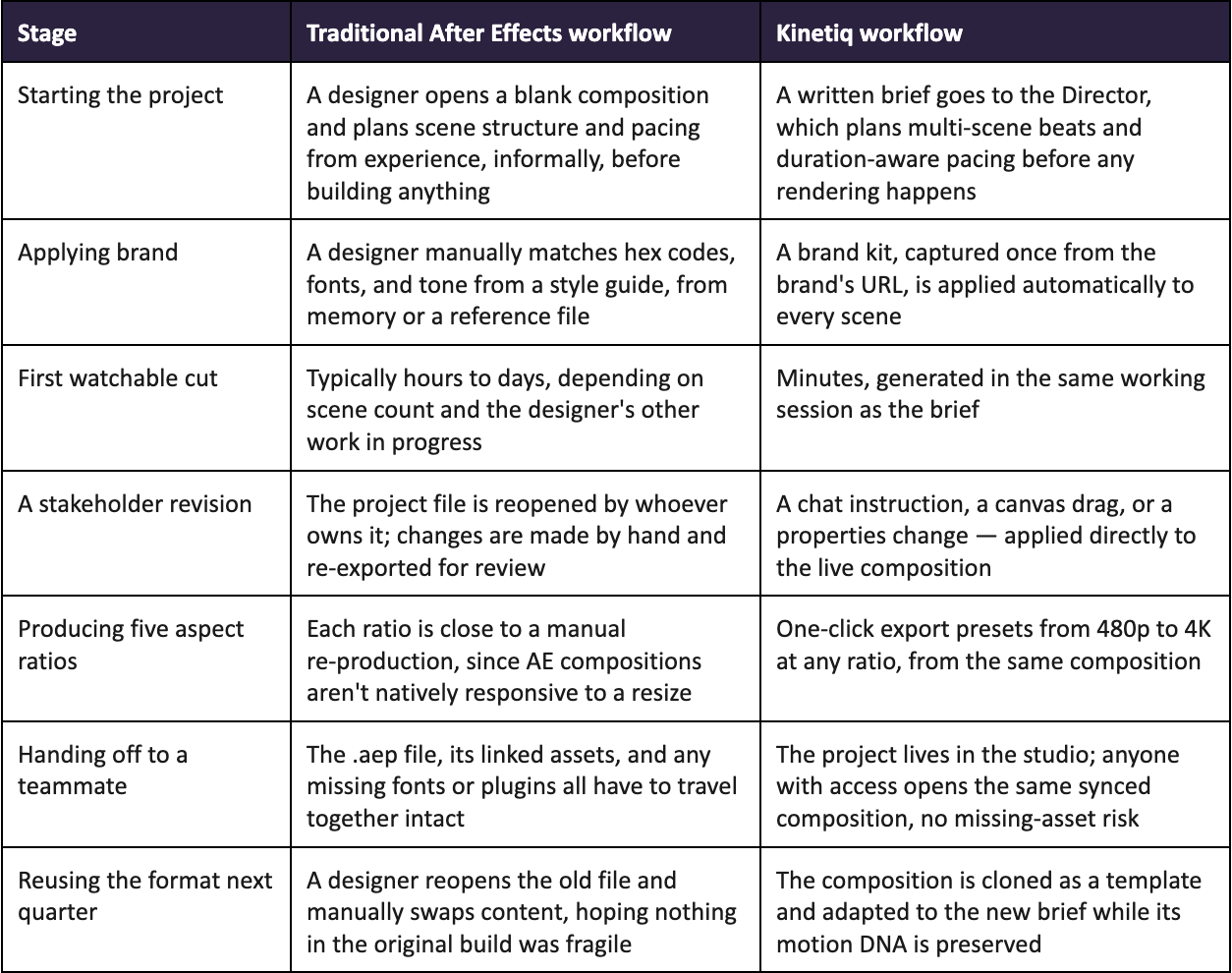
Laid out this way, the difference isn't that one tool makes prettier motion than the other — it's that every stage of the AE workflow after the first one depends on a specific file, and usually a specific person, being available and willing to reopen it. Kinetiq's workflow removes that dependency at almost every stage, because the underlying composition is a live, shared, structured artifact rather than a file that has to be located, opened, and correctly re-exported by whoever currently owns it.
Cost: The License Is the Smallest Number
After Effects itself carries a straightforward per-seat subscription cost, and on its own that number looks modest next to the price of most enterprise software. It's also the least representative number in the total cost of an AE-based workflow, because the license doesn't include the much larger cost sitting behind it: the salary or day rate of the specialist required to actually operate the software well, and the calendar time that specialist's limited availability imposes on every project that needs their attention.
Kinetiq's cost model is built around the opposite assumption — that the software itself should carry as much of the production burden as possible, with cost scaling by usage rather than by seat. A desktop installation runs a one-time cost plus roughly $2 to $5 in API cost per minute of rendered video, on keys the user controls. SaaS tiers start at $49 a month for up to twenty videos, rising to $199 a month for up to a hundred. An MCP and API tier, for teams building automated pipelines, starts from $1,000 a year with metered billing after that. Every one of these numbers is visible and predictable in a way a specialist's fully loaded cost — salary, benefits, the opportunity cost of their calendar — typically isn't.
The comparison that actually matters for most teams isn't “which software costs less” — it's what happens to cost as volume increases. A team that needs one hero video a year is well served by an AE specialist's time regardless of the per-seat license cost. A team that needs the fortieth on-brand variant of a recurring format is paying, under the AE model, close to what it paid for the first one, because very little of the previous asset's structure carries forward automatically. That's the specific gap Kinetiq's template, variable, and brand-kit system is built to close.
See the real per-video cost before you commit
Kinetiq's pricing is usage-based and visible — no guessing what a specialist's time actually adds to a project.
Reproducibility: A Composition vs. a Binary File
This is the most structural difference between the two workflows, and the one least visible until a team hits it directly. An After Effects project is an opaque binary file. It can be backed up, shared, and version-numbered by filename, but it cannot be meaningfully diffed, reviewed, or branched the way a modern software team reviews and branches code — there's no way to look at two versions of an .aep file and see, at a glance, exactly what changed between them.
Kinetiq represents every composition as a deterministic, inspectable definition: a root element with explicit width, height, and duration; timed clips; animation timelines that are created paused and driven by seeking, so the same composition renders to the exact same frames every time it's rendered. Because the artifact is structured data rather than an opaque render, it can be diffed, reviewed, rolled back, and edited directly in code — by a person or, notably, by an AI agent — the same discipline a software team already applies to everything else it ships. This is also what makes a render trustworthy to queue or automate at scale: determinism means “render it again” is a guarantee, not a gamble.
Brand Consistency: Manual Discipline vs. Structural Enforcement
In an AE-based workflow, brand consistency is a discipline a designer has to maintain by hand on every project: matching the right hex codes, the right type ramp, the right motion signature, from a style guide that lives outside the tool entirely. That discipline holds up reasonably well when one designer owns every project for a given brand. It gets noticeably harder the moment a second designer, a freelancer, or a new hire touches the same brand's work, because nothing in After Effects itself enforces what the style guide says — it only offers a canvas on which the guide can be followed or missed.
Kinetiq's brand kit is captured once, from a brand's own website, and applied automatically to every subsequent generation, template, and variant inside that project. Brand consistency stops being something a designer has to remember and becomes something the system enforces structurally, the same way a modern design system enforces spacing and type scale on a static design team, regardless of who's currently doing the work.
Collaboration: One Owner vs. Four Synced Surfaces
A typical AE project has a de facto single owner — the person whose local file is the current source of truth. Everyone else's input arrives as a comment, a marked-up frame, or a verbal note, and gets translated into the file by that one person. This isn't a flaw in After Effects specifically; it's a natural consequence of a project format built for one artisan working on one timeline, which was the correct design goal for the era the tool was built in.
Kinetiq's underlying composition is a single artifact that four different surfaces — chat, canvas, properties, and raw code — can all edit simultaneously, with every change staying in sync regardless of which surface made it. An account lead can apply a copy change through chat at the same moment a designer adjusts spacing on the canvas and a developer fixes an animation timing issue in code, on the same live project, with nobody's work getting overwritten. That structural difference is what actually removes the single-owner bottleneck, rather than just making the bottleneck's work faster.
The Knowledge-Walks-Out-the-Door Problem
There's a risk buried in the AE workflow that rarely gets discussed until a team has already been burned by it: because brand consistency and project structure live in a designer's head and in a binary file only they fully understand, that knowledge leaves with them. A specialist who moves on — to a new role, a different agency, out on leave — takes with them the informal map of how a brand's templates are actually built, which layers are safe to touch, and why a particular expression rig was set up the way it was. Whoever inherits the file is, in practice, starting closer to zero than the file's complexity would suggest, because the file itself doesn't explain its own decisions.
This isn't a hypothetical concern for any team that has weathered a departure mid-project. A rushed handoff usually means either a slow, careful reverse-engineering of the old file, or a decision to quietly rebuild the format from scratch under the next deadline, both of which are real costs that never appear on a budget line labeled “turnover risk.” Kinetiq's structured composition doesn't eliminate the value of institutional knowledge, but it does remove the specific failure mode of a project's logic being trapped entirely inside one person's working memory: the brand kit, the saved templates, and the composition's own explicit structure are all inspectable by the next person who opens the project, whether that's a new hire, a different team member, or an AI agent asked to pick up the work.
Where After Effects Still Wins, Honestly
A fair comparison has to name where the traditional tool remains the better choice, and there's a real answer here rather than a diplomatic non-answer. After Effects is still the right tool when a senior motion designer needs absolute, bespoke, frame-level control over one hero piece — a flagship brand film, a title sequence, a piece of character animation where every transition is hand-tuned for a specific emotional effect that no planning system, however good, is trying to replace. Its plugin ecosystem, its expression-driven rigs, and its compositing depth remain unmatched for that specific kind of work.
The mismatch isn't between After Effects and quality — it's between After Effects's artisanal, one-masterpiece-at-a-time design and a production requirement that looks like two hundred on-brand variants by Friday. Those are different problems, and pretending one tool should solve both equally well does a disservice to whichever one a team ends up choosing for the wrong job. The honest recommendation is to use After Effects when the requirement is craft, and Kinetiq when the requirement is volume, consistency, and speed — and to recognize that most real production calendars contain both kinds of requirements at once.
A Migration Path That Doesn't Require Abandoning After Effects
Teams already invested in an After Effects workflow don't have to choose one tool exclusively to benefit from this comparison. A practical path that a number of teams are already following looks like this:
Keep After Effects for genuinely bespoke, hero-tier work — the handful of pieces a year where a senior specialist's full manual control is exactly what the brief calls for.
Move recurring, on-brand production to Kinetiq — launch videos, social cutdowns, localized variants, and anything that follows a format the team has already proven works, where the value is consistency and speed rather than bespoke craft.
Use Kinetiq's template system to formalize an AE-era format that already works well — rebuild it once inside Kinetiq, save it as a template, and let Adapt and Variables carry it across every future brief that needs something structurally similar.
Free the team's AE specialist for the work only they can do, rather than the mechanical re-exports and aspect-ratio duplication that have historically consumed a disproportionate share of their calendar.
This isn't a hedge — it's a reasonably accurate description of where the category is heading generally, with the tool matched to the job rather than a single tool stretched to cover every job by default.
Keep After Effects for the hero pieces. Move the rest here.
Bring your next recurring, on-brand video to Kinetiq and free up your specialist's calendar for the work that actually needs it.
Frequently Asked Questions
Is Kinetiq trying to replace After Effects entirely?
No. After Effects remains the stronger choice for bespoke, frame-level, hero-quality motion work where a senior specialist's full manual control is the point. Kinetiq is built for the much larger share of production volume that needs to be fast, on-brand, and repeatable rather than individually hand-crafted.
Can an existing After Effects format be brought into Kinetiq?
There's no direct .aep import, but a proven format's structure and pacing can be rebuilt once inside Kinetiq, saved as a template, and then reused and adapted going forward through Kinetiq's own template, Adapt, and Variables system, without needing to rebuild it by hand for every future brief.
Does moving to Kinetiq mean losing precise, frame-level control?
Not for the composition itself — chat, canvas, properties, and raw HTML source all edit the same synced project, with properties offering exact numeric control over color, transform, and timing. What's genuinely different is the ceiling for extremely bespoke, plugin-driven effects work, where After Effects's ecosystem remains deeper.
How does the cost actually compare for a small team?
A small team's real AE cost is dominated by the specialist's time, not the license, and that cost stays roughly flat per video regardless of volume. Kinetiq's SaaS tiers start at $49 a month for up to twenty videos, with cost visible per generation rather than backed into after a specialist's invoice arrives — the comparison typically favors Kinetiq more heavily as monthly video volume increases.
What's the fastest way to evaluate the difference directly?
Take a brief you'd normally hand to an After Effects specialist — ideally a recurring format like a launch video or social cutdown — and run it through Kinetiq's chat-first workflow to see how close the first draft gets before any manual refinement, then compare that against your team's usual time-to-first-cut in After Effects for the same brief.
Say it. See it. Ship it.
After Effects earned its place as the professional standard the hard way, one hand-tuned frame at a time. Kinetiq isn't trying to out-craft it — it's built for everything after the first masterpiece: the fortieth variant, the revision on Friday afternoon, the brand consistency nobody has time to police by hand.
Try the workflow, not just the pitch
Kinetiq is an AI motion design studio built by Nagent — chat-first briefs, a brand kit that enforces itself, and four synced ways to refine the result.