
Motion Design for Agencies: Running Multiple Client Brands Without Multiplying Headcount
Every growing agency eventually runs into the same ceiling, and it rarely shows up on a P&L until it's already a problem. New client logos keep signing. The account list keeps growing. And motion output — the launch reel, the paid social cutdowns, the pitch-deck sizzle, the quarterly brand refresh — keeps needing to grow at the same rate, except headcount doesn't scale that cleanly. A senior motion designer takes months to hire and a year to fully ramp on an agency's roster of client brand systems. A freelancer network solves capacity but not consistency. The honest math most agency ops leads eventually do is uncomfortable: revenue per client is growing faster than the agency's ability to actually produce motion for that client, and the gap gets filled with overtime, missed deadlines, or a quiet decision to say no to work.
This isn't a talent problem. It's a reproduction problem. An agency managing fifteen client brands doesn't need fifteen times the creative talent of an agency managing one — it needs a way to apply the same creative discipline fifteen times without re-learning each client's visual language from scratch on every single asset. That's a fundamentally different problem than the one most motion design software is built to solve, because most of it is still built around a single project, a single brand, a single file at a time.
See it before you read the rest of this
Kinetiq is built around exactly this problem — one studio, many client brands, no re-learning per asset. It's invite-only right now, but agencies are exactly who it's built for.
Why Agency Motion Work Doesn't Scale Like Everything Else an Agency Sells
Most of what an agency sells scales reasonably well with process. A media buying team can run more accounts with better tooling and tighter playbooks. A copywriting team can brief faster and template more of its own thinking. Motion graphics has resisted that pattern longer than almost any other agency discipline, for a structural reason: the software that actually produces motion — the timeline editors, the keyframe tools, the professional compositing suites — was built for one artisan working on one project, not for a studio running dozens of client brand systems through a shared pipeline.
That produces a familiar shape of problem inside almost every agency motion team:
Onboarding a new client brand is a manual, one-time cost that never gets cheaper. A designer studies the brand guidelines, sets up a project template, hand-picks the palette and type ramp, and holds all of it in their head for the life of the account — knowledge that walks out the door if that designer leaves.
Brand drift compounds with every hand-off. A junior designer covering for someone on leave eyeballs a hex code instead of pulling it from the guideline PDF. A freelancer supplements the in-house team during a busy quarter and delivers something close but not quite right. None of it is negligence — it's the natural failure mode of a brand identity that lives in a PDF and a designer's memory instead of in the tool itself.
Every revision round reopens the whole production chain. A client asks to swap a line of copy in week three of a campaign, and the request has to route back through whoever owns the original project file, in whatever proprietary format that file is in, before anything can move.
Capacity is lumpy and headcount is not. Pitch season, a product launch, and three clients' quarterly refresh all landing in the same month is common; hiring a motion designer to cover that one month is not realistic, so the agency either turns down work or burns out the team it has.
None of these are creative problems. They're production-system problems, and they're exactly the kind of problem that gets solved by changing the software underneath the work rather than by adding more people to run the same software faster.
Per-Client Brand Kits: One Studio, Many Brands
The single most consequential feature for an agency evaluating motion design software isn't a flashier animation engine — it's whether the tool can hold more than one brand identity at once without a human re-entering it by hand every time. This is where Kinetiq's approach to brand is built specifically around the problem agencies actually have, rather than the single-brand assumption baked into most creative tools.
Point Kinetiq at a client's live website and it captures a brand kit automatically: palette, typography, tone, and mood, pulled directly from the site rather than transcribed by hand from a guideline document. That brand kit is then applied to every future generation for that client's project — every scene, every template, every variant — without a designer re-selecting colors or re-checking a type ramp before each new asset ships. For an agency, this changes what "onboarding a new client" actually costs. Instead of a designer spending a day setting up a project template and committing a brand's rules to memory, brand capture takes minutes, and the brand system it produces is enforced by the tool itself rather than by whichever designer happens to remember it correctly.
This matters more for agencies than for almost any other type of Kinetiq user, because agencies are the one category of buyer managing several brand systems in parallel by design, not by accident. A marketing team inside a single company only ever has to get one brand right. An agency has to get five, ten, or thirty brands right simultaneously, and the cost of a designer momentarily applying one client's palette to another client's asset — which happens more often than any agency likes to admit when brand knowledge lives in memory rather than in the software — is not hypothetical. Automated, per-project brand capture removes that failure mode structurally instead of relying on process discipline to catch it in review.
Brand inheritance also functions as institutional memory. When a freelancer or new hire joins a client account, they don't need a guideline PDF and a week of feedback loops to internalize what "on-brand" looks like for that client — the studio already encodes it, and every subsequent generation inherits it automatically.
There's a second, quieter benefit specific to agency operations: client hand-off risk drops. Account teams turn over. Freelancers rotate in and out with workload. A designer who ran a client relationship for two years eventually moves to a new team or a new company. In a traditional stack, a meaningful share of what made that designer effective on that account was tacit brand knowledge that left with them. When the brand system is captured and enforced by the studio itself, that knowledge is portable across whoever picks up the account next — the tool remembers the brand even when the person doesn't.
Try brand capture on one of your own client sites
Point Kinetiq at any client URL and watch the palette, type, and tone get pulled into a brand kit in under a minute — a useful gut check before you evaluate anything else.
Build Once Per Account, Adapt Endlessly: Templates and Variables
Most agency motion work isn't one-off creative — it's a format, repeated. A quarterly performance update for one client. A weekly social cutdown for another. A recurring "what's new" video for a SaaS client's changelog. A lower-third package used across every video a broadcast client produces for a season. The creative decision — the structure, the pacing, the motion language — gets made once. Everything after that is variation: new copy, a new stat, a new product shot, a new market's language.
Traditional motion tools treat every one of those repeats as a new production, because a locked project file doesn't separate the reusable structure from the one-off content sitting inside it. Kinetiq separates the two natively, through two features an agency should evaluate specifically for how they change unit economics rather than how they look in a demo:
Templates. Any composition can be saved as a template, then cloned into a new project. "Adapt" re-skins a saved template to a new brief in chat while keeping its motion DNA — the pacing, the transitions, the structural rhythm that made the original work — while swapping in new copy, new brand, and new imagery. A format built for one client's launch video becomes the starting point for the next client's launch video, not a from-scratch build.
Variables. A composition can declare parametrized fields — a title, a price, a theme, an accent color — and render the exact same structure with different content dropped in. For an agency running the same weekly or monthly format across a client roster, or the same base creative across a dozen localized markets, this turns what used to be a dozen separate production requests into one definition and a render matrix.
The economics here are the actual pitch, more than any single feature. An agency's real constraint isn't whether it can make one good video — every agency on this list of prospective buyers can already do that. The constraint is what happens to margin and turnaround time on the fiftieth video of the quarter, once the format itself is no longer new. A production model where the marginal cost of the next on-brand variant keeps falling toward the cost of a render, rather than staying roughly flat at the cost of a designer's time, is the difference between motion design being a bottleneck on agency growth and being a line of business that scales with it.
A scenes library adds a third layer of reuse underneath templates and variables: self-contained scenes — an intro bumper, a stat callout, a closing card — can be saved once and remixed across entirely different projects and clients, so even the pieces smaller than a full template compound into reusable creative capital over time instead of being rebuilt from zero on every brief.
Four People, One Project: Editing Without Stepping on Each Other
Agency production is inherently multi-role in a way a solo creator's workflow isn't. A single client deliverable typically passes through an account lead who owns the brief and the client relationship, a designer who owns the visual execution, and — increasingly, as agencies take on more technical and MCP-integrated work — a developer who owns anything programmatic about the deliverable, from a data-driven creative refresh to an API-triggered render. In a traditional stack, each of those roles usually owns a different tool, or at minimum a different stage of a single tool's timeline, and the hand-off between them is where agency production actually loses its days.
Kinetiq's architecture is built around a single underlying composition that four different surfaces can edit simultaneously, with every change staying in sync regardless of which surface made it:
Chat — for intent-level direction. An account lead can describe a client's revision request in plain language — "make the headline bigger, slow the intro, swap the accent to the client's secondary blue" — without needing to open a timeline or know what a keyframe is.
Canvas — for direct visual manipulation. A designer clicks, drags, resizes, and rotates elements with snap-to-grid and alignment guides, the same direct-manipulation workflow a design-trained hire already expects.
Properties — for numeric precision. Color values, gradient angles, easing curves, and stagger timing can be tuned exactly rather than approximated by eye, useful for a designer matching a client's exact brand specification down to the hex code.
Code — for a developer or technical producer who wants to work directly in the HTML source, with every change round-tripping back to the visual canvas rather than forking into a separate, unsynced file.
The practical effect for an agency team is that a client revision no longer has to route serially through whoever happens to own the file format. An account lead can apply a client's copy change through chat at the same moment a designer is adjusting spacing on the canvas and a developer is fixing an animation timing issue in code — on the same live project, with nobody's work getting overwritten by anyone else's, and no exported file circulating between three different applications while everyone waits their turn.
This is also where the everyday cost of agency motion work quietly hides. It's rarely the first draft that eats a production timeline — first drafts get scheduled and budgeted for. It's the third round of "can we just nudge this ten pixels" and "legal's replacement line needs to fit in the same beat" that adds a day each because each one requires reopening a proprietary project file that only one person on the team can safely touch. Collapsing four roles onto one synced source removes that specific, recurring cost, not by making any individual person faster, but by removing the queue they were all waiting in.
Put your own team on the same project at once
Bring an account lead, a designer, and a developer into the same Kinetiq project and watch chat, canvas, properties, and code stay in sync in real time.
Governance and Cost Control Across a Client Roster
Agencies carry a specific version of a problem that most in-house teams never have to think about: they need to know what motion production costs, per client, in a way that supports client billing and internal margin tracking — not just what the agency's total software spend looks like at the end of the month. A single flat-rate subscription with unlimited seats tells an ops lead nothing useful about whether Client A's account is actually profitable once production time is factored in.
Kinetiq's cost model is built with that visibility as a first-class property rather than an afterthought. Every generation runs through a hard, provider-neutral model allowlist and per-video cost metering, so spend is visible and bounded rather than an opaque monthly bill disconnected from actual usage. A persistent render queue tracks every export with file size and render duration, and credit or usage balance is shown in the working interface rather than buried in a separate billing dashboard checked once a month.
For an agency specifically, this has two direct operational uses beyond the obvious cost-control benefit. First, it supports honest client billing: if a client is billed for motion production on a per-asset or retainer-hours basis, having an actual, granular cost-per-video figure available makes that conversation defensible rather than a rough estimate. Second, it supports margin decisions at the account level — an agency can see, concretely, whether a given client's motion workload is being produced efficiently, rather than inferring it from how stretched the creative team feels at the end of the quarter.
None of this requires an agency to build governance itself, which matters because most agencies don't have — and shouldn't need — a dedicated platform engineering function just to keep AI production spend under control. The allowlist and metering are structural, not a policy a producer has to remember to follow.
Building Your Own Pipeline: API and MCP Access for Agencies
The furthest end of this problem — and the part of the market Kinetiq is most explicitly built for — is agencies that want to stop treating motion production as a request a human initiates every single time, and start treating it as a callable step inside a larger, partly automated production pipeline. This is where Kinetiq's agent-native architecture becomes directly relevant to how an agency scales past the point where hiring more producers is the only lever left.
Kinetiq ships a dedicated MCP server and API tier alongside its studio, and names direct integrations with Claude, Cursor, ChatGPT, Perplexity, and any MCP-capable agent. For an agency's own operations or engineering lead, this is the capability worth evaluating separately from the day-to-day studio experience, because it opens a different category of use case entirely:
Scheduled, recurring client production. A weekly social cutdown, a monthly performance report video, or a changelog-style update for a retained client can be generated on a schedule by an internal automation, with a human reviewing and approving before anything publishes, rather than a producer manually opening the studio every single week for a format that hasn't creatively changed.
Data-triggered creative refreshes. An agency running always-on paid social for a client can wire ad-performance data into a pipeline that triggers new creative variants automatically as existing creative fatigues, using Kinetiq's variables and API to generate the render without a person initiating each request.
Cross-client batch operations. An agency managing format-level consistency across many client accounts — the same seasonal campaign structure adapted for a dozen different brand kits, for instance — can script the batch through the API rather than manually repeating the same studio workflow a dozen times.
This is also where an agency's technical differentiation starts to matter competitively. The agencies most likely to win larger, more sophisticated retainers over the next few years are the ones who can credibly tell a prospective client that their production isn't just faster because of better software, but because they've built an actual pipeline around it — motion generation as one node in a larger automated system, with humans in the loop for direction and approval rather than for every mechanical step. An MCP server and a documented API are what make that pipeline buildable in the first place; a closed, human-only interface, however good, caps how far an agency's own engineering team can take it.
It's worth being clear about the intended shape of this: automation here means an agency's own systems and agents drive generation and assembly, with a human still reviewing and approving what actually ships to a client. Governed autonomy, not unsupervised autonomy, is the model that makes this safe to build into a client-facing production pipeline — the hard cost allowlist and per-video metering described above are exactly what make it reasonable to let an internal automation trigger generations without a person approving spend on each individual run.
Talk to us about API and MCP access
If your agency is already thinking about scripting parts of production, Kinetiq's API and MCP server are built for exactly that. Reach out and we'll walk through what a pipeline could look like for your account roster.
What a Realistic First Month Looks Like for an Agency
It's more useful to walk through a concrete onboarding arc than to list features in isolation, because the actual value shows up in how the pieces stack across a few weeks of real client work.
Week one: brand capture and a pilot account
An agency picks one existing client account to pilot rather than migrating the whole roster at once. A producer points Kinetiq at that client's website, reviews the captured brand kit against the client's actual guidelines, and makes any manual corrections — a specific approved hex code, a locked logo clear-space rule. This takes an afternoon, not a sprint.
Week two: rebuilding one recurring format as a template
Rather than starting from a blank brief, the team identifies one format that already repeats for that client — a monthly social recap, a recurring lower-third package, a standing explainer format — and rebuilds it once inside Kinetiq as a saved template with the reusable structure and variable fields (headline, stat, product shot) declared explicitly.
Week three: multi-role production on a live deliverable
The next real client request for that format gets produced live inside the new workflow: an account lead briefs the change in chat, a designer refines on canvas, and — if the piece needs it — a developer adjusts timing in code. The team times the round trip from brief to client-ready render and compares it honestly against the format's historical turnaround.
Week four: expanding to a second account and evaluating automation
With one account proven out, the same brand-capture and templating process runs for a second client, and the ops lead starts scoping whether any part of the now-two-account workload is a good early candidate for API or MCP-driven automation — typically the most repetitive, least creatively-differentiated recurring format is the right place to start, not the flagship campaign work.
By the end of that month, an agency has a concrete, defensible before-and-after on turnaround time and revision cost for at least one real account, rather than a demo impression — which is the evidence that actually justifies expanding the rollout to the rest of the roster.
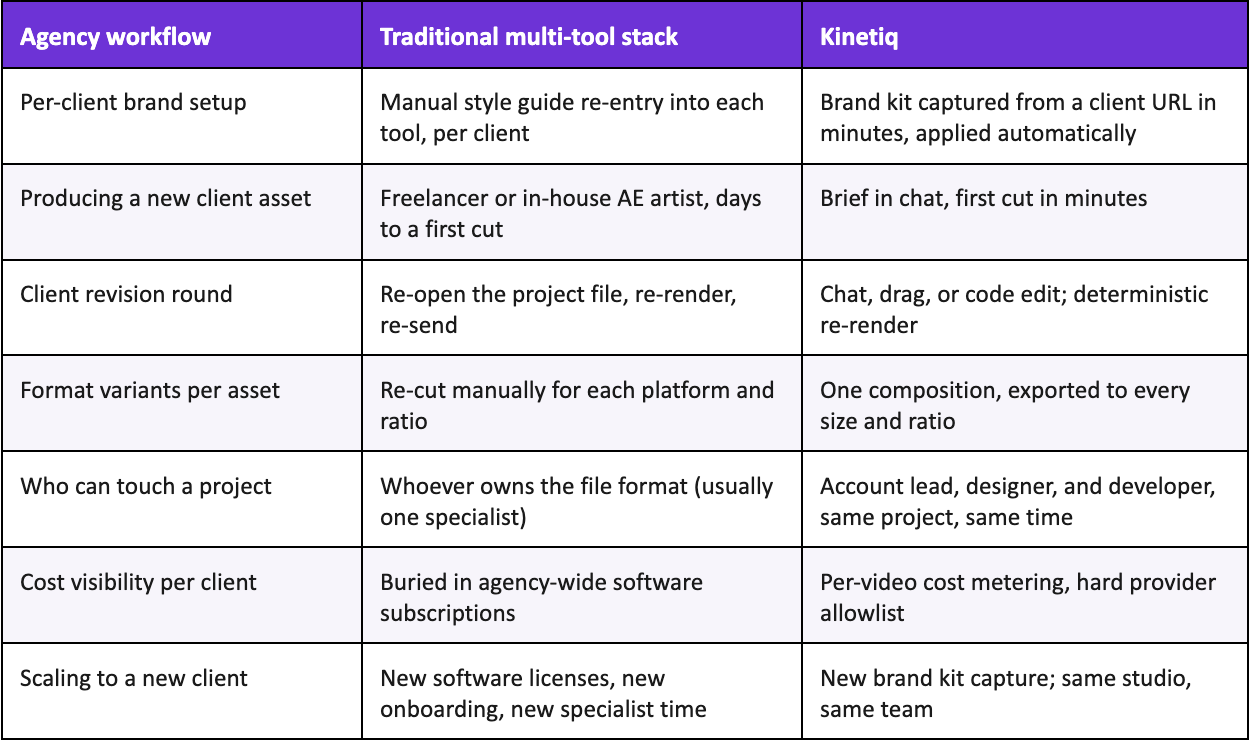
Kinetiq vs. the Traditional Agency Motion Stack
The table below summarizes the structural difference agencies specifically should weigh — not a general feature comparison, but the parts of the workflow that change shape once brand, editing, and production are unified across a whole client roster rather than handled per-project.
What to Look for When Evaluating Motion Design Software as an Agency
Most comparisons of motion design and AI video tools are written for a single-brand buyer — a marketing team, a solo creator, a founder. An agency evaluating the same category should be asking a different set of questions, because the constraint that matters most is whether a tool holds up across many brands and many hands, not whether it makes one beautiful clip.
Does brand setup scale per client, or does every new account require a manual re-configuration that eats a producer's day?
Can more than one person — an account lead, a designer, a developer — work the same project at the same time without a version-control problem?
Is cost visible and controllable per project or per client, not just as a flat agency-wide subscription line?
Does the tool support building a reusable format once and adapting it repeatedly, or does every asset start from a blank brief regardless of how many times the format has been used before?
Is there a documented API or agent-integration surface, for agencies planning to build any part of production into an automated pipeline as volume grows?
Does the output stay editable after generation — by chat, by hand, and at the code level — rather than locking into a rendered file the moment a client asks for one more change?
A tool that answers yes to all six of these is being evaluated as production infrastructure. A tool that only answers yes to the first one or two is still, functionally, a single-brand creative tool that happens to let an agency log in with a shared password — which is a meaningfully different, and more limited, thing to build a growing client roster's motion output on top of.
The Bigger Shift: From Specialist Bottleneck to Directed System
The pattern underneath everything in this piece is consistent with what AI-assisted production has done to other agency disciplines over the past few years: it doesn't just make the existing work faster, it changes what an agency can reasonably say yes to. When motion production for a new client brand required weeks of onboarding and a dedicated specialist's ongoing attention, agencies rationally limited how many accounts could carry a heavy motion component, or priced that work high enough to cover the real cost of the bottleneck. When brand capture takes minutes, templates carry the reusable creative decisions forward, and four roles can work one project without queuing behind each other, that constraint loosens — not because the creative bar drops, but because the reproduction cost per client falls.
For agency leadership specifically, this reframes a familiar hiring conversation. The question stops being "how many more motion designers do we need to service this many client brands" and becomes "how much of our existing team's judgment can we apply across more accounts before we need to add headcount at all." A senior motion designer's actual scarce skill — knowing what good pacing looks like, knowing when a brand system is being honored and when it's drifting, knowing which client request is worth pushing back on — doesn't get replaced by any of this. It gets applied across a wider surface of client work instead of being consumed, one project at a time, by the mechanical cost of re-learning a brand and re-fighting a proprietary file format on every single asset.
That's the actual pitch for an agency evaluating Kinetiq: not that it replaces creative judgment, but that it removes almost everything standing between that judgment and a client-ready, on-brand render — across as many client brands as an agency is prepared to point it at.
Frequently Asked Questions
Can Kinetiq actually manage more than one client brand at a time?
Yes. Brand identity is captured per project through a brand kit pulled from a client's website, and that brand kit is applied automatically to every generation, template, and variant inside that project. An agency runs each client as its own project with its own captured brand, rather than one shared brand configuration across the whole account roster.
How is this different from just giving each client their own seat in a normal video tool?
Most creative tools treat brand as something a designer applies by hand on each asset, which is exactly the manual, memory-dependent step that causes drift as more people touch more client work. Kinetiq captures the brand once and enforces it structurally on every subsequent generation, so consistency doesn't depend on which team member happens to be working that day.
Can our account, design, and development people really work the same project at once?
Yes. Chat, canvas, properties, and code are four views onto the same underlying composition, and changes made through any of them stay in sync with the others in real time, rather than forking into separate files that need to be manually reconciled.
Is API and MCP access something a small agency actually needs, or is that only relevant at large scale?
It matters less on day one than a year later. Most agencies start by using the studio directly for day-to-day production, and only reach for the API or MCP server once a specific recurring format — a weekly cutdown, a monthly report video — becomes repetitive enough that scripting it is worth the setup time. Evaluating whether that path exists at all is worth doing early, even if an agency doesn't plan to use it immediately, since re-platforming later is expensive.
How do we actually get access to try this with a real client?
Kinetiq is invite-only right now. The fastest way in is to request access directly at kinetiq.nagent.ai, or email the team at kinetiq@nagent.ai and mention that you're evaluating it for agency use — that context helps route the request appropriately.
Stop Re-Learning Every Client's Brand From Scratch
An agency's motion team already knows what good looks like for every client on the roster. The thing standing between that judgment and a shipped, on-brand video, asset after asset, client after client, is almost entirely reproduction cost — and that's the part of the job Kinetiq is built to remove.
Say it. See it. Ship it — across every client you run.
Kinetiq is an AI video studio built for exactly this: brand capture per client, four synced ways to edit, templates and variables for repeatable formats, and an API and MCP server for agencies ready to automate. Invite-only, and built for teams like yours.