
The Role of Templates in AI-Powered Motion Design
Templates have an image problem in motion design, and it's a fair one. For most of the last decade, a “template” meant a locked After Effects project, or a fill-in-the-blank clip on a stock site, where the honest promise was speed and the honest cost was sameness. Every brand that used the same template ended up with a video that looked, moved, and felt like every other brand that used it. Ask any creative director for their opinion of template-driven motion work and you'll get some version of the same answer: fast, cheap, and instantly forgettable.
That reputation is now colliding with a genuinely different technology, and the collision is producing some confused thinking. AI motion design tools are, almost without exception, built around some notion of a template — a starting point, a reusable structure, a library to browse. The natural assumption is that AI has simply industrialized the old problem: more templates, applied faster, by more people, producing more sameness at a larger scale. For a meaningful slice of the AI video category, that assumption is correct. For a smaller slice, built around a different idea of what a template actually is, it's exactly backwards. This piece is about that smaller slice, using Kinetiq — the AI motion design studio built by Nagent — as the concrete example of what a template becomes once it stops being a locked file and starts being a structured, agent-authored, endlessly adaptable definition.
See the difference for yourself
Kinetiq's template library is built on video-as-code, not locked timelines. Browse it, clone one, and watch it adapt to your brand in minutes.
Two Things People Mean When They Say “Template”
Almost every disagreement about whether templates help or hurt motion design traces back to an unstated assumption about which kind of template is under discussion, because the category currently contains two genuinely different objects wearing the same name.
The locked-timeline template. A finished animation with a handful of editable fields — a headline, a color swap, a logo slot — sitting on top of motion that cannot be restructured. This is the model behind most template walls: a large, browsable grid where the value proposition is choice among many finished looks, and the limitation is that none of them can become something structurally different from what they started as. It is also, not coincidentally, the model that produces the sameness problem creative directors complain about, because thousands of users fill in the same blanks on the same underlying timeline.
The structured, reusable definition. A composition expressed as data — scenes, timing, typography, motion curves, brand tokens — rather than as a rendered or semi-locked file. Because the template is a specification and not a finished object, it can be reauthored, restructured, and re-skinned by a person or an agent without hitting a wall the way a locked timeline does. This is the model behind Kinetiq's template system, and it is also, structurally, the same idea behind the “video as code” architecture described in Kinetiq's own product documentation: a composition with a root element, timed clips, and animation timelines registered in a way that is deterministic, inspectable, and editable at every level.
These two objects look similar in a product screenshot — both are a thumbnail in a gallery you click to start a new project — and that surface-level similarity is exactly why the reputational damage from one bleeds onto the other. But the difference matters enormously once a real brand tries to use either one for more than a single video, because only one of them can actually carry a brand's identity across dozens of variants without eventually breaking down into the same generic look every other user of that template also produces.
Why AI Generation Didn't Kill the Template — It Upgraded It
There was a reasonable prediction, a couple of years into the generative AI video wave, that templates would simply disappear. If a model can generate a bespoke composition from a written brief, the thinking went, why would anyone start from someone else's pre-built structure at all? In practice, that hasn't happened, for a reason that becomes obvious once you've actually run a production team: a blank brief is genuinely useful for exploration and genuinely inefficient for repetition, and the overwhelming majority of real motion design work — inside a brand, an agency, or a product team — is repetition. The same launch-video shape, run again for the next feature. The same lower-third package, applied to a new interview. The same quarterly recap format, refreshed with new numbers.
What generative AI actually changed is not whether templates exist, but what a template is capable of. A locked-timeline template can absorb a color swap and a headline change. An AI-authored, structurally reusable template can absorb a genuinely new brief — different product, different market, different tone — while preserving the pacing, structure, and motion language that made the original work, because an agent is doing the re-authoring rather than a human filling in pre-cut blanks. That is a difference in kind, not degree, and it is the reason “template” is worth rehabilitating as a concept in this category rather than treating it as a legacy idea AI is supposed to replace.
How Templates Actually Work Inside Kinetiq
Kinetiq treats templates as one layer in a small set of connected reuse mechanisms, each aimed at a different size of repeatable creative decision. Understanding all four together is more useful than looking at any one in isolation, because they're designed to compound.
Start from a template, not a blank page
Kinetiq ships with a library of more than 100 hand-designed templates, organized in the studio under “studio picks” and searchable directly from the compose panel. These span a wide range of motion styles and use cases — named effects like zoom-through and watercolour-drift sit alongside a long list of typography-specific treatments, kinetic type, stat pop-ups, and logo stings. One click applies a template to a new project, at which point it immediately inherits whatever brand kit that project has captured, discussed further below. For a first-time user, or for a producer under deadline pressure who doesn't want to compose a beat structure from scratch, this is the fastest path to a strong first draft.
This matters more than it might initially seem, because it removes the blank-page problem that makes generative tools intimidating for non-specialists. Someone who has never structured a video before doesn't have to invent a scene rhythm from nothing — they can start from a studio-designed structure that already embodies good pacing and adapt it, which is a fundamentally easier creative task than generating one from a single-line prompt.
Save as template: turn any finished video into reusable capital
The library isn't a closed set curated only by Kinetiq's own design team. Any composition — including one a user generated from scratch through a written brief — can be snapshotted as a template and cloned into a new project later. This is the mechanism that turns an individual team's best work into standing infrastructure rather than a one-off asset that lives and dies inside a single project file. A launch-video structure that worked exceptionally well for one product becomes, with one click, a real starting point for the next five products that need something structurally similar.
Adapt: re-skinning a template without losing its motion DNA
This is the feature that most clearly separates a structured template from a locked one. “Adapt” takes a saved template and re-skins it to a new brief through a normal chat instruction — new copy, new brand, new imagery — while explicitly preserving what Kinetiq's own documentation calls the template's motion DNA: its pacing, its structural rhythm, the transitions and timing decisions that made the original composition feel deliberate rather than generic. The output isn't a color-swapped copy of the same clip everyone else who used the template also has. It's a genuinely new composition that happens to share its ancestor's structural bones, in the same way a well-designed brand template in a document editor produces documents that are consistent without being identical.
This is worth sitting with for a moment, because it's the specific capability that resolves the sameness objection people rightly raise about template-driven motion work. The complaint that templates make every brand look the same is a true complaint about locked-timeline templates, where the underlying structure literally cannot change. It stops being true once the template is a structure an agent can genuinely rework rather than a shell a user can only lightly decorate.
Variables: one definition, many on-brand outputs
Where Adapt handles a new creative brief, Variables handle the more mechanical case of the same creative brief run many times with different content. A composition can declare parametrized fields — a title, a price, a theme, an accent color — and then be rendered repeatedly with different values dropped into those fields on each pass. This is the mechanism behind product-line variants, localized market cuts, and any workflow where the creative decision has already been made once and simply needs to be applied to new inputs at volume.
The distinction between Adapt and Variables is a genuinely useful mental model for anyone planning a production workflow: reach for Adapt when the brief itself is changing and the structure needs to flex with it; reach for Variables when the structure is fixed and only the content inside it needs to change. Most real production calendars use both, often on the same underlying template.
Scenes library: reuse below the level of a full template
Not every reusable creative decision is the size of a whole video. An intro bumper, a stat callout, a closing card — these are frequently strong enough to reuse on their own, independent of whatever full composition they were originally built inside. Kinetiq's scenes library lets these smaller units be saved and remixed across entirely different projects, which mirrors how creative reuse actually tends to work in practice: not whole videos copied wholesale, but strong individual beats recombined into new pieces for new briefs.
Turn your best video into a template in minutes
Save any Kinetiq composition, clone it for the next brief, and let Adapt keep the pacing while the content changes.
Brand Kits Make Templates Safe to Reuse at Scale
A structurally flexible template is only half the story. The other half is what stops that flexibility from becoming a liability — specifically, what stops a reused template from drifting off-brand the tenth or fiftieth time it's adapted, or from accidentally carrying one project's colors into another's. Kinetiq addresses this by tying templates directly to a per-project brand kit rather than leaving brand consistency to whoever happens to be operating the tool that day.
Point Kinetiq at a brand's own website and it captures palette, typography, and tone into a brand kit, which is then applied automatically to every generation, template, and variant inside that project going forward. Apply a studio template to a new project, and it inherits that project's captured brand immediately — the template supplies structure and motion language; the brand kit supplies the specific colors, type, and mood; and the two combine automatically rather than requiring a person to manually correct the template's default look on every use.
This is the piece that makes the whole system safe to scale. A template library without enforced brand behavior just multiplies the speed at which a mistake — the wrong shade of blue, a competitor's font — can propagate across a library of videos. A template library paired with an automatically applied brand kit multiplies the speed at which correct, on-brand work can be produced instead, which is the entire point.
How This Compares Across the Category
Template strategy is one of the clearest lines separating the current wave of AI motion and video tools, and it's worth being specific about how different platforms have approached it, because the differences are structural rather than cosmetic.
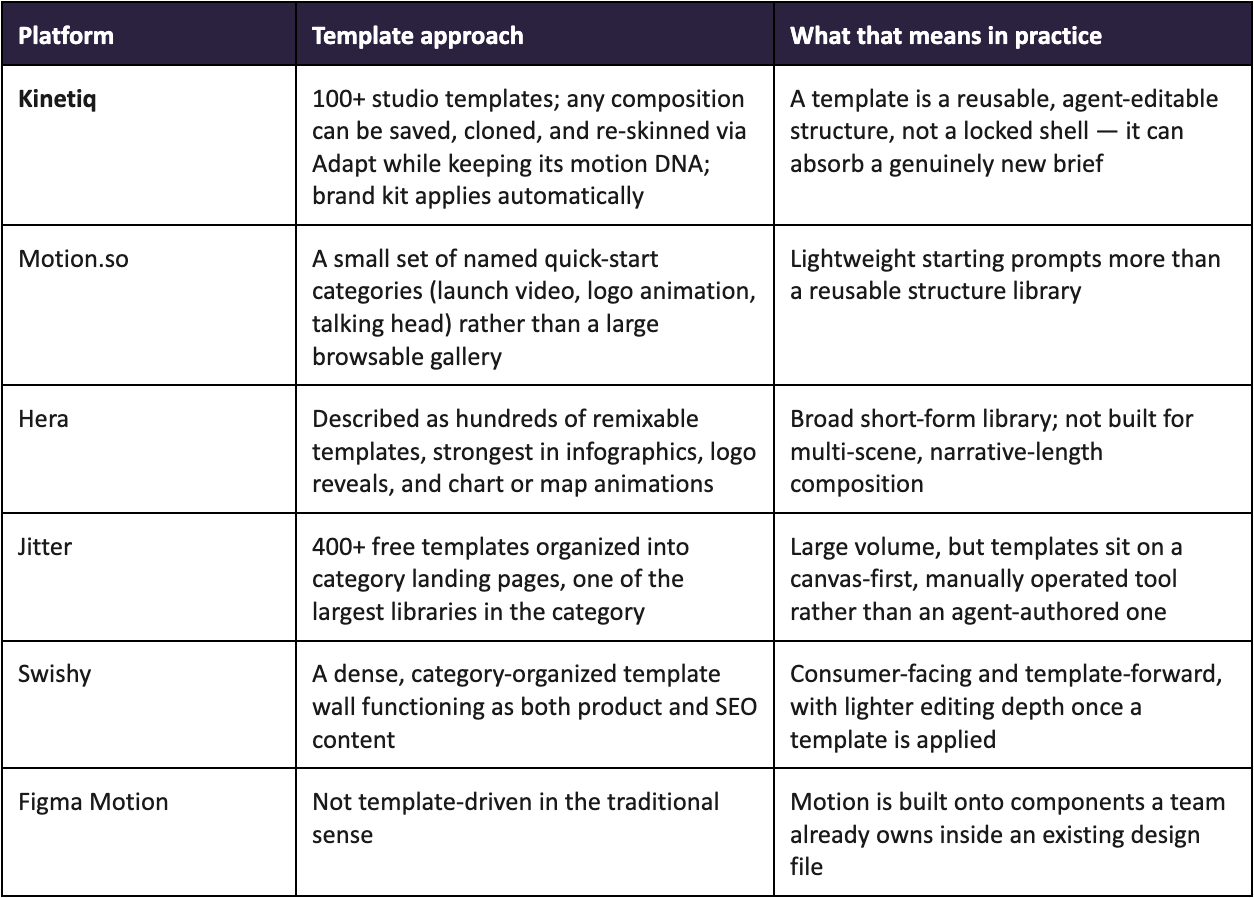
The pattern worth noticing across this comparison is that template count, on its own, tells you very little. A library of four hundred templates sitting on top of a manually operated canvas is a different product than a library of a hundred templates that an agent can genuinely restructure on request. The number that matters isn't how many templates a platform has — it's how much a template can change while still being recognizably itself, and whether that change happens through a written instruction or a manual rebuild.
The Economics: Why the Tenth Video Should Cost Less Than the First
The strongest argument for a well-built template system isn't speed on a single video — it's what happens to cost and turnaround as volume increases, which is where most motion design production actually lives once a format is proven. A brand or agency rarely needs just one launch video; it needs the same shape of launch video, repeatedly, for every product, every market, every quarter.
Under a traditional, non-templated production model, each of those repeats is close to a full re-production: a designer opens a new project file, rebuilds the structure from memory or from a reference video, and manually re-applies the brand. Cost stays roughly flat per asset, because very little of the work from the previous asset genuinely carries forward. Under Kinetiq's template model, the creative decision — the structure, the pacing, the motion language — gets made once and then reused through Adapt or Variables for every subsequent asset, so the marginal cost of the next on-brand variant keeps falling toward the cost of a render rather than staying flat at the cost of a designer's time.
This is also the mechanism behind claims like Kinetiq's own positioning around parametrized variants: declare a few fields once, and the same composition can produce dozens of on-brand outputs — different offers, different audiences, different locales — from one source. A campaign that needs forty market cuts across five aspect ratios stops being forty separate productions and becomes one definition and a render matrix, which is a genuinely different economic shape than the one most motion design budgets are built around.
When to Start From a Template, and When to Start From a Blank Brief
None of this means every video should start from a template, and it's worth being direct about when a blank brief is the better choice, because a tool that's honest about its own trade-offs is more useful than one that pretends templates are always the answer.
Start from a template when: the format has been done before — by your team or by Kinetiq's own studio library — and the goal is consistency and speed rather than creative discovery. Recurring formats, brand refreshes, and any campaign that needs many variants of one idea belong here.
Start from a blank brief when: the goal is genuinely new creative territory — a flagship brand film, a first launch video for a new product category, anything where the pacing and structure themselves are the creative problem to be solved rather than a known quantity to be applied. Kinetiq's Director plans these from scratch, beat by beat, with duration-aware pacing rather than forcing a new idea into an existing template's shape.
In practice, most real production calendars use both, often in sequence: a flagship piece gets built from a blank brief, performs well, gets saved as a template, and then quietly becomes the starting point for the next dozen variants that don't need to reinvent what already worked. That cycle — discover, then template, then scale — is a more accurate description of how good creative teams already work than the false choice between “AI generates everything from nothing” and “everyone fills in the same locked template.”
Not sure whether to template it or brief it fresh?
Open a project in Kinetiq and try both paths on the same idea — a studio template and a blank brief — and compare the first cut.
Templates as Infrastructure, Not Just a Starting Point
The broader shift underneath all of this is that a template, in an AI-native motion design system, stops being a static asset and starts behaving like infrastructure — something a team builds once, that gets more valuable every time it's reused, rather than something that depreciates with every additional user who touches it. That's a genuinely different relationship to have with a template than the one most creative teams have had for the last decade, where every additional user of the same locked timeline made the format feel a little more generic than it had before.
It's also, not coincidentally, the same reframing that makes Kinetiq's broader “video as code” architecture make sense as a category, rather than as a clever technical detail. If a composition is a structured, inspectable definition rather than an opaque rendered file, then a template built from one is diffable, versionable, and safely adaptable in a way a locked project file never could be — which is exactly the property that lets template reuse compound instead of decay.
Frequently Asked Questions
Do AI-generated videos in Kinetiq have to start from a template?
No. A composition can be generated entirely from a written brief with no template involved, with Kinetiq's Director planning the scene structure from scratch. Templates are one path to a first draft, not a requirement.
How is “Adapt” different from just editing a template's colors and text?
Adapt re-skins a saved template to a new brief through a normal written instruction, and can restructure content, imagery, and copy while deliberately preserving the template's pacing and motion structure. A locked-timeline template, by contrast, can typically only accept edits to pre-defined fields — it can't be asked to hold the same rhythm while telling a different story.
Will using the same template across many videos make them all look the same?
Less than a locked-timeline template would, because Adapt genuinely varies imagery, copy, and pacing details per brief, and the brand kit applies each project's specific colors and type rather than a single default look. Two videos built from the same template, for two different clients with two different brand kits, will read as visibly different pieces that happen to share a structural rhythm — not as the same clip with new text.
Can a template built for one brand be reused for a different brand without carrying over the wrong colors?
Yes. Templates and brand kits are scoped independently — cloning a template into a new project applies that project's own captured brand kit automatically, rather than carrying over whichever brand the template happened to be built under originally.
What's the fastest way to see how Kinetiq's templates actually work?
Open the studio, browse the template library, clone one, and use Adapt to re-skin it against a real brief — the fastest way to judge whether a template system is genuinely flexible is to ask it to do something it wasn't originally built for.
Say it. See it. Ship it.
Templates were never the problem with template-driven motion design. Locked timelines were. Kinetiq's template library, Adapt, Variables, and Scenes library are built to give teams the speed of a starting point without the sameness of a shell they can't restructure — with brand consistency enforced automatically underneath all of it.
Build your first template today
Kinetiq is an AI video studio built by Nagent: a searchable template library, Adapt and Variables for reuse at scale, and a brand kit that keeps every variant on-brand automatically.