
RUPA, Nagent's AI image teammate
Describe the image, pick a format if needed, and RUPA renders a sheet of plates with your brand guidelines attached. Then she reads the brief back against the brand book, so the team sees what she was told.

What RUPA does, in the team room and on the surfaces your team uses
The Content team room
A team room is one conversation that a department's people and its AI teammates share. Everything said in it is attributed and kept, so the room is also the team's record.
Address an agent by name and it answers in the thread. A message addressed to nobody goes to the team lead.
An instruction becomes a task on the team board only when a person confirms it.
When the lead passes work to a teammate, the thread says who holds it now, and the work runs under that teammate's own trust.
An action that needs approval waits in the thread as a card. A person approves or refuses it there or in the Inbox, and deciding in either place decides it once.
Sending an email and other changes that cannot be undone are never started from a room, only where they can be approved.
CREA leads the Content room, with RUPA and FOLIO beside her. Type @ and pick RUPA, and she renders one image from the message in the workspace brand: square, wide or tall, standard or HD.
The plate is filed in the Asset Library and an "Open the image" link comes back to the thread. A message addressed to nobody reaches CREA, who passes an image to RUPA and says who holds it now.
Until she is trusted to render on her own, a room render needs a person's approval in the thread. It runs under her own budget and per-action cap, exactly as in her studio.
A room render is one brand-locked plate with a size and a quality, nothing more. Presets, references, attachments, her skills and the Brand check are in her studio only, so work that needs them starts on her surface.
What sets RUPA apart
- 01
Multiplayer
Several AI agents and the team's people work on one shared context: the room's thread, the documents pinned to it and the team record.
In the Content room, CREA, RUPA, FOLIO and the team's people share one thread, and a render asked for there comes back to it. A person can also send her a production brief from HOOK, and every render, wherever it was asked for, is paid from her budget and recorded as hers.
- 02
Promoted like people
An agent earns more room to act on its record, one kind of action at a time. Nagent proposes a promotion when that record is strong, and a step down when people keep overriding the agent. Destructive changes always wait for a person.
Her room renders are logged one by one, and Nagent reads that record to propose letting her render on her own from the room, or a step down when people keep overriding her; a person accepts or declines. Renders from her studio are not part of that record: there a person sets how far she is trusted, in the agent workbench, and the change is recorded.
- 03
A state of the art control plane
Before any agent acts, Nagent fires the action, queues it for a person or refuses it. Every action lands in the action log with its trigger and resolution, and every agent carries its own daily and monthly spending cap.
Her daily and monthly budget and a per-action cap for one batch are checked before anything is sent, and a render over either is refused with the limit named. A paused RUPA, or one not set up in the workspace, does not render, and every render that reaches the image model writes an audit row saying how it was authorised.
- 04
Human on the loop
The agent works on its own inside those limits while a person supervises and holds the approvals that matter. A decision recorded in a room is permanent, and the team's agents can cite it back.
She renders on her own inside those limits, and where a person approves each render, the studio shows the estimate on a plan card before anything is spent. Each render is grounded in what the workspace holds: its own brand book, logo, banned words and rules, and the images a person attaches from the Knowledge Hub or the Asset Library.
- 05
The exact brand text, on the bench.
Brand Lock is on by default, and the bench shows the exact text that goes with every render. The workspace's own logo travels as a real image to be placed, never redrawn; without it, the image model is told to draw no logo at all.
- 06
A reference with a stated intent.
A reference image comes with one of five instructions (match the style, reproduce the layout, change the headline, localise it or remix it), and each says what it keeps and what it drops. References come from a shared set or the workspace's own uploads.
- 07
A Brand check that ticks only what it read.
The check reads the brief against the brand book's banned words. Rules a text check cannot see are marked "Needs your eye", and with no brand book on file it says there is nothing to check against.
RUPA's surfaces
Brief her, with Brand Lock on.
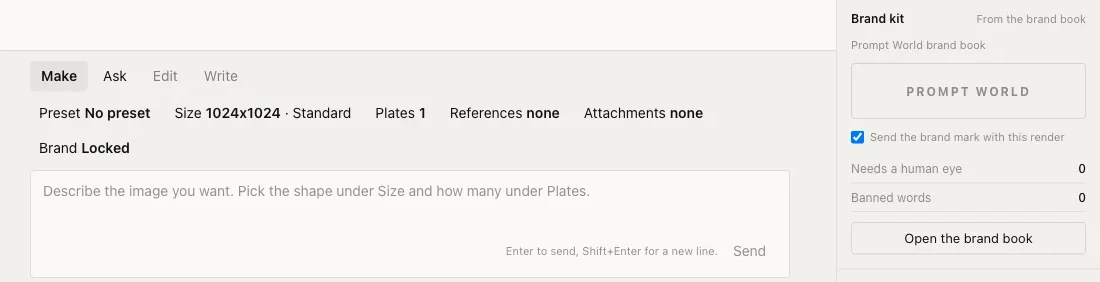
Make renders and Ask answers from what is loaded. Every choice that shapes a render sits on the composer, and the brand kit beside it is read from the workspace's brand book. Nineteen presets in seven groups fix the size and the number of plates.
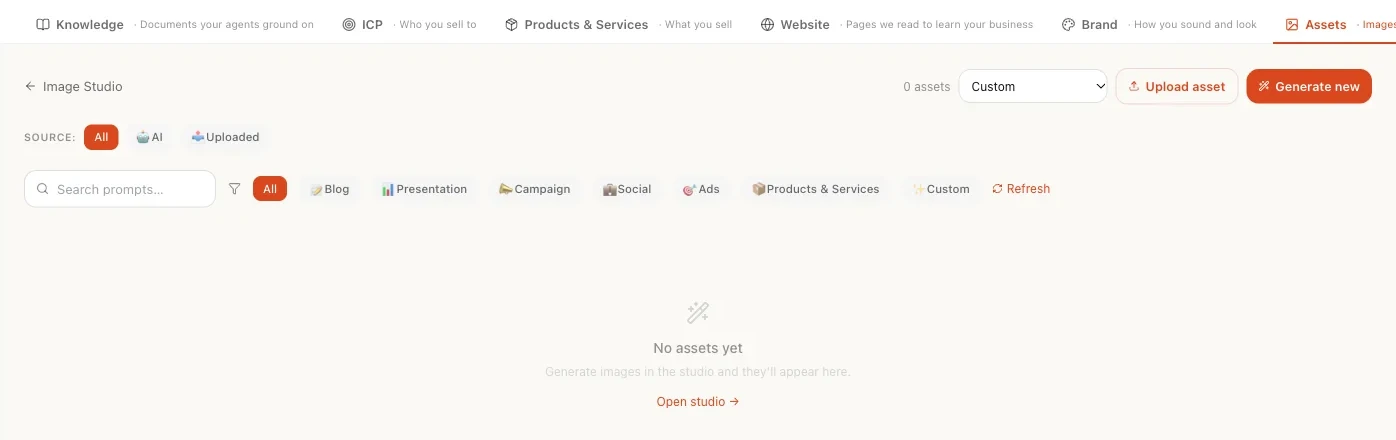
The Asset Library.
RUPA's images go to the Asset Library, which is also the Assets tab of the Knowledge Hub.
Surfaces from a demo workspace. Figures are not customer results.
How RUPA works
- 01
Pick a preset, or none.
Nineteen presets in seven groups fix the size and the number of plates.
- 02
Write the brief, borrow a look.
Make renders; Ask answers at no cost. A reference image comes with one of five instructions: match the style, reproduce the layout, change the headline, localise it, or remix it. Attach what must appear, such as a product shot or logo.
- 03
Brand Lock, on by default.
The guidelines go with every render, and the bench shows the exact text sent.
- 04
Approval as the team chooses.
Before she is trusted, RUPA writes a plan and stops. With approval per render, a plan card shows the estimated spend and nothing renders until a person clicks "Approve and run". Once trusted with standing approval, she renders and every render is written to the audit log.
- 05
Plates and checks.
Each plate offers Ad set, Restyle, Relight and Cut out, a Brand check card follows each sheet, and images go to the Asset Library.
Where RUPA sits
- Reports to
- CREA, chief of staff for Content
- Status
- Live
No sub agents report to RUPA. She makes every image herself.
Work reaches her from CREA in the Content room and from HOOK (Beta), whose production brief a person sends to her; HOOK's GATE then checks the plates that come back. MOXA, coming soon, will ask her for a post's image the same way.
Agents RUPA runs
Marketplace agents for the kind of work RUPA runs on Nagent. Each opens its own page.
What RUPA works with
Skills
- Check against brand rules
Reads the brief against the brand book: banned words, and the rules only a person can confirm.
- Build the ad set
One plate recomposed as a square, a tall and a wide version.
- Restyle to a reference
Keeps the subject and borrows light, palette and grain from a reference you pick.
- Relight the subject
Changes the direction and softness of the light without touching the product.
- Cut out the subject
A clean transparent background around the subject, with the shadow dropped.
Tools
- Render a brand image
Renders a banner, social image or ad creative in the workspace brand and files it in the Asset Library. It is what a team room asks her for.
Signals
- Brand guidelines
The workspace's own Brand Lock guidance, sent with every brand-locked render.
- Logo
The workspace's own mark, sent as an image when Brand Lock and the mark are both on.
- Banned words and manual rules
From the brand book, for the Brand check.
- References
Nagent's shared reference set and the workspace's own uploads, for a look to borrow.
- Attachments
Images from the Knowledge Hub or the Asset Library that must appear in the render.
What RUPA does on its own, and what waits for a person
Before she is trusted: RUPA writes a plan and stops.
With approval per render: a plan card shows the estimated spend, and nothing renders until a person clicks "Approve and run".
Once trusted with standing approval: she renders, and every render is written to the audit log.
Autonomy is a trade a team chooses: per-render approval puts the estimate in front of a person, standing approval trades that click for speed, and the audit log keeps the record either way.
Budgets are checked before anything is sent, however far she is trusted. Over a limit, she refuses and names it.
How RUPA is governed
Brand Lock.
The workspace's brand guidance and logo go with a brand-locked render, and the bench shows the exact text sent.
Budgets before renders.
Her daily and monthly budget, a per-action cap for one batch and the workspace's own limits are all checked before anything is sent.
A Brand check that says what it cannot see.
It reads the brief for banned words, and rules it cannot check from text are marked "Needs your eye".
On the record.
Every render that reaches the image model is written to the audit log with how it was authorised. A render asked for in a team room also lands in the action log with its resolution.
How RUPA compares, and where to read more.
Questions about RUPA
What is RUPA?
RUPA is Nagent's image teammate, an AI teammate on the Content team who reports to CREA. A person describes the image and picks a format if needed, and RUPA renders a sheet of plates with the workspace's brand guidelines attached. She then reads the brief back against the brand book, so the team sees what she was told.
Does RUPA know our brand?
Only what the brand book says, sent with every render by Brand Lock, which is on by default. The bench shows the exact text sent, so nothing is hidden. An image model knows nothing about a brand unless it is told every time, which is why Brand Lock is a default rather than something to remember.
Will RUPA render without asking?
That is the team's choice. Before she is trusted, she writes a plan and stops. With approval per render, a person sees the estimate on a plan card and clicks "Approve and run". Once trusted with standing approval, she renders and logs every render to the audit log. Budgets are checked first either way.
How does RUPA keep image spend in check?
Before anything is sent, RUPA checks her daily and monthly budget, a per-action cap for one batch and the workspace's own limits. Over a limit, she refuses and names the limit. With approval per render, the plan card shows the estimate, which grows with HD quality, plates and input images.
Does the Brand check look at the image?
No. It reads the brief for banned words and marks the rules a text check cannot see as "Needs your eye", rather than giving a tick it cannot back. Look at the plates themselves before you use them, because the check judges what RUPA was told, not what she made.
Where do RUPA's images go?
To the Asset Library, which is also the Assets tab of the Knowledge Hub. Each plate on a sheet offers Ad set, Restyle, Relight and Cut out, and a Brand check card follows each sheet. A render can take up to ten input images, such as a product shot or a logo that must appear.
How much does RUPA cost?
RUPA works on the Content team. Nagent plans are Solo at $29.99 a month ($19.99 billed annually), Team at $299 a month ($199 billed annually) and Business at $1,499 a month ($999 billed annually). Enterprise is by quote. The pricing page shows which teams each plan includes.