
AI Product Photoshoots With RUPA: What It Automates
AI Product Photoshoots With RUPA: What It Automates
RUPA, Nagent's AI image teammate, takes the crew, the location scout and the three-week timeline out of product photography. Give her a product shot and a brief, and she renders the scene to a preset with your brand guidelines attached: model, setting, light and styling. For e-commerce, fashion and brand teams producing hundreds of visual assets a quarter, that changes how visual content gets made.
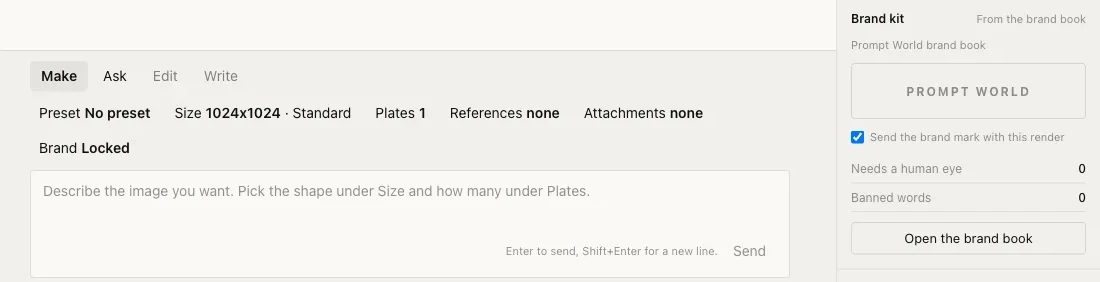
RUPA's composer: preset, size, plates, references and Brand Locked, beside the brand kit.
What does RUPA do for a product photoshoot?
RUPA runs the photoshoot from brief to final image without a photographer, studio booking or retouching queue. See AI product photoshoots with RUPA.
The preset and the references you attach set:
Model selection: body type, skin tone, pose, expression
Location and environment: urban street, minimalist studio, tropical outdoor, branded set
Weather and lighting: golden hour, overcast, studio strobe, natural diffuse
Styling preferences: garment fit, accessory pairings, colour palette alignment
Output format: aspect ratios, resolution, file format for each channel
Give her the product shot, a brand brief and the channel sizes. She renders the visuals for a person to review and approve.
What problem does this agent actually solve?
Traditional photoshoots are slow, expensive, and hard to scale. The real cost is not the photographer's day rate, it is the compounding delay: the location permit, the model agency back-and-forth, the weather rescheduling, the retoucher queue. A single campaign shoot can consume six to eight weeks from brief to final asset.
For an e-commerce brand launching 200 new SKUs per quarter, that timeline is not a bottleneck. It is a growth ceiling.
RUPA removes the variables that create that delay: no model availability conflicts, no weather, no studio booking window. The brief goes in and a draft comes back for review.
Each render is reviewed and approved by a person before it is used, and the record is kept. AI teammates start supervised and are promoted level by level on their track record.
Who uses RUPA for product photography?
RUPA is built for teams where visual output volume outpaces visual production capacity.
E-commerce and retail teams
A product range grows faster than a shoot schedule. RUPA renders product photography at scale with consistent lighting and a consistent brand look, without rebooking a studio for every product drop.
Fashion and apparel brands
Seasonal campaigns used to mean big production budgets and long lead times. RUPA lets a fashion team render editorial looks in several colourways, model profiles and settings from one brief, so testing creative concepts before committing to a physical shoot becomes a realistic workflow.
Marketing and advertising agencies
Agencies running performance creative need volume and variation. RUPA renders ad stills in several variants from a single brief, with different backgrounds, models and lighting moods, ready for split testing across Meta, Google and programmatic channels.
Media production companies
Pre-visualisation and mood boarding used to need a separate team. RUPA renders reference imagery that replaces early mockups.
Brand and content studios
In-house brand teams managing several sub-brands or seasonal refreshes keep a consistent look without rebuilding the shoot brief each time. The brand kit is read from the brand book, and presets and references carry the approved look into every new shoot.
How does RUPA fit into an existing workflow?
RUPA works inside Nagent, in the Content team led by CREA, so briefs, drafts and approvals sit in the team room beside the people on the team.
A typical flow:
Product input: product shots and details from your own assets, uploaded or kept in the Asset Library.
Brand brief input: a short natural-language prompt or structured template defines campaign parameters.
Generation and review: renders land in the Asset Library for a person to review before approval.
Use: approved assets go to your CMS, ad platform or e-commerce back end.
Where the plan includes it, a Nagent forward deployed marketer joins the team and owns the number with you.
What does a representative use case look like?
Seasonal campaign launch, fashion brand
A fashion brand is launching a summer collection: 80 SKUs, four colourways each, across three channels (e-commerce PDP, Instagram, paid social).
Without the agent:
- Studio bookings, model casting, location scouting: 4 weeks
- Shoot day(s): 2 to 3 days
- Post-production and retouching: 2 weeks
- Total: 6 to 8 weeks
With RUPA, the brief and the preset are set up once, the product and colourway combinations are rendered in batches, and the team spends its time on review and approval before export. The timeline is set by how fast the team approves, not by a shoot calendar.
Asset volume is higher and the timeline is shorter, because the shoot logistics disappear.
Performance creative testing: D2C brand
A D2C brand running paid acquisition wants to test 12 creative hypotheses across two demographics and three background environments: 72 ad variants in total. A traditional shoot for 72 distinct images is cost-prohibitive.
RUPA renders the variants from a single brief, the brand runs the split test, and the results inform the next brief.
Where does RUPA fit in Nagent?
RUPA is one of Nagent's AI teammates. Nagent is multiplayer AI for growth teams: people and AI agents in one shared context, delivering the number.
For strict data residency, the Enterprise plan offers private VPC deployment with BYO model and BYO key.
What should you try first?
Start narrow. Pick one product category and set three parameters: model profile, background and lighting mood. Brief RUPA and review the output against your existing shoot assets.
The gap in quality, speed, and cost will make the next decision straightforward.
Related reading
Frequently Asked Questions
What does RUPA automate in a product photoshoot?
Model, setting, light, styling and output format, set by a preset and the references you attach, from a single brief. It removes the logistics of a physical shoot: no location scouting, no model agency, no studio booking. A person reviews and approves every image before it is used.
Does RUPA keep to strict brand guidelines?
Yes. Brand Locked attaches the brand guidelines to every render, and the brand kit is read from your brand book. For strict data residency, Enterprise offers private VPC deployment.
How do teams get started with RUPA?
RUPA is part of Nagent. Attach your brand guidelines, pick a preset and upload a product shot. See pricing for the plans.
How does RUPA earn more autonomy?
Every render is approved by a person and the record is kept. Like every AI teammate on Nagent, RUPA starts supervised and is promoted level by level on her track record.
Which teams get the most from AI product photoshoots?
E-commerce, fashion and apparel, marketing and advertising agencies, and media production: any team producing a high volume of visual content on a recurring basis, from product listings to seasonal campaigns and performance creative. It helps most where a physical shoot makes variant volume cost-prohibitive.
What's next
See RUPA on your own products. Book a demo and run your first virtual shoot with the team.