
CREA, the AI chief of staff for Nagent's Content team
Give the team a topic. It researches, drafts, edits, reviews, illustrates and links a blog post, then waits. Nothing goes live until a person approves it.
Watch the video: CREA, the AI chief of staff for Nagent's Content team
What CREA does, in the team room and on the surfaces your team uses
The Content team room
A team room is one conversation that a department's people and its AI teammates share. Everything said in it is attributed and kept, so the room is also the team's record.
Address an agent by name and it answers in the thread. A message addressed to nobody goes to the team lead.
An instruction becomes a task on the team board only when a person confirms it.
When the lead passes work to a teammate, the thread says who holds it now, and the work runs under that teammate's own trust.
An action that needs approval waits in the thread as a card. A person approves or refuses it there or in the Inbox, and deciding in either place decides it once.
Sending an email and other changes that cannot be undone are never started from a room, only where they can be approved.
CREA leads the Content room, so a message addressed to nobody reaches her. A brief becomes a task on the team board, and the work comes back as a file to review rather than a message.
She asks for what she does not make: an image goes to RUPA and a publication to FOLIO, and she says who holds it now.
A content gap DRIS finds lands on the same board as a task for the Content team, at most ten a day. A Blog Studio run is started by a person on its own surface, not from the room.
What sets CREA apart
- 01
Multiplayer
Several AI agents and the team's people work on one shared context: the room's thread, the documents pinned to it and the team record.
In the Content room, CREA, RUPA, FOLIO and the team's people share one thread, and a content gap DRIS finds in Marketing arrives on the Content board as a task.
- 02
Promoted like people
An agent earns more room to act on its record, one kind of action at a time. Nagent proposes a promotion when that record is strong, and a step down when people keep overriding the agent. Destructive changes always wait for a person.
Publishing a post stays with a person until someone explicitly grants it, and under the stricter governance profile content always asks.
- 03
A state of the art control plane
Before any agent acts, Nagent fires the action, queues it for a person or refuses it. Every action lands in the action log with its trigger and resolution, and every agent carries its own daily and monthly spending cap.
Each Blog Studio run is checked against a daily blog budget before it starts, and the Content Studio shows what the day has spent.
- 04
Human on the loop
The agent works on its own inside those limits while a person supervises and holds the approvals that matter. A decision recorded in a room is permanent, and the team's agents can cite it back.
The team drafts from the workspace's brand profile, its products and services, the Knowledge Hub passages that match the topic and the brand voice, then waits: a person approves and publishes.
- 05
One house style for writer and reviewer.
The same style rules are handed to the writer and to the reviewer, so a rule the review enforces is a rule the writer was told.
- 06
An editorial check that fails closed.
An independent check of facts and compliance runs apart from the reviewer. A live block, a required check that never ran or an unreadable record holds the post.
- 07
Sources and links that exist.
The writer may assert only what the retrieved passages support, a Sources section is appended, and internal links go only to entities and posts the site already has.
CREA's surfaces
Start a run and watch it.
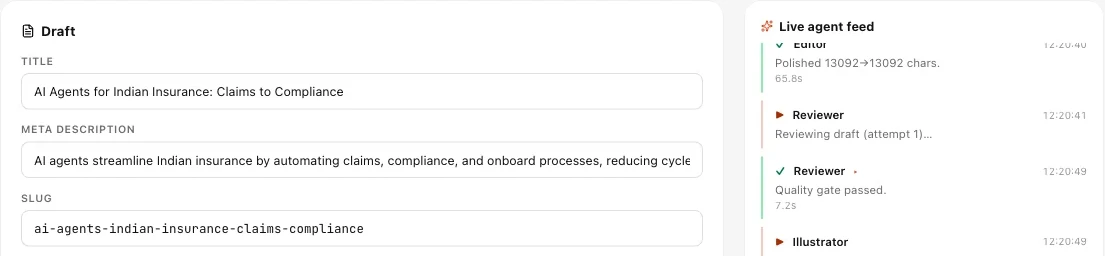
In Blog Studio, type a topic and optionally an angle. The run page shows a live agent feed, the draft so far, the citations gathered and the visuals generated.
Posts
Every post, AI and human, filtered by status. New Post writes one by hand.
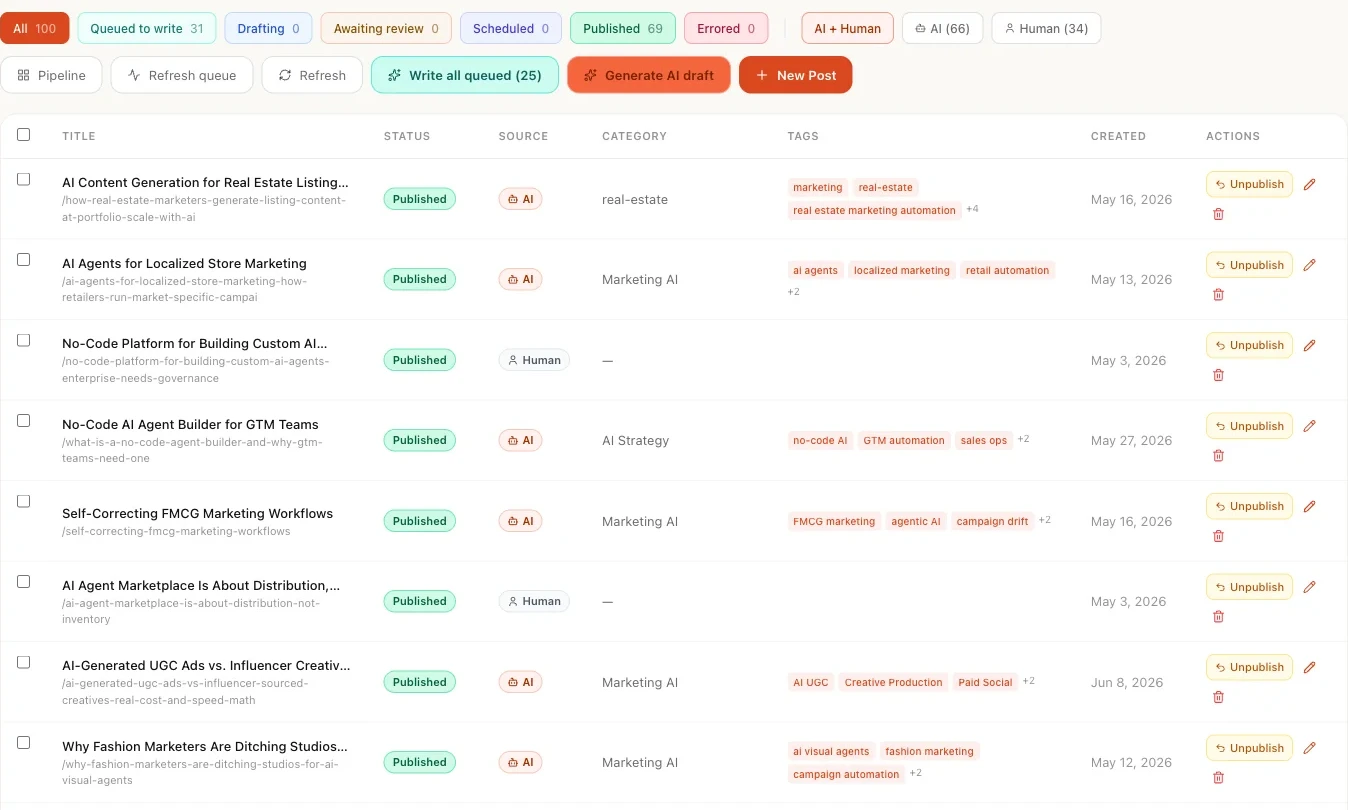
Surfaces from a demo workspace. Figures are not customer results.
How CREA works
- 01
Ground it.
The team reads the company name from the brand profile, what is sold from Products and services, up to six Knowledge Hub passages that match the topic, the voice from the brand book, and the booking link.
- 02
Start a run and watch it.
In Blog Studio, type a topic and optionally an angle. The run page shows a live agent feed, the draft so far, the citations gathered and the visuals generated.
- 03
Review and decide.
At Approve, the title, meta description, slug and body open for editing. "Send back with feedback" starts a new run with your note as the brief; "Approve & Publish" publishes, and an independent editorial check at publish holds the post if it finds a blocker.
- 04
Route what CREA does not make.
An image goes to RUPA and a publication to FOLIO, and CREA says who holds it now.
- 05
Brief in the room.
In the Content team room a brief becomes a task on the team's board, and DRIS can hand content gaps over as tasks.
Where CREA sits
- Reports to
- You
- Status
- Live
Team leads under CREA
- RUPA, Image studioLive
Renders to a preset with your brand guidelines attached by default, and shows exactly what was sent with every render.
- FOLIO, Long-formLive
Turns your own source documents into an illustrated publication rendered as PDF and DOCX, in your brand voice.
- Alpha, Video studioLive
Makes video for the Content team.
- Presentation makerComing soon
A seat on the Content roster that is not built yet.
- Landing page makerComing soon
A seat on the Content roster that is not built yet.
- Email creator for templatesBeta
Composes brand-voiced e-mail templates in the Email templates editor. The Content install does not seat it yet.
Kinetiq is Nagent's video product, with its own sign-up. Open Kinetiq
Agents CREA runs
Marketplace agents for the kind of work CREA runs on Nagent. Each opens its own page.
- Ad Script Writer
- Ad-Genie : The AI Agent for Video Advertising Creation
- Adorn IQ: The Jewellery Campaign Intelligence Agent
- AI Blog Writer
- AutoGraphix
- Carousel Maker
- ComicDirector AI
- ComicTales
- CopyCrafter AI
- Creative Alpha
- Glyphos
- JsonVision
- Kinetiq: AI Motion Design Studio
- MetaMorph Male
- Movie Script Writer
- Offer Variation Agent
- ReFrame
- ScrollStop AI The Viral Reel Creator
- UGC Genie
- UGC Studio
- Virtual Photoshoot Agent
What CREA works with
Skills
- Content theme
Drafts a content theme from the operator's own words, so the themes form opens filled instead of blank.
Tools
- Fetch citations
Pulls grounding documents from the Knowledge Hub, case studies and toolkits.
- Draft blog body
A long-form draft in the brand voice, from the citations and a tone preset.
- Polish draft
Tightens flow and voice without adding claims.
- Review blog draft
Pass or fail with reasoning and fix suggestions.
- Generate visuals
A cover and inline visuals for the post.
- Apply internal links
Entity links and a related posts section.
- SEO audit
Title, meta description and readability checks.
- Publish blog
Puts the post live once a person approves it.
Signals
- Knowledge Hub passages
The passages that match the topic, for every factual claim.
- Brand voice
The voice in the brand book, handed to the writer and the reviewer.
- Products and services
What the workspace sells, so product names are never invented.
- Booking link
Where the post sends a reader who wants to talk.
- Content gaps from DRIS
Gaps in organic visibility, as tasks on the Content board.
Integrations
- Google Drive
Documents connected here are read into the Knowledge Hub the team writes from.
- Site connection
Beta. Your site reads published posts from the workspace with its own site key.
What CREA does on its own, and what waits for a person
The team does every step up to the last one, and the last one belongs to a person. Nothing is published, scheduled or sent by CREA.
Before any agent acts, Nagent fires the action, queues it for a person or refuses it, depending on how far the agent is trusted, the governance profile and the kind of action.
Under the stricter governance profile, content always asks.
When a class of action reaches 20 approvals with no reversals, Nagent raises one promotion request, and a person grants or declines it.
A daily blog budget applies: when it is spent, a new run stops until the next day.
How CREA is governed
Every claim from a source.
In the room, CREA holds every factual claim to the knowledge, offerings or documents the workspace has shared; with no source to cite, the sentence comes out. In Blog Studio, the writer is told to ground every product claim in the workspace's own products and passages.
One house style for writer and reviewer.
A rule the gate enforces is a rule the writer was told.
Brand voice confirmed by a person.
A voice the machine extracts from your material stays a draft until a person confirms it.
A person publishes.
Nothing goes live until a person approves it, and an editorial check runs at publish.
How CREA compares, and where to read more.
Questions about CREA
What is CREA?
CREA is the chief of staff for Content on Nagent, the multiplayer AI platform for growth teams. CREA leads the content team: give it a topic and it researches, drafts, edits, reviews, illustrates and links a blog post, then waits. Nothing goes live until a person approves it. RUPA for images and FOLIO for long-form publications lead under CREA.
Will the posts be about our company?
Yes. Each draft is grounded on the workspace's brand profile, products, Knowledge Hub and brand book. The team reads the company name, what is sold, up to six Knowledge Hub passages that match the topic, the voice from the brand book and the booking link, so the more a team puts in, the better every draft gets.
What if our Knowledge Hub is empty?
The draft is written without invented detail. In the room, a sentence with no source to cite comes out, and CREA says what source would let it back in. Internal links are never made up: they go only to entities and posts the site already has.
Does anything publish without us?
No. A person approves and publishes, and an independent editorial check runs at publish and holds the post if it finds a blocker. At Approve, the title, meta description, slug and body open for editing; "Send back with feedback" starts a new run with your note as the brief. A post carries the company's name, so the last step belongs to a person.
What does CREA hand to other teammates?
CREA writes briefs, articles, e-mails, posts and scripts, drafted, edited and checked against the brand. What CREA does not make goes to the seat that makes it: an image to RUPA, a long-form publication to FOLIO. CREA says who holds the work now, and finished work goes to a person to approve.
How much does CREA cost?
CREA works on the Content team. Nagent plans are Solo at $29.99 a month ($19.99 billed annually), Team at $299 a month ($199 billed annually) and Business at $1,499 a month ($999 billed annually). Enterprise is by quote. The pricing page shows which teams each plan includes.