
Top 10 AI Image Generators That Keep Your Brand On-Brand (2026)
An AI image generator makes marketing images from a brief: ad creatives, social posts, product shots on new backgrounds, banners and editorial art. The ones worth a brand team's time in 2026 differ on one question: does the tool know your brand every time it renders, or only when someone remembers to tell it?
Disclosure: Nagent makes RUPA, first on this list. The other nine are described from their own published claims and prices.
An image model knows nothing about a brand unless it is told, every time. That is the whole problem. Most tools leave the telling to the person at the keyboard, so the fifth render of the day drifts from the first, the logo gets redrawn, and nobody can say what the model was actually asked. The tools below take different routes to the same goal: a brand kit, a style reference, a locked set of guidelines, or a studio that attaches the brand book to every render and shows the text it sent.
How did we pick these tools?
Brand by default: does the brand guidance go with every render, or does it live in a kit the user has to apply?
Transparency: can the team see exactly what the model was told, and what the tool checked?
Product fidelity: does a real product stay the real product, with the pack, label and logo intact?
Control: what a person approves, how spend is capped, and whether every render is on the record.
Value: what the entry price buys, and whether it is public.
Prices are the vendor's published figure where there is one, checked October 2026, and marked approximate otherwise.
What are the 10 best AI image generators for brands in 2026?
1. Nagent RUPA
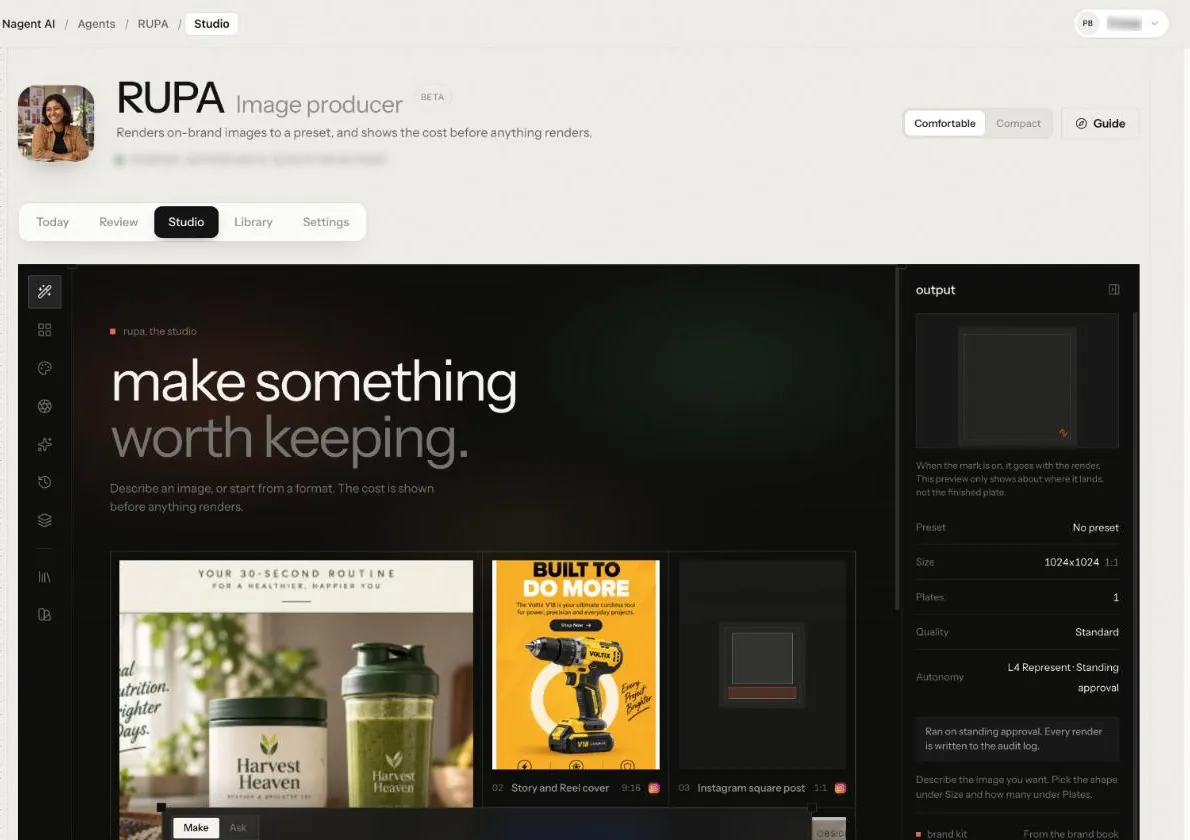
RUPA is Nagent's AI image teammate. Describe the image, pick a format if needed, and she renders a sheet of plates with the workspace's brand guidelines attached. Then she reads the brief back against the brand book, so the team sees what she was told. She owns the image studio on Nagent's Content team under CREA, the Content chief of staff, and takes production briefs from HOOK, the creative strategy lead. The studio carries a Beta tag.
Try it: Hire RUPA · See plans · Talk to the team
A new studio. The presets rail on the left, the composer in the middle, and the output spec and brand kit on the bench, read from the workspace's brand book. Shown from a Nagent workspace.
How RUPA keeps a render on brand
Pick a preset, or none. Nineteen presets in seven groups fix the size and the number of plates, so a Meta ad and a profile image start from the right shape.
Write the brief. Make renders; Ask answers at no cost. A reference image comes with one of five instructions: match the style, reproduce the layout, change the headline, localise it, or remix it. Each says what it keeps and what it drops.
Attach what must appear, such as a product shot or a logo. A render can take up to ten input images from the Knowledge Hub or the Asset Library.
Brand Lock, on by default. The workspace's brand guidance and logo go with every brand-locked render, and the bench shows the exact text sent. The logo travels as a real image to be placed, never redrawn. Without one, the model is told to draw no logo at all.
Approval as the team chooses. Before she is trusted, RUPA writes a plan and stops. With approval per render, a plan card shows the estimated spend and nothing renders until a person clicks "Approve and run". Once trusted with standing approval, she renders and every render is written to the audit log.
Plates and checks. Each plate offers Ad set, Restyle, Relight and Cut out. A Brand check card follows each sheet, and the images go to the Asset Library.
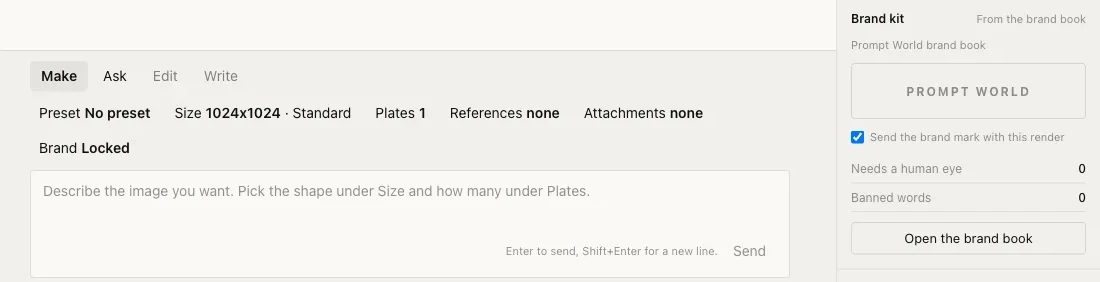
The composer, with Brand Lock on. Every choice that shapes a render sits here, and the brand kit beside it is read from the brand book.
Why RUPA stands out
The brand goes with every render. Brand Lock is a default, not a setting to remember. An image model forgets your brand the moment the tab closes; RUPA tells it again every time.
You see what the model was told. The bench shows the exact brand text sent with a render. Nothing is hidden behind a "brand-aware" label.
A Brand check that says what it cannot see. It reads the brief against the brand book's banned words, and marks the rules a text check cannot judge as "Needs your eye", rather than giving a tick it cannot back.
One brand row for everything. Brand Lock AI is the single brand record a workspace has. Every image, copy block and asset the agents make reads from it. An uploaded guideline outranks anything read off the website, and a voice drafted from the site applies only after a person confirms it.
Budgets before renders. Her daily and monthly budget, a per-action cap for one batch and the workspace's own limits are all checked before anything is sent. Over a limit, she refuses and names it.
On the record. Every render that reaches the image model is written to the audit log with how it was authorised.
Works with the rest of the team. A person can send her a production brief from HOOK, and HOOK's GATE checks the plates that come back. In the Content room, type @ and pick RUPA for one brand-locked plate from the message.
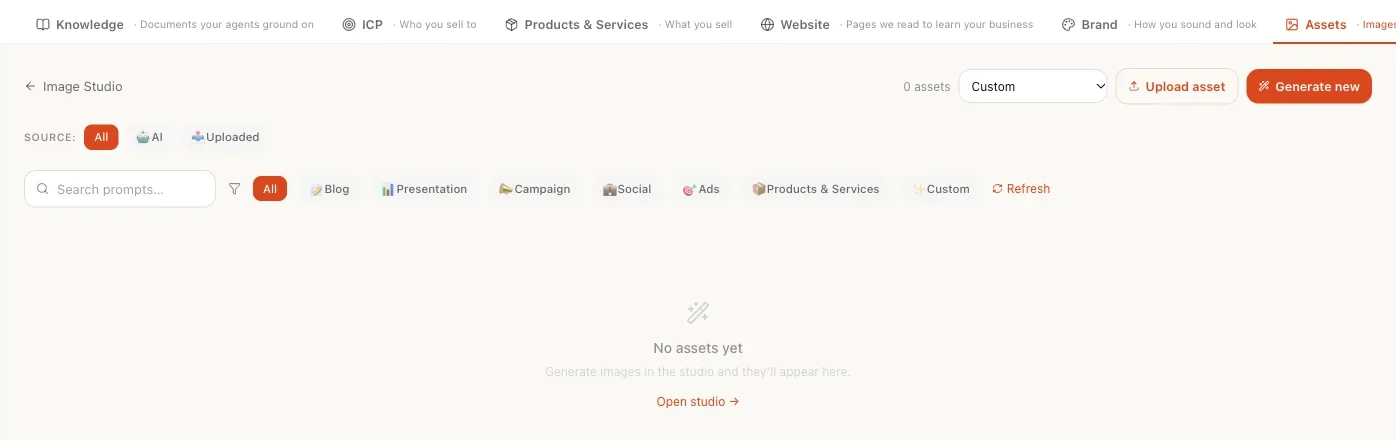
The Asset Library, which is also the Assets tab of the Knowledge Hub. Every plate RUPA makes is filed here.
Limits to know
The studio is in Beta. The Brand check reads the brief, not the finished picture. Look at the plates before you use them.
A cost appears only on the per-render plan card. A RUPA added with a content or marketing team starts with standing approval, so most teams see no price on screen, though spend still counts against every budget.
Cut out and the logo mark preset need a transparent background, and a render fails when the image model refuses one. Treat Cut out as unreliable.
No 9:16 size or custom crop yet, and no Edit or Write mode.
Pricing
RUPA works on the Content team. Nagent plans: Solo $29.99/mo ($19.99/mo billed annually), Team $299/mo ($199/mo annually), Business $1,499/mo ($999/mo annually), and Enterprise by quote. See pricing for which plans include the Content team.
Best for: brand and content teams that want the brand book attached to every render by default, a record of what the model was told, and spend checked before it happens.
2. Photoroom
An AI product photo editor and API for background removal, generated backgrounds and batch editing. Photoroom's claim is to be the fastest, most precise background remover on the market, serving more than a million businesses.
Standout: a Brand Kit for colours, logos, fonts and layouts, and batch editing that applies it across a catalogue. The API covers removal, staging, relighting, expansion and upscaling.
Watch for: the brand kit is applied by the user, not attached to every render by default. Published entry price $12.99 a month for Pro, with Max at $34.99 and Ultra at $99.
Best for: e-commerce teams with hundreds of product shots to clean, stage and resize to one look.
3. Pebblely
An AI product photography tool that places an uploaded product on generated themed backgrounds. Pebblely's claim is more than 25 million images generated by creative companies worldwide.
Standout: the product stays the product. The AI builds a background around the upload and adds shadows and reflections, with more than 40 themes, custom prompts and resizing for marketplaces and social.
Watch for: it does one job. There is no brand kit, no copy and no ad layout. Published entry price $9 a month for 30 images, with Basic at $19 for 200 and Pro at $39 for 500, and bulk generation of up to 25 products at a time.
Best for: small brands and marketplace sellers who need clean, consistent product scenes cheaply.
A creative generation suite for ad images, copy, product photos and video. AdCreative.ai's claim is that its models produce conversion-oriented creative and performance insights.
Standout: multi-format ad generation with predictive scoring and a compliance checker, so the output is an ad, not just an image.
Watch for: the performance and accuracy percentages are vendor marketing claims. Published entry price from $39 a month for 10 download credits and one brand, with lower monthly equivalents on longer commitments.
Best for: performance marketers who want ready-to-run ad layouts in volume and will judge the scores themselves.
5. Typeface Arc
A marketing orchestration engine connecting people, agents, brand context and campaign systems. Typeface's claim is that context-rich, on-brand campaigns can be orchestrated across formats and channels.
Standout: Arc Graph holds the brand context, Arc Agents work from it, and Arc Spaces run planning through approval and publishing.
Watch for: enterprise quote only, with implementation and service scope to agree. It is a platform decision, not a tool trial.
Best for: large marketing organisations running multi-market campaigns that need brand context shared across many teams and systems.
6. Jasper
A marketing-focused AI platform for brand-governed content, campaigns and agents. Jasper positions its marketing agents as specialised teammates that accelerate outcomes.
Standout: brand, knowledge and audience configuration that governs copy and campaigns, with Canvas on the Pro tier and image generation inside the same workspace.
Watch for: Jasper is a writing and campaign platform first. Images are one output among many, not the centre of the product. Published entry price $69 a month for Pro, or $59 billed annually, for one seat.
Best for: content teams that want brand-governed copy and images from one platform and already write at volume.
Canva's AI layer across its design editor: text to image, background removal, resizing, and generated copy inside templates.
Standout: the Brand Kit, with logos, colours and fonts, applies to templates and generated images across a whole team, in a tool most marketers already use.
Watch for: the brand kit is a layer on a design tool, and generation runs on third-party models under the hood. Approximately $15 a month per person for Pro, with Teams priced per seat; check the current page.
Best for: small marketing teams that live in Canva and want generation without leaving the template.
Adobe's generative image model and web app, built into Photoshop, Express and the Creative Cloud apps.
Standout: trained on licensed and public-domain content, with Content Credentials attached to output, which matters to brand and legal teams. Style and structure references help hold a look across renders.
Watch for: brand consistency is something a designer builds with references and templates, not a locked default. Approximately $10 a month for the standalone plan, and included in many Creative Cloud subscriptions.
Best for: design teams already in Adobe who want generation inside the tools they use and a defensible training story.
9. Midjourney
The best-known generative image model for striking, editorial-quality imagery, used through its web app and Discord.
Standout: image quality and style range. Style references and personalisation help keep a series coherent.
Watch for: no brand kit, no product fidelity and no team governance. A real product or logo will be reinterpreted, not reproduced. Approximately $10 a month on the Basic plan.
Best for: concept art, mood boards and editorial imagery where the look matters more than the pack shot.
10. Ideogram
A generative image model known for rendering legible text inside images, with style controls and a design-oriented canvas.
Standout: typography in the image. Headlines, labels and posters come out readable, which most models still get wrong.
Watch for: text in the picture is not the same as text from your brand book, and there is no locked brand layer. Approximately $8 a month on the entry plan.
Best for: social posts and posters where words on the image are the point.
How do they compare at a glance?
Tool: Nagent RUPA, What it is: AI image teammate on a Content team, Brand handling: Brand book attached to every render by default; bench shows the exact text sent, Product fidelity: Attach the real product and logo; logo placed, never redrawn, Entry price: Nagent plans from $29.99/mo (check which include Content)
Tool: Photoroom, What it is: Product photo editor and API, Brand handling: Brand Kit applied by the user, Product fidelity: Real product, generated background, Entry price: $12.99/mo
Tool: Pebblely, What it is: Product photography on themed backgrounds, Brand handling: None, Product fidelity: Real product, generated background, Entry price: $9/mo
Tool: AdCreative.ai, What it is: Ad creative generation suite, Brand handling: One brand on entry plan, Product fidelity: Product photos and layouts, Entry price: From $39/mo
Tool: Typeface Arc, What it is: Marketing orchestration engine, Brand handling: Arc Graph brand context, Product fidelity: Enterprise workflows, Entry price: Enterprise quote
Tool: Jasper, What it is: Brand-governed content platform, Brand handling: Brand and knowledge configuration, Product fidelity: Secondary to copy, Entry price: $69/mo
Tool: Canva Magic Studio, What it is: AI inside a design editor, Brand handling: Brand Kit on templates, Product fidelity: Editing, not rendering, Entry price: ~$15/mo
Tool: Adobe Firefly, What it is: Generative model in Creative Cloud, Brand handling: References and templates, Product fidelity: Designer-led, Entry price: ~$10/mo
Tool: Midjourney, What it is: Generative image model, Brand handling: Style references only, Product fidelity: Reinterprets products, Entry price: ~$10/mo
Tool: Ideogram, What it is: Generative model with legible text, Brand handling: Style controls only, Product fidelity: Reinterprets products, Entry price: ~$8/mo
Prices change often; check each vendor's pricing page before buying. Entries 2 to 6 paraphrase the vendor's own published claims as recorded in Nagent's comparison research.
How do you choose the right one?
Start from what "on brand" has to mean for you. If it means the brand book goes with every render and someone can audit what the model was told, that is RUPA. If it means a thousand product shots on one clean look, Photoroom or Pebblely do that job well and cheaply. If it means ready-to-run ad layouts with a score beside each, AdCreative.ai. If it means a brand context shared across an enterprise, Typeface Arc or Jasper. If the look matters more than the pack shot, Midjourney, Firefly or Ideogram will make something beautiful, and your designer will keep it on brand.
Then check three things on a trial:
Render the same brief twice, a day apart. Compare the two. If the second has drifted, the tool is not holding the brand; the person is.
Upload your real logo and product. Look at whether the logo is placed or redrawn, and whether the pack, label and colour match the real thing.
Ask what the model was told. A tool that can show you the exact brand text it sent can be trusted with the next hundred renders. One that cannot is asking you to take its word.
Frequently Asked Questions
What is a brand-consistent AI image generator?
One that makes images to your brand's guidelines, colours, fonts and logo every time, not only when the prompt mentions them. The honest ones also show what they sent to the model and say which rules they could not check.
Can AI image generators use my real product?
Product photo tools like Photoroom and Pebblely keep the real product and generate the scene around it. RUPA takes up to ten input images per render, such as a product shot or a logo, and places the logo as a real image rather than redrawing it. General models like Midjourney reinterpret what they are shown.
How much do AI image generators cost?
From about $8 to $15 a month for a general model or a product photo tool, $39 to $69 for an ad or content platform, and enterprise quotes for orchestration engines. Nagent plans start at $29.99 a month; see the pricing page for which plans include the Content team.
Will an AI image tool render without my approval?
Most render the moment you press the button and bill by the credit. On RUPA that is the team's choice: a plan card with the estimated spend before each render, or standing approval with every render logged. Budgets are checked first either way.
Does the tool check the finished image against the brand?
Rarely, and not reliably. RUPA's Brand check reads the brief for banned words and marks the rules a text check cannot see as "Needs your eye". Look at the plates yourself before they go out.
What should you do next?
Ready for images that know your brand every time? RUPA attaches the brand book to every render and shows you what she sent. Hire RUPA → · Virtual Photoshoot Agent: What It Automates · Product Ad Creative Generator Agent: Scaling Jewellery Ads from Few Winners to Infinite Performers
See an AI team at work
Book a 15-minute demo and watch a Nagent team plan, do and hand back real work in its room.