
How to Keep AI Content on Brand: A Practical Guide
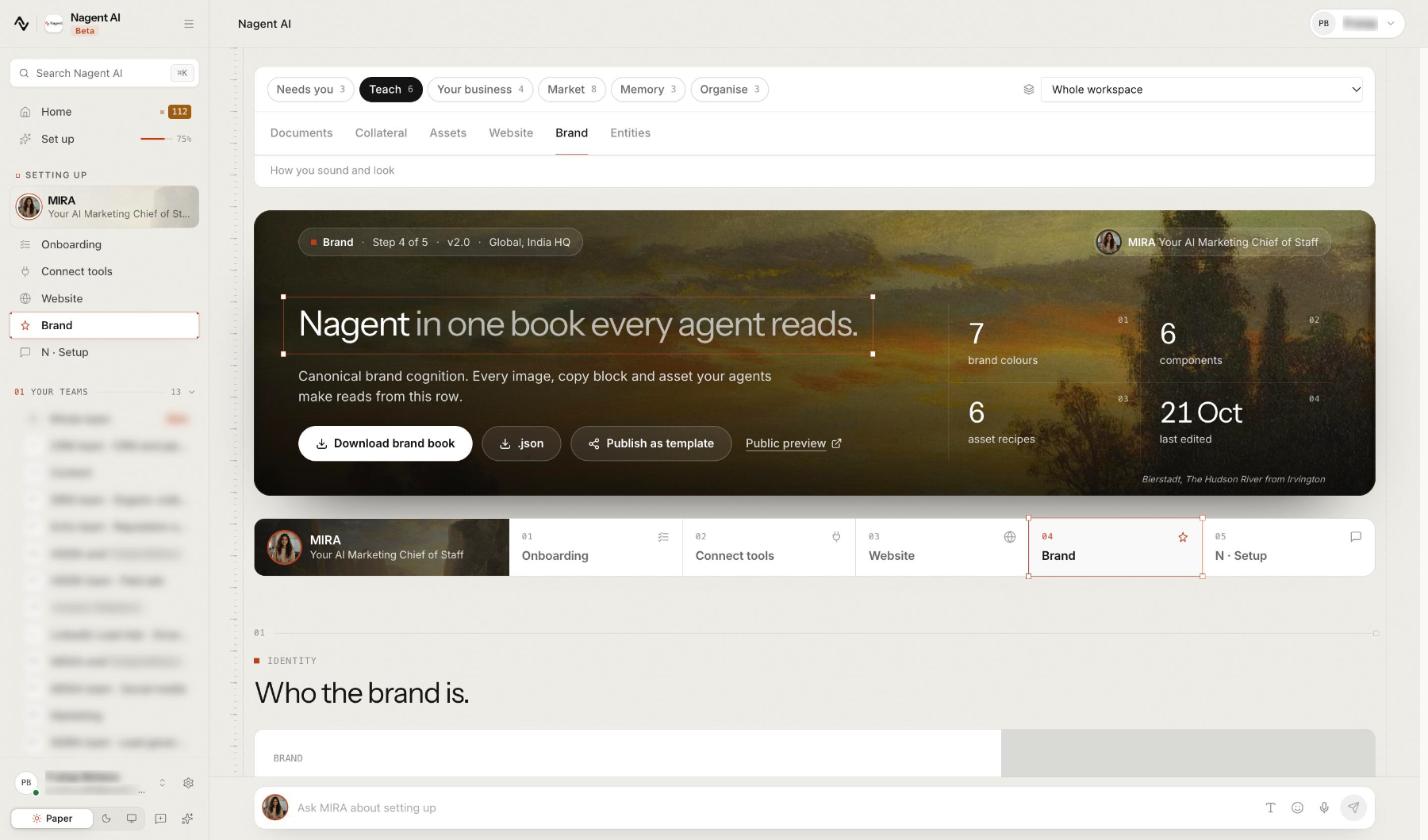
To keep AI content on brand, give the AI what it can't guess: a voice a person has confirmed, your brand's written rules and the words it must avoid, your own facts to cite, and a reviewer before anything publishes. Then make those the defaults rather than reminders, so every draft, image and page starts from them. This guide shows how to set that up, step by step, with CREA and her Content team on Nagent.
Why does AI content drift off brand?
AI content drifts for three predictable reasons, and none of them is that the model is bad at writing.
It was never told who you are. A model knows nothing about your brand unless it's told, every time. A style note pasted into one prompt is forgotten by the next.
It fills gaps with generalities. Ask a general-purpose writer about your product without giving it your product facts, and it writes something plausible about a product like yours.
Nobody checks the last mile. A draft that is mostly right still carries the one line a customer, a lawyer or your CEO will notice.
So keeping AI content on brand is a setup problem: one source of brand truth every agent reads, your own material as the only source of facts, and a review step that can't be skipped.
Who keeps the brand line on Nagent's Content team?
On Nagent, Content is a department with its own line, the same three layers every Nagent team has. The team page explains the model; for Content it looks like this:
You and your people. You approve what publishes and decide how much each agent may do on its own.
CREA, AI Content Chief of Staff. Owns output and the brand line, and routes each piece to the seat that makes it.
RUPA, image studio. A team lead who renders with your brand kit attached.
FOLIO, long-form. A team lead whose six stage agents turn your documents into PDF and DOCX publications.
Alpha, video studio. A team lead with a bench of ADS, UGC and AVATAR.
LANDON, PAIGE and the Blog Studio agents. The makers for landing pages, decks and documents, and blog posts.
Work comes down the line and goes back up it. You brief the Content room; CREA decides who owns the piece and hands it to that maker or lead, whose sub-agents hand their parts back up, never sideways to another seat. One message travels at most three hops, and the finished piece comes back to you to approve.
That line matters for brand. Every maker reads the same brand book, and the same style rules go to the writer and the reviewer, so a rule the review enforces is a rule the writer was told. Other departments ask rather than write their own, as a written handoff to the room's lead: MIRA, the AI Marketing Chief of Staff, passes the writing and visuals to CREA's Content team, and anyone can type @CREA in another room to put a request on the Content board.
How do you keep AI content on brand, step by step?
Step 1. Start from one brand book
Your workspace has one brand, on the Knowledge Hub's Brand tab under Teach (nagent.ai/admin/brand). The page is headed with your brand's name and "in one book every agent reads", and its next line says why: "Every image, copy block and asset your agents make reads from this row."
Brand is one of the five set-up steps, so you can fill it in the set-up chat with N, the head of your AI growth org (Beta), and your AI Chief of staff, or work down the page yourself. You rarely start from blank: the first time your website is read after sign-up, Nagent drafts a brand book in the background, once, while the brand is still the untouched starter.
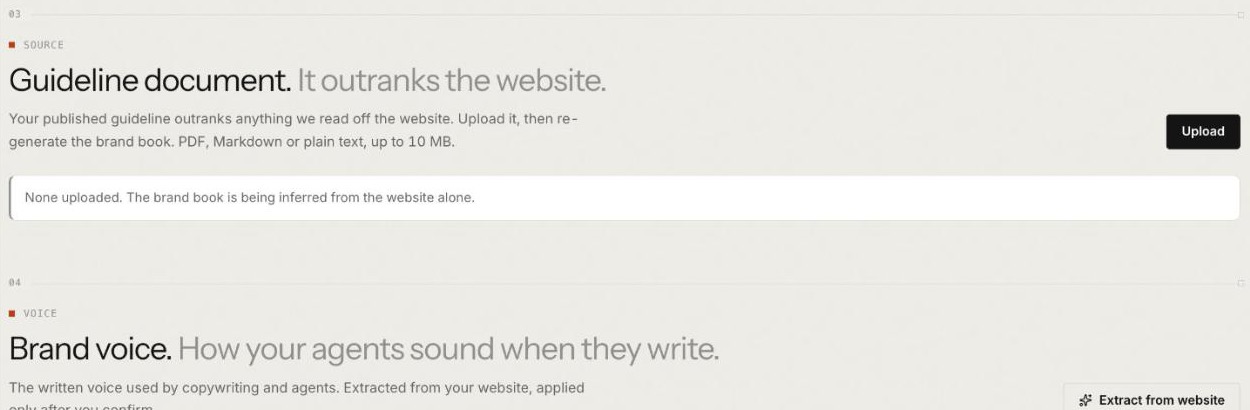
Then add the document that matters most. Under Guideline document, "It outranks the website", press Upload (PDF, Markdown or plain text, up to 10 MB). If it reads "None uploaded. The brand book is being inferred from the website alone.", your agents are working from a guess: upload, then generate the book again.
Step 2. Confirm the voice, don't just extract it
Below the guideline sits Brand voice, with its rule in one line: "Extracted from your website, applied only after you confirm."
Press Extract from website. Nagent reads up to eight of your crawled pages and writes a draft.
Read the card marked Extracted draft, awaiting review, beside the voice in use. It shows a personality, a writing style, what to avoid, examples from your own site and a confidence figure.
Press Confirm if it sounds like you, or Reject and extract again later.
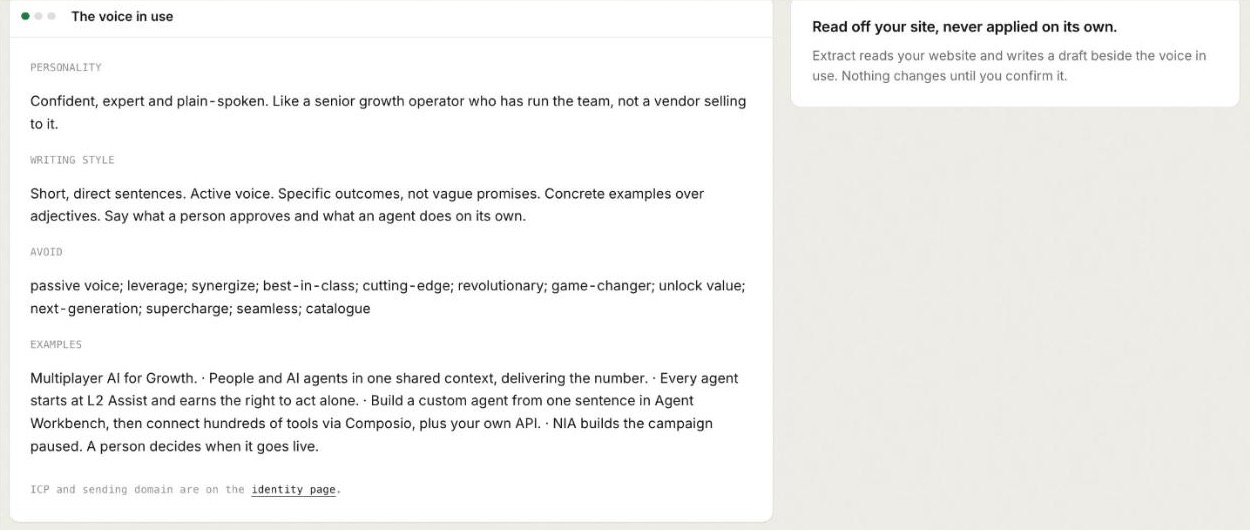
Once confirmed, The voice in use shows Personality, Writing style, Avoid and Examples.
This is the step most teams rush. Agents read the confirmed voice only, never the draft, and until you confirm one they write neutral copy rather than borrowing someone else's. A voice read off a website is a guess; Confirm is where a person turns it into a rule.
Step 3. Write the rules down where agents read them
A voice describes how you sound. Rules say what you never do. On Nagent they live in two places.
The Avoid list. The words under Avoid in the voice in use go to the writer with the rest of your voice, and they are the banned words RUPA reads every image brief against. Check it before you confirm a draft: it comes with the voice, and the page has no box for typing one word into it.
The book itself. Further down, a section headed "The book. What every agent reads, part by part." holds the full brand document in tabs, from Overview to JSON. Communication holds tone of voice and linguistic rules, Forbidden the patterns your brand never uses, and Recipes how each kind of asset should look.
Those tabs are for reading. To change what they show, open JSON, edit the document and press Save; a save that breaks the document's shape is refused with the reason. Editing the book needs content write permission, which a workspace admin holds. Changes reach agents within a few minutes. The Brand guide walks through every section.
Put banned claims in writing too: in your guideline document, which the book is generated from, and in the forbidden patterns, not in one person's head.
Step 4. Give the team your facts, and only your facts
Brand is not only tone. A post that sounds like you but describes a feature you don't have is off brand in the way that costs most. Facts start in the Knowledge Hub:
Products & Services, under Your business. Nagent can draft offerings from your site, a page or a file, and drafts wait in a review queue. An offering reaches agents only once a person makes it active.
Documents, under Teach. Add what your site doesn't carry. Each blog draft reads up to six Knowledge Hub passages that match its topic. If the hub has nothing on a topic, the draft is written without it rather than inventing detail, and internal links go only to entities and posts your site already has.
Gaps, under Needs you. It lists questions your agents could not answer from what they may read in the last 30 days. Write this document fills one, and the agents that needed it can then read it.
In the Content room, CREA holds every factual claim to the knowledge, offerings or documents you've shared; a sentence with no source to cite comes out, and she says what source would let it back in. PAIGE treats case studies the same way: names, results and quotes appear only when your material contains them, and anything missing becomes a placeholder such as "[Customer name]". See the Knowledge Hub guide.
Step 5. Lock the brand on images, pages and books
Images drift faster than words. Open RUPA's Studio tab. Under the brief, the Brand Lock pill sends your brand guidelines and logo with the render, and the Logo pill decides whether your mark goes too. The mark travels only while Brand Lock is on, as a real image to be placed rather than redrawn.
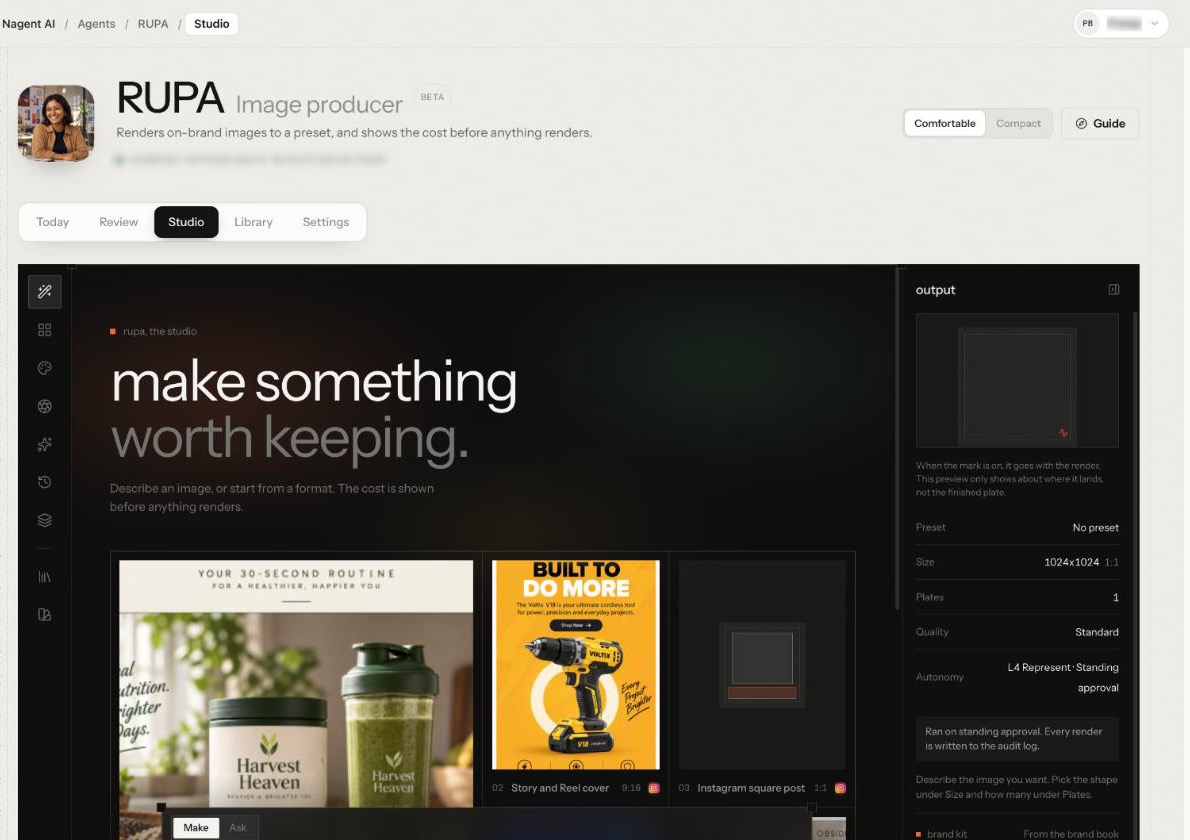
Before you send, read the Brand kit panel on the right, marked "From the brand book". Needs a human eye and Banned words count the rules only a person can confirm and the words from your Avoid list. What goes with every render opens the exact brand text sent, and Open the brand book takes you back to fix anything at the source.
RUPA reports any banned words she finds in your brief, so a person can act on them, but doesn't refuse the render. Rules she can't check from text are marked Needs your eye, because nothing inspects the finished image. See RUPA, the image studio.
LANDON's landing pages and PAIGE's decks take their colours, fonts and logo from the same brand book. Without one, the form says "No brand guidelines set, using a neutral theme".
Long-form needs one more check. In FOLIO's studio, the plan for a new book shows a voice field, and it reads Generic until a brand guideline is attached.
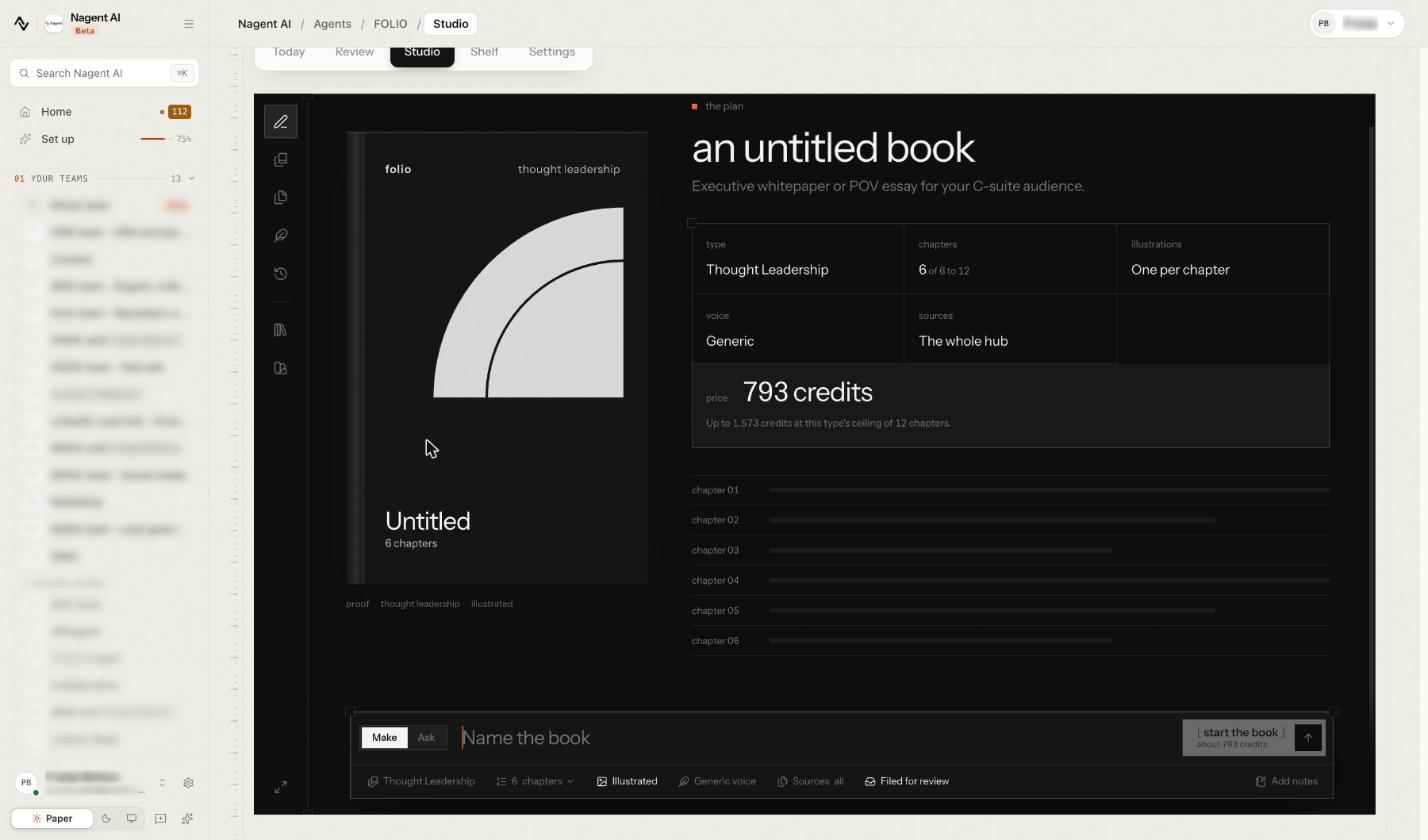
Press the voice pill under the composer and pick a guideline: "Every stage writes in this brand's voice and honours its banned claims. Leave it unset and the book reads generic." Banned claims and mandatory items go ahead of tone, so a long guideline loses style before it loses a rule. If the panel says no brand guidelines are on file yet, decide whether a generic book is acceptable before you press start the book.
Step 6. Review every piece before it publishes
The last control is a person: nothing the Content team writes goes live until one approves it.
In Blog Studio, when a run reaches Approve, the title, meta description, slug and body open for editing, with any reviewer feedback above the draft. Send back with feedback runs it again with your note as the brief. Approve & Publish publishes.
Before it publishes, every post, yours included, passes a check in code: a lead paragraph of 40 to 90 words, most section headings written as questions, a FAQ of three to five questions, your brand's voice and links a reader can open. On voice, it asks that the post writes in the person your voice sets, and without contractions if your voice uses none. It fixes on its own what it can without changing your meaning, and holds the post with one sentence per problem for what only a writer can fix. A post carrying Nagent's identity instead of yours, such as a Nagent author or link, is refused too. No permission overrides either check.
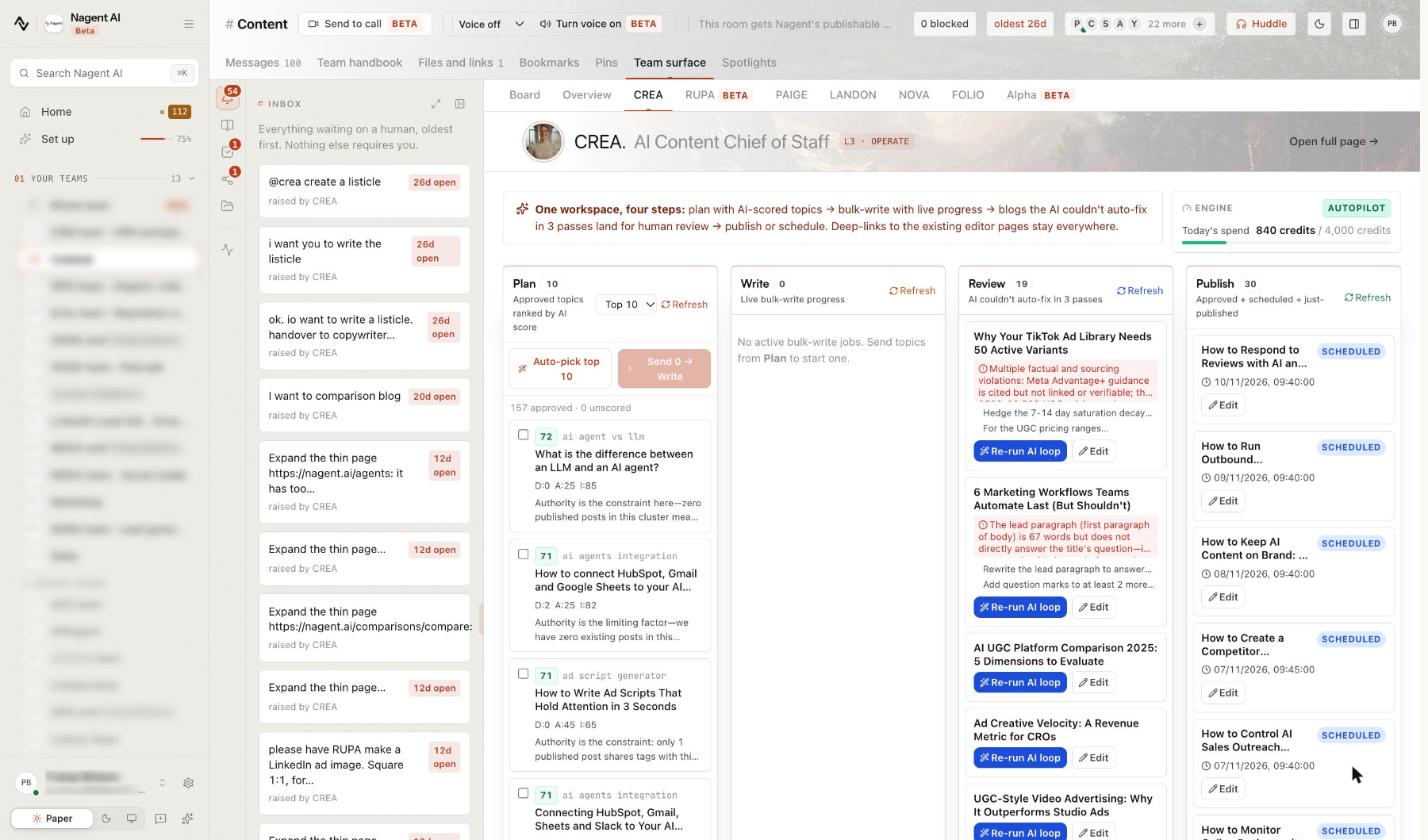
For posts the team writes in bulk, CREA's tab on the Content room's Team surface shows which ones need you. Its Review column lists blogs the AI couldn't auto-fix in three passes, each with the check it failed, and Re-run AI loop or Edit beside it.
The team's reviewer also reads every post. On a team draft, its rejection holds the post. On a post you wrote yourself with New Post, it only advises; to publish anyway you type your reason, and the reason is recorded with the post.
Step 7. Keep the rules and the review in step
Brand control erodes when the rules change and the review doesn't. Four habits help:
Change the brand book, not the prompt. Fix the guideline, the voice or the JSON on the Brand tab, so every agent picks up the change.
Send drafts back with a reason. The note on a send back becomes the brief for the next run.
Feed what you catch back into the rules. When a phrase or claim keeps coming back, add it to your guideline (then generate the book again) or the forbidden patterns, so the fix reaches every future draft.
Keep publishing with a person. Publishing a post stays with a person until someone explicitly grants it, and under the stricter governance profile content always asks.
What does Nagent not check for you?
Be clear about the limits, so nobody assumes a check that isn't there:
Nothing inspects the finished image. RUPA checks the brief, not the plate. Look at every plate yourself.
A confirmed voice is only as good as its pages. It was read from up to eight of them; read it before you confirm.
Most of the book is read only on screen. Tabs such as Forbidden and Communication show the rules; changes go through the JSON tab, and the Avoid list changes only with a voice you confirm.
The reviewer only advises on your own posts. You can publish over its advice on a post you wrote, with a recorded reason.
Frequently Asked Questions
How do you keep AI writing in your brand voice?
Write the voice down once where every agent reads it, have a person confirm it, and make it the default. On Nagent that is the Knowledge Hub's Brand tab: agents read the confirmed voice only, and write neutral copy until one exists.
Can AI follow brand guidelines?
It can follow what it is given every time. Upload your guideline, keep tone, rules and words to avoid in the brand book, and check the output before it ships. FOLIO, for example, honours a guideline's banned claims at every stage once you pick it as the book's voice.
How do you stop AI content from making things up about your product?
Give it your product facts and nothing else to invent from. Make your offerings active, add your documents to the Knowledge Hub, and fill the gaps your agents report. CREA's team writes without detail it can't source rather than guessing.
Who should approve AI content before it publishes?
Someone who owns the brand and holds the right to publish. On Nagent, approving and publishing a post needs the content publish permission, which a workspace admin holds, and an editorial check runs at publish whoever presses the button.
Make the brand the default, not a reminder
AI content stays on brand when every agent reads the brand by default: one confirmed voice, written rules, your own facts and a person at the last step. Set those up once in the Knowledge Hub, then let review catch the rest. CREA and her Content team write from that book; the CREA guide covers every screen.
Book a demo to see CREA's team write in your brand voice from your own material.
Continue learning
Agents that match this read.
Brand Voice Analyser
An AI analyst that scans existing content to decode and document your brand voice for consistent communication.
View agent MMetaMorph Female
A high fidelity generative agent that creates photorealistic female AI influencers with visually consistent identities for branding, marketing, and social media content.
View agent WWebinar Poster
A specialized design tool that creates high impact promotional assets for webinars to increase registrations and engagement.
View agent