
How to Fix AI Search Visibility Gaps, With Approval
To fix AI search visibility gaps, first find where answer engines cite competitors and not you, where your pages rank just off page one, and where crawlers or audits can't read your pages. Then turn each finding into a specific, reasoned proposal, rank the proposals against your objective, and have a person approve every change before it reaches the live site. This guide shows the workflow in DRIS, Nagent's organic visibility team lead.
What counts as an AI search visibility gap?
A gap is any reason a buyer's question gets answered without you. In practice they fall into five kinds:
Answer engine gaps. Questions where an answer engine cites a competitor and no answer cites you.
Coverage gaps in classic search. Pages ranking on page two of Google, and pages with plenty of impressions but a click through rate below what their position should earn. Answer engines lean on the open web, so weak search coverage tends to show up in AI answers too.
Pages machines can't read. If an audit cannot fetch readable content from a page, an answer engine may have the same trouble.
Crawler access. Whether the answer engines' bots fetch your site at all, and which pages they read.
Wrong facts. Answers that say something about you that contradicts what you have confirmed.
Each kind has a different fix, from a rewritten title to a new FAQ section to a question for your developers.
Why should a person approve every fix?
Because every fix lands on your live website, under your brand. A bad title rewrite costs clicks; a wrong canonical rule can remove a page from search. Speed matters less than getting it right.
There is also less magic involved than vendors suggest. Google's own guidance on AI features and your website says there are no additional requirements or special optimizations needed to appear in AI Overviews or AI Mode, and that SEO fundamentals still apply. Most AI visibility fixes are good search fixes, made deliberately.
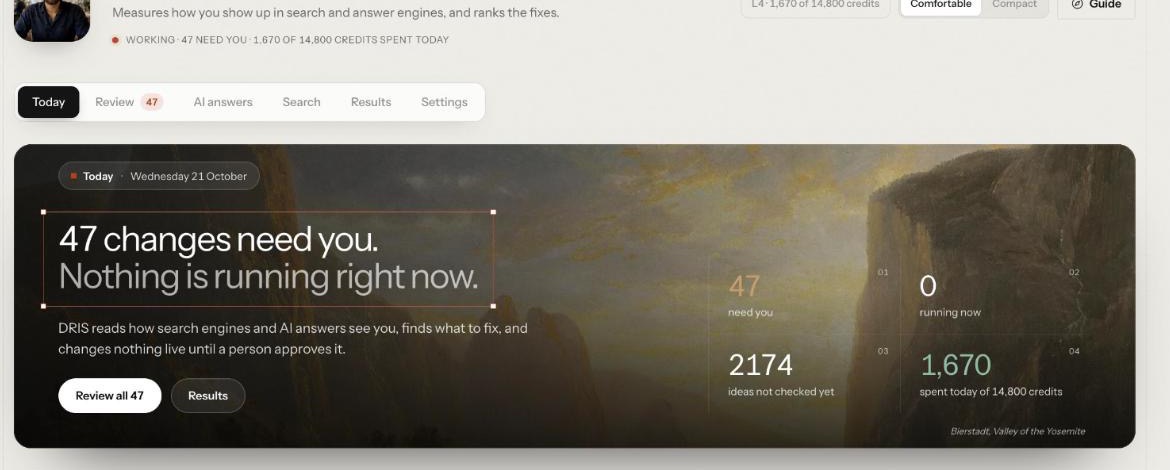
That is why DRIS works the way he does. His Today screen puts it in one line: DRIS "reads how search engines and AI answers see you, finds what to fix, and changes nothing live until a person approves it." Publishing stays a human decision at every level of autonomy.
How do you turn findings into approved fixes, step by step?
This assumes DRIS is already tracking your site, with Search Console connected, a competitor list and accepted prompts. If not, start with setting up DRIS. DRIS is in Beta, and his screens open from Agents, then DRIS, across six tabs: Today, Review, AI answers, Search, Results and Settings.
Step 1: Set the goal first
DRIS will find more problems than anyone could fix. The goal you set, such as AI answer presence or Organic clicks with a target and a date, tells him which kind of fix matters to you. Search fixes or answer engine fixes then rise to the top of the queue accordingly. If Today says "Nothing can start until there is an objective", open Settings, then Goal, and declare one before anything else.
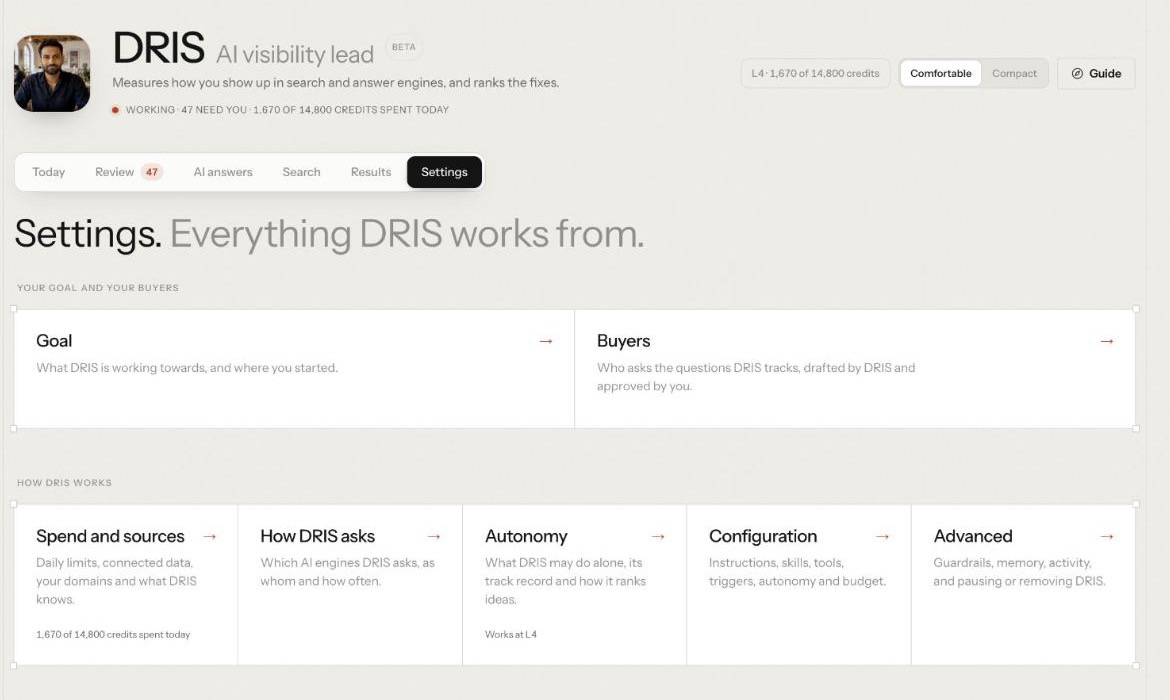
The same page holds Autonomy: what DRIS may do alone, his track record and how he ranks ideas.
Step 2: Find the answer engine gaps
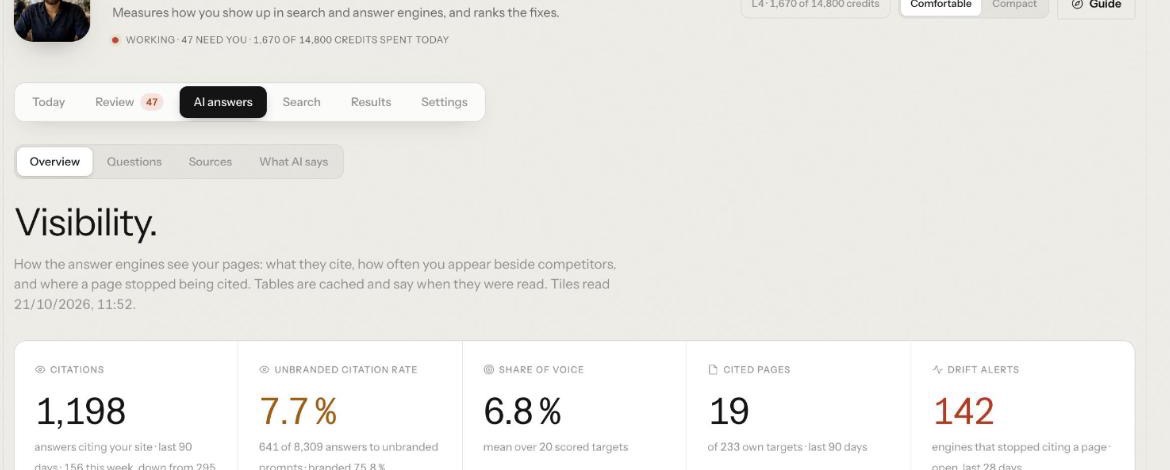
Open AI answers. The Overview, headed Visibility., shows how the answer engines see your pages: Citations, Unbranded citation rate, Share of voice, Cited pages and Drift alerts, which count the engines that stopped citing a page.
Then work the other views:
Sources shows the pages AI quotes, the lists that should name you, and the answer engine gaps: questions where competitors appear and you do not. Use Track as keyword on the ones worth chasing.
What AI says checks recent answers that name you against the facts you confirmed, and lists Contradicts your facts first, quoting the engine's own words. Each check is one AI call from the workspace's daily AI budget, and nothing is stored.
Under Results, then Competitors, Beat us on counts the prompts where an answer cites a rival and no answer cites you.
Step 3: Find the coverage gaps in classic search
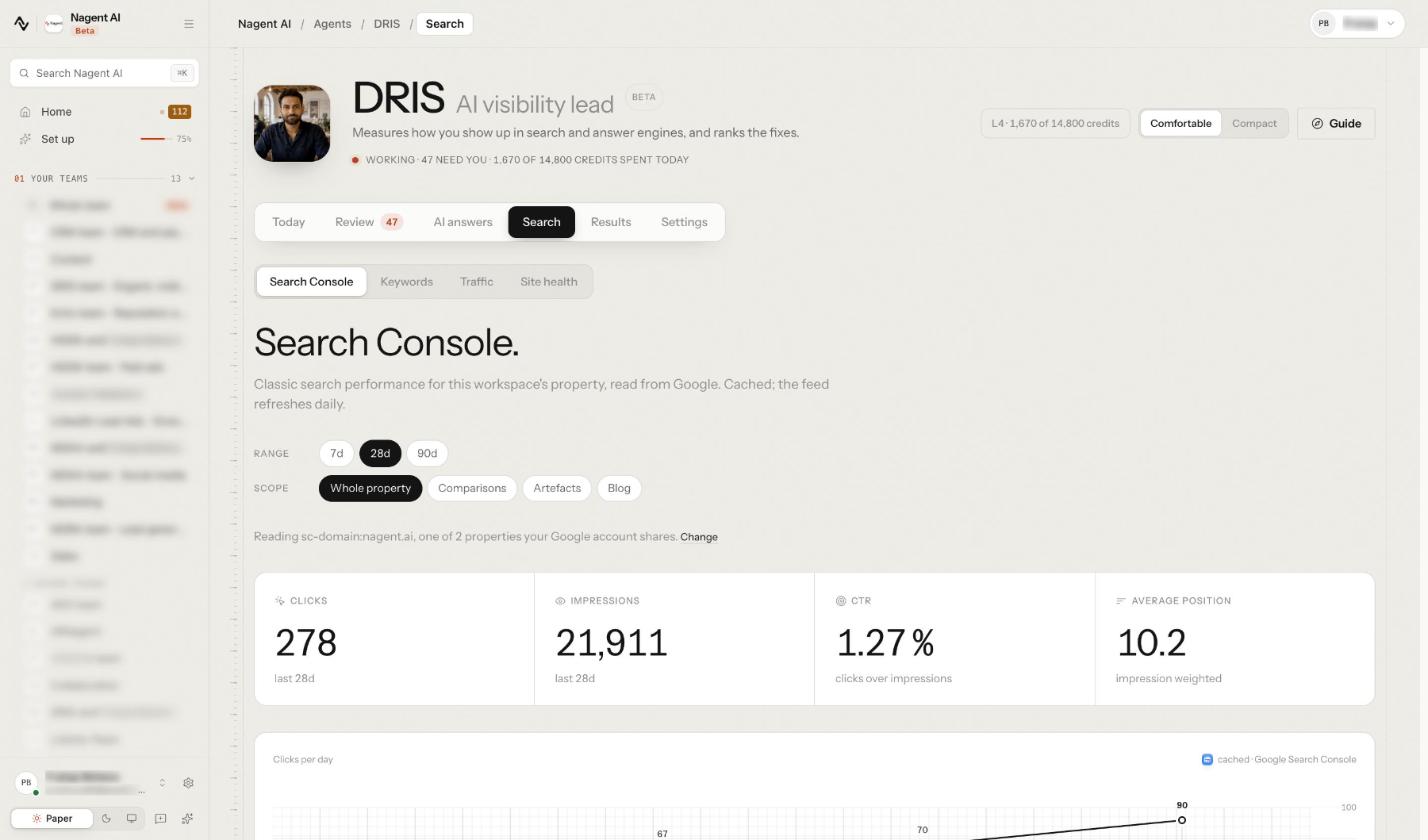
Open Search. Its four views are Search Console, Keywords, Traffic and Site health.
The coverage gaps sit under Keywords, below your keyword plan and the keywords you rank for. They read your own Search Console and list Page 2 rankings, the pages one nudge from page one, and CTR opportunities, where high impressions meet below expected click through and a title and meta rewrite could earn the missed clicks.
Step 4: Check the AI crawlers
Open Search, then Site health, and scroll to AI crawlers to see which answer engine bots fetch your site, how often, and which pages they read. DRIS separates three kinds that mean different things:
Kind: Live fetch, Crawlers: ChatGPT-User, Claude-User, Perplexity-User, What a visit means: Someone asked a question and the engine read your page to answer it
Kind: Search index, Crawlers: OAI-SearchBot, Claude-SearchBot, PerplexityBot, Bingbot, What a visit means: The engine is indexing you for its search results
Kind: Training, Crawlers: GPTBot, ClaudeBot, What a visit means: Content collected for model training
The split matters when you decide what to block. OpenAI's crawler documentation, for example, says opting out of OAI-SearchBot hides a site from ChatGPT search answers, while blocking GPTBot signals that content should not be used for training. Check each provider's own page before you change robots rules.
This section comes from your hosting or CDN analytics, not a tag on your pages, and Nagent's team switches it on. Until then it reads "Crawler logs are not connected."
Step 5: Run the site audit
The site audit grades your pages and diagnoses what is wrong with them. Site health holds it, with AI readiness and single page checks beside it. Check my whole site, offered on Today and in the Guide, audits every page and groups what it finds; when the check starts, DRIS tells you the findings land in Search, then Site health. You can also ask in DRIS's team room, where the SEO auditor, the sub-agent that owns the audit, picks it up. Because a crawl spends credits, that request waits on a card for your approval before it runs.
Ask the same agent what the last audit found. It writes each page up with its score and its issues in priority order, P1 first, each with the fix in one sentence. Reading the audit costs nothing and changes nothing; only the crawl spends.
To grade a single address, use Run audit on a URL. If no page returns readable content, the check is marked could not read, with the reason for each page, and charges nothing. That is itself a finding worth fixing.
Step 6: Decide in Review
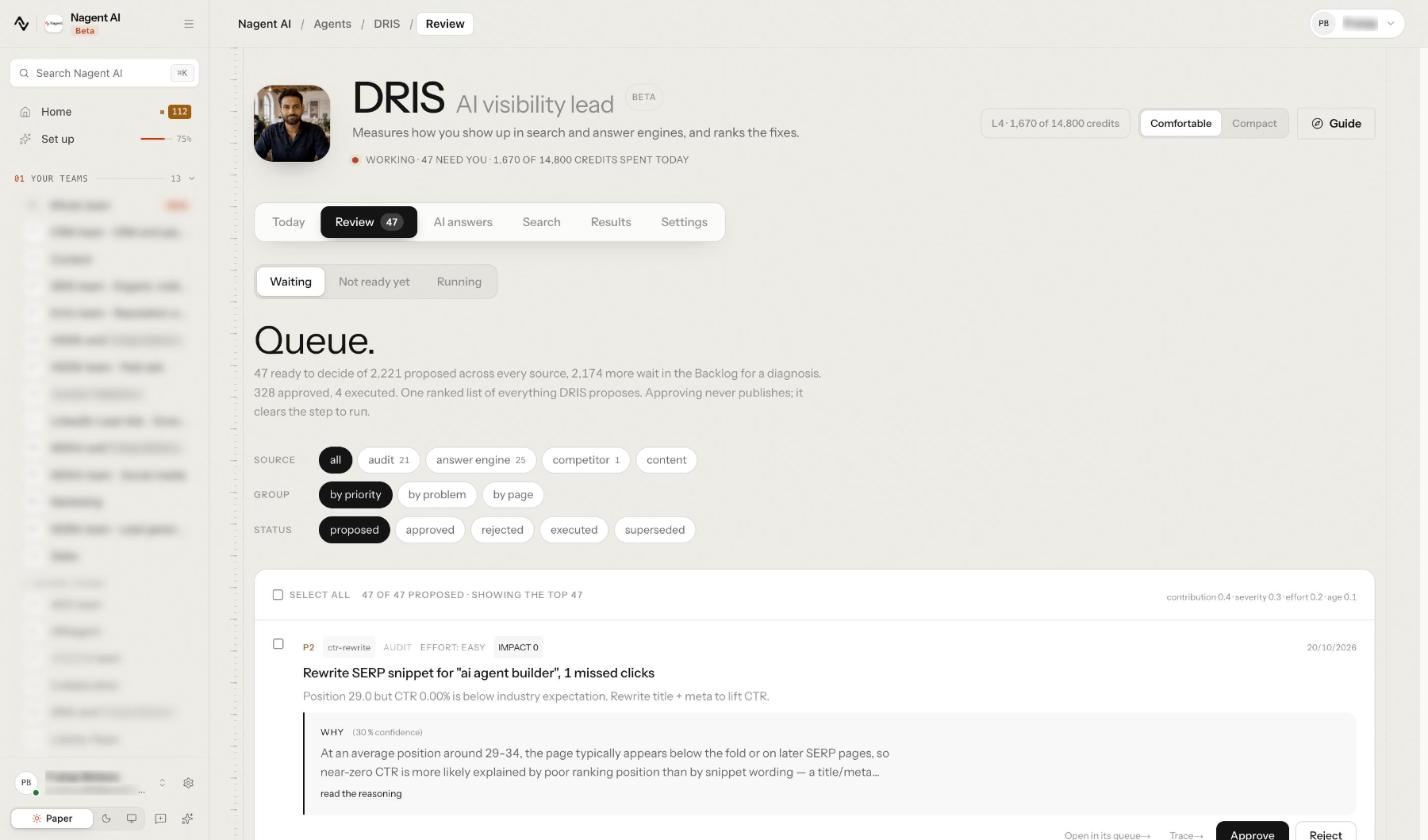
Open Review. Its three views are Waiting, Not ready yet and Running. Waiting holds the Queue., and its own description is the most important line in this guide: "One ranked list of everything DRIS proposes. Approving never publishes; it clears the step to run."
Filter by Source, Group and Status. Each card shows its priority, the kind of fix, its source, the effort and the impact, a one line summary, and a Why block with DRIS's confidence and read the reasoning. Trace opens a read only drawer with the steps behind the proposal, and Open in its queue takes you to the screen of the source it came from.
Cards are ranked by how much they contribute to your goal, how severe the problem is, how little effort it needs and how long it has waited; the weights sit at the top right of the list. Click Approve or Reject on each card, or select several. A decision can be undone for a few seconds with Undo. The other approvals from DRIS's agents sit under the Queue.
Step 7: Look at what is not ready yet
The Queue's header also counts the proposals waiting in the Backlog for a diagnosis, and Today counts them as ideas not checked yet. They live under Review, then Not ready yet, with the findings grouped by page. Nothing there can say why it would work yet, so none of it is in the Queue; a full site audit diagnoses, and a diagnosed idea moves into the Queue on its own. Promote the good ones.
Step 8: Approve and execute the answer engine fixes
FAQ sections, direct answers, schema and llms.txt lines are worked under Review, then Answer changes: what DRIS suggests so AI answers name you. Approve, then execute. For your own website, each fix is served on the site fixes feed as a ready to paste snippet, with the current value, the proposed value and where it goes on the page. Export developer handoff on the same page downloads a Markdown checklist grouped by page, with where each change goes, the current value, the snippet and a box to tick when applied.
Weigh these honestly. A clear direct answer or a well formed FAQ helps any reader. An llms.txt line is cheap, but as Google's guidance notes, it is not a requirement for its AI features.
Step 9: Get the approved fixes live
Search fixes are worked under Review, then Site fixes: each suggested change to a page with its fix, the option to hand it to HOOK, the creative strategy lead (Beta), and serving it on your site. What happens after approval depends on the fix:
Page titles, descriptions, headings and structured data. If your website is connected, an approved fix reads Live on your site, and Withdraw takes it off again. If DRIS cannot change the page, fix it in your own CMS and click Mark applied.
Answer engine snippets. Your developers read them from the same site connection.
New content. DRIS drafts a page change or hands the topic to your content team. Drafts never publish on their own.
Index and canonical rules. These are never automatic. They go to a separate approval decided by a senior role, not the person who asked.
The site connection is wired in once: someone with settings permission issues a site key, and your developers store it on the server and read the approved fixes for each page.
Step 10: Watch what ran
Review, then Running, shows the audits, crawls and approved changes on their way, and Today counts what is running now. Results, then Shipped, shows every change planned, drafted and live, each with its trail.
Once a fix is live, DRIS compares its target metric over equal windows before and after it shipped, so you learn which kinds of fix work on your site.
Where does DRIS sit in the team?
Nagent builds AI teams the way you would staff one: an AI Chief of staff who owns the outcome, team leads who run their part of it, and sub-agents who do the specialist work. See how a Nagent team is built. In Marketing, the line looks like this:
MIRA, AI Marketing Chief of Staff, owns reach and pipeline cost
DRIS, team lead, organic visibility
SEO auditor: runs and reads the site audit
AEO runner: runs your targets' prompts on the answer engines
Technical SEO
Content producer
NIA, team lead, paid marketing
HOOK, creative strategy, and Echo, reputation, both Beta
MOXA, social media, coming soon
Work moves down the line and back up it. You ask in one line, in the room. MIRA decides who owns it and hands visibility work to DRIS. DRIS breaks it down, puts the tasks on the board and briefs his bench. Each sub-agent hands its result back to DRIS, never sideways to another seat, and DRIS brings one answer back with anything that needs a person waiting on a card.
Handoffs outside his team are written, not improvised. Content gaps go to CREA's Content team as tasks. Review and marketplace pages that answer engines cite can go to Echo with Send to Echo, where a person accepts or dismisses them. Asking another department is always a written handoff to that room's lead.
What will DRIS never do on his own?
DRIS's Autonomy screen, under Settings, lists what he may do alone per kind of action, and his track record. Some actions are "Always a human · every level":
publishing any change to a live page;
changing index directives or canonical rules;
changing how the queue is weighted;
spending above the daily cap.
A level is raised in the workspace governance, never on that screen, and a person decides. A few more limits to know: changes reach your site only through the site connection your developers wire in once, so there is no direct WordPress or Shopify publishing. And DRIS is in Beta, which his header says on every screen.
Frequently Asked Questions
How do I fix AI search visibility gaps?
Find the questions where answer engines cite competitors and not you, the pages just off page one, and the pages machines can't read. Turn each into a specific fix, rank the fixes against your goal, approve each one, and ship it through your CMS or a site connection. Then measure each fix against the period before it.
Do I need llms.txt or special schema to appear in AI answers?
Google says no additional requirements or special optimizations are needed for AI Overviews or AI Mode. Clear direct answers, sound structured data and strong search fundamentals do most of the work. DRIS can propose llms.txt lines, but treat them as low cost extras.
Can an AI agent change my website without approval?
Not DRIS. Every fix is a proposal with its reason and confidence, approving in Review clears a step to run without publishing it, and publishing to a live page needs a person at every level. Index and canonical changes go to a separate senior approval.
Should I block AI crawlers?
Decide per crawler, not per company. Live fetch bots read your page to answer a user's question, search bots index you for answers, and training bots collect content for models. Read each provider's own documentation before changing robots rules, and watch the AI crawlers section under Search, Site health afterwards.
Close the gaps, one approved fix at a time
Fixing AI search visibility is mostly disciplined search work: find the real gaps, rank them against one goal, and let a person approve every change. DRIS finds and ranks the gaps and keeps every fix waiting for you, and the DRIS guide covers each screen in more depth.
Book a demo to see DRIS turn your own visibility gaps into fixes you approve.