
DRIS, AI Visibility
How DRIS measures your company in search and in the answer engines, ranks fixes against the objective you declare, and turns a proposal you approve into a change on your site.
Browse documentation
DRIS finds what would make you more visible, and you decide what changes
DRIS is the AI visibility lead. In its own words: "DRIS watches how your company appears in classic search and in the answer engines, audits pages, finds gaps and proposes fixes. It never edits a live page on its own: publishing stays a human decision."
Answer engines are the AI assistants people now ask instead of searching: DRIS's run profiles name ChatGPT, Claude, Gemini, Perplexity and Grok. DRIS asks them the questions your buyers ask and records whether each answer cites your site and which other sources it relies on. Alongside that it reads Google Search Console and Google Analytics, audits your pages, sees which AI crawlers read your site and watches competitors.
DRIS comes with the Visibility module. If your workspace has DRIS, it sits in the Marketing room and its own DRIS team room; if not, your plan does not include it. Open it at nagent.ai/admin/dris. The header carries a Beta chip: "the DRIS shell is new, and some seats are still being built."
Finding your way
DRIS has six tabs across the top of its page.
| Tab | What it holds |
|---|---|
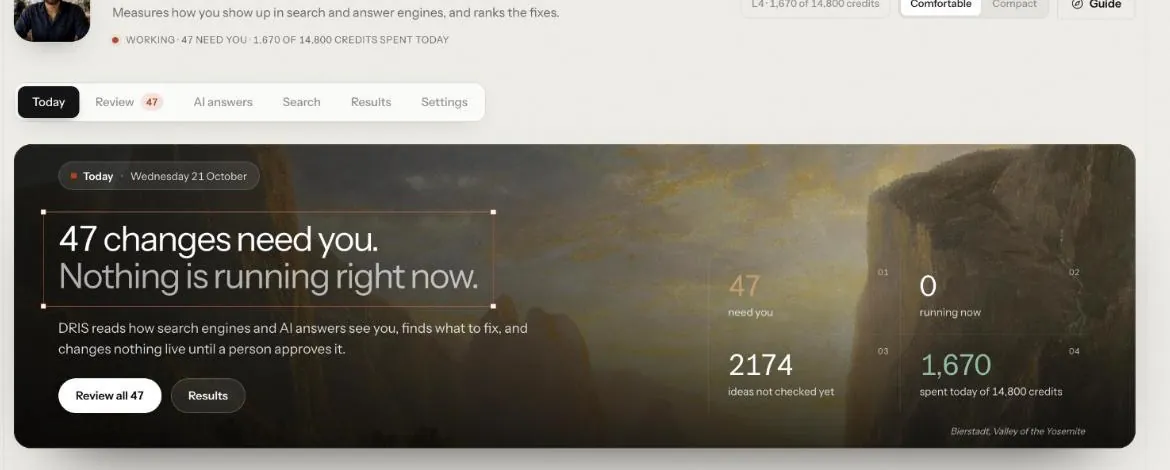
| Today | What DRIS did, what needs you and how visible you are |
| Review | Every change waiting for a person: Waiting, Not ready yet and Running |
| AI answers | What the answer engines say about you: Overview, Questions, Sources and What AI says |
| Search | How Google finds and ranks your site: Search Console, Keywords, Traffic and Site health |
| Results | What worked, and how you compare: Overview, Reports, Shipped and Competitors |
| Settings | Your goal, your buyers, your sites and how DRIS works |
The status line under DRIS's name shows today's spend in credits, and the Review tab carries the count of what waits for you.
Before you start: connect your data
Setting up DRIS walks through each source step by step. In short, DRIS reads:
- Your website, to know which citations are yours.
- Google Search Console for clicks, impressions and the queries you rank for. It is read daily.
- Google Analytics 4 for sessions and conversions by source, including visits from the answer engines.
- Your hosting or CDN analytics for the AI crawlers that read your pages. Nagent's team switches this on.
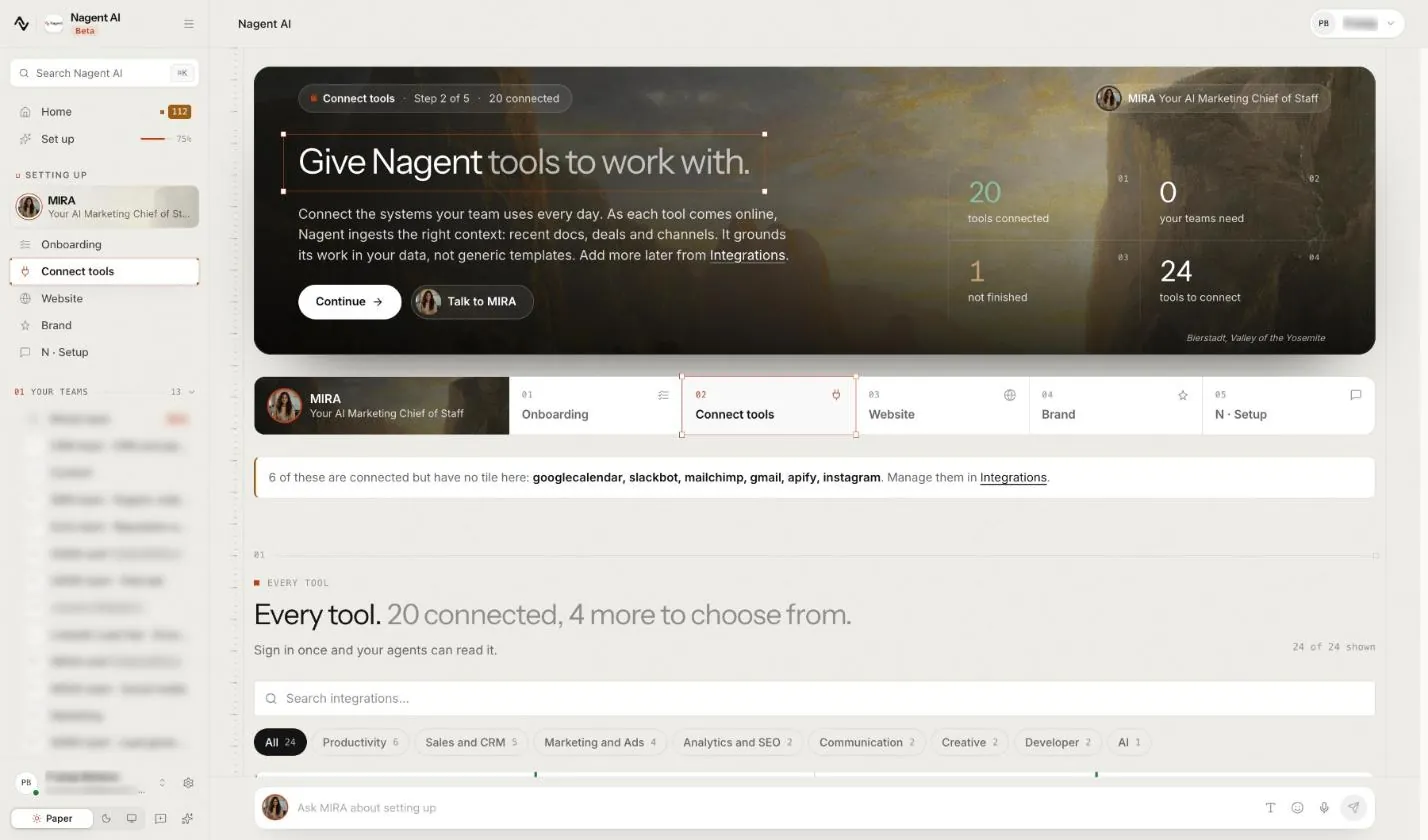
Connect the Google tools from Connect your tools. Settings in DRIS lists them under Connected sources. Keyword data is provided by Nagent and needs nothing from you.
The first day
Right after set-up, Today may say "Your visibility dashboard is being prepared". DRIS is running your baseline sweep and site audit, and the dashboard unlocks on its own, usually within a day. If a readiness check needs attention, the page links to the fix, such as reviewing your targets or your budget, and Nagent's team is notified.
If Today says Setup incomplete, some of DRIS's agents are not set up yet. Click Retry setup.
Finish setting up
While a measurement source is missing, Today shows Finish setting up. with one step per gap, what it unlocks and a button to fix it. The panel goes away once nothing is missing.
| Step | Shown when | Button |
|---|---|---|
| Connect Google Analytics | Google Analytics is not connected | Connect |
| Choose your Google Analytics property | It is connected but no property is chosen, so blog conversions are invisible. Picking one starts a 90-day backfill | Choose property |
| Connect AI-crawler analytics | No crawler analytics are set up. The button opens AI crawlers; Nagent's team switches them on | Connect |
| Add your buyer personas | You have no personas | Add personas |
Step 1: declare an objective
Until there is an objective, Today says: "Nothing can start until there is an objective." Click Declare an objective, or open Settings, then Goal.
- Capture the baseline. DRIS records where you stand today. This happens once and cannot be replaced, so connect Search Console and let the site audit run first. If nothing is measured yet, the page offers Connect Search Console, Run the site audit and Review your prompts.
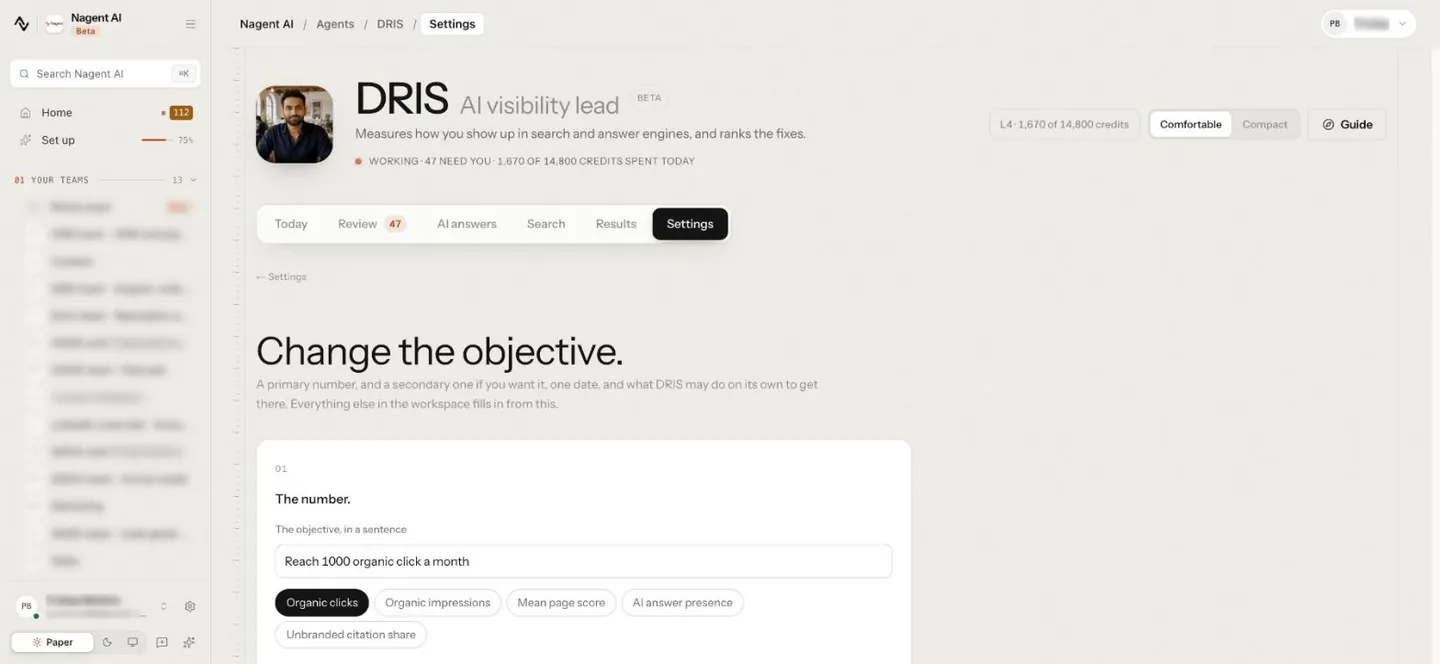
- The number. Write the objective in a sentence, pick what you are aiming to move: Organic clicks, Organic impressions, Mean page score, AI answer presence or Unbranded citation share, and set a Target.
- The date. When the verdict is called, which property it tracks, and an optional Lifetime spend cap.
- Click Declare.
Once an objective is set, the same page reads Change the objective.
For Prompt World the objective might be AI answer presence from 8% to 25% by the end of the quarter, because buyers now ask assistants who runs prompt workshops.
Today then grades the objective every month: ahead, on target or behind. Under What this workspace is aiming at. it shows the Verdict: with the arithmetic behind it. A date that has passed, or one less than 7 days away, gets no monthly rate, and the verdict says why, for example "The target date has passed (12 days ago), so no monthly rate applies. Set a new date to get a verdict." Use Change this objective to set a new date.
The plan. on Today lists the steps DRIS's programme will take, grouped by the teammate who does each one. A step that failed says so with its reason: "Failed:" followed by why, then "Re-plan to route around it." The plan's button then reads Re-plan around the failed step, and the new plan works around it.
Our logic: DRIS will find more problems than anyone could fix. The objective tells it which kind of fix matters to you, so search fixes or answer-engine fixes rise to the top of the queue accordingly.
Step 2: look
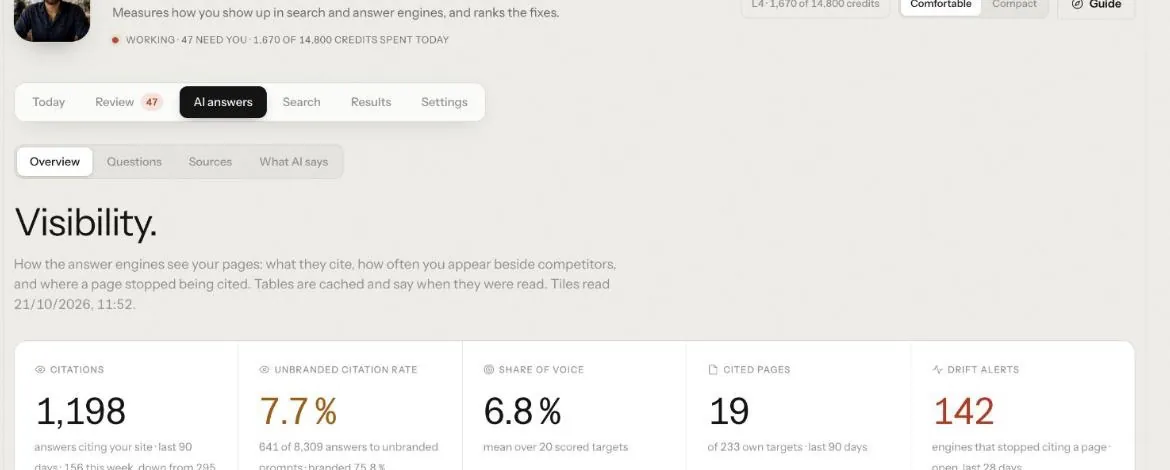
AI answers covers the answer engines in four views. Overview opens on Visibility., with tiles for citations, the unbranded citation rate, share of voice, cited pages and drift alerts. Questions holds the targets and the prompts DRIS asks, Sources shows which sources the engines rely on, and What AI says shows the answers themselves. Which engines DRIS asks, and as whom, is set under Settings, How DRIS asks; your scores are read from the default run profile.
A target's Chatbot runs tab shows Share of answers by channel: how often each chatbot, and Google's AI Overviews and AI Mode, cited you on that target's prompts.
An AEO audit grades a page for the answer engines. Run one on any URL from Audits. with Run audit. The audit fetches your pages itself and grades what it read. If no page returns readable content, the audit is marked could not read: "Could not read the site, so it was not graded." It writes no score and charges nothing, and opening it gives the reason for each page. Scores and the scorecard keep using your last audit that was graded.
What AI says (Beta) checks what the engines' answers say about you against the facts you confirmed: your active offerings (leaving out any field a research pass filled after you confirmed it), the claims you added to the brand pack with a source, and your workspace profile once you confirmed it. Check what AI says about you, for someone who can edit DRIS, takes the last 28 days' answers that name you, the latest for each question and engine, up to 40, and makes one AI call from the workspace's daily AI budget. Contradicts your facts comes first, each with the engine's own words and the fact it contradicts; then Not in your confirmed facts, claims that may be true but that nothing you confirmed covers; then how many agree. Every quote is checked against the answer's own text, so a claim the AI made up cannot appear. Nothing is stored, so each check spends again. Google's AI Overviews and AI Mode are not checked, since their text is not kept.
Search covers classic search: the Site audit, Ranked keywords, Coverage gaps, Search Console, Traffic and AI crawlers. Traffic splits out the visits answer engines send, from ChatGPT, Perplexity, Gemini, Copilot and Claude. AI crawlers separates the fetches an engine makes while someone is asking from its indexing and training crawls. On the Keyword plan, a search volume nobody has measured, taken from impressions or a discovery estimate, reads "est." and ranks after every measured one, and totals count only measured volumes. Measure volumes behind the content plan "Fetches real search volumes for open topics' keywords first, up to 100, on your keyword data budget." On Ranked keywords, Read now fetches fresh rankings: "This is a paid provider call, so it runs when you ask for it." Search Console's Rank movers lists the queries whose position moved past their band against their own last seven days, the queries whose ranking page changed, and marks a move made on a day the whole category moved, which reads as weather rather than a page problem. Explain (Beta), for someone who can edit DRIS, asks AI to describe what moved: a short read, the queries worth a look and a caveat. Each click is one AI call from the workspace's daily AI budget, and nothing is stored. It describes the figures on the screen and never changes them; when the day's budget is spent, or nothing moved, it says so and spends nothing.
Competitors holds your competitor list and Competitive gaps. Add a competitor with Add to list and choose Track weekly. For each competitor, AI citations counts the answers in the last 28 days that cite its site, and Share is its citation share (see Step 5). Cited beside you, not on your list shows the ten sites those answers cite most, three times or more, that are neither yours nor on the list, with Add to list. Beat us on counts the prompts where an answer cites the site and no answer cites you, naming the first few, and New marks a site first cited in the last seven days, going back 90. Up to five new sites are listed past the ten, so a site is not hidden for being new; a workspace whose stored history is still filling sees no New marks yet. Wikis, forums, news, docs, social and video are left out.
Competitive gaps compute only against sites on your list. Add the most-cited sites to your list, above Cited beside you, not on your list, "Puts up to five of the sites below on your list so gaps compute against them. No research starts." It adds the sites cited in the most answers, three at least, and says so if none qualifies yet. When DRIS's autonomy is L3 Operate or above (see Autonomy) and your list has fewer than three competitors, DRIS does the same on its own each night.
Named in AI answers, not linked (Beta), for someone who can edit DRIS, finds the brands those answers name in their text without linking a site, which the sites above cannot show. Find brands named in answers reads the last 28 days of answers for names they repeat, leaving out your own names and your list, then makes one AI call from the workspace's daily AI budget to say which are competing businesses. Nothing is stored, so each search spends again. Each brand shows the answers naming it and how many of those link it; it is listed once three answers name it without a link. The domain box is filled only when a site cited in those answers matches the name, so check it, or type it, before Add to list. A brand written in lower case is not found.
Review sites AI engines cite lists the review and marketplace pages those answers cite (G2, Capterra, Trustpilot, Clutch, app stores, listings), each with whether its address names you and where Echo stands on it. They are never on the competitor list. A page that names you and is cited in three answers or more goes to Echo on its own each night as a proposed source, while Echo's queue for it has fewer than five waiting; Send to Echo sends any other page Echo can read. Either way a person in Echo accepts it, which starts Echo reading its reviews, or dismisses it. Echo's Sources in turn says which of its sources AI engines cited in the last 28 days.
The site audit from the team room
The site audit can also be asked for in DRIS's team room, from the SEO Auditor, the agent that owns the audit, once it is switched on for your workspace and seated in the room. Ask it to run the site audit. Because a crawl spends, the request waits on a card headed Confirm before it runs; once approved, the auditor says what it queued, for example "The site audit is queued: 120 of 120 sitemap pages. Progress shows on the SEO audit page." The run then advances on the Site audit page under Search, which shows how far it has got and, where your plan covers fewer pages than the sitemap holds, how many it covers. A workspace without full site audits switched on is told so instead, and to ask its Nagent contact.
Ask the same agent what the last audit found and it answers in plain words: it reads the latest completed audit, the pages it covered and its scores, and writes each page up with its score and its issues in priority order, P1 first, each with the fix in one sentence. An issue that repeats across pages is grouped, not repeated. If no audit has ever completed, it says so and proposes running one. Reading the audit costs nothing and changes nothing; only the crawl spends.
The questions DRIS asks are yours to shape
Every answer DRIS reads comes from a prompt on a target, a page DRIS watches. Only accepted prompts are asked.
Prompts
Open a target from AI answers, Questions, then its Prompts tab. The top line counts them, for example "9 accepted of 30, 21 waiting for review." Each prompt carries its intent (how-to, comparison, definition, pricing, vendor evaluation, troubleshoot, integration, use case) and where it came from: Search Console, People Also Ask, query fan-out, written by hand or written by DRIS (marked ai).
| Control | What it does |
|---|---|
| Generate prompts | Writes 25, 50 or 100 new prompts for review. Mix (Beta) sets how many may name your brand: none, 20% or 40% |
| Add a prompt | Adds one by hand with its intent |
| Upload prompts | Adds a pasted list, one prompt per line, or a CSV with a Prompt column. They save accepted, so the next sweep asks them |
| accept and reject | Decide one prompt; Accept selected and Accept all unbranded decide many |
The form prices both steps before you commit. Generating costs a little ("Generating: about 74 credits", in the example). Accepting is what costs over time: "each accepted prompt adds about 36 credits to every full sweep". Beside the accept buttons, a line prices the whole panel as it stands: "Your accepted panel:", its prompt count, and about what one full sweep of it costs.
A target holds at most 25 accepted prompts, so the panel measures every page rather than one. Accepting past 25 is refused with a note to accept fewer, or give the prompts to targets that have none. The form also names the enabled targets with no accepted prompts, which "the panel does not measure".
New prompts are written the way your buyers would phrase them, in your market and language: the one shown beside Keyword data under Connected sources. in DRIS Settings. Near-duplicates, the same question reworded, are dropped before you see them.
Personas
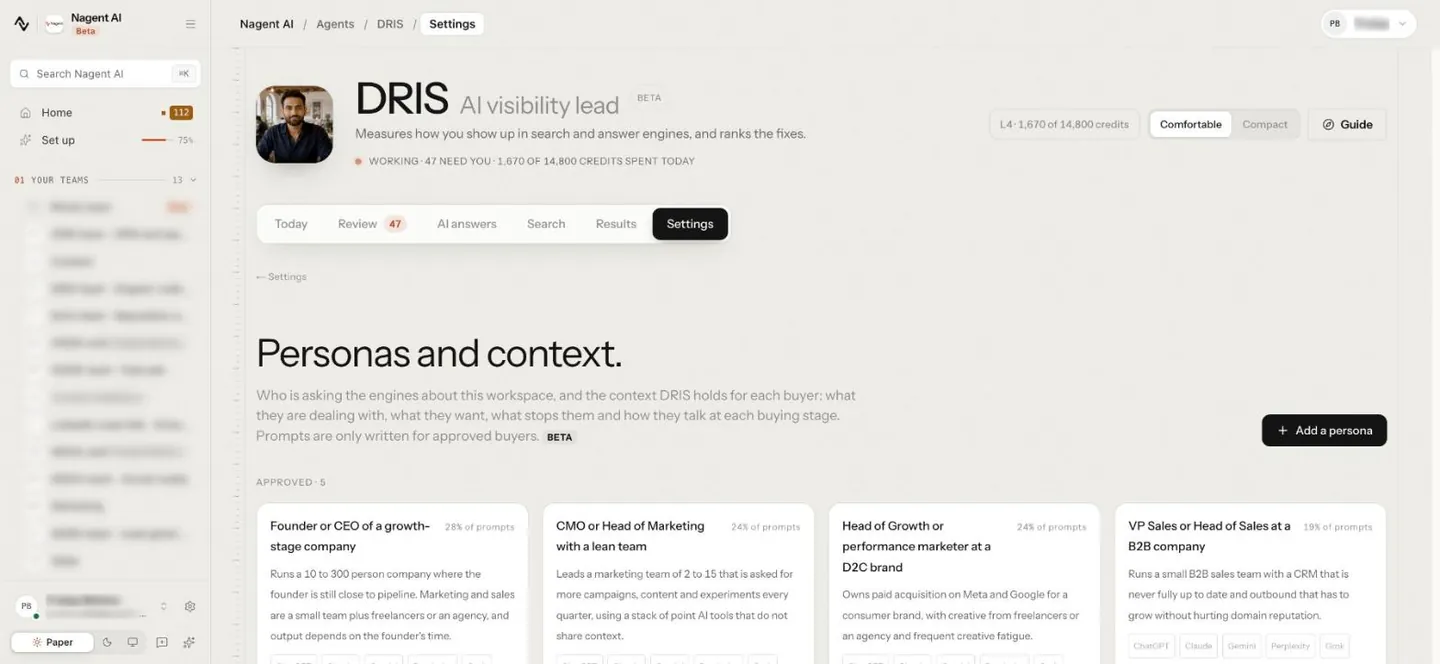
Settings, then Buyers, opens Personas and context. (Beta). It holds "the context DRIS holds for each buyer: what they are dealing with, what they want, what stops them and how they talk at each buying stage. Prompts are only written for approved buyers." Each approved buyer shows its share of the prompts and the engines it is asked on. Add a persona opens New persona. with a Name, the Situation, Goals, one per line, What stops them, one per line and What an assistant would remember about them.
Until a buyer is approved, DRIS writes prompts from the job titles and persona keywords in your customer profile, or for no buyer in particular.
Run profiles
A run profile is a saved way of asking the engines. Add a profile asks for a Name, which Engines and models to ask, Fast or Deep research (offered only where the engine's API has it), who it Asks as, the Memory (Stranger, Remembered or Both, side by side, which asks each prompt twice), when it Runs (Only when run by hand, Weekly or Monthly) and where the AI Overview is captured from.
Your scores come from the default profile only. Every other profile is shown beside it, never averaged into it, and its answers are labelled "API, simulated memory": they come from each engine's API with a simulated memory, not from a signed-in user's app.
Weekly prompts
On the Founders and Growing plans, DRIS Settings has a Weekly prompts. card: "Every accepted prompt is checked weekly on ChatGPT, Gemini and Perplexity, and monthly on Claude, each target on its own day of the month. New prompts are found and picked on the same night as the weekly check." It shows your Allowance ("Each accepted prompt counts once, and once more for each competitor target it is also checked on."), the Last batch, anything Waiting for approval and a Monthly estimate. An estimate above the plan's monthly guide is a warning: "Nothing is paused for it."
Step 3: decide in the Queue
Review opens on Waiting, the Queue (nagent.ai/admin/dris/review): "One ranked list of everything DRIS proposes. Approving never publishes; it clears the step to run."
Each row shows the problem, the page, the effort and impact, DRIS's Recommendation: and a Why block with its confidence. Rows are ranked by how much they contribute to your objective, how severe the problem is, how little effort it needs and how long it has waited. With Search Console connected, search demand on the page weighs in too: a page missing clicks it should earn at its position, or with many impressions, rises, and a title or description length fix on a page with no impressions drops. Without Search Console data, demand plays no part. Click Approve or Reject, or select several and use the bar. A decision can be undone for a few seconds with Undo.
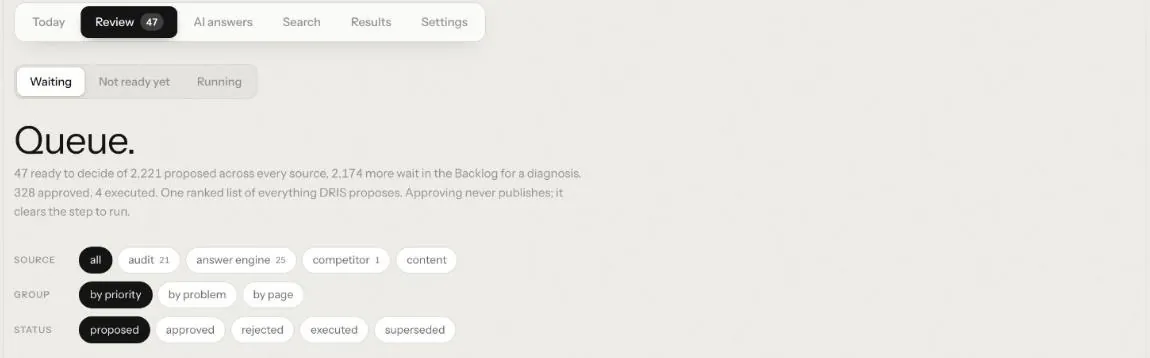
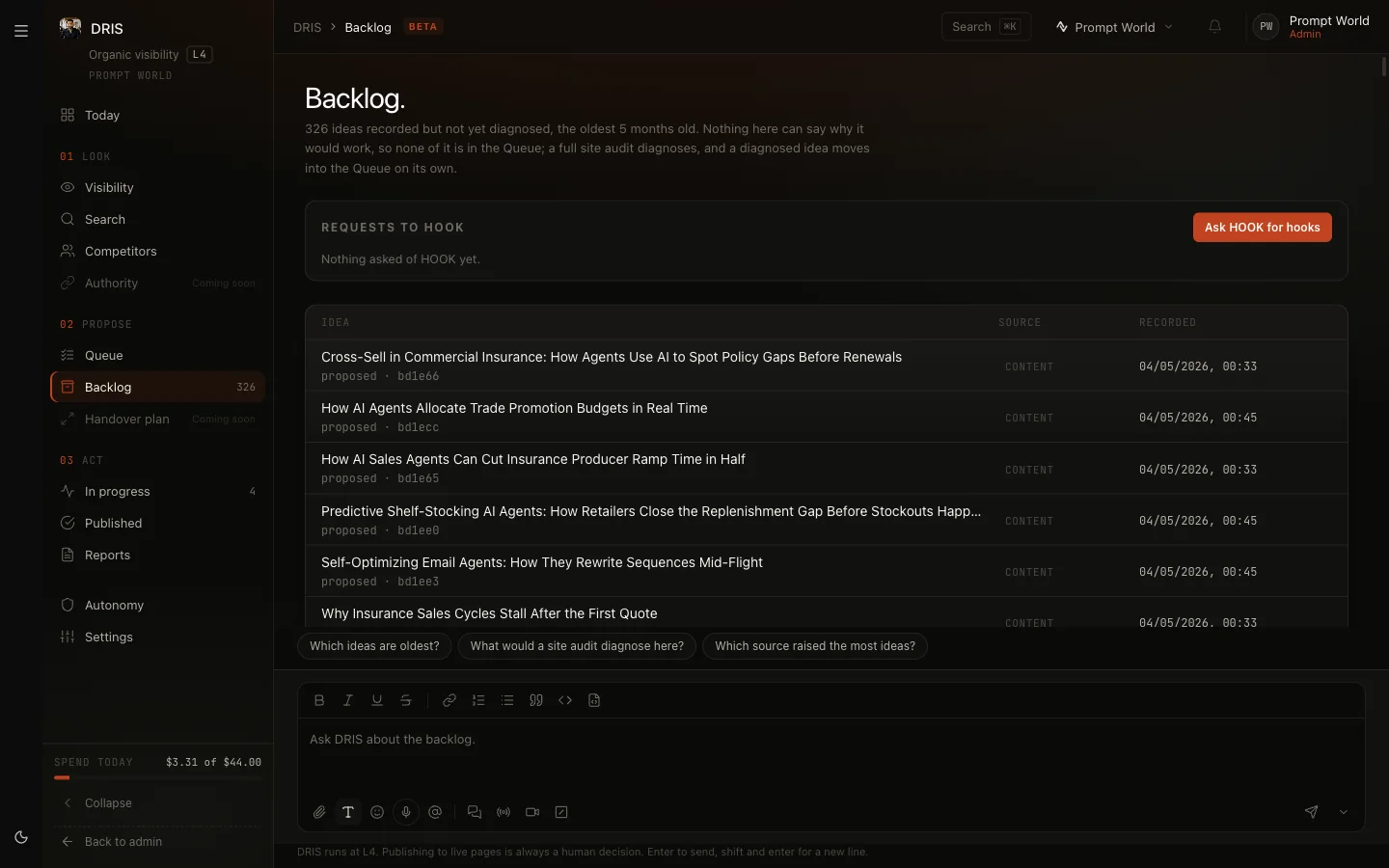
Proposals DRIS has not yet diagnosed wait in the Backlog, under Review, Not ready yet (nagent.ai/admin/dris/review?view=not-ready), oldest first. They reach the Queue once DRIS has worked out why the problem matters. Today, answer-engine and content proposals stay in the Backlog; the Queue holds search fixes.
The Approvals panel under the Queue holds requests from DRIS's agents waiting on your sign-off.
Step 4: from approval to your site
What happens after you approve depends on the fix.
- Page titles, descriptions, headings and structured data. Open the proposal with Open in its queue and approve it there. If your website is connected (see Connect your site), the row reads Live on your site. Withdraw takes it off again. If DRIS cannot change the page, fix it in your own CMS and click Mark applied.
- FAQ, direct answer, schema and llms.txt fixes. On the AEO proposals page, approve, then execute. For your own website, the fix is "served on the site-fixes feed as a ready-to-paste snippet": the current and proposed value, the snippet and where it goes on the page. Your developers read it from the same site connection (see Connect your site).
- New content. DRIS drafts a page change or hands the topic to your content team. "Drafts never publish on their own."
- Index and canonical rules. These are never automatic. They go to a separate approval decided by a senior role, not the person who asked.
Review, Running (nagent.ai/admin/dris/review?view=running) shows what is running and what is approved and waiting to run. Results, Shipped, shows each change as plan, draft and published.
Some approved fixes cannot reach your site on their own: nothing in Nagent can apply them, or your site does not read the site-fixes feed yet. In progress marks the first kind "nothing can apply this automatically; export it as a developer handoff, then mark it applied, or withdraw it". Export developer handoff on the AEO proposals page downloads both kinds as one Markdown checklist for your developers: each change grouped by page, with where it goes, the current value, the snippet and a box to tick when applied.
Step 5: read the results
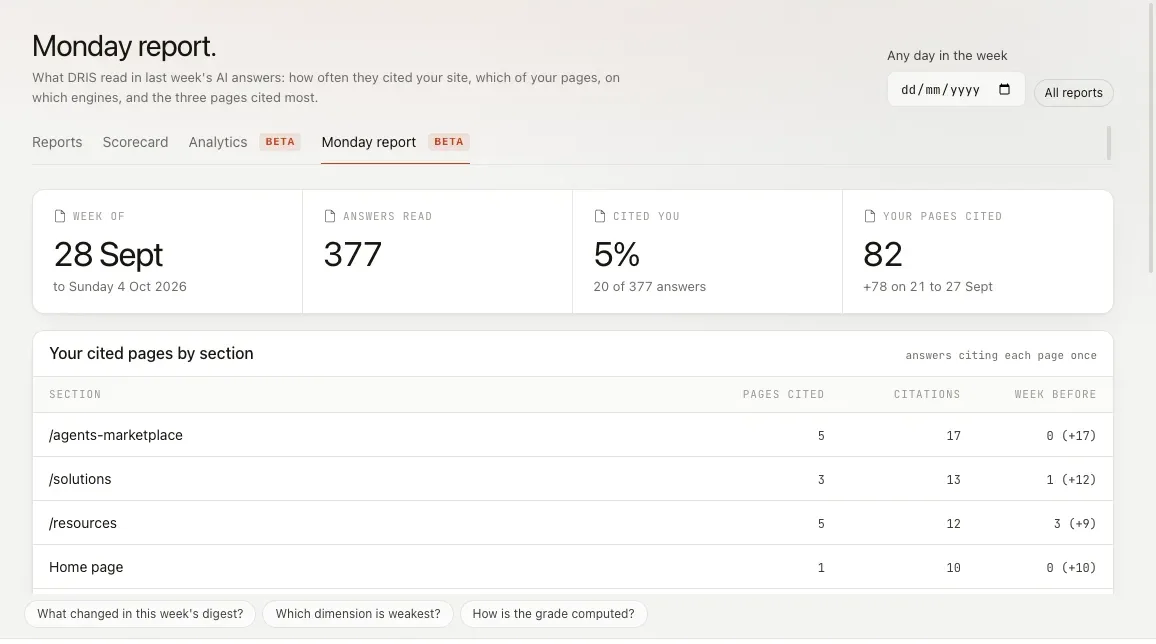
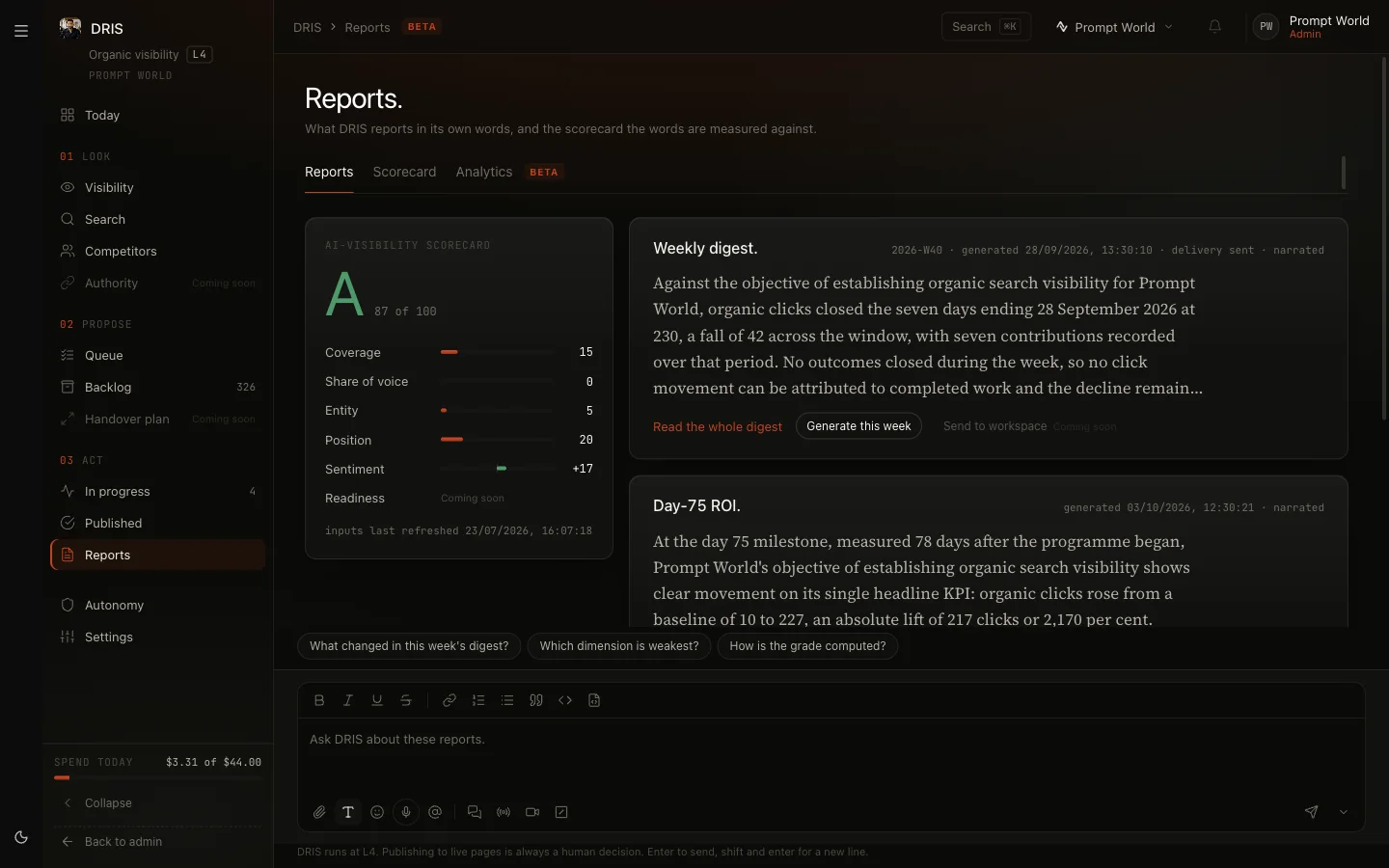
Results, then Reports (nagent.ai/admin/dris/results?view=reports), holds the Weekly digest (Generate this week), a Day-75 ROI report and a Monthly report, each downloadable as a Word file. Scorecard gives the site audit as Word or PDF. The Monday report (Beta) reads the last complete week of answers: how often they cited your site, your cited pages grouped by your site's own sections beside the week before, each engine's share by section, and the three pages cited most. Today's tiles show the last 28 days: AI answer presence, Citations gained, Organic clicks, Site audit total, Actions executed and Spend today.
A bigger prompt panel gathers more citations without you being any more visible, so Citations gained also shows the count per answer, with the previous period's figure, and the panel's size, for example "0.42 per answer (was 0.30) · panel 120 prompts". When the panel changed size between the two periods, the tile says so: "The panel went from 80 to 120 prompts between the two windows, so the raw count moved with the measurement." Days the panel grew are marked on the tile's chart.
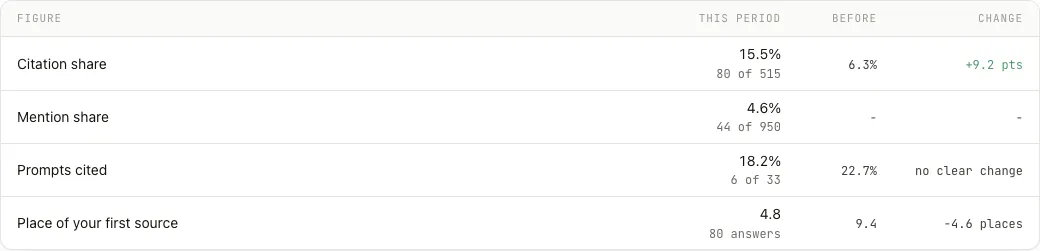
Analytics (Beta) shows Share of AI answers for the range you pick, for you and each competitor on your list, and yours by engine, question, persona, intent and branded or unbranded prompt:
- Citation share is the answers whose sources cite a brand, over the answers citing you plus those citing each competitor, each competitor once per answer.
- Mention share counts the answers whose text names a brand, linked or not. DRIS counts each closed day once a night and keeps the count, so mention share and its change show at 7, 28 and 90 days. Before a range's days are counted, which takes a night or a few for a large workspace's first 180 days, or the night after you change your competitor list, your prompts or your brand names, it covers what can be read on the spot, 28 days at most, and the screen says so.
- Both count the answers of your default run profile and leave repeated samples out. The Competitors page, the monthly report and the movement alerts use the same citation share; the first monthly report counted this way says its share does not compare directly with earlier ones.
- Prompts cited is the share of the prompts asked with at least one answer citing you, and Place of your first source the average place of your site among an answer's sources, 1 being first.
Each figure is set against the same length of time before it. A change is shown only when both periods hold at least eight and their 95% ranges no longer overlap; otherwise it reads no clear change, or too few under eight. A share's range is sized on the answers behind it, not its citations: one answer citing three brands is one observation. Below, the range is laid out day by day over 7 days and week by week over 28 and 90, the current week marked so far, with the changes published in each. On the presence, citations and clicks lines, dotted marks show the days changes were published: read them beside a movement, not as its cause. Today shows your citation and mention share for the last 28 days with their change.

Autonomy
Autonomy shows what DRIS may do on its own, per kind of action, and its track record. The record is evidence on DRIS's nomination for the next level, which Nagent files each night once DRIS has spent 30 days at its level with at least 25 decided approvals and few dismissed; an admin approves or declines it. Some things are "Always a human · every level": publishing any change to a live page, changing index or canonical rules, changing how the queue is weighted, and spending above the daily cap.
What it costs
Spend today at the foot of the rail shows today's spend against DRIS's daily caps, turning amber at 80%. In Settings, AEO daily cap. sets the cap for answer-engine reads, between 200 and 200,000 credits: "Answer-engine reads pause at this cap until you raise it here." Other caps are set by Nagent. Paid runs started by hand show an estimate first, for example "Estimated cost $X. Today's spend $Y of $Z."
How often the engines are asked depends on your plan: weekly on most plans, daily on Enterprise.
Limits today
- Most figures count an answer for you only when it links your site. Mention share on Analytics also counts an answer that names you without a link.
- A change to your competitor list, prompts or brand names restates every stored day overnight; until then, long ranges read more slowly.
- The Share of voice tile on Visibility and AEO readiness, and Share of voice on the Scorecard, are an older per-target measure: your citations against the competitor pages linked to each target, and 0 where none is linked. They are not the share of AI answers on Today and Analytics.
- A competitor with no tracked name is matched by its domain and the domain's first word, so a brand whose name is an ordinary word is counted wherever that word appears.
- Authority (backlinks), Handover plan, Technical SEO, Browser intelligence and sending reports to the workspace are Coming soon.
- Traffic is read by source, not by landing page, so DRIS can say an engine sent visitors but not which page they arrived on.
- Search Console is read for one property, chosen in DRIS Settings when the connected Google account sees several and none is on your domain. Until one is chosen, DRIS shows no Search Console figures.
- Answer-engine and content proposals wait in the Backlog, not the Queue.
- Changes reach your site only through the site connection your developers wire in once. Fixes are never written into WordPress or Shopify directly. Blog articles are different: they can go to WordPress as drafts, see send approved articles to WordPress.
Where to go next
- Setting up DRIS: connect each source and check it is reading.
- Connect your site: make approved fixes live.
- CREA and the content studio: where content gaps go.
- Echo: whether what answer engines say about you is right.