
How to Track Brand Visibility in AI Search
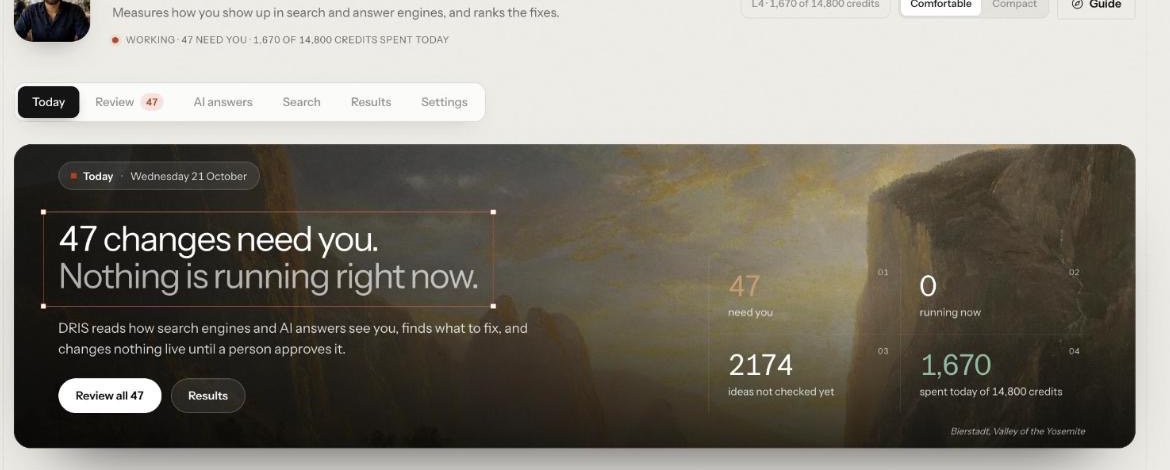
To track brand visibility in AI search, fix a set of questions your buyers ask, put them to the answer engines on a regular schedule, and record whether each answer cites your site, names you, or cites a competitor instead. Tie that to your own search data so you can see the whole picture. This guide walks through the setup in DRIS, Nagent's organic visibility team lead, from connecting your site to reading your first numbers.
What does tracking brand visibility in AI search actually mean?
Buyers now ask ChatGPT, Claude, Gemini, Perplexity and Grok the questions they used to type into a search box. Each answer either cites your site as a source, mentions your name without a link, or leaves you out. Tracking visibility means measuring that, consistently, so a change in the number reflects a change in the answers and not a change in how you measured.
Three habits make the tracking trustworthy:
A fixed question set. Ask the same prompts every cycle. If you add fifty new prompts, you will collect more citations without being any more visible.
A clear definition of "cited". DRIS counts an answer as citing you when one of the sources it links is on your domain. An answer that names you without linking you counts only toward mention share.
A baseline. Record where you stand before you change anything, so every later claim is measured from it.
DRIS records the exact prompt behind every result and keeps the prompt set fixed per account, so a trend means something. Alongside the answer engines he reads Google Search Console and Google Analytics 4, so you see classic search and AI answers side by side.
What do you need before you start?
A Nagent workspace with DRIS in it. DRIS comes with the Marketing department, or you can pick him on his own at sign-up. His screens open from Agents, then DRIS, with six tabs: Today, Review, AI answers, Search, Results and Settings. DRIS is in Beta: his header carries a Beta tag today.
Your site's domain, plus any other domains you publish on, such as a separate docs or shop domain.
A Google account that can see your Search Console property, and ideally your Google Analytics 4 property.
About half an hour. The setup guide notes that most of it is waiting for Google to show you the right account.
How do you set up AI search visibility tracking, step by step?
Follow these in order. A missing source does not stop the others.
Step 1: Hire DRIS with the Marketing department
At sign-up, the first step is Choose teams. Press the Marketing card, marked Whole department, to take MIRA, the AI Marketing Chief of Staff, with all her team leads. Or tick DRIS on his own under Team leads, where his row reads organic visibility, Reports to MIRA. A workspace that picks DRIS alone still gets his own room and a Marketing room with MIRA and DRIS in it, so you can brief him either way.
Step 2: Set up with N and MIRA
Set-up runs as a conversation in N · Setup, with N, the head of your AI growth org (Beta), and MIRA. The page is headed N, with MIRA, your AI Marketing Chief of Staff. Tell N about your business: N saves each answer where it belongs, and only asks you to sign in to your tools. Turn voice on (Beta) lets you talk instead of typing, and I'll set it up myself switches to the set-up screens.
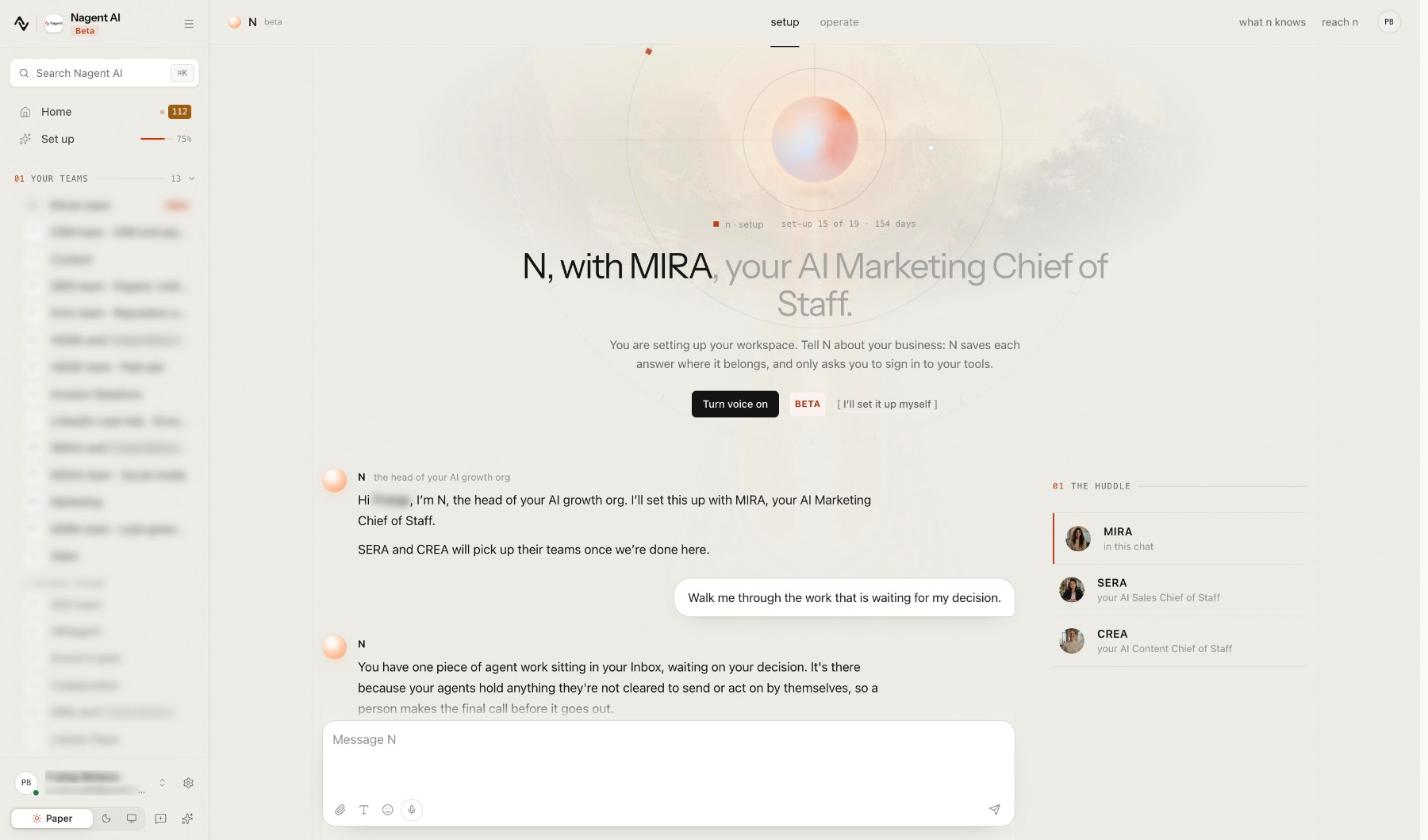
The same work shows as five steps under Set up in the sidebar, from Onboarding to N · Setup, and you can pause and resume from there.
Step 3: Connect Google Search Console and Google Analytics
Open the Connect tools step, headed "Give Nagent tools to work with." Search the tool list or use the Analytics and SEO chip, choose Google Search Console, and sign in with the Google account that can see your property. The first pull reads the last 90 days for every property that account can see. After that the feed refreshes daily, overnight in UTC.
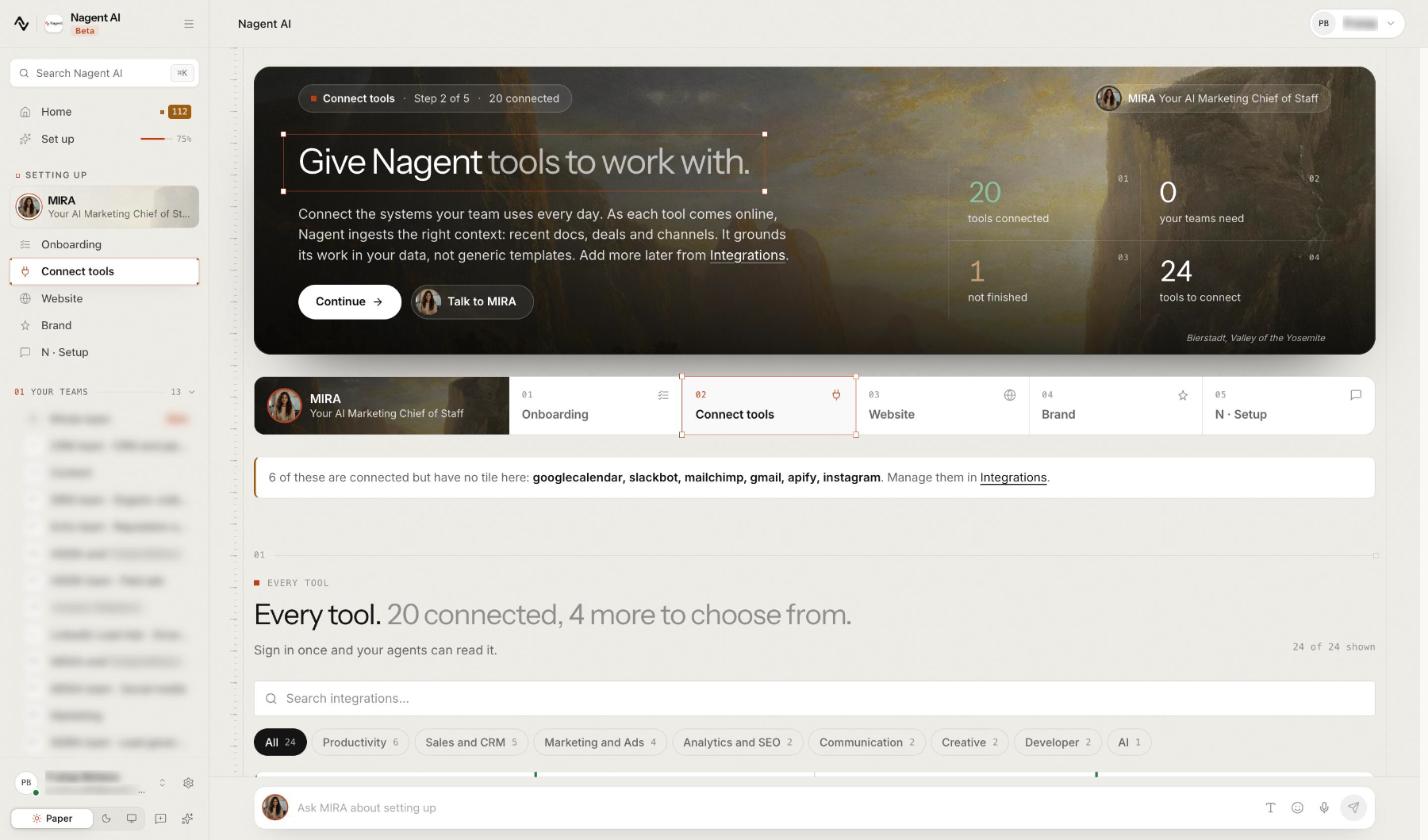
Connect Google Analytics from the same list, then choose your property in workspace Settings. It is optional but worth it: Search, then Traffic, shows sessions and conversions by source, with the visits answer engines send split out as AI referrals.
Step 4: Tell DRIS which site is yours, and what he may spend
Without a domain, no answer can count as citing you. Open DRIS Settings, then Spend and sources, the card for daily limits, connected data, your domains and what DRIS knows. Under Your domains. type your domain, click Add, then Save domains. A pasted address such as https://www.example.com/shop is saved as example.com. The first domain you add is your main site: the site audit reads its sitemap, and DRIS matches your Search Console property to it.
DRIS reads one Search Console property, never a sum of several, and picks it for you when the account sees only one or one sits on your main domain. Otherwise pick yours here and click Use this property. Search, then Search Console, names the property it reads, with a Change link.
On the same page, AEO daily cap. sets what answer engine reads may spend in a day, between 200 and 200,000 credits. Reads pause at the cap until you raise it. Connected sources. shows which of Search Console and Analytics are in.
Step 5: Set the goal
Until there is a goal, Today says "Nothing can start until there is an objective." Click Declare an objective, or open Settings, then Goal:
Capture the baseline. DRIS records where you stand today. This happens once and cannot be replaced, so connect Search Console first and let the site audit run.
The number. Write the objective in a sentence, then pick the metric: Organic clicks, Organic impressions, Mean page score, AI answer presence or Unbranded citation share. You can add a secondary number if you want one.
The date, and what DRIS may do on his own to get there, with an optional Lifetime spend cap.
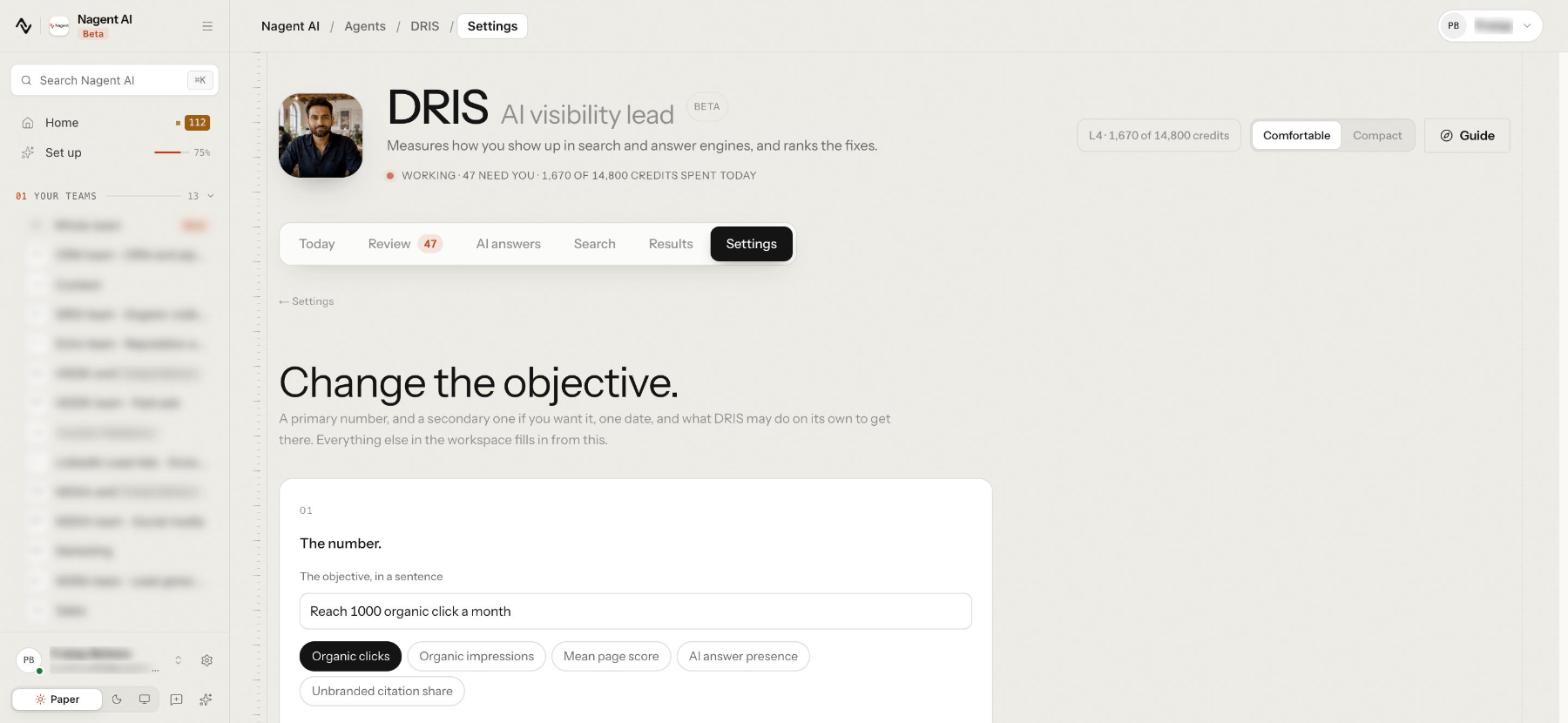
If AI answers are your focus, pick AI answer presence or Unbranded citation share. The goal also decides which fixes DRIS ranks first. Once it is set, the page reads Change the objective., and Today shows whether you are ahead, on target or behind.
Step 6: Approve your buyers
Open Settings, then Buyers, headed Personas and context. (Beta). DRIS drafts buyers from your site and you approve each one. To add your own, click Add a persona and fill in a name, the Situation, Goals, one per line, What stops them, one per line and What an assistant would remember about them.
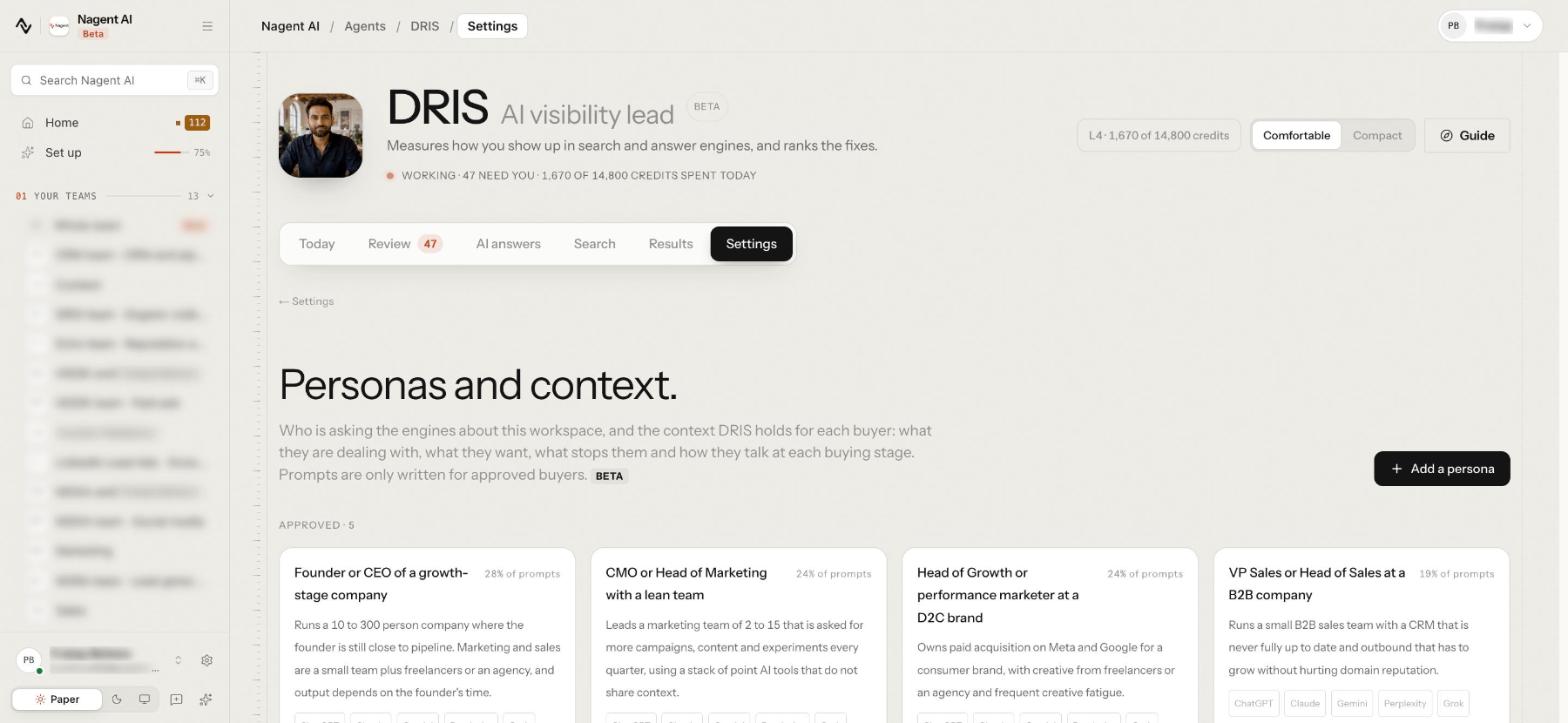
DRIS writes prompts only for approved buyers. Until you approve one, he writes them from the job titles and persona keywords in your customer profile, or for no buyer in particular.
Step 7: Add your competitors
Open Results, then Competitors, add each competitor's domain with Add to list, and choose Track weekly. DRIS then checks every answer he collects for links to them.
Not sure who they are? Once answers come in, Add the most-cited sites to your list puts up to five of the sites the engines cite most beside you on the list, each cited in at least three answers. Wikis, forums, news, docs, social and video sites are left out of those suggestions.
Step 8: Choose the questions
A target is a page DRIS watches, with the questions that page should answer. Open AI answers, then Questions, to see your target runs. Discover targets suggests them from DRIS's own suggestions, your sitemap, your top traffic or a competitor's sitemap; you choose which to track.
Open a target, and on its Prompts tab you can:
Generate prompts: 25, 50 or 100 new ones for review.
Add a prompt by hand, or Upload prompts as a pasted list or a CSV.
Accept or reject each prompt. Only accepted prompts are asked.
The form prices each step in credits before you commit. A target holds at most 25 accepted prompts, so spread them across the pages that matter. Once a target has answers, its Share of answers by channel panel shows how often each chatbot, and Google's AI Overviews and AI Mode, cited you on that target's prompts.
Step 9: Choose how DRIS asks
Open Settings, then How DRIS asks: which AI engines DRIS asks, as whom and how often. It holds your Run profiles (Beta), saved ways of asking the answer engines. The Default profile is the plain run your scores are read from, sent as a stranger with no memory, across ChatGPT, Claude, Gemini, Perplexity and Grok.
Add a profile to ask as one of your approved buyers, with or without what an assistant would remember about them. Every other profile is shown beside the default, never averaged into it, and its answers are labelled "API, simulated memory": they come from each engine's API, not from a signed-in user's app. How often the engines are asked depends on your plan: weekly on most plans, daily on Enterprise.
Step 10: Read your first visibility numbers
Right after setup, Today may say "Your visibility dashboard is being prepared" while DRIS runs your baseline sweep and site audit. It usually unlocks within a day. If Today says Setup incomplete, click Retry setup, and anything still missing is listed under Finish setting up.
Today opens on what needs you and what is running. Further down, Share of AI answers gives two numbers worth learning first:
Citation share: the answers citing you, over the answers citing you or any competitor on your list.
Mention share: the answers whose text names you, linked or not, over every brand's.
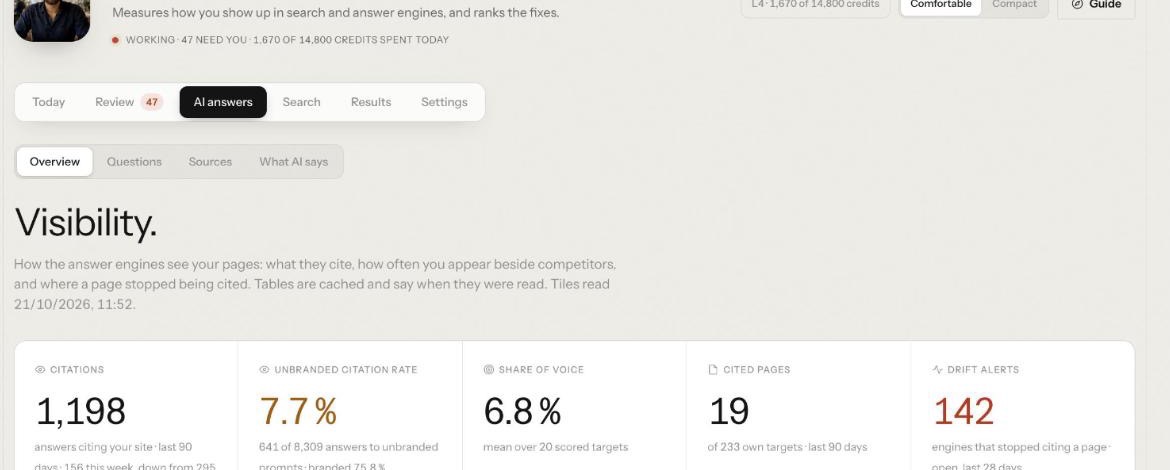
For the full answer engine picture, open AI answers, then Overview, headed Visibility. Its tiles are Citations, Unbranded citation rate, Share of voice, Cited pages and Drift alerts, which count the engines that stopped citing a page.
Here is what to expect, and when:
After: A day, Where: Search, Search Console, What you should see: Clicks, impressions, CTR and average position from your property
After: A day, Where: Search, Traffic, What you should see: Sessions by source, with AI referrals split out
After: Your sweep day, Where: AI answers, Questions, What you should see: Answers on each accepted prompt
After: A few days, Where: Search, Keywords, What you should see: Pages on page two and below par click through
After: Any time, Where: Today, What you should see: No Finish setting up. list, once every source is in
Every DRIS screen has a box at the foot for questions, and anything DRIS wants to do from there waits for your OK. The Guide button in the header finds any task by name.
Where does DRIS sit in the team?
Nagent builds AI teams like a team you would hire, with an AI Chief of staff, team leads and sub-agents. See how a Nagent team is built. DRIS is a team lead in Marketing:
MIRA, AI Marketing Chief of Staff, owns reach and pipeline cost
DRIS, team lead, organic visibility
SEO auditor
AEO runner
Technical SEO
Content producer
NIA, team lead, paid marketing
HOOK, team lead, creative strategy (Beta)
Echo, team lead, reputation (Beta)
MOXA, social media (coming soon)
A request moves down the line and back up it. You ask in one line, in the room. MIRA decides who owns it and hands visibility work to DRIS. DRIS breaks it down, puts the tasks on the board and briefs his bench. Each sub-agent hands its result back to DRIS, who brings one answer back with anything that needs a person waiting on a card.
Sub-agents hand work back to their lead, never sideways to another seat. A message travels at most three hops, and every hop is checked against the receiving agent's budget. Work for another department is a written handoff to that room's lead: content gaps DRIS finds go to CREA's Content team as tasks, and paid reach is NIA's work, not his.
What can't you track with DRIS yet?
Be clear about the limits before you report on anything:
DRIS is in Beta. So are the Buyers and How DRIS asks screens, and each says so.
Unlinked mentions count only toward mention share. Most other figures count an answer only when it links your site.
Landing pages from AI referrals are not read yet, only the source.
Google's AI surfaces are measured for citations, but their text is not kept, so the What AI says check does not cover them.
AI crawler visits, under Search, then Site health, need Nagent's team to switch them on from your hosting or CDN analytics. Until then the section says "Crawler logs are not connected."
Frequently Asked Questions
How do I track my brand's visibility in ChatGPT and other AI answers?
Fix a set of buyer questions, ask them on a schedule, and record whether each answer cites your domain, names you, or cites a competitor. In DRIS that means accepted prompts on each target under AI answers, a competitor list under Results, approved buyers and the default run profile under Settings, with citation share and mention share on Today.
How long does it take to see the first AI visibility data?
Search Console and Analytics data usually appears within a day. Answer engine results arrive on your sweep day, and the DRIS dashboard usually unlocks within a day of setup, once the baseline sweep and site audit finish.
What is the difference between citation share and mention share?
Citation share counts answers that link your site, against answers linking you or a listed competitor. Mention share counts answers whose text names you, linked or not, against every brand named.
How many prompts should I track?
Enough to cover the questions each important page should answer, and no more than you will keep stable. DRIS caps a target at 25 accepted prompts, prices each step in credits before you commit, and keeps the set fixed so trends mean something.
Start tracking your AI search visibility
Good AI visibility tracking is boring by design: one domain definition, one fixed question set, one baseline and the same engines every cycle. DRIS does the asking, counting and comparing, and the DRIS guide covers every screen in detail.
Book a demo to see DRIS set up visibility tracking on your own site.