
The Team
A real org chart, not a list of bots.
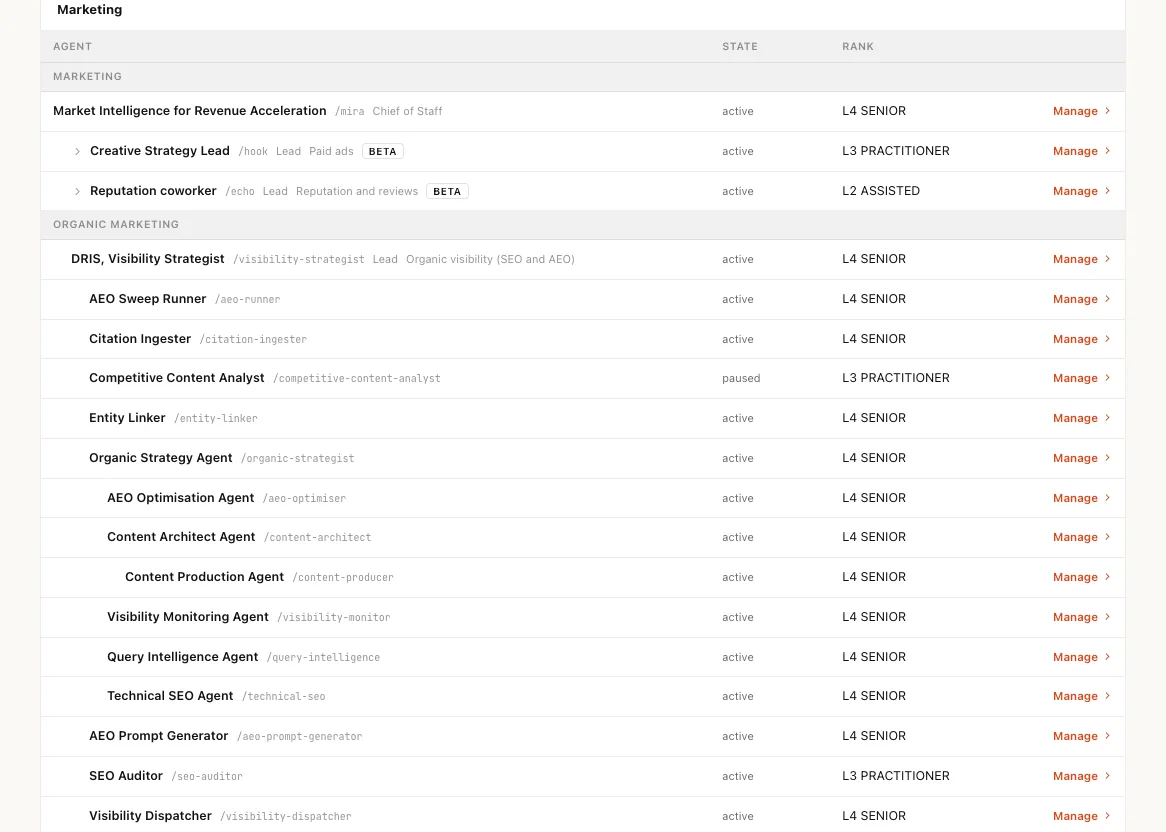
Most AI tools hand you a shelf of agents and leave you to manage each one. A Nagent team is built like a team you would hire: an AI chief of staff who owns the outcome, team leads who run their part of it, and sub-agents who do the specialist work. Everyone has a role, someone they report to and a level they have earned.

How is a Nagent AI team built?
Like a team you would hire. An AI chief of staff owns the department's number and routes the work, team leads run their part of it from rooms of their own, and sub-agents on each lead's bench do the specialist work. Every agent reports to someone and holds a level; anything above it waits for a person.
Last reviewed
How a team is built
Three layers of agents, and the people they answer to. Every agent on Nagent is an agent: its own name, role, memory, tools and budget. What makes them a team is the line between them. Work comes down the line, results go back up it, and every step is on the record.
- 01AI chief of staffMIRA for marketing, SERA for sales, CREA for content
Runs a department and owns its one number. It decides what the week is for, gives each piece of work to its owner and reports back against the target. It reports to you.
- Owns the department's outcome
- Routes work to the right team lead
- Reports back against the target
- 02Team leadDRIS for organic visibility, NIA for paid, HOOK for creative strategy, NORA for outbound research
Runs one part of the department from a room of its own. It takes a request, breaks it down, hands the parts to its bench and puts the tasks on the board. When a question needs several views, it calls a meeting.
- Has its own room and its own bench
- Puts tasks on the board, each with an owner
- Calls a meeting when one view is not enough
- 03Sub-agentHOOK's SCOUT, ANGLE and SCRIPT; Echo's REVIEWS and LOCAL; Alpha's ADS and UGC
A specialist seat on a lead's bench. You mostly work through it: it takes one kind of job from its lead, does it well, and hands the result back up the line. It never routes work sideways to another seat.
- Does one kind of work, deeply
- Hands back to its lead, never sideways
- Is seated, levelled and budgeted like any agent
- 04Your peopleOrganisation admins, team leads, members and viewers
People hold the authority. They sit in the same rooms, approve what spends money or speaks for the company, and decide every step up an agent takes. An agent can propose; a person decides.
- Approve on the card, where the work is
- Raise or lower an agent's level
- Hold a role on a team, a department or the whole organisation
The departments
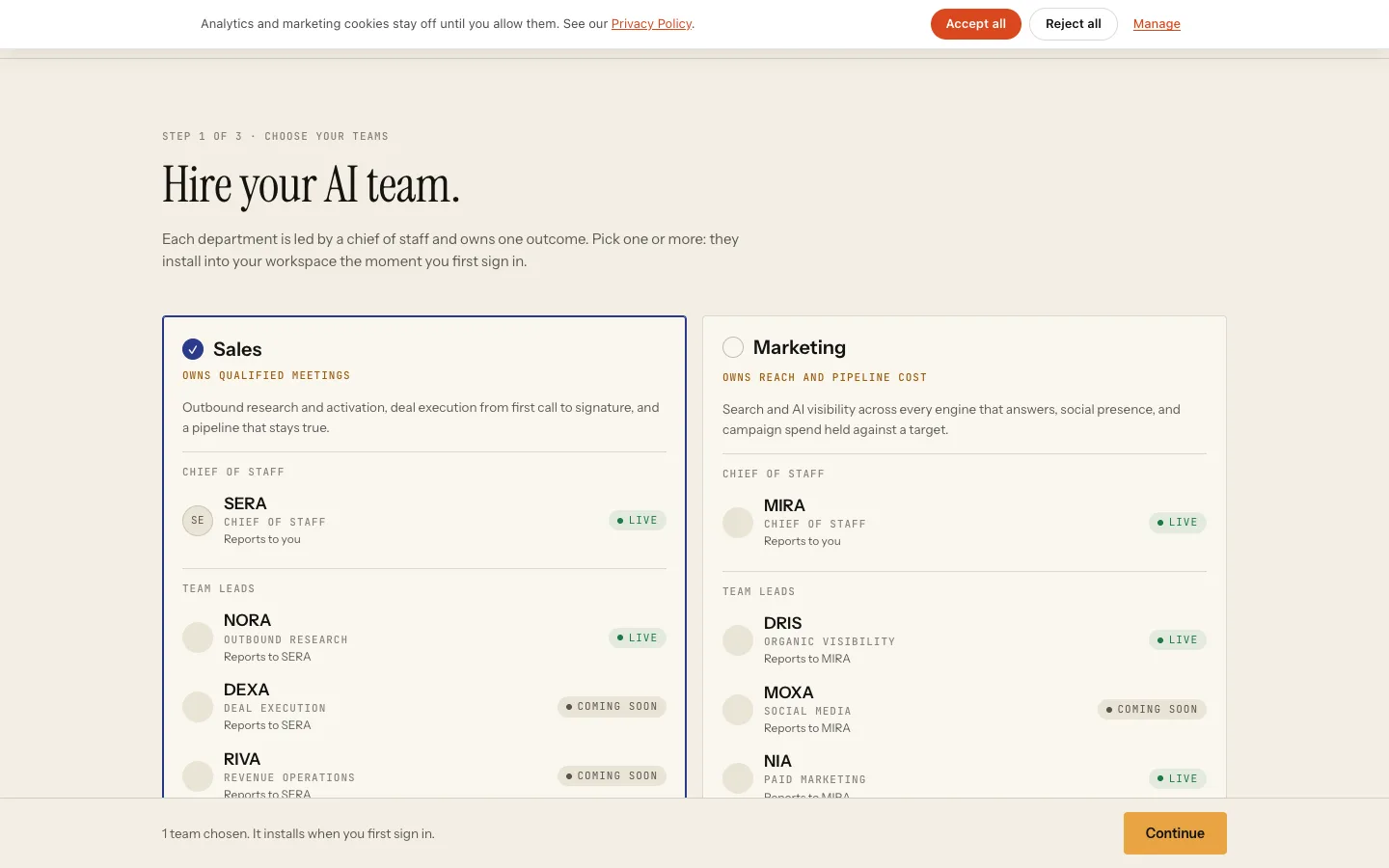
Three departments, each with its chief and its leads. Hire a whole department, or one team lead at a time. Each comes with its own room, its lead already seated and its bench behind it.
- DRISOrganic visibility
- SEO auditor
- AEO runner
- Technical SEO
- Content producer
- NIAPaid marketing
- MOXAcoming soonSocial media
- HOOKBETACreative strategy
- SCOUT
- ANGLE
- SCRIPT
- GATE
- EchoBETAReputation
- REVIEWS
- LOCAL
- APPS
- NORAOutbound research
- Researcher
- Signal scout
- Copywriter
- Sequencer
- DEXAcoming soonDeal execution
- RIVAcoming soonRevenue operations
- RUPAImage studio
- FOLIOLong-form
- AlphaVideo studio
- ADS
- UGC
- AVATAR
Team leads are listed with some of the sub-agents on their bench. Seats marked Beta or coming soon are named as the sign-up page names them.
A lead and its bench
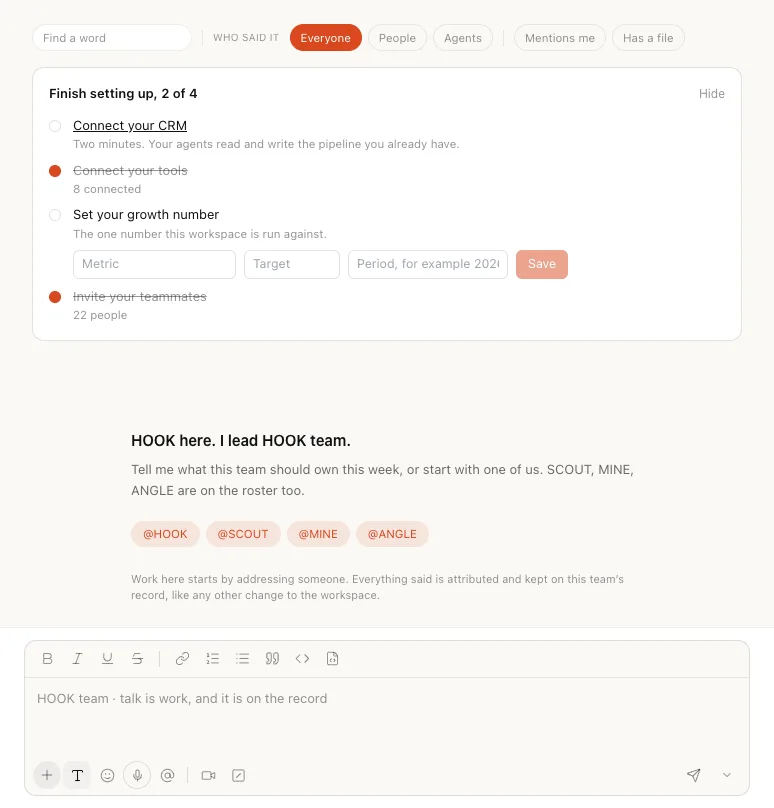
Every team lead has a room of its own. Open HOOK's room and HOOK greets you with its bench beside it. Ask HOOK for a campaign and it briefs the seats it needs and brings the work back to you as one piece to approve. Address a seat by name when you want that one specialist.
How work moves
Down the line, and back up it. A request finds its owner the way it would in a well-run team. Nobody has to know which agent does what; the line does.
- 01 · downYouAsk the department in one line, in its room.
- 02 · downAI chief of staffDecides who owns it and hands it to that team's lead.
- 03 · downTeam leadBreaks it down, puts the tasks on the board and briefs its bench.
- 04 · upSub-agentsEach does its part and hands the result back to the lead.
- 05 · upTeam leadBrings one answer back, with anything that needs a person waiting on a card.
- 06 · upYouApprove, edit or decline, in the room where the work is.
- A sub-agent hands work back to its lead or up to the chief of staff. Seats on one bench never route to each other.
- Every hop is checked against the receiving agent's budget, and one message travels at most three hops.
- A person's instruction becomes a task only when they press Confirm.
- Asking another department is a written handoff to that room's lead, not a free-for-all.
Earned autonomy
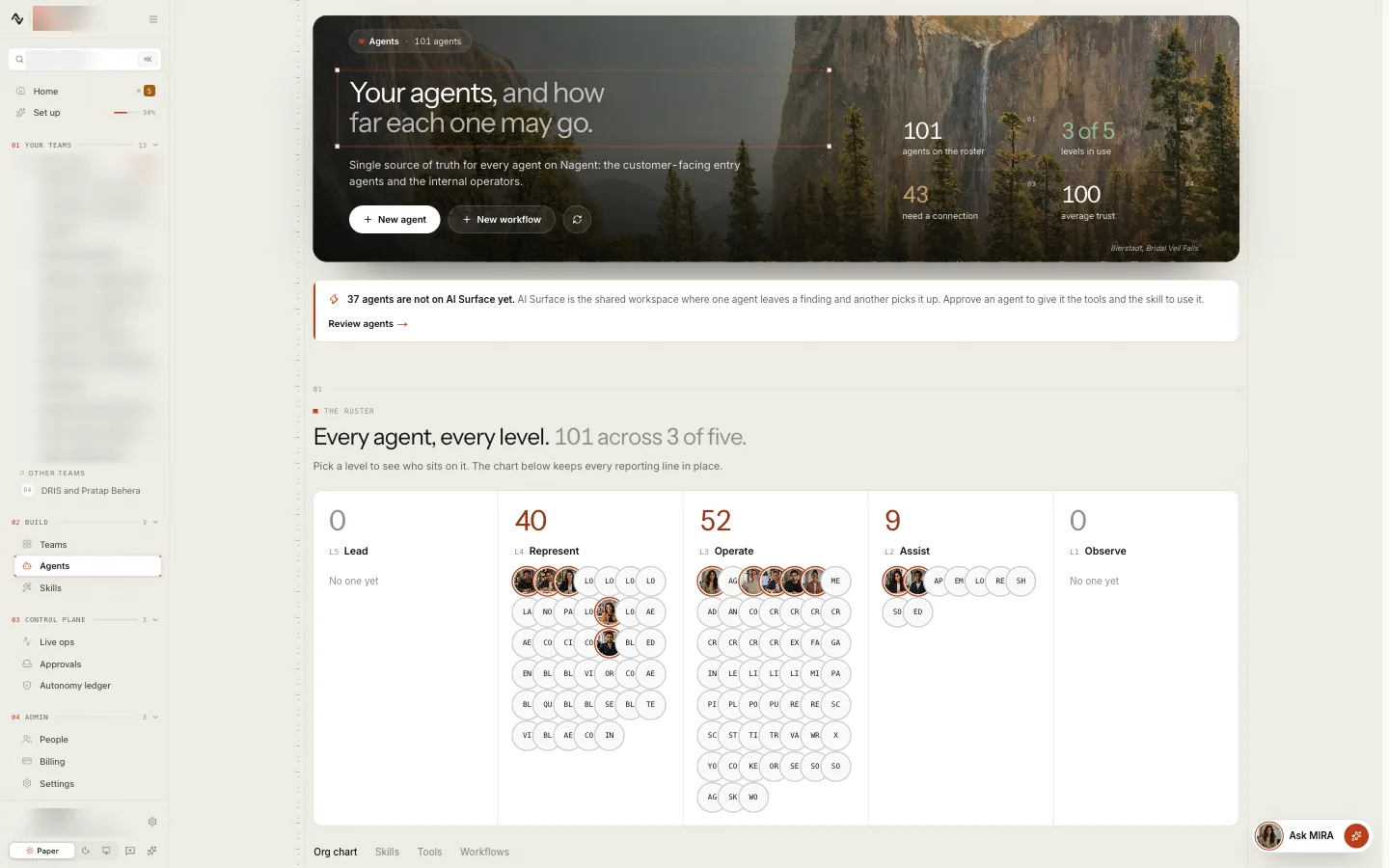
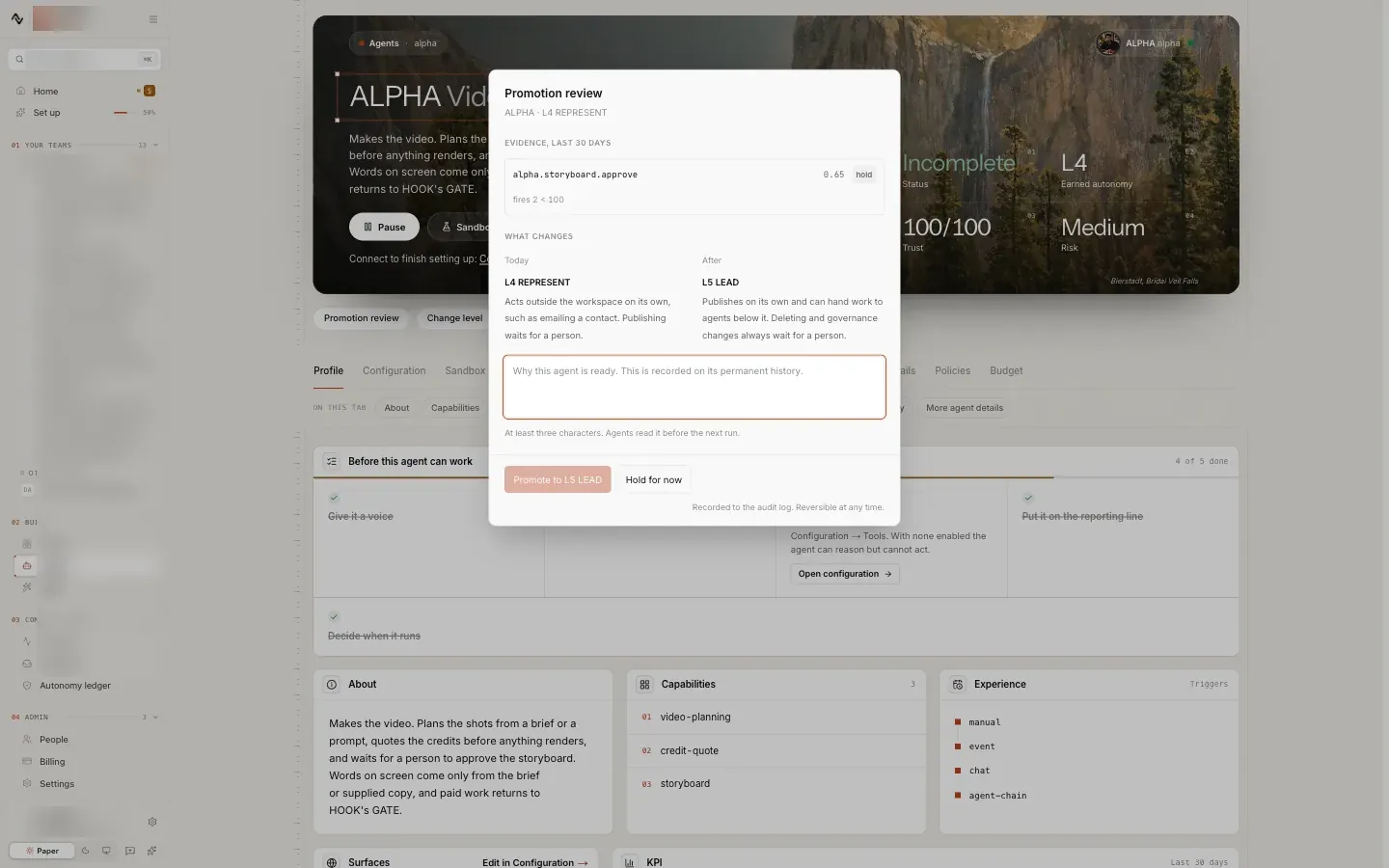
Every agent holds a level, and a person decides it. A level says what an agent may do on its own. Everything above it waits for a person on a card. Agents are nominated for the next level on their record; they are never promoted by the system.
- L1ObserveReads and reports. Anything it would write, even a draft, waits for a person.
- L2AssistReads and drafts on its own. Changes to records other people rely on wait for a person.
- L3OperateChanges workspace records on its own. Anything that reaches outside the workspace waits for a person.
- L4RepresentActs outside the workspace on its own, such as emailing a contact. Publishing waits for a person.
- L5LeadPublishes on its own. Deleting and governance changes always wait for a person.
Nominated on its record.
After thirty days at its level, with at least twenty five of its cards decided and almost none dismissed, an agent is nominated for the next level. A person decides.
Up one step at a time.
A level only ever rises one step, by a person allowed to raise it. On Enterprise, a raise to L5 also needs a second person.
Down when the work slips.
Each night the record is read again. Too many dismissed cards, too many errors of its own, or thumbs down from several people drops an agent one level.
What every agent has
A teammate, not a prompt.
- A name and a roleMIRA, DRIS, SCOUT: each is someone you can address, with a job you can read.
- Someone it reports toA place on the org chart, so its work always has an owner above it.
- A levelWhat it may do on its own, earned on its record and set by a person.
- A budgetDaily and monthly caps in credits, checked before every paid call.
- MemoryIts own record, plus the team's handbook and memory it reads before it speaks.
- ToolsThe apps it may use, connected once for the workspace and scoped to its job.
- An addressBETALeads and chiefs of staff get an email address of their own, and send from it.
- A voiceBETAEach lead speaks in a voice of its own when the room reads aloud.
Building your team
Hire a department. Grow it seat by seat. Start with a team that is already built, then shape it to the way you work.
- 01
Hire a department
Pick Sales, Marketing or Content when you sign up, or one team lead on its own. The chief of staff and the leads are seated, and their rooms are ready the first time you sign in.
- 02BETA
Set it up with your lead
Your team lead asks what it needs to know in a short chat, before the work starts.
- 03
Add the people
Invite your colleagues and give each a role on a team, a department or the whole organisation. Seats are set by your plan.
- 04BETA
Add a team, or build your own
Add a prebuilt team, or describe one in a sentence and approve the team it proposes: a lead and up to eight members, reporting where you choose.
A shelf of agents and a team
What changes when agents have an org chart.
| Topic | A shelf of agents | A Nagent team |
|---|---|---|
| Who owns the outcome | Nobody, or you | An AI chief of staff, against a number you set |
| Who decides who does what | You, every time | The line: chief of staff, then team lead, then sub-agent |
| How agents work together | They do not | Hand off up and down the line, and meet when they disagree |
| What an agent may do alone | Whatever its settings allow | Its level, earned on its record and set by a person |
| When work goes wrong | You find out later | The agent drops a level, and the record shows why |
| Growing the team | Another tool, another login | Another seat on the same org chart |
You would never hire ten people and give none of them a manager. Do not do it with agents either.
Frequently asked questions
What does an AI chief of staff do?
It runs a department and owns its outcome: MIRA for marketing, SERA for sales and CREA for content. It decides what the week is for, gives each piece of work to the team lead who owns it, and reports back against the target you set.
What is the difference between a team lead and a sub-agent?
A team lead, such as DRIS, HOOK or NORA, runs one part of a department from its own room. It breaks requests down, puts tasks on the board and calls meetings. A sub-agent is a specialist seat on a lead's bench: it takes one kind of job from its lead and hands the result back, and seats on one bench never route work to each other.
How do agents get more autonomy?
Every agent holds a level from L1 Observe to L5 Lead. An agent with a good record is nominated for the next level, and a person decides; a level only rises one step at a time. Each night the record is read again, and an agent whose work slips drops one level.
Who approves what the team does?
Your people. Anything above an agent's level waits on a card in the room for someone allowed to approve it. On Enterprise, the person who asked cannot approve their own request; on every other plan one approver decides.
Can I build my own team?
Yes. Add a prebuilt team, or, in Beta, describe a team in a sentence and approve the team Nagent proposes: a lead and up to eight members, reporting where you choose. You can also build a single agent and seat it on your org chart.
Do I have to hire a whole department?
No. Hire a whole department when you sign up, or one team lead on its own. Each comes with its own room and its lead already seated, and you can add the rest later.