Multiplayer AI for growth teams: the detailed deck
Multiplayer AI for growth teams, platform capability and deployment options


NAGENT FOR ENTERPRISES · THE DETAILED DECK
Multiplayer AI for growth teams.
The growth org, the platform under it, and the three ways to run it: in our cloud, in the enterprise’s own cloud, or on premise.
NAGENT.AI · OCTOBER 2026 · FOR CMOs, CXOs AND CEOs IN THE USA AND THE GCC
WHAT THIS DECK COVERS
Three parts, and a way to start.
01
Multiplayer AI for growth teams
The room where people and agents work, the team and its reporting line, how work moves, how agents meet, and N, the one teammate everyone talks to. The marketing, sales and content teams in detail.
02
Platform capability
The control plane, levels and budgets. The Knowledge Hub, memory, sources and tools. Agentic capabilities, agent configuration, models and keys, ways in, and what a person can check.
03
Deployment options
Nagent cloud, private VPC on GCP, AWS or Azure, and on premise. What runs inside the enterprise’s cloud, security and compliance, the Enterprise plan and the engagement model.
A short overview deck accompanies this one. Use the overview in the first meeting, and this deck with the teams who will evaluate, secure and run Nagent.
NAGENT FOR ENTERPRISES · CONTENTS
2
PART 01
Multiplayer AI for growth teams.
One room where the enterprise’s people and its AI team talk, decide and do the work together, on one shared record.
THE PROBLEM
Most AI at an enterprise is single-player: one person, one window, nothing shared.

Every person works in a private window
The performance lead, the content lead and the sales lead each prompt their own tool, and nobody sees the others’ work.

The company is explained again and again
What the team decided yesterday sits in one person’s chat history, so every new conversation starts from a blank page.

Nobody can say who decided what
Answers are pasted into decks, posts and emails with no record of who asked, who checked and who said yes.
The fix is not a better prompt. It is a room where the whole team, people and agents, works on one record, with a person deciding the turns that matter.
01 · MULTIPLAYER AI FOR GROWTH TEAMS
4
THE ROOM
People and agents in one room, on one record.

One thread, one board, one record
Each team gets all three. Every message is attributed and kept. A correction is a new entry, never an edit.

People and agents side by side
One members list, addressed the same way, with each lead tagged. Type @ and pick an agent, exactly as a colleague would be picked.

A person holds the authority
Spend, and anything that speaks for the company, waits on a card. The card shows the cost, the risk and who may approve it. Only the buttons decide.

Wherever the team is
The same room in a phone’s browser with nothing to install, from Slack, and by email, under the same rules and the same approvals.
Above every room, N: the one teammate each person talks to, by voice or by text.
01 · MULTIPLAYER AI FOR GROWTH TEAMS
5
ANATOMY OF A ROOM
Every room opens on the same parts, by name.
Messages
People and agents in one thread.
Team handbook
The charter: what the team exists to do.
Files and links
Everything shared with the team, with its status.
Pins
The shared documents the team works against.
Team surface
The board, the overview and each lead’s own page.
Spotlights
Messages someone put in front of the whole room.
Inbox
Everything waiting on a person, oldest first.
Team memory
What the team agreed to keep, promoted by a person.
Repository
The team’s files: charter, tasks, decisions, runs.
Activity
Every action in order, timed and attributed.
Members
People and agents in one list, the lead tagged.
Huddle
Pull the room together in one line.
01 · MULTIPLAYER AI FOR GROWTH TEAMS
6
HOW THE ROOM WORKS
Talk in the room becomes a task on the board, then a file on the record.
01
Ask in the thread
Type @ and pick an agent. Addressing an agent asks it to answer.
→
02
Confirm the task
An instruction becomes a card. Once a person confirms it, it lands on the board.
→
03
Watch it work
The room shows each step as it happens, from reading the message to writing back.
→
04
A person decides
Anything above an agent’s level waits on a “Confirm before it runs” card.
→
05
It lands on the record
The result is a file to accept or send back, kept in the team’s files.

One board, two kinds of task
An agent task is picked up without asking again. A person task waits for that person.

Answers with sources
Questions are answered in a thread beside the room, with the sources the answer came from, each one openable.

The room keeps going
After hours the work continues within each agent’s level and budget, and the record shows what ran.
01 · MULTIPLAYER AI FOR GROWTH TEAMS
7
THE TEAM
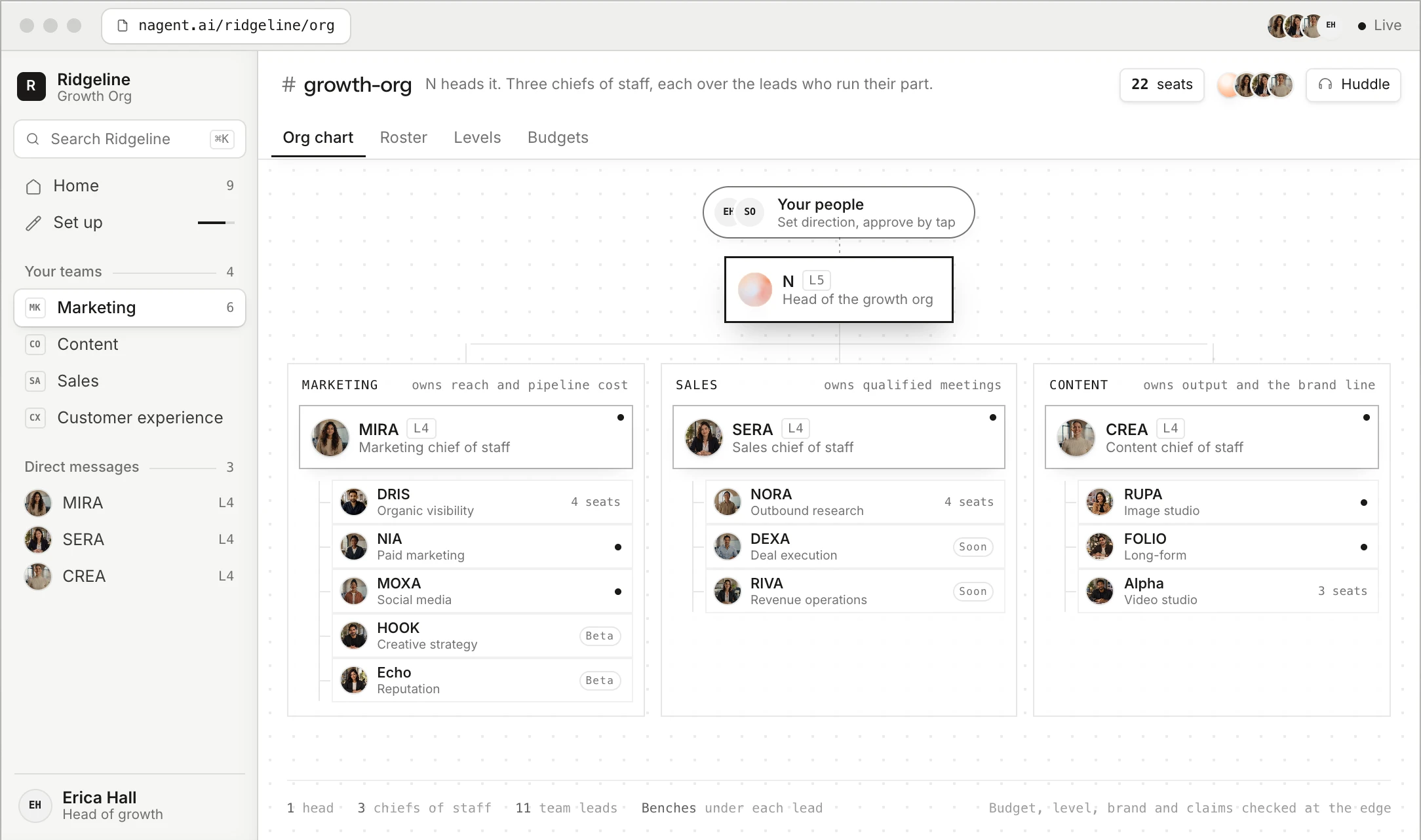
A real org chart, not a list of bots.
N
Head of the growth org
One N for the whole org. It takes every ask, hands it to the chief of staff who owns it, and brings the work back with what needs a yes.
AI CHIEF OF STAFF
Owns a department’s number
MIRA for marketing, SERA for sales, CREA for content. Decides what the week is for, routes work to its owner and reports back against the target.
TEAM LEAD
Runs one part of the department
DRIS, NIA, HOOK, NORA and the rest. Each has a room of its own and a bench, puts tasks on the board and calls a meeting when one view is not enough.
SUB-AGENT
A specialist seat on a bench
Does one kind of work, deeply, and hands the result back to its lead, never sideways. Seated, levelled and budgeted like any agent.
THE PEOPLE
Hold the authority
Organisation admins, team leads, members and viewers sit in the same rooms, approve on the card, and decide every step up an agent takes.
Every agent has a name, a role, someone it reports to, a level it has earned, a budget, memory, tools, an address and a voice. What makes them a team is the line between them.
01 · MULTIPLAYER AI FOR GROWTH TEAMS
8
THE GROWTH ORG
Three departments, each with its chief of staff and its team leads.
N Head of the growth org
MARKETING · Owns reach and pipeline cost
MIRA
AI Marketing Chief of Staff
DRIS Organic and AI search
NIA Paid media
HOOK Creative strategy
Echo Reputation
MOXA Social media
SALES · Owns qualified meetings
SERA
AI Sales Chief of Staff
NORA Outbound research
DEXA Deal execution
RIVA Revenue operations
CORA The agentic CRM
CONTENT · Owns output and the brand line
CREA
AI Content Chief of Staff
RUPA Image studio
Alpha Video studio
FOLIO Long-form
Every team lead has a room of its own and sub-agents on its bench, for example HOOK’s SCOUT, ANGLE, SCRIPT and GATE, or Alpha’s ADS, UGC and AVATAR. Customer experience runs on Convexa, on its own subscription. Custom agents and teams are built from one sentence.
01 · MULTIPLAYER AI FOR GROWTH TEAMS
9
MARKETING · OWNS REACH AND PIPELINE COST
Six marketing agents under one chief of staff.

MIRA AI Marketing Chief of Staff
Takes the outcome as a brief, plans it and hands each piece to the AI teammate who owns it. Owns the marketing number.

DRIS Organic and AI search · Asks ChatGPT, Claude, Gemini, Perplexity and Grok what buyers ask, scores every page and drafts the fixes.

NIA Paid media · Runs ads across Google Ads, Meta Ads and ChatGPT ads. Every live change waits for a person.

HOOK Creative strategy · Turns a brief into angles, hooks and scripts, and checks every claim against the company’s proof.

Echo Reputation · Reads reviews into cases and checks what answer engines say about the company against approved facts.

MOXA Social media · Leads organic social, community and creators, from the weekly plan to the published post.

The number it owns
Reach, and the cost of pipeline: rankings and AI citations, paid results, creative that converts, reputation and social.
What waits for a person
Every live ad change, every publish and every public reply waits for a person until the agent has earned the level to act alone.
Where it works
The Marketing room: people and agents on one thread, board and record. Each lead has a room of its own.
01 · MULTIPLAYER AI FOR GROWTH TEAMS
10
SALES · OWNS QUALIFIED MEETINGS
SERA keeps the pipeline true. NORA fills the funnel; CORA runs the CRM.

SERA AI Sales Chief of Staff
Leads Sales, the department that owns qualified meetings. Keeps the pipeline true and reports where every deal stands from the CRM, not from memory.

NORA Outbound research · Finds accounts that fit the ideal customer profile, researches each into a sourced dossier, drafts the first email and hands a qualified meeting to a person.

DEXA Deal execution · Picks up where NORA stops. DEXA remembers, prepares, papers and follows through; the account executive talks, judges and closes.

RIVA Revenue operations · Keeps the pipeline true. Measures, flags and reports, and names the deals that break the hygiene rules the team agreed.

CORA The agentic CRM · Leads the CRM team that carries deals from first touch to a kept customer. A rep and an agent look at the same lead, the same stage and the same email thread.
The number it owns
Qualified meetings handed to a person, and a pipeline whose stages, values and next steps are read from the CRM, never from memory.
What waits for a person
Nothing is sent to a prospect without a person’s approval. A person takes the meeting, judges the deal and closes it.
Where it works
The Sales room: people and agents on one thread, board and record. Each lead has a room of its own.
01 · MULTIPLAYER AI FOR GROWTH TEAMS
11
CONTENT · OWNS OUTPUT AND THE BRAND LINE
CREA drafts from the Knowledge Hub and routes the craft.

CREA AI Content Chief of Staff
Researches, drafts and reviews from the company’s Knowledge Hub, and publishes only when a person approves.

RUPA Image studio · Renders to a preset with the brand guidelines attached by default, and shows what was sent with every render.

Alpha Video studio · Plans video to a preset, quotes it before anything renders, and waits for a person to approve the storyboard.

FOLIO Long-form · Turns the company’s own documents into an illustrated publication, as PDF and DOCX, in the company’s voice.
P
PAIGE Decks and documents · Drafts presentations and PDF documents from the company’s own knowledge, in its own theme, ready to edit and export.
L
LANDON Landing pages · Writes on-brand landing pages from a brief and the brand book. A person presses Publish, and every lead lands in the CRM.
N
NOVA Newsletters · Turns a one-line brief into a finished, on-brand newsletter issue from the company’s own knowledge, then waits for a person to press Send.
B
Blog Studio Blog posts · Give it a topic. It researches, drafts, edits, reviews, illustrates and links a post from the company’s own material, then waits for a person to approve it.
The number it owns
Output on the brand line: pages, posts, images, films, publications, decks and newsletters, each with its sources.
What waits for a person
Publishing, sending and every paid render wait for a person. A drafted voice reaches agents only once confirmed.
Where it works
The Content room: people and agents on one thread, board and record. Each lead has a room of its own.
01 · MULTIPLAYER AI FOR GROWTH TEAMS
12
CUSTOMER EXPERIENCE · OWNS CONVERSATIONS
Convexa answers every customer, with a person one tap away.

Convexa Conversations that act
Answers customers in chat, voice and video, books meetings, solves what it can and passes the rest to the team. It tells customers it is AI, and the team can step into any conversation.
Answers only from what is approved. A person approves the list of answers and the rules for when a conversation goes to the team. Nothing changes until it is approved.
Says it is AI. In its first message, every time.
Asks the agreed questions. Team size, use case, timeline, or whatever the team agreed, before it qualifies a buyer.
Books the meeting. When a buyer is a good fit, books it and attaches the transcript for the owner.
Passes to a person. When a customer asks for a person, or a question goes beyond what it may answer, with the full transcript.
Hands buyers to Sales. A real opportunity from a chat is passed to SERA’s team.
The number it owns
Every customer who reaches out gets an answer, from approved content only, with a person one tap away.
What waits for a person
The answers and the hand-off rules are approved by a person before anything goes live. A custom request goes to a named owner.
Where it works
The Customer experience room: people and agents on one thread, board and record. Each lead has a room of its own.
01 · MULTIPLAYER AI FOR GROWTH TEAMS
13
THE WORK
From a sentence to a finished file, in steps the team can watch.
01
Brief
A person names an agent with @ and describes the outcome in one line.
→
02
Plan
The lead splits the work into jobs, one per teammate, up to six from one message.
→
03
Act
It reads the Knowledge Hub, uses its tools and lists each step as it goes.
→
04
Check
A call beyond its level waits on a card for a person. Budgets are checked first.
→
05
Deliver
The lead reviews the parts and posts one file to accept or send back.
What the room shows while it works “Choosing who takes this” · “Looking up …” · “Reading what came back” · “Writing the answer” · “Waiting on an approval”
Repeatable work becomes a workflow. Built from one sentence, test run on a free model, then kept on a schedule. It starts in the room and posts back to it, with its own spending cap.
01 · MULTIPLAYER AI FOR GROWTH TEAMS
14
HOW WORK MOVES
Down the line, and back up it. Nothing is lost between.
01
Ask
A person asks N or a chief of staff for an outcome, in one line. Once confirmed, it is a task.
→
02
Route
The chief decides who owns it, and the thread says so: “Passing this to DRIS”.
→
03
Hand over
The piece carries its owner, what done looks like and what it waits on, under the receiver’s own level.
→
04
Work and return
The lead briefs its bench. Each seat hands its result back up the line, never sideways.
→
05
Decide
One answer comes back. What spends money or speaks for the company waits on a card.

A handoff never widens what an agent may do
Handed work runs under the receiving agent’s level and budget, never the sender’s.

Bounded by design
Every hop is checked against the receiver’s budget, and one message pulls in at most three more teammates.

Up to a person
What needs a person’s decision is raised as an escalation and lands in the Inbox. A person can take a case over and later return it.
01 · MULTIPLAYER AI FOR GROWTH TEAMS
15
AGENT MEETINGS
The team and its agents at one table, on the record.
01
Called
The lead calls it, a person presses Huddle, or a long thread offers to take it to a meeting.
→
02
Seated
Agents take their seats. Each person is told once: in the room, by calendar invite, or by email.
→
03
Worked through
Agents check the board first, then speak only to add something new. People speak, vote and answer.
→
04
Minuted
The lead writes decisions and who agreed, action items with owners, and dissents with reasons.
→
05
Landed
Tasks go on the board marked From a meeting, decisions on the decision log.

Disagreement is required
A contested item needs every agent’s position, and the strongest argument against it, before the minutes.

People steer as it runs
Speak, address a teammate with @, vote Agree, Dissent or Abstain. When the lead needs a call only a person can make, it asks with options to press.

Ends on a fixed budget
A meeting ends when its budget is spent, a whole round passes with nobody speaking, or every action item is accepted.
01 · MULTIPLAYER AI FOR GROWTH TEAMS
16
MEET N
One teammate every person talks to. N does the routing.

Talks or types
N speaks its replies and listens, in English or in the language detected, and typing works throughout. By email, phone call, Slack or the platform.

Briefs the right chief
Marketing work goes to MIRA, sales work to SERA and content work to CREA, and each hands it to the agent who owns it.

Brings the work back
Finished work returns to the person who asked, on a card to approve. Typing yes never approves it; nor does a phone call.

Keeps a daily rhythm
A brief every weekday morning and a close of the day each evening. If nothing moved, N says so in one line.

Sets up the workspace
During onboarding N runs the set-up as a conversation, saving each detail as it goes, with Undo on every saved card.

Keeps each person’s context private
Admins see that N worked and what it cost, not what was said. Each person can see, edit or delete what N keeps about them.
01 · MULTIPLAYER AI FOR GROWTH TEAMS
17
ILLUSTRATIVE · A PRODUCT LAUNCH
One launch brief, and the whole growth org carries it.
01 · BRIEF
N and MIRA
The head of growth asks N for the launch. MIRA plans it from the Knowledge Hub and puts one task per owner on the board.
02 · MAKE
CREA, RUPA and Alpha
CREA drafts the launch page and emails. RUPA renders the key visuals; Alpha quotes the launch film in credits before anything renders.
03 · FIND THE GAPS
DRIS
Asks the answer engines what buyers ask about the category, finds where the company is not cited and drafts an answer page.
04 · SPEND
NIA
Builds the paid plan paused across Google Ads and Meta Ads. Each change waits for a person; each paid call is checked against caps first.
05 · PUBLISH
MOXA
Drafts the week’s posts in the confirmed voice. They wait for a tap until MOXA earns L5, where posts publish on their own.
06 · PIPELINE
SERA and NORA
NORA researches the accounts the launch should reach and drafts the first email. SERA reports where each deal stands, from the CRM.
The enterprise’s people decide throughout: they open each file, accept it or send it back with a reason, and approve anything that spends money or speaks for the company.
ILLUSTRATIVE · 01 · MULTIPLAYER AI FOR GROWTH TEAMS
18
PART 02
Platform capability.
The control plane under every agent, the knowledge and memory they read, the tools and models they use, and what a person can check.
TECHNICAL ARCHITECTURE
The control plane over everything, and the room on top.
THE ROOM
People and agents in team rooms: one thread, one board, one record. The Growth Org room above the team rooms, and N above every team.
THE AGENT TEAMS
N · AI chiefs of staff · Team leads · Sub-agents · Custom agents and teams built from a sentence
THE PLATFORM
One organisation context · Orchestration · Composable agents · Skills · Tools and connectors · Models · Memory
THE CONTROL PLANE
Levels · Approvals · Roles · Budgets · The append-only record. Enforced on every action, in every deployment.
The same stack in every deployment. Nagent cloud, a private VPC or on premise run the same platform and the same control plane; only where it runs and whose keys it uses change.
02 · PLATFORM CAPABILITY
20
CONTROL PLANE
Every action is checked before it runs, not after.
01
The agent proposes
It writes down what it wants to do, on what, and with which inputs.
→
02
The action is classed
From C1 Read up to C5 Publish, or Locked.
→
03
The checks run
Its level, the governance profile and its budget. The strictest wins.
→
04
Fire, queue or refuse
It runs, waits on a card for a person, or stops.
→
05
It lands on the record
With its trigger, target, cost and outcome.

Always runs
Pure reads, which change nothing and spend nothing.

Always waits
Deleting, governance changes and spending past a cap, at every level.

Who decides
An Organisation admin, or a Chief of staff or Team lead where the work belongs. A Member sees the card but cannot decide.
02 · PLATFORM CAPABILITY
21
EARNED AUTONOMY
Every agent holds a level, and a person decides it.
L1
Observe
Reads and reports. Anything it would write, even a draft, waits.
L2
Assist
Reads and drafts on its own. Changes to shared records wait.
L3
Operate
Changes workspace records on its own. Anything outside waits.
L4
Represent
Acts outside the workspace, such as emailing a contact. Publishing waits.
L5
Lead
Publishes on its own where the agent’s rules allow it. Deleting and governance always wait.

Nominated on its record
After thirty days at its level, with at least twenty five of its cards decided and almost none dismissed, an agent is nominated for the next level. A person decides.

Up one step at a time
A level only ever rises one step, by a person allowed to raise it. On Enterprise, a raise to L5 also needs a second person.

Down when the work slips
Each night the record is read again. Too many dismissed cards, too many errors, or thumbs down from several people drops an agent one level.
02 · PLATFORM CAPABILITY
22
SIX CONTROLS
Six controls, and a person decides what matters.

Levels an agent earns
L1 Observe to L5 Lead. A level rises one step at a time, and a person decides each step.

Actions sorted by risk
Six classes, from reading to publishing. Locked actions wait for a person at every level.

One card for every decision
It names the agent, the action, its cost, its risk and who may approve it. Approvable from the room, the Inbox or an email.
Approvers by role
An Organisation admin, Chief of staff or Team lead decides. A Member sees the card but cannot. Roles are held on a team, a department or the whole organisation.
Budgets checked first
Daily and monthly caps in credits for each agent, checked before every paid call. Each agent reads Healthy, Approaching cap, Exceeded or Paused.

Pause, stop and read back
A pause holds the very next action. Every job’s steps open with their input and result, and Stop is always to hand.
02 · PLATFORM CAPABILITY
23
KNOWLEDGE HUB
The company tells its agents once. Every agent reads it first.
01
Website
Nagent reads the site, the pages that say what the company sells first.
→
02
Customer
A few sentences on who buys. Nagent works out the rest.
→
03
Products
Drafted from the site or a file. A person makes the right ones active.
→
04
Brand
The voice is drafted from the site, read, then confirmed.
→
05
Documents
What the site does not carry: decks, price sheets, research, a facts sheet.

Takes material in any form
Text, a link, a deck, a sheet or a PDF, a video of up to two hours, and a facts sheet of claims agents must get right.

Reaches agents only once confirmed
Drafted products wait in a review queue and a drafted voice waits for a person. Until then, agents write neutral copy.
Turns gaps into documents
Questions agents could not answer are grouped by topic, and one press drafts an answer from the company’s own documents, citing each.
02 · PLATFORM CAPABILITY
24
MEMORY
Agents propose what they learned. People decide what is kept.

Knowledge Hub
Products, customers, voice, rules and documents. Every agent reads it before it works.

Team memory
The team’s handbook and record, so the second agent knows what the first one learned. Built at team, department and workspace level.

Agent memory
Each agent keeps what worked and what failed, and keeps it even when it is paused or stopped.
01
Read
First it reads the Knowledge Hub, team memory and its own memory.
→
02
Work
It answers and drafts from that record, and lists the sources it used.
→
03
Propose
When it notices something worth keeping, it proposes a learning on a card.
→
04
Decide
A person chooses Promote or Keep it out, in the room or the Inbox.
→
05
Share
Every agent on the team reads it from its next reply.
Only a person can promote. An agent cannot write its own way into the team’s memory. Revert takes a line back out; it stays on the record, struck through. Reading the Hub and memory draws no credits.
02 · PLATFORM CAPABILITY
25
SOURCES AND TOOLS
Every fact an agent uses has a source a person can see and control.
01 · WHAT THE COMPANY GIVES
The Knowledge Hub
Documents, website pages kept in step by re-crawl, the customer profile, products, brand and assets, and a facts sheet with each claim’s value, source, date and owner.
02 · CONNECTED ACCOUNTS
Eight hundred connectors, granted per agent
From the CRM to the ads consoles, Search Console and analytics. Each action is ticked by hand, narrowed to named agents, and revoked in one click.
03 · SOURCE WATCH
The market, read every day
Feeds, pages, news searches and social accounts CREA reads daily, scored against the company’s buyers and themes, with a digest posted to its room.
04 · WHAT AI ENGINES CITE
The sites answer engines rely on
DRIS asks the answer engines what buyers ask and records which sites they cite, beside the company’s own citation share.
A figure with no source is dropped. Answers in the room carry sources a person can open, and what an agent could not answer lands in Gaps for the team to fill.
02 · PLATFORM CAPABILITY
26
AGENTIC CAPABILITIES
Six things our agents do that a chat window cannot.

Plans the brief
The lead splits a request into jobs, up to six from one message, and reviews each part before it comes back.

Works in the company’s own accounts
Only the actions a person ticked, narrowed to the agents that need them.
Runs long work in the background
Jobs of up to two hours, every step on a card, with Stop always to hand.

Wakes on its own
A schedule, an event in a connected tool or a signed webhook starts the work.
Repeats a workflow exactly
Built from one sentence, test run on a free model, then kept on a schedule with its own spending cap.

Follows written skills
Plain procedures a person can read. Change one and every agent carrying it follows.
Reached like a colleague: by email, phone call, Slack, the Nagent platform, or by API and MCP from the enterprise’s own systems. Every way in keeps the same level and the same approvals.
02 · PLATFORM CAPABILITY
27
AGENT CONFIGURATION
One sentence starts an agent. Its own page keeps it in shape.
01
Start from a team
Seat the marketing, sales or content team, or write a charter for a new one.
→
02
Describe the agent
One line in plain words. The builder asks a few questions, each with a recommended answer.
→
03
Review the draft
Tools, skills, triggers and guardrails, field by field. Nothing exists until Provision agent.
→
04
Tune its page
Instructions, skills, tools, level and budget, each on a tab of the agent’s own page.
→
05
Extend the team
Add agent from the member list. It joins at its own level, with its own tools and budget.
Prebuilt or built
Seat a department whole, add one lead at a time, or form a team from a blank charter. Ask the Build AI Team chat for a whole team in one message; nothing is built until a person approves it.

Tools narrowed per agent
Each action of a connected tool is chosen one at a time and narrowed to the agents that need it. Tools, caps and rosters need an admin.
A voice and a brief of its own
Each lead speaks in its own voice, has an email address of its own, and reads the Knowledge Hub and its team’s charter before every run.
02 · PLATFORM CAPABILITY
28
MODELS AND KEYS
The model is a setting. The tools are a grant.
Every frontier model, routed per agent
Each agent runs on the model that fits its work, through one layer that falls back when a key is exhausted and prices every call against the agent’s budget.

Bring your own model and keys
Enterprise runs its own keys through the same router, with the same budget guard. Unlimited credits on the enterprise’s own key; Nagent works with any LLM.
Open-weight models inside the perimeter
In a private VPC or on premise, an agent’s model can be an open-weight model served inside the enterprise’s perimeter, routed through the same layer and held to the same ladder.

An Anthropic partner
Nagent is an Anthropic partner. Enterprise agreements with model providers plug into the same router, so the enterprise’s existing contracts carry over.
Credits, not surprises. Every run is quoted and spent in credits against daily and monthly caps. Need more credits? Top up at any time. Want unlimited credits? Bring your own API key.
02 · PLATFORM CAPABILITY
29
WAYS IN AND OUT
Many ways in, one memory, one record.

The Nagent platform
The room on a desktop, and the same room in a phone’s browser with nothing to install.

Leads and chiefs of staff have an address of their own and send from it: members at once, anyone outside after approval.

Phone call
Call N and talk. N briefs the chief who owns it and brings the work back on a card. A call never approves anything.
Slack
Brief the team from Slack; the whole team room mirrors it. Only admins, chiefs of staff and team leads brief from Slack.

API and MCP
The enterprise’s own systems call agents, and signed webhooks start work. Every way in keeps the same level and approvals.

SDK and developer docs
A TypeScript SDK and a command line for building on the platform, with developer docs at nagent.ai/developers.
02 · PLATFORM CAPABILITY
30
WHAT A PERSON CAN CHECK
Every rule can be seen and checked by a person, any day.

While away
Back after a day or more, the first card on Home says what ran, which agents ran it, what was approved and what waits.

Every firing
Each action’s trigger, target, the agent’s level at the time, and its cost, on the Actions page.

Spend against caps
Each agent reads Healthy, Approaching cap, Exceeded or Paused, today and this month.

Earned autonomy
The ledger shows each agent as healthy, on watch or at risk, and the audit log names every rise and drop with who and why.
Sources under answers
An answer in a thread lists the files it came from, and each one opens. A figure the agent cannot cite is discarded.
The events and decisions logs
Every actor in one append-only log, and who decided what, and why, kept where the agents cite it back. Exportable for audit.
Reviews on a rhythm. At one month, one quarter and one year, what the team did is set against its first week. A sample of what agents did alone comes back to a person to grade.
02 · PLATFORM CAPABILITY
31
PART 03
Deployment options.
The data where it must live. The same platform and the same control plane in every case.
THREE WAYS TO RUN NAGENT
One control plane across all of them.
| Nagent cloud | Private VPC | On premise | |
|---|---|---|---|
| Who it is for | Every plan | Enterprise | Enterprise, regulated estates |
| Where the platform runs | Nagent’s cloud, tenant-isolated, multi-region (US, EU, India) | The enterprise’s own GCP, AWS or Azure account, in the region it chooses | The enterprise’s own data centre; air-gap ready |
| Where the data lives | In the enterprise’s own tenant, in Nagent’s region | Inside the enterprise’s perimeter; custom data residency | Never leaves the building |
| Models | Frontier models through Nagent’s keys | The enterprise’s keys, plus open-weight models served in the VPC | Open-weight models on the enterprise’s GPUs |
| Connectors | Eight hundred connectors ready to grant | The enterprise’s own connectors; VPN or PrivateLink to its systems | Connectors to internal systems |
| Operated by | Nagent, with managed updates and a 99.9% uptime SLA | Nagent with the enterprise’s platform team: prebuilt images, installer, Terraform | The enterprise’s engineers, from prebuilt images and tested releases |
| Time to first agent | Hours | Weeks | Weeks |
03 · DEPLOYMENT OPTIONS
33
PRIVATE VPC
Runs inside the enterprise’s cloud, on the enterprise’s keys.
THE ENTERPRISE’S CLOUD ACCOUNT · GCP, AWS OR AZURE · ITS REGION
The Nagent platform service
One prebuilt image behind the enterprise’s HTTPS load balancer. Agents, rooms, control plane and record, all inside.

Its database
The enterprise’s own cluster
Its secrets
Model and tool keys in its secret store

Its storage
Files and media in its own bucket
Its models
Its keys, or open-weight models served in the VPC
Connectors to the enterprise’s systems over VPN or PrivateLink · SSO through the enterprise’s identity provider · The audit record, readable and exportable by the enterprise

One daily licence check-in
Carries only the licence ID. No usage or business data leaves the enterprise’s cloud.

Installed and upgraded by the enterprise’s engineers
Prebuilt images, an installer, Terraform for GCP and a guide. Tested monthly releases, operated with the enterprise’s platform team.
03 · DEPLOYMENT OPTIONS
34
SECURITY AND COMPLIANCE
Enterprise controls from day one.
Certification
ISO/IEC 27001:2022 certified (InterCert, IC-IS-2609127). SOC 2 Type II programme underway; status and controls summary under NDA. Pen test results available.

Data isolation
Tenant isolation in every deployment. Every enterprise tenant gets isolated infrastructure; data never co-mingles with another customer’s.
Encryption
AES-256 at rest and TLS 1.3 in transit. Keys in the enterprise’s own secret store on private VPC and on premise.
Identity and access
SSO with SAML 2.0 and SCIM provisioning: Okta, Azure AD, Google Workspace or any SAML provider. Five roles, held on a team, a department or the organisation.
Audit
An append-only record of every human and agent action, data access and user change, with who decided and why. Exportable for compliance.

Data protection
GDPR and DPDP aligned, with a data processing agreement, right to erasure, retention controls and configurable regional data residency. BAA for healthcare.
03 · DEPLOYMENT OPTIONS
35
THE ENTERPRISE PLAN
The whole growth org, on the enterprise’s terms.
Every seat, every team
Unlimited seats. The marketing, sales and content teams, plus custom agents and teams built from a sentence.
Own models and keys
Custom credits with top-ups at any time, or unlimited credits on the enterprise’s own API key. Nagent works with any LLM.
Autonomy to L5
Agents may earn L5 Lead. On Enterprise, every raise to L5 needs a second person.

Deployment of choice
Nagent cloud, private VPC on GCP, AWS or Azure, or on premise. Custom data residency.

Dedicated support
A named customer success manager, a dedicated Slack channel, under one hour P1 response around the clock, and quarterly business reviews.

For partners and integrators
A private-label edition: the partner runs its own copy for its customers under its own brand, on an annual licence with per-tenant bands.
Procurement-ready. Standard MSA and DPA on the first call, security questionnaire in 48 hours, custom SLA, purchase order and invoicing, multi-year pricing.
03 · DEPLOYMENT OPTIONS
36
ENGAGEMENT MODEL
From a 30-minute call to a governed pilot in weeks.
01
Discovery call, 30 minutes
We map the highest-value workflows and name the first three agents. A plan is left behind either way.
→
02
Pilot design, one week
Our Agentic AI Lab configures the first team for the enterprise’s stack, in the deployment it chooses.
→
03
Expansion, 30 to 60 days
Roll-out across teams, an internal champion trained, autonomy earned card by card.
→
04
Quarterly business review
A named customer success manager, and the roadmap aligned to the enterprise’s needs.
A bounded pilot
One department, one number, one deployment, with outcomes agreed up front and reviewed at the end.

Forward deployed team
Discovery first, custom agents next. A dedicated implementation team takes the enterprise from discovery to deployment in weeks, not quarters.
Autonomy earned, not granted
The team starts at L2 and earns each level on its record, with a person deciding every step up.
04 · WORKING WITH NAGENT
37
APPENDIX
The agents, one by one.
One slide per agent: what it does, what it delivers, what it connects to, and what waits for a person.
ABOVE EVERY TEAM
N
N
Head of the growth org
The one teammate every person talks to, by voice or by text. N hands the work to the chief of staff who owns it and brings it back for a person to approve.
BRIEFS MIRA, SERA and CREA
What it does
Talks or types
Speaks its replies and listens, in English or in the language detected. Typing works throughout.
Briefs the right chief
Marketing work goes to MIRA, sales work to SERA, content work to CREA, and each hands it to the agent who owns it.
Brings the work back
Finished work returns to the person who asked, on a card to approve. Typing yes never approves it; nor does a phone call.
Keeps a daily rhythm
A brief every weekday morning and a close of the day each evening. If nothing moved, N says so in one line.
Sets up the workspace
During onboarding N runs the set-up as a conversation, saving each detail as it goes, with Undo on every saved card.
Keeps each person’s context private
Admins see that N worked and what it cost, not what was said. Each person can see, edit or delete what N keeps.
Delivers
One answer back for every ask, and a card to approve for anything that would publish or send.
Connects to
Reached by email, phone call, Slack and the platform. Only admins, chiefs of staff and team leads brief from Slack.
Waits for a person
N never approves or rejects work for anyone, and never decides; it routes.
APPENDIX · THE AGENTS · N
39
MARKETING
MIRA
AI Marketing Chief of Staff
Takes the outcome as a brief, plans it and hands each piece to the AI teammate who owns it. Owns the marketing number.
LEADS DRIS, NIA, HOOK, Echo and MOXA
What it does
Plans the outcome
Every item gets an owner, what done looks like and what it waits on.
Routes the work
Hands each piece to DRIS, NIA, HOOK, Echo or MOXA, or straight to HOOK’s bench.
Answers on any screen
“Ask MIRA” on Home, and about any admin page the team has open.
Plans in counts
With no target set, MIRA plans in counts of work instead of guessing numbers.
Cites every number
Every figure in a plan says where it came from.
Owns the number
Reports marketing progress against the target the company sets.
Delivers
Weekly marketing plans and routed tasks, each with an owner.
Connects to
The team’s accounts: Search Console, GA4, Google Ads, Meta Ads, Business Profile.
Waits for a person
The lead who owns a piece keeps its approvals. MIRA’s answers change nothing.
APPENDIX · THE AGENTS · MIRA
40
MARKETING
DRIS
Organic and AI search
Asks ChatGPT, Claude, Gemini, Perplexity and Grok what buyers ask, scores every page and drafts the fixes.
OWNS One number, a target and a date: clicks, impressions, page score or AI answer presence
What it does
Baseline and audit
Sweeps the answer engines and audits the site before proposing anything.
Citation tracking
Follows which pages and sources the engines cite, and where competitors win.
Page scoring
Scores how citable each page is, then writes answer blocks and schema.
AI crawler readiness
Recommends llms.txt and AI crawler rules for the site.
A ranked queue
Ranks the gaps that cost citations, each proposal with its reason.
Feeds CREA
Sends content gaps to CREA as briefs, up to ten a day.
Delivers
Audits, ranked proposals, weekly digests and plain monthly reports.
Connects to
Google Search Console, Google Analytics 4 and a site connection.
Waits for a person
Every proposal and every live-page publish. Index and canonical rules never go autonomous.
APPENDIX · THE AGENTS · DRIS
41
MARKETING
NIA
Paid media
Runs ads across Google Ads, Meta Ads and ChatGPT ads. Every live change waits for a person.
READS Spend, conversions, cost per conversion and return on ad spend
What it does
Builds from a brief
Search, Shopping, Display, Video and Performance Max, built paused.
Checks before launch
Budget ceiling and pace, structure, copy safety, tracking and duplicates.
No tracking, no build
Lead and sales campaigns wait until conversion tracking works.
Finds wasted spend
Diagnoses waste and proposes pause, budget, bid and target CPA fixes.
Moves budget
Recommends where to shift spend between platforms. It only recommends.
Answers in plain English
Account questions answered with charts. HOOK supplies the angles.
Delivers
Campaign plans, paused campaigns, spend diagnoses and dashboards.
Connects to
Google Ads, Meta Ads (Facebook and Instagram) and ChatGPT ads.
Waits for a person
Every live action. A change that commits money goes to a named approver every time.
APPENDIX · THE AGENTS · NIA
42
MARKETING
HOOK
Creative strategy
Turns a brief into angles, hooks and scripts, and checks every claim against the company’s proof.
BENCH SCOUT, MINE, ANGLE, SCRIPT, GATE, PACK, PULSE and VAULT
What it does
Brand pack first
Voice, buyer profile, claims with their proof, and banned language.
Swipes and teardowns
Keeps a swipe library and tears down competitor ads.
Briefs with kill conditions
Every creative bet states what would end it.
Hooks and scripts
Hook sets and scripts with shot lists, ready for RUPA and Alpha.
GATE claim check
Blocks unsupported claims. Overriding a block needs a second person.
Learns from winners
Ranks winners against the company’s own ads over 90 days and plans refreshes.
Delivers
Briefs, hook sets, scripts and packs: Meta 9:16 and 1:1, TikTok Spark, Google RSA.
Connects to
Meta Ads (read only), Google Ads through NIA, and Meta, Google or TikTok exports.
Waits for a person
Ad library searches and teardowns. HOOK cannot launch, pause, or change a budget or bid.
APPENDIX · THE AGENTS · HOOK
43
MARKETING
Echo
Reputation
Reads reviews into cases and checks what answer engines say about the company against approved facts.
BENCH LOCAL, REVIEWS, APPS, SHOP, EMPLOYER and SOCIAL
What it does
Approved facts
Each fact the company stands behind carries a version, an owner and an expiry.
Reviews become cases
Hourly reads open cases with the issue, risk, owner and due time.
Answer engine checks
Samples up to three engines weekly and marks each claim accurate or not.
Findings by severity
Every finding is graded, so the team fixes the worst first.
Reply drafts
Drafts replies. Reviews it grades sensitive go straight to a person.
Weekly digest
Separate measures for claims, inclusion and source coverage, never one vague score.
Delivers
Cases, findings, reply drafts and weekly digests.
Connects to
Google Business Profile, plus marketplaces, app stores, Trustpilot, Reddit and more.
Waits for a person
Every public word. Echo has no send path, and there is no approve-all.
APPENDIX · THE AGENTS · ECHO
44
MARKETING
MOXA
Social media
Leads organic social, community and creators, from the weekly plan to the published post.
WORKS WITH HOOK for hooks, RUPA for images and Alpha for video
What it does
Weekly plans
Plans each channel to its own cadence.
One message, every channel
Writes master copy and cuts it for each channel.
Five-check review
Voice, claims, consent, channel fit and community rules before anything posts.
Scheduled publishing
Posts on time, reads each post back and records its permalink.
Listening and crisis hold
Watches the conversation and holds the calendar when something breaks.
Creator desk
Runs creator work with disclosure checks.
Delivers
Channel plans, published posts, creator briefs and outcomes per channel.
Connects to
Instagram, Facebook, LinkedIn, X, YouTube, TikTok, Pinterest and Reddit.
Waits for a person
Every spend. Posts wait for a person until MOXA earns L5. Community no-gos never bend.
APPENDIX · THE AGENTS · MOXA
45
SALES
SERA
AI Sales Chief of Staff
Leads Sales, the department that owns qualified meetings. Keeps the pipeline true and reports where every deal stands from the CRM, not from memory.
LEADS NORA, DEXA, RIVA and CORA
What it does
Leads the Sales room
A message addressed to nobody reaches SERA. Ask where the pipeline stands, what a stuck deal needs, or who should take a piece of work.
Routes to the owner
NORA finds and researches prospects and runs first outreach. The email writers draft to leads in the CRM and to first-touch prospects.
Reads the CRM, never memory
Stage, count, value and age come from the CRM digest in the team record. Where the record is silent, SERA says what is missing.
Unsticks deals
For a stuck deal, names the next step and who owns it.
Hands a meeting to a person
A booked meeting goes to a named person, who owes an acknowledgement.
Keeps trust where it belongs
Work SERA hands over runs under the receiving teammate’s own level, never SERA’s.
Delivers
Pipeline status from the record, routed sales work, and the next step on every stuck deal.
Connects to
The CRM and the Sales room. Named deals only for people who may read leads.
Waits for a person
Sending is never started from a room. Outreach waits for a person’s approval; nurture steps are drafted for a rep to review.
APPENDIX · THE AGENTS · SERA
46
SALES
NORA
Outbound research
Finds accounts that fit the ideal customer profile, researches each into a sourced dossier, drafts the first email and hands a qualified meeting to a person.
BENCH Researcher, Signal scout, Copywriter, Sequencer
What it does
Discovery
Finds companies that match the active customer profile, scores each one, and records which profile produced the score and when.
Research
Deepens a company it found: the people, the signals and a dossier.
Drafting
Writes the first-touch email from what the workspace knows about itself, and rewrites it on request.
Sending, only after approval
Sends a draft only after it has been approved, and checks the approval again immediately before it leaves.
Hand-off
When a company qualifies, books the meeting and hands a dossier to a named person, then records the outcome.
Qualified leads only
Counts a lead in the CRM only when the four qualification questions are answered with evidence.
Delivers
Scored accounts, dossiers, approved first-touch emails and booked meetings with a named owner.
Connects to
The CRM, the mailbox it sends from, and six screens: Today, Review, Prospects, Outreach, Results, Settings.
Waits for a person
A draft nobody approved is refused with “Approve before sending”, whatever its level. NORA does not close deals or set its own target.
APPENDIX · THE AGENTS · NORA
47
SALES
DEXA
Deal execution
Picks up where NORA stops. DEXA remembers, prepares, papers and follows through; the account executive talks, judges and closes.
REPORTS TO SERA
What it does
The buying committee
Who holds each seat, and whether anybody has spoken to them.
Qualification
Pain confirmed, budget owner, timeline stated and decision process, each with its evidence.
The next commitment
What happens next, who owes it, and by when.
The papers
Drafts such as an order form, for a person to approve and send.
Risks
A deal held by one person past an early stage, a deal with no next step, gaps in qualification, a close date that has passed.
The discount band
A paper inside the band is the account executive’s to approve; above it, the head of sales.
Delivers
Deal records kept in order, next commitments, draft papers and risk flags.
Connects to
The CRM and Sales settings, where the discount band lives.
Waits for a person
DEXA never sends anything on its own, and never moves the figures it is judged by. Sending, pricing and closing stay with people.
APPENDIX · THE AGENTS · DEXA
48
SALES
RIVA
Revenue operations
Keeps the pipeline true. Measures, flags and reports, and names the deals that break the hygiene rules the team agreed.
REPORTS TO SERA
What it does
Pipeline truth
Open deals per stage and what they are worth, which stages have gone quiet, and how long a deal sits in a stage.
Hygiene
Every rule checked on every sweep, including the rules that found nothing, so a clean pipeline is proved, not assumed.
Stalls
Deals whose stage has not changed for longer than the threshold, with the days elapsed.
Credits used
What the workspace used this month against its allowance, in credits.
The stall threshold
Starts at five days, and any stage can have its own, from the CRM’s own stages.
Separated on purpose
The one seat on the team that cannot change a deal, so it cannot tidy away the problems it reports.
Delivers
Pipeline reports, hygiene sweeps and stall lists, by deal name.
Connects to
The CRM and Sales settings. Read only.
Waits for a person
RIVA edits nothing. Keeping the truth and acting on it are separated by design.
APPENDIX · THE AGENTS · RIVA
49
SALES
CORA
The agentic CRM
Leads the CRM team that carries deals from first touch to a kept customer. A rep and an agent look at the same lead, the same stage and the same email thread.
COMES WITH Every workspace, as the CRM team room
What it does
One pipeline, people and agents
When an agent moves something, the record says so; when it wants to write to a lead, the draft waits for a person first.
Leads, list or board
Every lead with its company, intent and stage; drag a card to move it. Filters by intent, stage, source, owner and date.
Four ways in
Type a lead, paste a thread for quick intake, import up to 5,000 contacts, or let forms, the chatbot and booking links feed it.
Fair ownership
A new inbound lead goes to the sales or admin member with the fewest open leads; never to anyone outside the workspace.
Content attribution
Which pages, posts and comparison pages produced leads, bookings and wins, and what sent the visitor.
In every room
The same list opens as a CRM tab inside the CRM team room and the Sales room.
Delivers
A pipeline every person and agent works on the same record, with history, owners and attribution.
Connects to
Website forms, the chatbot, booking links, spreadsheets and the reps’ own mailboxes.
Waits for a person
Every email to a lead is drafted for a person and sent from the rep’s own mailbox after approval.
APPENDIX · THE AGENTS · CORA
50
CONTENT
CREA
AI Content Chief of Staff
Researches, drafts and reviews from the company’s Knowledge Hub, and publishes only when a person approves.
LEADS RUPA, Alpha, FOLIO, PAIGE, LANDON, NOVA and Blog Studio
What it does
Grounded drafts
Every draft reads the brand profile, products, brand book and Knowledge Hub.
Blog Studio
Draft, polish, review, illustrate, internal links and SEO audit, with a live feed.
Beyond blogs
Writes briefs, articles, emails, social posts and scripts.
Closes search gaps
Turns the content gaps DRIS finds into briefs and drafts.
Routes the craft
Images to RUPA, video to Alpha, publications to FOLIO, decks to PAIGE, pages to LANDON.
Shows its sources
Every post carries a Sources section.
Delivers
Blog posts with sources, briefs, emails, social posts and scripts.
Connects to
Google Drive into the Knowledge Hub, and a site connection.
Waits for a person
Publishing, scheduling and sending. The editorial check at publish fails closed.
APPENDIX · THE AGENTS · CREA
51
CONTENT
RUPA
Image studio
Renders to a preset with the brand guidelines attached by default, and shows what was sent with every render.
TAKES BRIEFS FROM CREA, HOOK and MOXA
What it does
22 presets in seven groups
From paid and organic social to product photoshoots and editorial.
Brand Lock
Guidelines on every render, with the real logo placed as an image.
References with intent
Match a style, reproduce a layout, change a headline, localise or remix.
Up to ten inputs
Combines up to ten images in a single render.
Plate tools
Ad set, restyle, relight and cut out.
Brand check
Flags anything it cannot verify for a person’s eye.
Delivers
Ad creatives, social posts, carousels, product shoots, brand, email and landing visuals.
Connects to
The Knowledge Hub and the Asset Library, where every finished plate lands.
Waits for a person
Nothing renders until a person clicks “Approve and run”. Budget is checked first.
APPENDIX · THE AGENTS · RUPA
52
CONTENT
Alpha
Video studio
Plans video to a preset, quotes it before anything renders, and waits for a person to approve the storyboard.
NEVER Touches an ad account. Launching stays with NIA and a person
What it does
Eight stages
Slate, board, cast, route, render, cut, proof and reel.
Native ratios
Each aspect ratio is rendered natively, not cropped.
On-brand finish
Templates for captions, logo and end card.
Personas and twins
Digital twins only with a written release from the person.
Cheap variants
Swap the hook or call to action, resize, or change the language.
Provenance
Content Credentials on every cut.
Delivers
UGC video ads, product ads, organic social, demos, presenter and long-form video.
Connects to
Desks: ADS, FEED, AVATAR, TWIN, UGC, LENS, FASHION and DEMO.
Waits for a person
Any cap overrun, any real likeness and every finished cut. Storyboards too, until Alpha earns trust.
APPENDIX · THE AGENTS · ALPHA
53
CONTENT
FOLIO
Long-form
Turns the company’s own documents into an illustrated publication, as PDF and DOCX, in the company’s voice.
BENCH Ingestor, Architect, Writer, Artist, Compositor and Publisher
What it does
Twelve publication types
Thought leadership, brand book, research report, listicle, comparison and more.
Source-ranked chapters
Ranks the company’s source passages for every chapter.
Brand rules first
Brand rules outrank tone in every chapter.
Comparisons
Two to six subjects side by side, with numbered sources.
Illustrated
Up to three illustrations in each chapter.
Estimate first
Shows the cost estimate before anything runs.
Delivers
PDF and DOCX publications, a knowledge asset, and an optional gated lead magnet.
Connects to
Knowledge Hub documents only, so every claim traces to the company’s own sources.
Waits for a person
A person presses Promote on the finished book. FOLIO never runs on a schedule.
APPENDIX · THE AGENTS · FOLIO
54
CONTENT
P
PAIGE
Decks and documents
Drafts presentations and PDF documents from the company’s own knowledge, in its own theme, ready to edit and export.
REPORTS TO CREA
What it does
Thirteen purposes
From sales pitch and proposal to board report, training and event brief.
Grounded drafts
Up to ten Knowledge Hub documents, department knowledge and a named presenter or author.
Eleven layouts
Title, key numbers, quote, table, timeline and closing call to action, among others.
Page-by-page rewrites
“Ask PAIGE to rewrite this page” redoes one page and leaves the rest alone.
A brand theme
Colours, fonts and logo come from the brand guidelines, with speaker notes on every page.
Canvas slides
A deck’s own HTML design is kept exactly, beside PAIGE’s own layouts.
Delivers
Decks and documents as PDF, PowerPoint and print, each a button a person presses.
Connects to
The Knowledge Hub, the brand guidelines and the presenter profile.
Waits for a person
Drafts stay drafts. Only a person moves a deck from draft to ready.
APPENDIX · THE AGENTS · PAIGE
55
CONTENT
L
LANDON
Landing pages
Writes on-brand landing pages from a brief and the brand book. A person presses Publish, and every lead lands in the CRM.
REPORTS TO CREA
What it does
Drafts from a brief
Eight goals, an optional template, and up to ten Knowledge Hub documents to ground on.
Wears the brand
Colours, fonts and logo from the brand book, with a theme for one page when a campaign needs it.
Rewrites one block
A person says what a section should say, and LANDON redoes that section alone.
Builds the form
Name, work email, phone, company, role and message, with a success message and consent text.
Sets up search
URL slug, SEO title, meta description, a social share image and a switch to hide from search.
Serves on the company’s domain
Through the site connection, or as a package of plain HTML to host anywhere.
Delivers
Published landing pages whose leads land in the CRM.
Connects to
The site connection, the brand book and the CRM.
Waits for a person
Publishing is always a person’s. Publish, Publish changes and Take offline wait for a person.
APPENDIX · THE AGENTS · LANDON
56
CONTENT
N
NOVA
Newsletters
Turns a one-line brief into a finished, on-brand newsletter issue from the company’s own knowledge, then waits for a person to press Send.
REPORTS TO CREA
What it does
Writes the whole issue
Subject line, preview text, lead story, up to three short items and exactly one call to action.
Grounded in what the company knows
Reads the Knowledge Hub, department goals, team memory and the presenter profile first.
Never invents a fact
No made-up customers, results, quotes, prices or dates. A gap gets a marked placeholder.
In the brand’s look and voice
Brand colours and voice applied to every issue, with the email preview beside the fields.
Pictures from RUPA
On request, RUPA draws the lead story’s picture in the brand’s look, as one paid render.
Built to be sent safely
Every issue ends with an unsubscribe link, filled in for each reader, and goes out once.
Delivers
Finished newsletter issues, previewed as the reader will see them.
Connects to
The Knowledge Hub, team memory and the sending mailbox.
Waits for a person
The send, every time. A person clicks Send and confirms the count. No level lets NOVA send.
APPENDIX · THE AGENTS · NOVA
57
CONTENT
B
Blog Studio
Blog posts
Give it a topic. It researches, drafts, edits, reviews, illustrates and links a post from the company’s own material, then waits for a person to approve it.
REPORTS TO CREA
What it does
Grounded on the brand
Brand profile, products, up to six Knowledge Hub passages, the brand book voice and the booking link.
Nothing made up
With no Knowledge Hub material on a topic, the post goes without it. Internal links are never invented.
The company’s own byline
Every post carries the company’s default author. Drafting waits until one is set.
Three article styles
Search-ready blog, news article or custom. The writer and the reviewer hold every post to the same shape.
Asked for from any room
“@CREA” in any team room becomes a task on the Content board, and the outcome posts back to the thread.
A check before publishing
Fixes dashes and stray headings itself, and holds the post, with a reason, for what only a writer can fix.
Delivers
Blog posts with sources, pictures and internal links, ready for approval.
Connects to
The Knowledge Hub, the site connection and the Content board.
Waits for a person
Every post stops at Approve. A reviewer’s rejection holds a team draft, and no permission skips the publish check.
APPENDIX · THE AGENTS · BLOG STUDIO
58
CUSTOMER EXPERIENCE
Convexa
Conversations that act
Answers customers in chat, voice and video, books meetings, solves what it can and passes the rest to the team. It tells customers it is AI, and the team can step into any conversation.
SOLD On its own subscription, beside the growth org
What it does
Answers only from what is approved
A person approves the list of answers and the rules for when a conversation goes to the team. Nothing changes until it is approved.
Says it is AI
In its first message, every time.
Asks the agreed questions
Team size, use case, timeline, or whatever the team agreed, before it qualifies a buyer.
Books the meeting
When a buyer is a good fit, books it and attaches the transcript for the owner.
Passes to a person
When a customer asks for a person, or a question goes beyond what it may answer, with the full transcript.
Hands buyers to Sales
A real opportunity from a chat is passed to SERA’s team.
Delivers
Answered conversations, booked meetings with transcripts, and hand-offs to a named owner.
Connects to
Website chat, voice and video, the booking calendar and the Sales room.
Waits for a person
The answers and hand-off rules, before they go live. A custom request goes to a named person.
APPENDIX · THE AGENTS · CONVEXA
59
NEXT STEP
A 30-minute call, and a plan either way.
We look at the enterprise’s growth funnel, show the workspace and a room at work, and leave a growth plan, whether the enterprise signs or not.
Pratap Behera, Founder
pratap@nagent.ai · +91 73810 91238

Scan to book a demo
NAGENT.AI · BENGALURU · AN ANTHROPIC PARTNER
←→ to move through the deck, F to present it full screen
60 slides
Open any slide in the player above.