
How to Hand Off Leads From Marketing to AI Sales Agents
To hand off leads from marketing to AI sales agents, put both teams on one lead record, agree in writing what makes a lead ready for sales, send every marketing lead source into that record with an owner, and qualify each lead where sales works it. When marketing needs sales to act on something, hand it over as a written request with its context, not a message someone has to carry. On Nagent, SERA, the AI Sales Chief of Staff, receives that request and routes it.
Why do marketing to sales handoffs break?
The classic handoff fails in three places, and adding AI agents to either side makes each one faster, not better:
Two records. Marketing tracks a lead in one system and sales in another, so the context from the campaign never reaches the rep.
No shared definition. Marketing calls a lead qualified when it downloads something; sales calls it qualified when it has budget and a buyer. Nobody wrote either down.
Handoffs by hallway. Someone in marketing tells someone in sales about a hot account. The note lives in a chat, and a week later nobody remembers who owns it.
The fix is the same with or without agents: one record, one written definition, and a handoff that leaves a trail. What agents change is that the record, the scoring and the trail can be kept for you, if they are set up to be.
Where does SERA sit in the team?
Nagent builds a department like a team you would hire: an AI chief of staff who owns the outcome, team leads who run parts of it, and sub-agents who do the specialist work under each lead. Marketing is led by MIRA, the AI Marketing Chief of Staff, and owns reach and pipeline cost. Sales looks like this (the full model is on The Team):
SERA, AI Sales Chief of Staff. Owns qualified meetings and answers pipeline questions from the CRM.
NORA, team lead, outbound research. Live. Finds, researches and drafts outreach to new accounts, and hands a booked meeting to a person.
Sub-agents, where the workspace holds the lead-generation module: Researcher, Signal scout, Copywriter, Sequencer.
DEXA, deal execution. Coming soon.
RIVA, revenue operations. Coming soon.
Shared writers (Beta). LIPI writes to leads you have already spoken to; VANI writes NORA's first-touch emails.
Inside a department, work moves down the line and back up it: you ask in the room, the chief of staff hands it to the right team lead, the lead briefs its sub-agents, each hands its part back, and the lead brings one answer with anything that needs a person waiting on a card. Sub-agents under one lead never route work to each other.
Between departments, the rule is stricter. Asking another department is a written handoff to that room's lead, not a free-for-all. That rule is the heart of a marketing to sales handoff, and Step 5 shows how it works.
How do you hand leads from marketing to sales, step by step?
These steps assume the Marketing and Sales departments are both hired in one workspace. The pricing page shows which teams each plan includes.
Step 1. Write down what sales-ready means
Before any lead moves, agree the definition, and put it where the software reads it rather than in a slide.
Describe the buyer once. On the Knowledge Hub's ICP tab, write who you sell to in plain sentences and press Work out the targeting. This one customer profile scores leads and prospects alike. See who you sell to.
Set the hot-lead rules. Open Settings, CRM. Under Hot-lead rules, set the Minimum intent, the ICP bands and the Recent-reply window that make a lead show as hot.
Set the escalation line. Under Currency & escalation, set the Escalation threshold: the deal value above which a lead escalates to a person.
Fit the stages. Under Pipeline stages, rename and reorder the thirteen stages so both teams use the same words. Each stage's kind, open, won or lost, is fixed, and adding or removing stages is not available yet. Press Save changes.
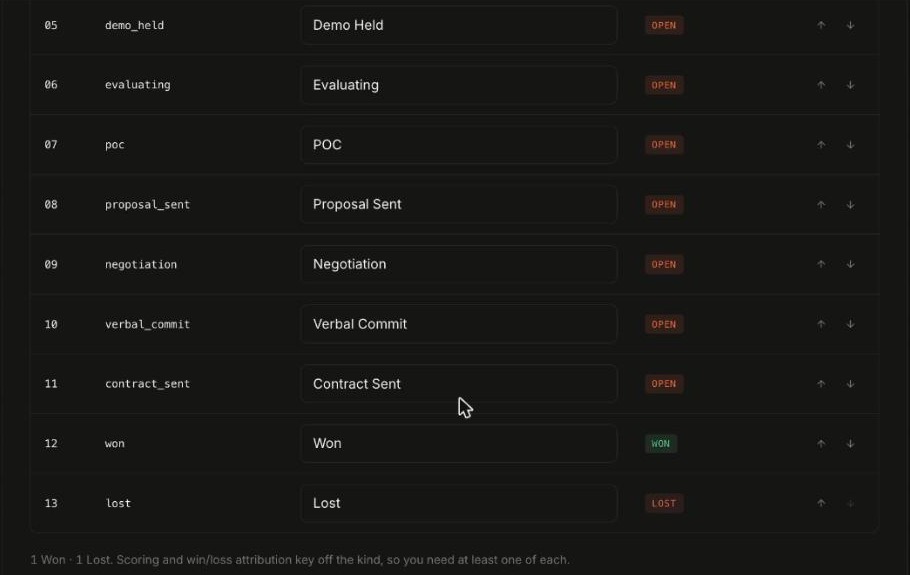
The note under the table matters for a handoff: scoring and win and loss attribution key off each stage's kind, so keep at least one Won and one Lost stage. Now "sales-ready" is a rule the record applies to every lead, not an argument.
Step 2. Send every marketing lead source into the CRM
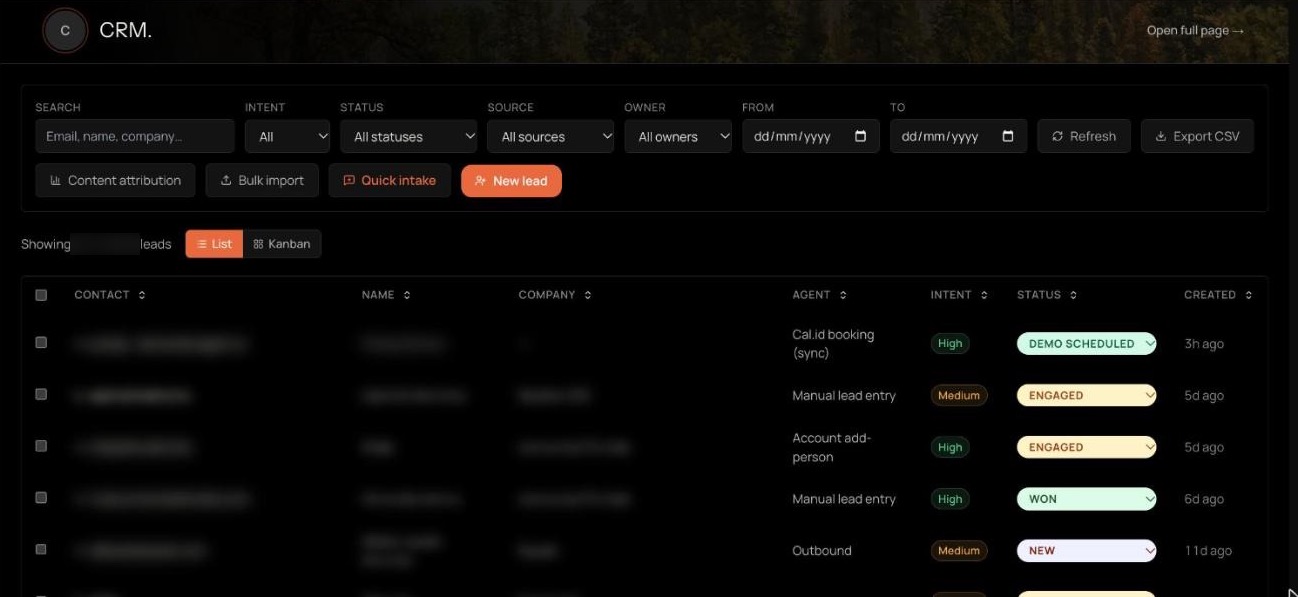
Leads that marketing generates should land in the same record sales works, with no export in between. Open the Sales room, then Team surface, then CRM. The Source filter shows where each lead came from: website forms, content pages, chatbot, Cal.id bookings, manual or admin entry, and prospecting.
Website forms and chatbot send leads in on their own once they are connected.
Landing pages that CREA's Content team builds carry a lead form, and leads from it land in the CRM.
Lists from events or old tools go in with Bulk import, up to 5,000 contacts from a spreadsheet or CSV.
One-off leads from a call or an email thread go in with New lead or Quick intake, which reads the fields out of a pasted thread for you to check.
Each lead that arrives from a form or the chatbot gets an owner automatically: the member with a sales or admin role who has the fewest open leads. Only people who have joined the workspace count. If nobody qualifies, the lead stays unassigned rather than going to someone outside it. The Owner filter shows each person's leads, and the unassigned ones.
Step 3. Read which marketing work produced the lead
Sales takes a lead more seriously when it knows what the buyer read. Beside Export CSV, Content attribution breaks down the leads that came from a content page over a window you choose.
It counts leads from content, high-intent leads, booked demos and wins, by kind of page, by the channel that sent each visitor (an AI assistant, search, social, another site or direct) and by top page. It fills only for leads captured on those pages. Marketing gets credit it can defend; sales gets the page the buyer acted on.
Step 4. Qualify the lead where sales works it
Qualification happens on the same list. Filter by Intent to see the high-intent leads first, by Status to see one stage, or by Source to see one campaign's leads. Then:
Stage. Move a lead along the pipeline from the stage dropdown on its row, or switch to Kanban and drag its card between columns.
Pipeline questions. Ask SERA in the Sales room, for example "Which leads from last month's webinar are still at New, and who owns them?" She answers from the CRM record, and where the record is silent she says what is missing instead of guessing.
First reply. LIPI (Beta) drafts a personalised email from the lead's record, your knowledge and your offerings, and names no product you do not sell. A person reads it and sends it.
If a lead marketing rates highly sits far outside your profile, treat it as a finding about the profile, not the lead. Change the description from Step 1 and work out the targeting again. Arguing over single leads teaches nobody anything; fixing the profile changes every score at once.
Qualification stays a person's judgement, backed by the record. On the outbound side, NORA counts a prospect as a lead only when four qualification questions are answered with evidence, and her own screens say that writing anyone into the CRM stays a person's decision.
Step 5. Write the handoff between rooms
Sometimes marketing needs sales to act on more than one lead: a list of accounts that engaged with a campaign, a webinar's attendees, a segment showing intent. Do not carry it by hand. Ask for it in writing, from the Marketing room.
In the Marketing room, ask MIRA in one line, with the context: "Ask SERA's team to research the twelve accounts that booked a demo from last month's guide, and bring back which ones fit our profile."
MIRA uses Ask another team (Beta). The thread replies "Asked SERA in the Sales room (Beta). Progress shows below, and the answer comes back to this thread," with a card that follows the request.
In the Sales room, the request is one task on the Sales board, owned by SERA. SERA's team works it there, under the same approvals and budgets as any of its work.
The outcome comes back to the Marketing thread: finished, waiting for an approval (with the names of who can give it), refused with the reason, or a question the Sales team needs answered.
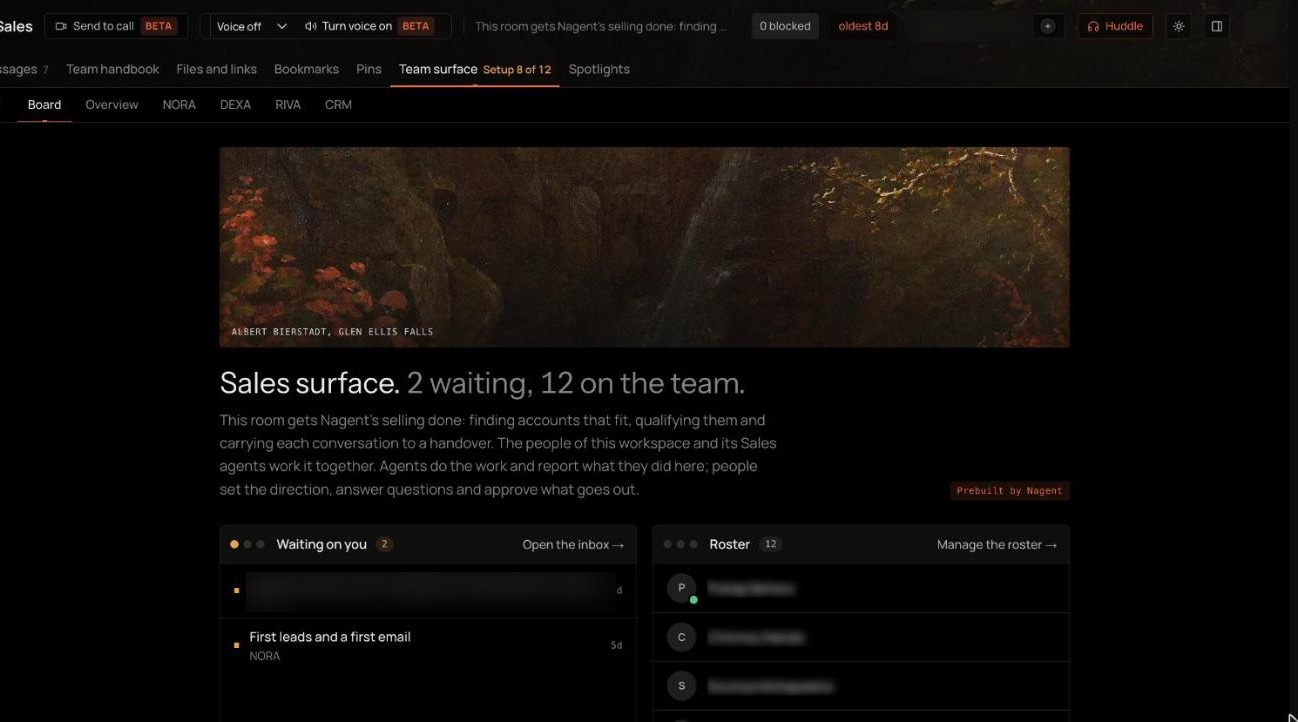
On the Sales side, the Board tab of Team surface shows what is waiting on a person, with who raised each item, beside the room's roster. The DEXA and RIVA tabs there are coming soon seats.
Because SERA's team does not see the Marketing thread, the request carries what it needs: the facts and figures from the thread and exactly what to hand back. A request that comes back useful usually names three things:
The accounts or segment, written out, not "the ones we discussed".
Why now: the campaign, page or event that made them worth a look.
What to return: for example "a list of the ones that fit our profile, each with one reason". Agent requests between teams are capped at 100 a day per workspace; a person can always still ask.
Step 6. Approve what reaches the lead
Whatever the handoff produces, anything that would reach the lead waits for a person first.
Drafted next actions. An email an agent drafts for a lead waits as a lead review on NORA's Review tab, under Waiting, with Approve and send or Dismiss 7 days.
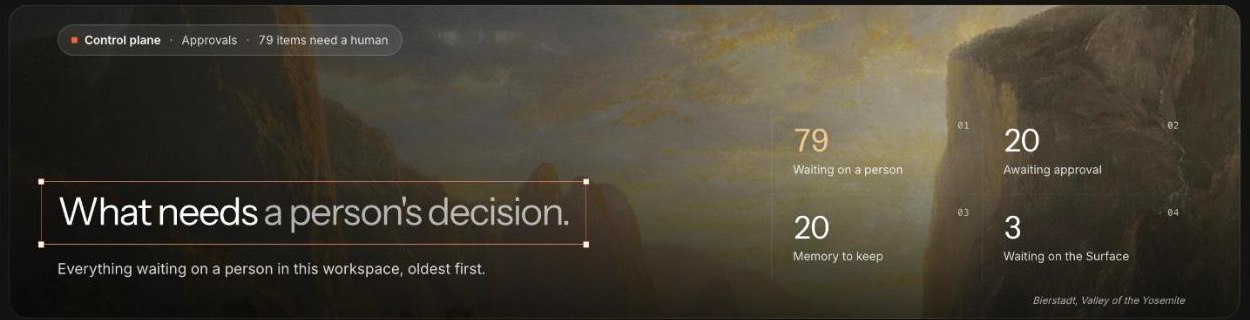
Held agent actions. Anything an agent holds for a person also lists on Approvals, under Control plane, headed What needs a person's decision. Each item there has Approve and Reject.
Sequences. Nurture steps are drafted for a rep to review unless a workspace changes that setting, the Autopilot mode under Settings.
No automatic first email. An automatic email goes only to a lead who has replied to an email your workspace sent. A newly captured lead gets no automatic first email; a person sends it, or approves it.
Step 7. Keep the opt-out with the lead
A handoff must never undo a buyer's choice. A sequence email carries an unsubscribe link that marks the lead unsubscribed and ends its enrolments. A prospect who opted out of NORA's outreach arrives in the CRM already marked unsubscribed, and no sequence, nurture follow-up or sales agent email goes to a lead marked that way. No agent can clear either mark. See unsubscribe and suppression.
What does Nagent not do in the handoff yet?
Be precise about the edges, so you set the process up around them:
No automatic lead routing between rooms. A lead that lands in the CRM is shared by both teams, but nothing moves it from MIRA's room to SERA's on its own. The record is the handoff, and a written request covers work beyond one lead.
No deal desk yet. DEXA, which would take the deal after a person acknowledges a handoff, is coming soon, even though its tab shows on the Team surface.
Ask another team is Beta. Read what comes back before you act on it.
Attribution covers content pages. Leads from other sources show their source, not a page.
Stages can be renamed, not added. Fit your words to the thirteen stages rather than building new ones.
How do you know the handoff is working?
Watch three things for a month: the share of new leads with an owner, the time between a lead arriving and its first approved reply, and the count of booked demos in Content attribution against the leads it shows. If leads sit unassigned, give more people a sales role. If replies wait, add an approver. If demos lag, revisit the hot-lead rules from Step 1.
Frequently Asked Questions
How do you hand off leads from marketing to sales with AI?
Keep both teams on one CRM record, write the definition of sales-ready into the hot-lead rules and customer profile, route every marketing lead source into the CRM with an owner, and send larger asks as a written request to the sales team's lead, with its context, so the answer comes back to the thread that asked.
Who owns a lead that comes from a marketing form?
On Nagent, the member with a sales or admin role who has the fewest open leads, chosen automatically. Only people who have joined the workspace are considered; otherwise the lead stays unassigned.
Can MIRA ask SERA's team for work directly?
Yes, through Ask another team, which is in Beta. The request becomes a task on the Sales board owned by SERA, and the result comes back to MIRA's thread.
Will an AI agent email a new inbound lead automatically?
No. A newly captured lead gets no automatic first email. A person sends it or approves it, and automatic follow-ups go only to leads who have replied.
What should you set up first?
Start with Step 1. A written definition of sales-ready, kept in the customer profile and the hot-lead rules, fixes more handoffs than any agent. Then let the record and SERA's Sales team carry the rest, with the CRM docs as your reference.
Book a demo to see a lead move from a marketing page to a sales reply in a live workspace.