
Top 10 AI Video Tools for Ads and Social (2026)
An AI video tool turns a brief, a script or a product shot into a finished clip: a presenter to camera, a creator-style testimonial, a product in motion or a short explainer. The best ones in 2026 differ on three things: whether you see the price before the render, whether the product on screen is really yours, and who writes the words.
Disclosure: Nagent makes Alpha, first on this list, and HeyGen, third, is Nagent's avatar partner: Alpha's presenters and digital twins render on HeyGen. The other eight are described from their own published claims and prices.
Video is the most expensive thing an AI agent in a marketing workspace can make, and most tools take the money first and show the result after. Some are avatar platforms built for training that also work for social. Some are generative models that make striking footage and leave the ad to you. Some make UGC-style ads at volume and nothing else. The list below says which is which.
How did we pick these tools?
Price before the picture: does the tool quote a job before it renders, or bill you by the credit as it goes?
Your product, not a lookalike: can a product shot start from an image of the real product, so the pack, label and colour match?
Who writes the words: whether the voice-over, supers and call to action come from your copy or from the model.
Control and disclosure: what a person approves, how spend is capped, and whether synthetic presenters are disclosed and real people consented.
Value: what the entry price buys, and whether it is public.
Prices are the vendor's published figure where there is one, checked October 2026, and marked approximate otherwise.
What are the 10 best AI video tools for ads and social in 2026?
1. Nagent Alpha
Alpha is Nagent's AI video teammate. Describe the video or pick a preset, and she plans it shot by shot, quotes it in credits and waits. Nothing renders until a person approves the storyboard and its quote. She owns the video studio on Nagent's Content team under CREA, the Content chief of staff, takes her product keyframes from RUPA, the image studio, and takes paid briefs from HOOK, the creative strategy lead. Alpha carries a Beta tag.
Try it: Hire Alpha · See plans · Talk to the team
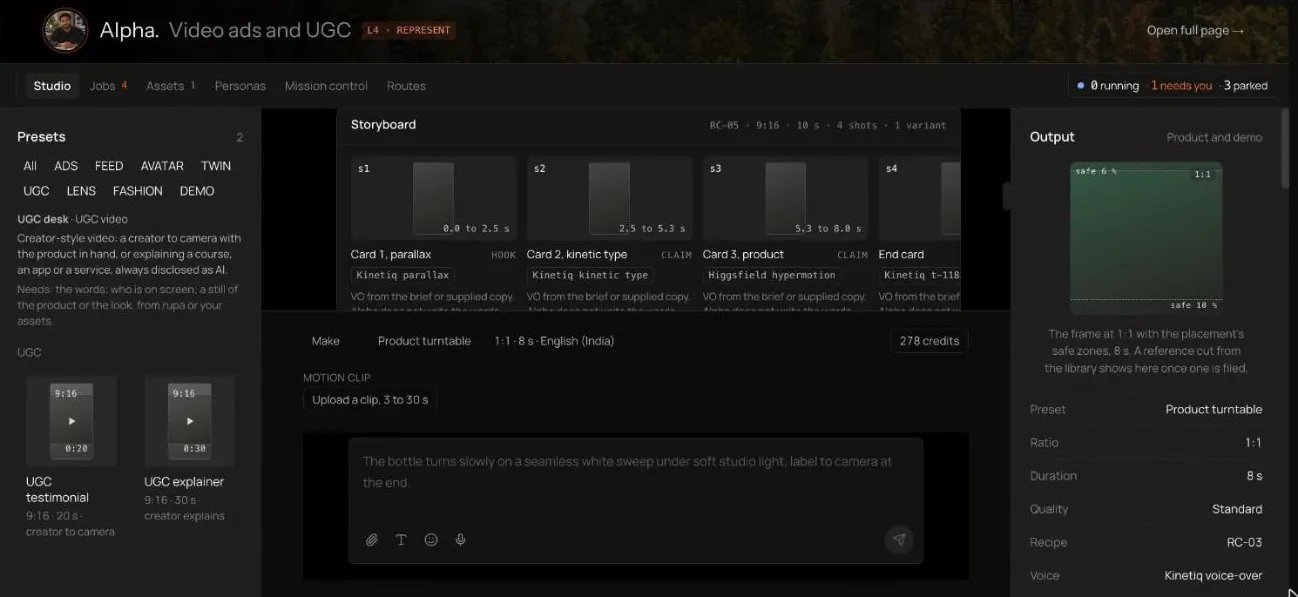
The studio. Describe the video in the composer, pick a preset or none, and read the storyboard and its quote in the thread before anything renders. Shown from a Nagent workspace.
How Alpha makes a video
Describe the video. Brief talks it through: Alpha drafts every detail and the person approves each one before anything is planned. Make plans and quotes at once. Ask spends nothing.
Pick a desk and a preset, or none. Seven desks, one per kind of video, own 24 of the 25 presets in nine groups: ADS for paid ads on Meta, YouTube and LinkedIn, FEED for organic posts and explainers, AVATAR, TWIN and UGC for a presenter, a real person's twin or a disclosed creator, and LENS and FASHION for a product or a look in motion from its still. A preset sets ratio, length, safe zones and the kind of shots.
Set the details, including quality (Test, Standard or Hero) and Brand Lock, which is on by default.
Read the plan and the quote. Each shot with its timing and lane, the layers on top, and the credits. Anything over 60 seconds moves to the complex band.
Climb the preview ladder. P0 is an animatic with keyframes, the real voice and every layer, which a person approves. P1 is a 720p draft of the hero shots, only above 400 credits or at Hero quality. P2 is the final.
Approve the storyboard, or send it to a workspace admin who can. It is approved by looking at it, never by a message asking for it.
Follow the job through its eight stages, SLATE to REEL. A render takes 30 minutes to 2 hours of wall-clock. "Needs you" means a person must decide. "Parked" means the platform is not ready, and nothing is spent while parked.
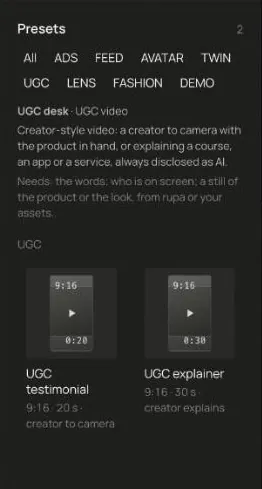
The presets panel. A preset fixes ratio, length, safe zones and the kind of shots, so a Meta Reels ad and a YouTube pre-roll start from the right shape.
Why Alpha stands out
A quote before anything renders. The quote is fixed when the storyboard is approved, and a delivered job bills the quote, less anything that was not made.
Your product, not a lookalike. A product shot only ever renders from the exact pack, starting from a keyframe of the real product in the workspace's RUPA library, never from words alone.
The words are yours. Alpha never writes the words on screen. Voice-over, supers and the call to action come from a HOOK brief or from copy a person supplies, and a plan with neither says so.
Budgets before spend. Alpha carries a daily and a monthly budget and a cap on any one job, with a platform default of $5 a day and $100 a month until someone sets them. A quote above a cap parks the job until a person lets it go on.
Disclosed presenters, consented twins. A synthetic presenter always carries a disclosure layer, and PROOF blocks a cut without one. A digital twin renders only with a written release on file, and revoking it blocks new renders at once.
Variants that do not pay twice. A hook swap, a call to action swap, a refreshed end card, a resize, captions or another language keeps every shot already rendered and renders again only what changes.
Never on an ad account. Alpha never publishes, traffics or touches an ad account. Paid work goes back to HOOK's GATE.
Agentic, on partner engines. Alpha plans, routes and checks every shot herself and renders through the engines she is bound to: presenters and digital twins on HeyGen, Nagent's avatar partner, and generated and motion shots on the lanes her Routes page shows. You brief one teammate; she picks the lane and keeps the reason.
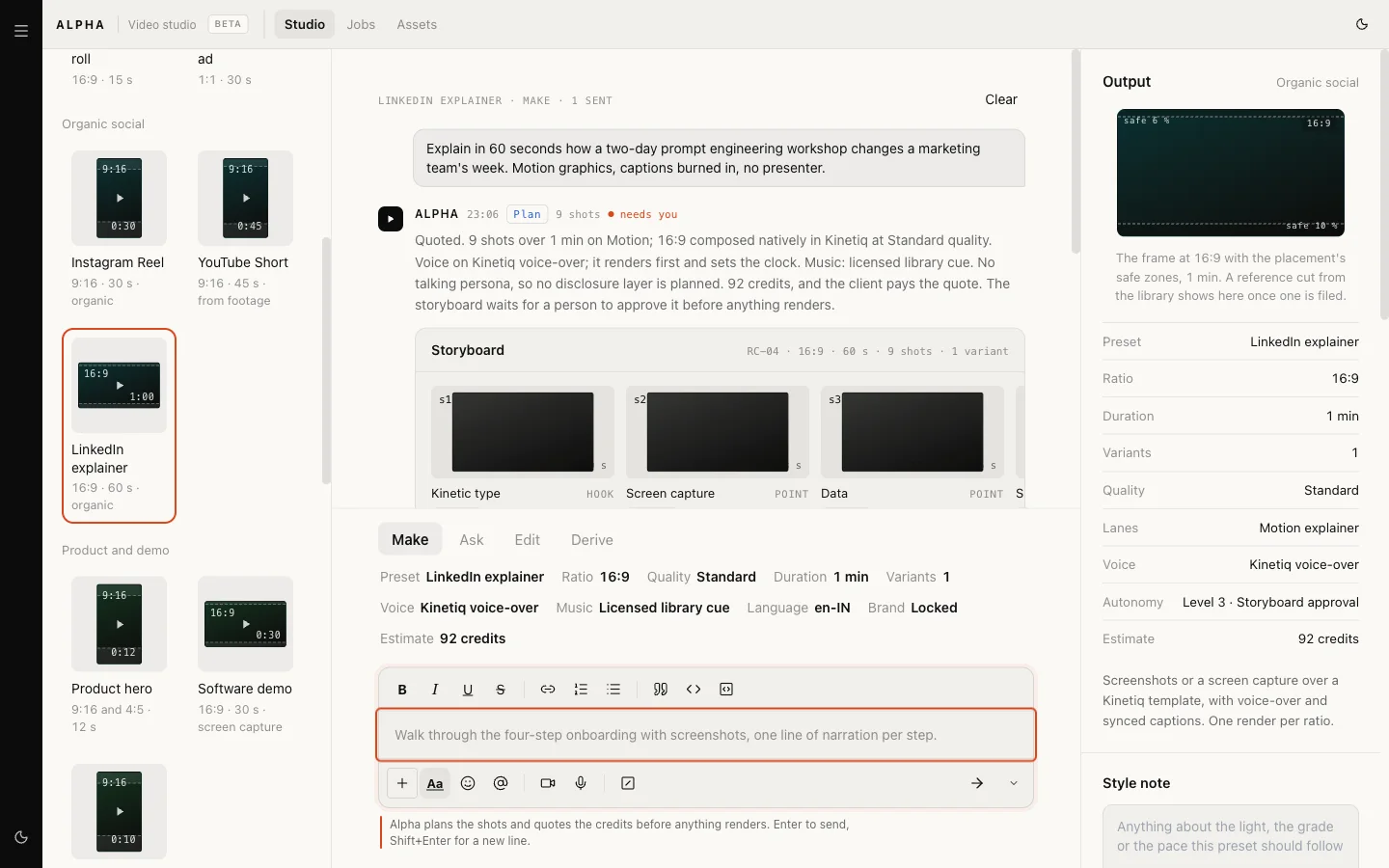
A quoted storyboard. The credits are broken into planning, shots, finishing, composition and scale, and the preview ladder shows the rungs the job will climb.
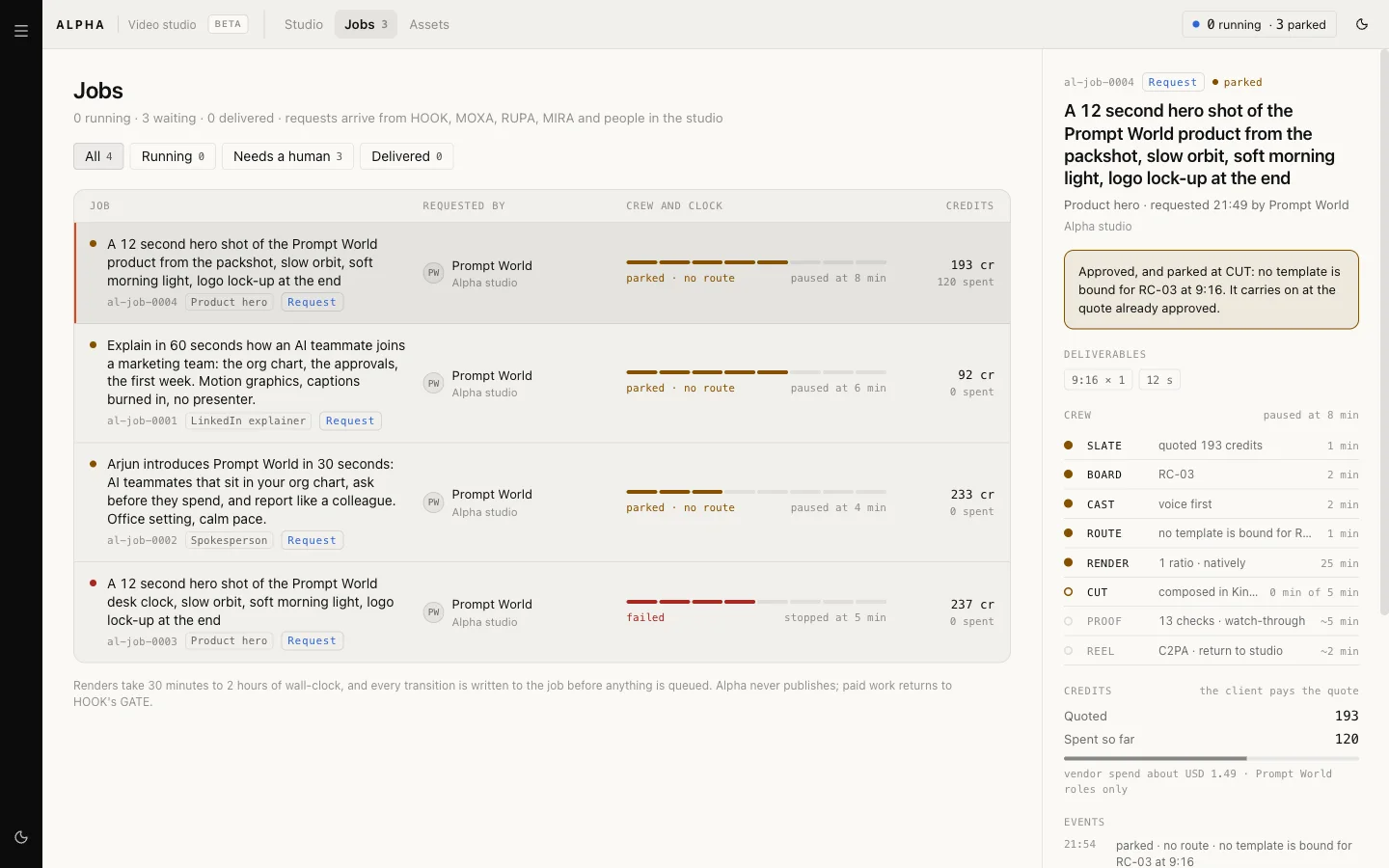
A job in detail: its eight stages, the credits quoted and spent, and why it waits when it does.
Limits to know
Alpha is in Beta. No Kinetiq template is bound yet, so a joined cut carries the disclosure, supers, offer and legal line on screen and leaves out captions, the logo, the end card and the music, saying so on the asset. All-motion presets, such as the explainers and the software demo, are made whole by Kinetiq.
A presenter or digital twin renders only once its persona is complete: an avatar made on HeyGen from a still, from words or from the person's own footage, and for a twin a written release on file and consent given on camera. A preset with no lane yet plans and quotes, then parks after approval, and the job page names which.
PROOF does not yet read the words on screen.
Alpha is set up per workspace by Nagent.
Pricing
Alpha works on the Content team. Nagent plans: Solo $29.99/mo ($19.99/mo billed annually), Team $299/mo ($199/mo annually), Business $1,499/mo ($999/mo annually), and Enterprise by quote. See pricing for which plans include the Content team.
Best for: marketing and content teams that want the price and the storyboard approved before a credit is spent, with the product, the words and the presenter all under their own control.
2. Synthesia
An enterprise AI video platform for training, enablement, marketing and support content. Synthesia's claim is that teams can make studio-quality business video without a traditional production.
Standout: the most mature avatar and localisation stack on this list, with enterprise collaboration on the top tier.
Watch for: it is built for the training and enablement desk first. Ads and social are a use, not the design centre. Published entry price $29 a month, with Creator at $89 and video and AI-credit allowances on each plan.
Best for: companies that make a lot of explainer, onboarding and localised video and want one presenter tool across departments.
3. HeyGen
An AI avatar and video generation platform for personalised and localised communications, and Nagent's avatar partner: Alpha's presenters and digital twins render on HeyGen's engine. HeyGen's claim is rapid production of high-quality video at global scale. Pick HeyGen directly when a person will write the script and run the account; pick Alpha when you want HeyGen's avatars with a brief, a quote and approvals around them.
Standout: avatar video, translation and a Video Agent in one product, with workspace collaboration and draft comments from the Business tier up.
Watch for: credit-based. The published entry price is $29 a month for 600 credits, Pro from $49 for 1,000, and Business at $149 plus $20 a seat.
Best for: marketers who want a presenter in many languages fast and are comfortable managing a credit balance.
4. Runway
A creative AI platform and generative video model provider for advanced visual production. Runway positions its research and tools as a new creative production substrate.
Standout: the strongest raw footage generation here, with an agentic creative collaborator and models you can shape a look with.
Watch for: it makes shots, not ads. Model, duration and resolution change credit use, and the finished cut, the supers and the offer are your editor's job. Published entry price $15 a month ($12 annual) for 625 credits, Pro $35 and Max $95.
Best for: creative teams with an editor who want generative footage inside a production they already run.
5. Tavus
Conversational video and digital-replica infrastructure for interactive, human-like experiences. Tavus's claim is that developers can build emotionally aware video agents for personalised interaction.
Standout: real-time conversational replicas, metered by conversation minutes, rather than rendered clips.
Watch for: it is a developer product. The ad or social use is a replica that talks to a visitor, not a cut you post. Published pricing: CVI Basic free, Starter $59 a month, Growth $397 a month, with separate consumer PAL plans.
Best for: product and growth teams building an interactive video experience into their own app or site.
Real-time visual agents that combine conversational AI, avatars, knowledge and system actions. D-ID's claim is that visual agents can qualify leads, guide customers and support on-brand multilingual interactions.
Standout: a presenter that answers, with video generation, avatars and an API alongside.
Watch for: the current Visual Agents price is unverified. The Studio page bills by the video minute, rounded to 15-second intervals, and unused minutes do not accumulate.
Best for: marketing and support teams that want a presenter-led front door on the website more than a feed of ads.
7. Creatify
An AI ad generator that turns product inputs into short-form video campaigns. Creatify's claim is that teams can make and test more ad variations with less production effort.
Standout: video and image ad generation, avatar variants and a Performance Agent with ad-launch features in one place.
Watch for: credit-based, and brand spaces, seats and the performance-agent scope vary by plan. Published entry price $39 a month for 100 credits, with a $99 tier for 300.
Best for: e-commerce teams that want volume variants from a product URL and are happy to launch from the same tool.
8. Arcads
An AI video ad tool built around synthetic actors and rapid creative iteration. Arcads's claim is that brands can produce high-volume performance creative quickly.
Standout: AI actors and a shared canvas for creating, testing and scaling creative as a team.
Watch for: no reliable public numeric price has been verified. The homepage promotion is not a subscription quote, so ask for one.
Best for: performance teams that test many hooks a week with actor-led ads and want a shared workspace to do it in.
9. MakeUGC
An AI UGC video ad generator built around a library of AI actors and scripted videos. MakeUGC's claim is that 10,000 companies use it to make AI UGC ads in minutes.
Standout: more than 1,000 AI actors and more than 50 languages, product-in-hand videos, custom avatars, B-roll, captions and a batch mode for testing creatives.
Watch for: the pricing page does not state how many credits a video uses. Published entry price $59 a month for 500 credits, shown at a discount in October 2026, with Growth at $79 and Pro at $149.
Best for: DTC brands that want creator-style testimonials at volume without booking creators.
10. Captions
An AI video editing and creation app, best known for automatic captions and a mobile-first editor, that has added avatars, dubbing and ad generation.
Standout: the fastest route from a phone recording to a captioned, polished social clip, with a desktop app for teams.
Watch for: the creation features are newer than the editing ones, so trial them before relying on them. Pricing is approximately $10 to $25 a month on individual plans.
Best for: creators and small social teams who film their own footage and want it edited and captioned quickly.
How do they compare at a glance?
Tool: Nagent Alpha, What it is: AI video teammate on a Content team, Who writes the words: Your copy or a HOOK brief; Alpha never writes them, Price before render: Yes, a credit quote a person approves, fixed at approval, Entry price: Nagent plans from $29.99/mo (check which include Content)
Tool: Synthesia, What it is: Enterprise avatar video platform, Who writes the words: Your script, Price before render: No, plan allowances, Entry price: $29/mo
Tool: HeyGen, What it is: Avatar video and translation; Alpha's avatar partner, Who writes the words: Your script, or the Video Agent, Price before render: No, credits, Entry price: $29/mo
Tool: Runway, What it is: Generative video models and tools, Who writes the words: Your editor, Price before render: No, credits per generation, Entry price: $15/mo
Tool: Tavus, What it is: Conversational video replicas, Who writes the words: The conversation, Price before render: No, metered minutes, Entry price: Free tier; Starter $59/mo
Tool: D-ID Visual Agents, What it is: Real-time visual agents, Who writes the words: The conversation, Price before render: No, video minutes, Entry price: Unverified
Tool: Creatify, What it is: Product-to-video ad generator, Who writes the words: Generated from product inputs, Price before render: No, credits, Entry price: $39/mo
Tool: Arcads, What it is: Synthetic-actor ad generator, Who writes the words: Your script, on a shared canvas, Price before render: No, Entry price: Requires confirmation
Tool: MakeUGC, What it is: AI actor UGC ad generator, Who writes the words: Your script, Price before render: No, credits, Entry price: $59/mo
Tool: Captions, What it is: AI video editor and creator app, Who writes the words: Your footage, AI edits, Price before render: No, Entry price: ~$10 to $25/mo
Prices change often; check each vendor's pricing page before buying. Entries 2 to 9 paraphrase the vendor's own published claims as recorded in Nagent's comparison research and the ads and creative category.
How do you choose the right one?
Start from what the video is for. A paid ad with a claim in it needs words from a brief a person owns and a check before it ships: that is Alpha, with HOOK writing the brief and GATE checking the cut. A presenter explaining something in twelve languages points to Synthesia or HeyGen. Striking footage for an editor you already have points to Runway. A hundred creator-style testimonials by Friday points to MakeUGC, Arcads or Creatify, with you supplying the judgement. A video that talks back to a visitor is Tavus or D-ID, a different product altogether.
Then check three things on a trial:
Ask what it costs before it renders. A tool that can only tell you after the credits are gone cannot be budgeted. Look for a quote per job, fixed when the job is approved.
Put your real product in it. Upload the pack shot and ask for a product video. Compare the label, the colour and the shape with the real thing. A lookalike is not your product.
Read the words on screen. Find out who wrote them. If the model did, find out who checks them before the ad runs, and whether the presenter is disclosed as synthetic.
Frequently Asked Questions
What is an AI video tool for ads and social?
Software that makes a finished clip from a brief, a script or a product image, using generated footage, synthetic presenters or both. The tools differ on whether they quote before rendering, whether your real product appears, and who writes the words.
Can AI video tools use my real product?
Some can, if they start from an image of it. Alpha renders a product shot only from a keyframe of the real product, never from words alone. Check the pack, label and colour on any tool's first result.
How much do AI video tools cost?
From about $10 a month for an editing app, $15 to $29 for generative and avatar entry tiers, $39 to $59 for ad generators, and custom quotes for enterprise and agent products. Nagent plans start at $29.99 a month; see the pricing page for which plans include the Content team.
Will an AI video tool spend money without my approval?
Most bill by the credit as you generate. Alpha waits: nothing renders until a person approves the storyboard and its quote, a quote above a cap parks the job, and spending past a cap always waits for a person however far she is trusted.
Do AI presenters have to be disclosed?
Rules vary by platform and country, and they are tightening. Alpha gives every synthetic presenter a disclosure layer and renders a digital twin only with a written release on file. Ask any other tool how it handles both.
What should you do next?
Ready to see the quote before the video? Alpha plans it shot by shot, quotes it in credits and waits for your approval. Hire Alpha → · HOOK, the AI creative strategy lead · Video platforms compared
See an AI team at work
Book a 15-minute demo and watch a Nagent team plan, do and hand back real work in its room.