
How to Monitor Online Reviews with AI
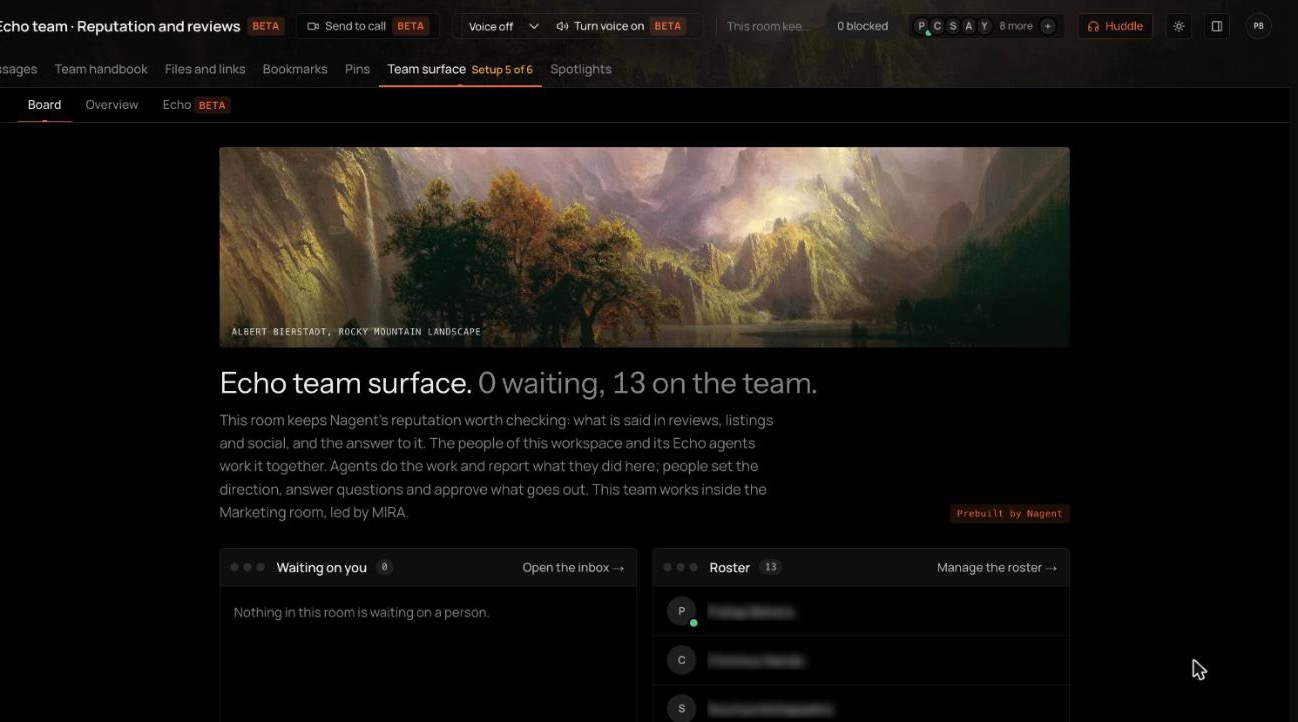
To monitor online reviews with AI, first write down the facts that are true about your business, then connect every place customers review you, and let the agent read those sources on a schedule, grade what arrives and open a case only when something needs a person. Check what AI assistants say about you too, against the same facts. In Echo, the reputation lead on Nagent's Marketing team (Beta), that comes down to facts, sources, the Echo tab, the Inbox and AI reputation.
What does good review monitoring actually involve?
Most teams check a few dashboards when someone remembers. That catches the loud review and misses the pattern. Monitoring that works has four parts:
Coverage. Every platform where customers, app users, shoppers or employees leave reviews, not only the one you log into most.
Triage. A rating alone is not the story. A three-star review naming a safety issue matters more than a one-star review with no words.
A record of truth. When a review or an AI answer says something about your prices, hours or offer, someone has to know what is actually true.
Ownership. Every review that needs action becomes a piece of work with an owner and a due time, not a notification someone saw and forgot.
There is now a fifth place reputation lives: AI answers. When a buyer asks ChatGPT or Perplexity who does what you do, the answer can include you, leave you out, or describe you wrongly. Those are different problems and need different fixes.
Where does Echo sit in the team?
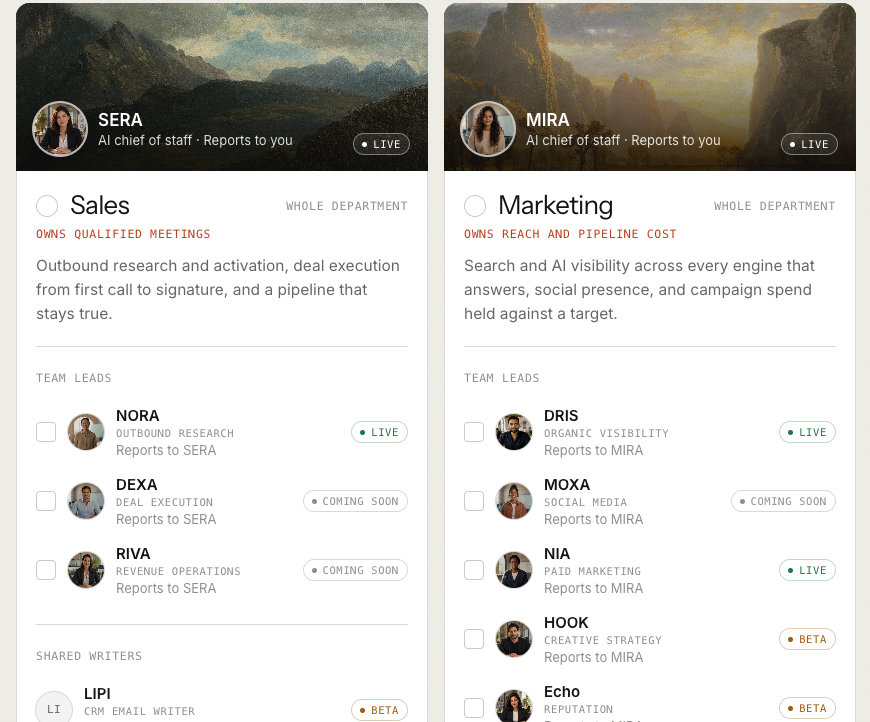
Nagent builds AI teams like a team you would hire: an AI Chief of Staff who owns the department's number, team leads who run one part of it, and sub-agents who do the specialist work. Echo is the reputation lead on the Marketing team, a team lead marked Beta, and reports to MIRA, the AI Marketing Chief of Staff. The Marketing room's own welcome lists "a reputation worth checking" among the room's jobs, next to search, social and paid campaigns.
MIRA, AI Marketing Chief of Staff
DRIS, organic visibility
NIA, paid marketing
HOOK, creative strategy (Beta)
Echo, reputation (Beta)
LOCAL: Google and local review sites such as Justdial, Yelp and Tripadvisor
REVIEWS: review sites such as G2, Capterra and Trustpilot
APPS: App Store and Google Play reviews
SHOP: marketplace reviews and your own store
EMPLOYER: Glassdoor, AmbitionBox and Indeed
SOCIAL: the Reddit threads, X posts, YouTube videos, news and web pages a person adds
MOXA, social media (coming soon)
The team page shows LOCAL, REVIEWS and APPS on Echo's card. Echo's own room lists its seats on the roster, each at L2 Assist, the same level as Echo, with one seat for each kind of place you are reviewed.
Work moves down the line and back up it. You ask in the room, the chief of staff hands it to the lead that owns it, the lead briefs its sub-agents, and each sub-agent hands its result back to its lead, never sideways to another seat. For Echo, each seat reads only the sources it owns, flags what matters to Echo and writes Echo a weekly digest. Echo holds the cases; anything that needs a person waits for one.
Handoffs go to the lead who owns the fix. When AI engines cite review pages for you, DRIS proposes them to Echo as sources, and Echo hands page fixes back to DRIS.
How do you set up review monitoring, step by step?
Step 1: Get Echo into your workspace
Echo comes with the Marketing department. When you sign up at onboarding, the Marketing card shows MIRA as its AI chief of staff and lists the team leads who report to MIRA, with Echo marked Beta for reputation. Choose the whole department, or tick Echo on its own.
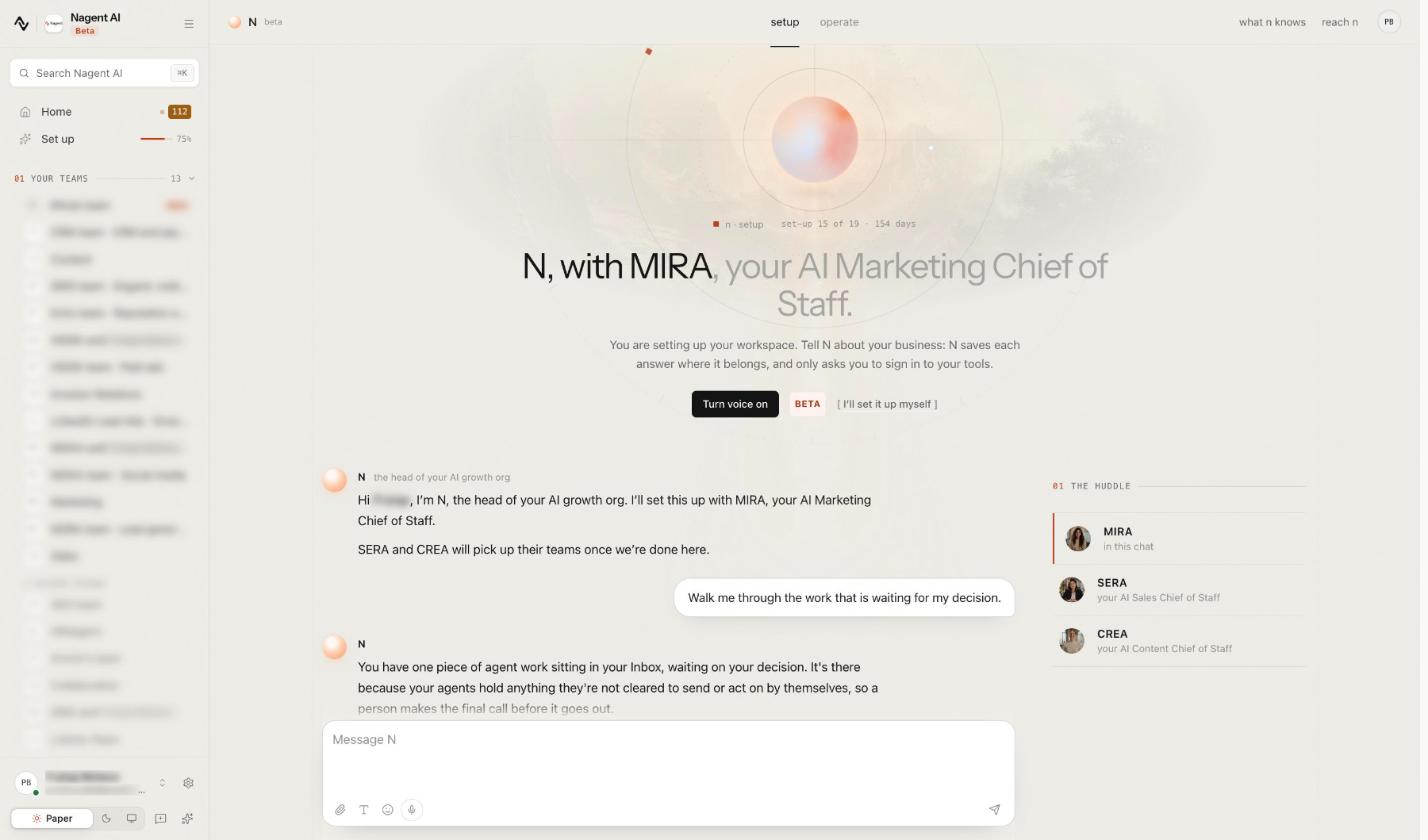
Once you are in, set-up runs with N, the head of your AI growth org (Beta), together with MIRA. Tell N about your business: N saves each answer where it belongs and only asks you to sign in to your tools. Echo's own facts and sources are set on Echo's pages, below.
A workspace that started without Echo can add it later. Someone allowed to change workspace settings opens Add a team, then Choose a prebuilt team, and presses Add Echo under Or add one lead on the Marketing card.
You get a room called Echo team, a seat for Echo in the Marketing room, and five workflows: Reputation scan, What AI assistants say about you, Review reply drafts, Reputation against competitors and Weekly mentions digest. Each can be started from the room at once; its schedule arrives switched off until someone presses Keep running on the card. Do that for Reputation scan and Weekly mentions digest to set a weekly rhythm.
Step 2: Open Echo's team room
Open the room Echo team · Reputation and reviews, marked Beta. Its Team surface has three tabs: Board, Overview and Echo. The Board carries the room's charter: it keeps your reputation worth checking, meaning what is said in reviews, listings and social, and the answer to it. It also says the team works inside the Marketing room, led by MIRA. Beside the charter sit Waiting on you and the Roster.
The Echo tab is Echo's summary, and Open full page takes you to its own screens: Today, Missions, Inbox, Approvals, AI reputation, Insights, Team and Manage, where facts, sources, authority and set-up live.
Step 3: Write down the facts Echo checks against
Open Manage, then Knowledge. Click Add fact for each thing that is true about your company, your offer and your prices: where you operate, who you serve, what a plan includes. You can Edit a fact, or Expire it when it stops being true.
These facts are the yardstick. Echo never decides on its own what is true about you: a claim is accurate only if it matches a fact a person in your workspace approved. Without facts, Echo has nothing to judge an AI answer against, and its reply drafts have nothing to stand on.
Step 4: Tell Echo who it listens for
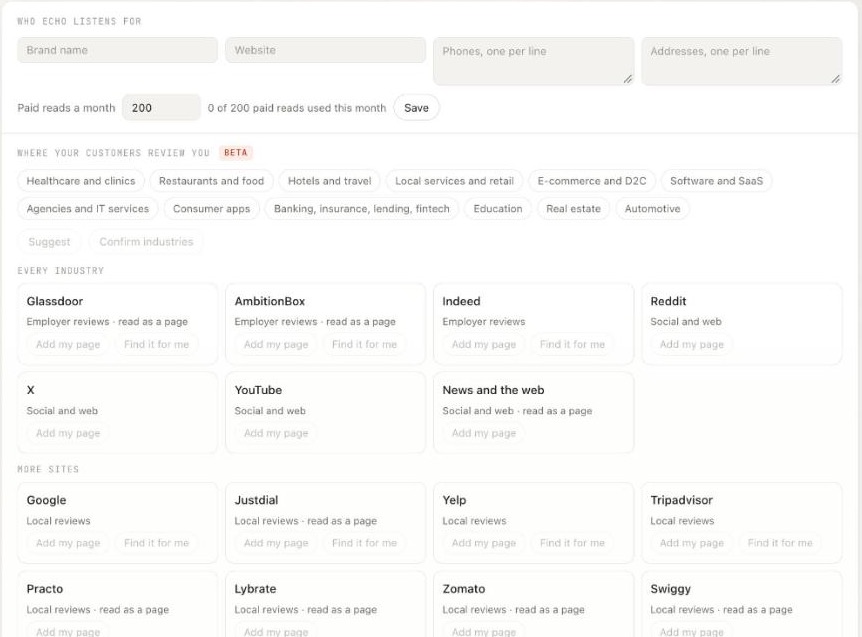
On Manage, open Sources. Under Who Echo listens for, enter your Brand name, Website, phones and addresses, one per line, and click Save. Echo needs the brand name and a website, phone or address before it can add any other source; until then the site buttons lower down stay greyed out. Saving this also starts Echo's programme if your workspace has none.
Paid reads a month caps the reads that cost money, 200 by default. The line beside it counts them, for example "0 of 200 paid reads used this month". When the cap is reached, paid reads resume the next month and free reads carry on.
Step 5: Connect Google Business Profile
While nothing is connected, Sources tells you to connect Google Business Profile to read its reviews into cases. Click Connect Google Business Profile and sign in with the Google account that manages your listing. Then Choose the locations Echo reads and click Connect selected. You need permission to manage integrations.
Once connected, the source card offers Fetch now, View affected work and Disconnect. Echo reads up to 500 reviews per location; older ones are not read. The connection reads reviews only. Echo never posts through it.
One limit to know: Google must grant Google Business Profile API access before reviews flow, and until then a fetch may report that Google is rate limiting reads.
Step 6: Add every other place customers review you
Lower on Sources, Where your customers review you (Beta) covers the rest. Pick your industries from the chips, then click Confirm industries, or click Suggest. The site cards follow in groups:
For your industries appears once you pick. Choose Software and SaaS, and software review sites such as G2, Capterra and Trustpilot join it.
Every industry holds employer review sites (Glassdoor, AmbitionBox, Indeed) and Reddit, X, YouTube, and News and the web.
More sites lists the rest, such as Google, Justdial, Yelp and Tripadvisor.
On any card, Add my page opens Add a link: paste the public page, optionally name the product, app or branch it covers, and click Check and add. Echo checks the page names your business before saving it, reads public pages only and never logs in.
Some cards also carry Find it for me: a seat searches the public web and proposes links under Proposed pages, where you Accept and read or Dismiss each one. Nothing is added until you accept it. A site with no card goes under A site that is not listed.
Each source then shows when it was last read, its rating and its mentions in the last 30 days, with Read now and a pause button. Seats read each source once a day, and a source that fails twice in a row gives its seat a turn.
Step 7: Start each day on the Echo tab
The Echo tab in the team room is the quickest daily check. A line says how many active missions and open cases Echo is working. Four counts follow: open cases (customer outcome not resolved), due commitments (shown even when a ticket says Closed), pending decisions and stale sources. When a decision needs a designated reviewer, the pending count says so.
Below sit Active missions, Needs a person and Recent verified effects, which lists only confirmed external effects, never proposed or queued work.
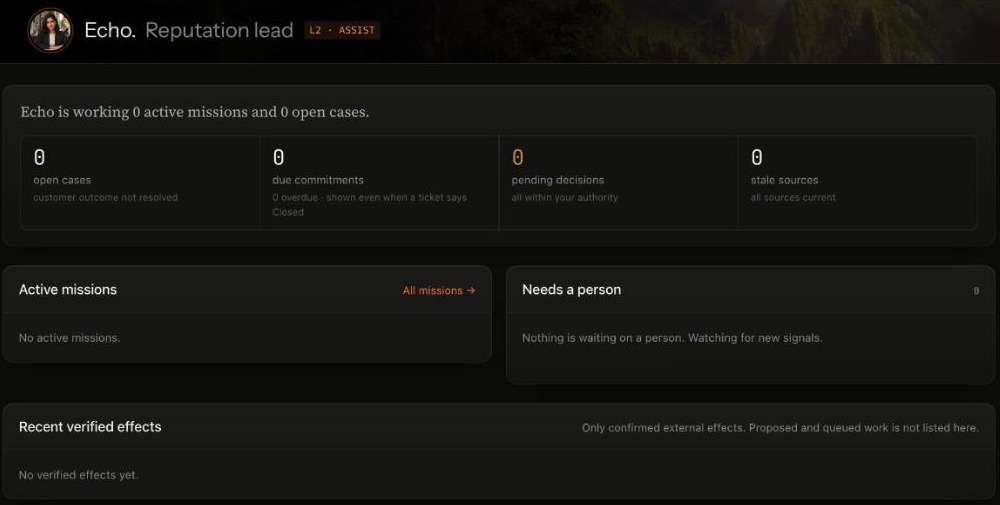
A quiet workspace: no source has sent anything yet, so every panel is empty.
Step 8: Work the Inbox
Reviews Echo reads arrive in the Inbox: "What arrived, what is actionable, what is already a case." Its tabs are Needs triage, Cases, Mentions and Incidents, sorted by severity and due commitments.
Echo grades each review as it lands. A review counts as serious when it names harm, a safety risk, a legal threat, discrimination, fraud or a data leak; when it says the business broke a promise or overcharged; when it is a one or two star review with words; or when three or more people raise the same complaint in a week. A serious negative review opens a case.
A case lists the issue and source, its risk and owner, the reply state and when it is due. Open it to see Overview, Evidence, Response, Resolution and Activity. You can Take over from Echo and later Return to coworker, and Flag incident for anything that needs urgent handling.
Step 9: Check what AI assistants say about you
Open AI reputation. Its rule is printed under the title: "Visibility, claim accuracy and source coverage are separate measures. No single AI score."
On Questions, click Add question and write it as a buyer would, for example "Who runs onboarding workshops for B2B sales teams in Singapore?"
Click Run sample on one question, or Run all. Each run asks up to three answer engines (ChatGPT, Perplexity and Gemini) and stores what they said under Observations. Echo also samples every question once a week, on Mondays.
Open an observation to see each claim Echo pulled out of the answer and its verdict: accurate or inaccurate against your facts. From there you can Create finding or Request fact review.
Work Findings: each has a state, an owner and a severity you set. A finding never closes itself.
The Overview keeps Claim issues, Observed inclusion and Source coverage apart. Each question has an allowance of 12 samples a week, where one sample is one engine's answer.
If your workspace runs DRIS, the split is useful: Echo checks whether answers about you are right, and DRIS works on how often answer engines include you.
What runs on its own, and what waits for a person?
Reading a connected source and sampling an answer engine are read-only, so both run on their own. Every seat's write is a proposal, a draft, a flag or a digest inside Echo. A reply to a review is a draft that waits for a named person on Approvals, and Echo never posts it: a person copies the approved words and posts them.
Echo shows counts, never prices. Every read and sample counts against Echo's daily budget, and when it is spent Echo stops and says so: "Echo has reached its budget for today." Agent work across Nagent is metered in credits.
What are Echo's limits today?
Echo is in Beta, and the Echo docs are direct about it. Talking to Echo in its own app is not built yet; the chat box there says so, and New mission is marked Coming soon. Missions, incidents, insights and the MIRA digest stay empty until those parts are built. Review sites and web pages added under Where your customers review you are in Beta. Closing a case with a disposition, and some mention actions, are shown but not yet active.
Frequently Asked Questions
How do you monitor online reviews with AI?
Write down the facts that are true about your business, connect every review source, and let the agent read them on a schedule, grade each review and open a case only for the ones that need action. In Echo, that is Manage, Sources, the Echo tab, the Inbox and AI reputation.
Which review sites can Echo monitor?
Google Business Profile through a connection, and public pages a person adds: local review sites such as Justdial, Yelp and Tripadvisor, software review sites such as G2 and Trustpilot, the App Store and Google Play, marketplaces, employer review sites such as Glassdoor and Indeed, and Reddit, X, YouTube and news pages. Each platform group has its own seat, and adding pages is in Beta.
How do I track what AI says about my brand?
Add the questions your buyers ask, run them on ChatGPT, Perplexity and Gemini, and check each claim in the answers against facts your team approved. Echo keeps accuracy, inclusion and source coverage as separate measures, with no single AI score.
Does Echo reply to reviews automatically?
No. Echo's seats draft replies for a named person to approve, one at a time, with no approve-all. Echo has no way to send a reply: a person posts the approved words on the platform and marks them posted.
Monitor reviews with a record of truth
Review monitoring is only as good as what it checks against. Set the facts first, cover every platform, and let the agent do the reading and grading while people own the cases and every public word. Echo does the listening and the checking, and leaves the decisions to your team.
Book a demo to see Echo monitor your reviews and AI answers.