
How to Research Accounts for Outbound With an AI Agent
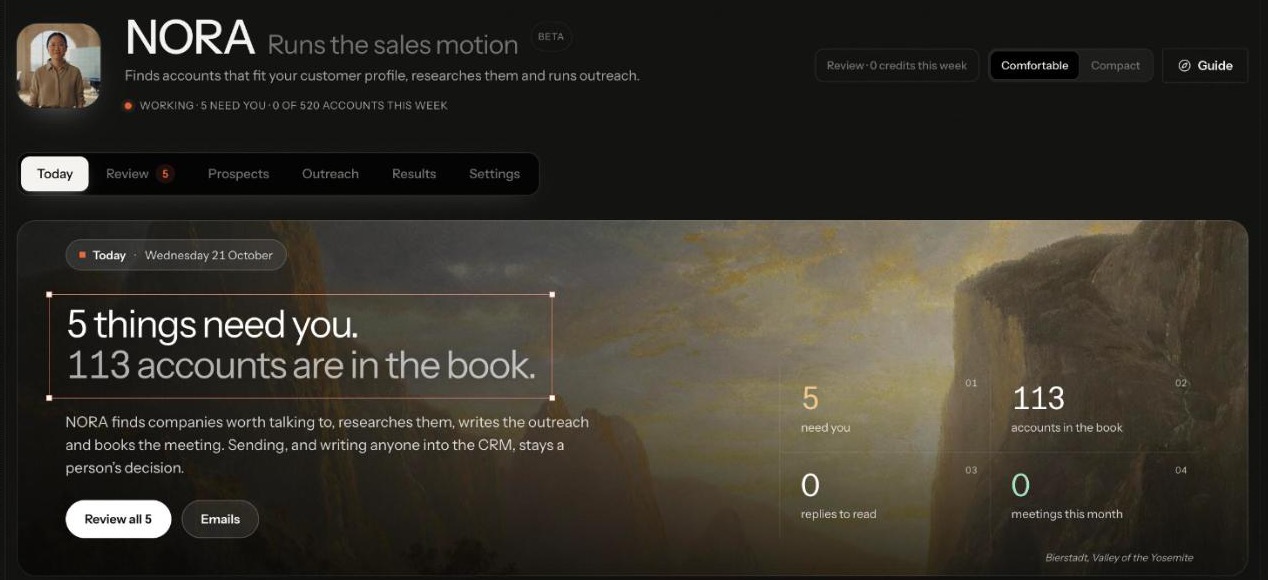
To research accounts for outbound with AI, start from a written customer profile, let the agent score every company against it, and spend research only on the ones that fit. For each fit, collect dated buying signals with a source, build a dossier of why the company fits and what to say, map the buying committee, and qualify with evidence before anyone is contacted. On Nagent, NORA, the Sales team lead who runs the sales motion, does this work and shows you what each step cost.
What makes account research worth the money?
Account research is the expensive part of outbound. Searching a database is cheap; revealing a contact, reading a company's news and writing a defensible reason to reach out is not. Most teams waste research in one of three ways:
Researching everyone. Full research on accounts that were never a fit.
Stale reasons. Opening an email on a funding round from last year.
Unsourced claims. A "personalised" line nobody can trace back to anything real.
Good research reverses all three. Score fit first, research only the top of the list, date every signal, and keep a source next to every claim. An AI agent helps when it follows those rules by design, not when it simply does more of the same research faster.
Where does NORA sit in the team?
Nagent builds departments like a team you would hire: an AI chief of staff who owns the outcome, team leads who each run a part of it, and sub-agents who do the specialist work. NORA is a team lead in Sales (the full model is on The Team):
SERA, AI Sales Chief of Staff. Owns qualified meetings and routes sales work to its owner.
NORA, team lead, runs the sales motion. Beta. Owns the top of the funnel, from "we have no idea who to call" to "here is a qualified account and everything we know about it".
Sub-agents, where your workspace holds the lead-generation module: Researcher (turns your ICP into targeting and researches accounts), Signal scout (reads the research for buying signals and orders the queue), Copywriter (drafts outreach) and Sequencer (cadence and replies, every send approval-gated).
VANI (Beta), a shared writer, drafts NORA's emails.
DEXA, deal execution. Coming soon.
RIVA, revenue operations. Coming soon.
Work moves down the line and back up it. You ask in the Sales room, or ask NORA directly in the box at the foot of NORA's screens. SERA hands research work to NORA, which breaks it down, puts the tasks on the board and briefs the sub-agents. Each sub-agent hands its result back to NORA, never sideways to another seat, and NORA brings one answer back with anything that needs a person waiting for a decision. If research needs another department, such as Marketing's view of a segment, that is a written handoff to that room's lead.
How do you research accounts with NORA, step by step?
Open NORA from the workspace, or from the NORA tab on the Sales room's Team surface. The header reads Runs the sales motion, marked Beta, and six tabs sit under it: Today, Review, Prospects, Outreach, Results and Settings.
The Today hero states the rule the workflow runs on: sending, and writing anyone into the CRM, stays a person's decision. The Sales room's NORA tab lays the same work out as three steps, in order.

The steps below follow that order. Research lives in the first two.
Step 1. Write down who you sell to
Nothing is discovered without an active customer profile. If you set up the workspace with N, the head of your AI growth org (Beta), the set-up chat asks who you sell to and saves that description. The targeting itself is worked out on the Knowledge Hub's ICP tab, which opens Who you sell to, so finish there.
Choose Other businesses. Discovery searches companies by industry, size and job title, so it does not run for a consumer audience.
Describe your customer in a few sentences: what they do, where they are, who signs and what they are stuck with. Press Save description.
Press Work out the targeting. Read what comes back as carefully as what you wrote, because NORA targets on both.
To correct a wrong conclusion, change the description and run it again; the new result replaces the old. See who you sell to.
Step 2. Check what NORA will look for
Open NORA's Settings tab. The page is titled "Everything NORA works from", and four cards sum up how NORA will research:
Autonomy, on Manual, Review or Auto. At Review, "NORA does the work; a person approves before anything leaves."
Limits: the accounts NORA may take on this week, a research cap per account and the countries it searches.
Channels: email, sent once a person approves, plus LinkedIn and X messages from templates.
Who NORA looks for: the traits NORA reads from your profile, shown as tags you can check against what you wrote in Step 1.
Each company NORA finds is scored from 0 to 100 against the active profile. Industry, company size and geography weigh most, and NORA records which profile produced each score. If no profile is active, Find new companies refuses with "No ideal customer profile is active, so there is nothing to score against" and points you to Settings, then Controls.
Step 3. Give NORA something to research against
Under Settings, open Knowledge: "The files NORA grounds its research and writing in." It shows four shelves: Who you sell to, What you sell, Who you are and Sales collateral. Research tells NORA about the prospect; the shelves say what you can honestly offer them. With a shelf empty NORA can still work, but a draft cannot point to anything on it.
Step 4. Ask for the first accounts
Go back to Today. Under NORA suggests, two cards start research: Find new accounts, which works inside this week's volume and the research budget, and Research the waiting accounts, which researches what is already in the book and finds the people to talk to. Each has a Let NORA do it button.
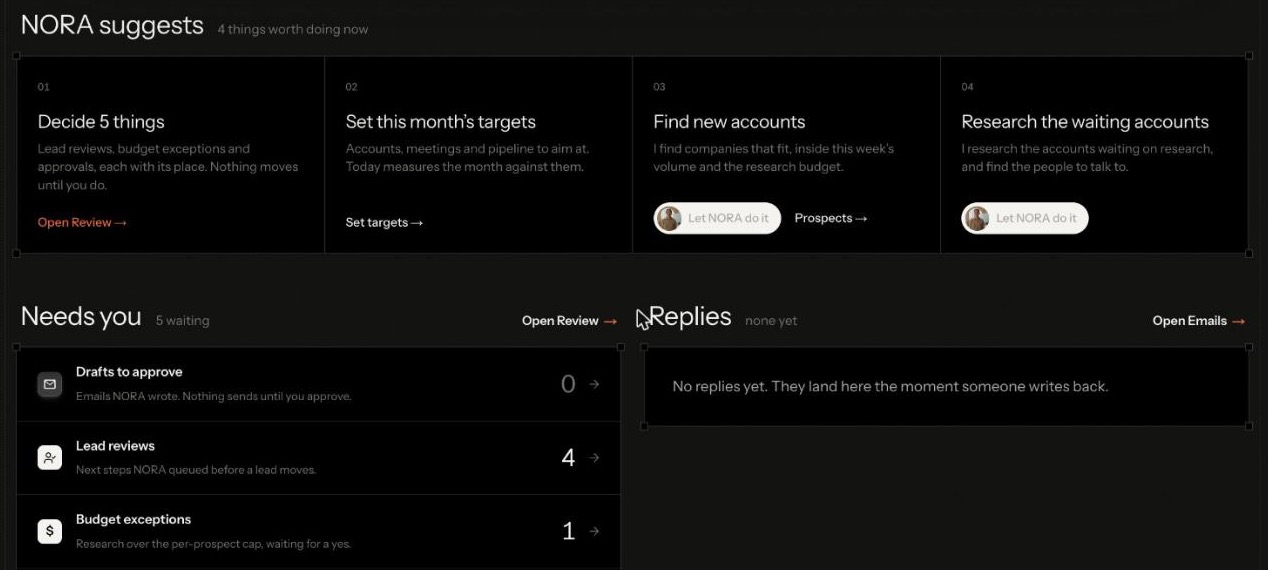
To aim the search yourself, open Prospects, then Find with NORA. Its Run discovery button runs a search, and the page says every run states its cost before it starts. Suggestions such as Find lookalikes of a named account fill the ask for you. You can also ask in the Sales room or in NORA's ask box:
@NORA find heads of marketing at 200 to 2,000 person B2B companies in India who are hiring for sales enablement@NORA find five companies like our best customer and tell me why each one fits
Discovery scores what it finds and removes your existing customers and suppressed contacts before they enter the book. A run whose forecast crosses the weekly spend cap does not start until somebody approves the overage, and research over the per-account cap waits under Budget exceptions on Today.
Start small. A first run of a handful of accounts is easier to review than a full list, and it tells you quickly whether the profile is aimed well.
Step 5. Read why each account surfaced
Open Prospects. The Companies view lists every company NORA found, with its fit score, its Why now, its contact and its stage. Chips across the top filter to Strong fits, Signals to confirm, Need research and Ready to send, and the list sorts by Best fit.
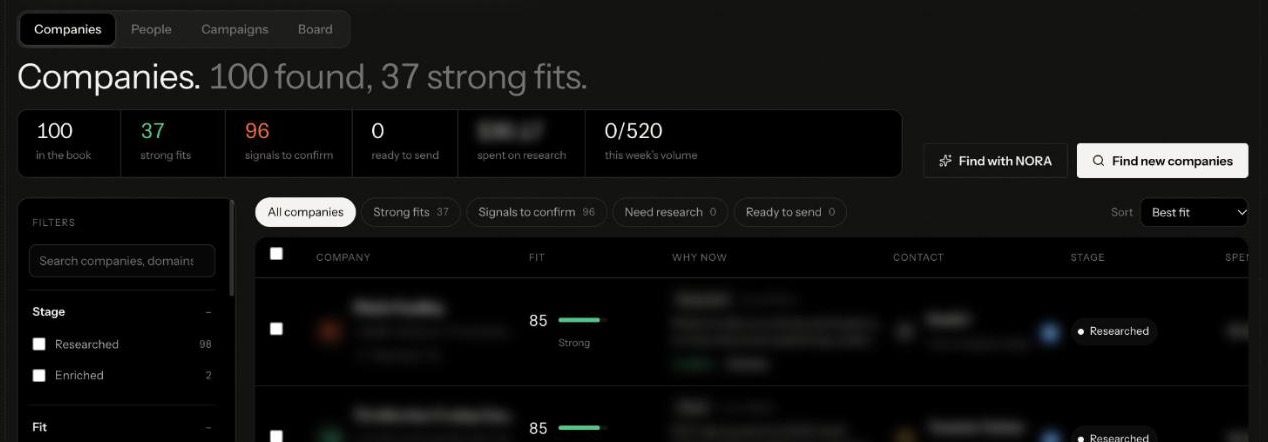
NORA reads buying signals of six kinds: stated pain, funding, a new leader, hiring, a tech change or expansion, each with its source and date. Signals order the queue by who is worth contacting now. After 30 days a signal counts as stale; stale signals sort to the bottom, and NORA will not open a draft with one.
Read the first page as you would a new researcher's work. For each row, ask: would we sell to this company if it called us today, and is the why-now recent enough to mention? A row that fails the first points at the profile. A row that fails the second points at the signal.
Your judgement sharpens the queue. Click a row to open it, read Why now with its Source link, and press Confirm the signal or Dismiss. Confirmed signals rank higher. A dismissed signal stops counting but is kept, so you can see why it was set aside.
Step 6. Research the accounts that fit
From an open company, press Research. To work in bulk, open Prospects, then Board. Every company sits in one stage, and the board says what put it there:
Stage: Discovered, What puts a company there: Found by a run and not yet researched
Stage: Researched, What puts a company there: Research done, no contact revealed
Stage: Enriched, What puts a company there: A contact has been revealed and paid for
Stage: Ready to send, What puts a company there: A draft exists and a person approved it
Stage: Contacted, What puts a company there: Something left the mailbox
Each card shows its next step, such as Research this account or Discover stakeholders. The Let NORA do it strip runs a step for a whole column, such as Research all waiting; anything over the per-account budget waits in Review.
Research produces a dossier: an overview, why the company fits, its signals and its pitch hooks, each with its source. That dossier is the rule for everything after it. Every fact a draft states about a prospect must trace to the dossier or the company record, or the draft is refused. With a thin dossier, NORA asks one qualifying question instead of asserting.
Before you let research run at volume, check three dossiers by hand:
Does why it fits match your profile, in words a buyer at that company would recognise?
Does every signal carry a source and a date inside the last 30 days?
Would you be comfortable opening an email with any of the pitch hooks?
If the answer is no for more than one, fix the profile or the knowledge shelves before you run more. A wrong brief costs credits on every row.
Step 7. Map the buying committee
One contact is not an account. Press Find stakeholders on a researched company, or run it for the column from the board. NORA maps the committee as four roles, so outreach can reach more than one person. The People view under Prospects lists "the people to talk to at every company NORA found", each with a Buying role.
Contact details are revealed only for a company that scores 70 or more out of 100 against your profile. The board's reveal gate card counts what is held below it, and a person can trigger a reveal from the approval queue. Revealing spends credits, which is why the threshold sits in front of it.
Step 8. Qualify with evidence, not enthusiasm
NORA does not write unqualified people into your CRM. A prospect becomes a lead only when four qualification questions are answered with evidence: pain confirmed, budget owner, timeline stated and decision process. On a new workspace that CRM view is nearly empty, and that is correct.
A company moves backwards on the board only when a person moves it, and that move is recorded. Disqualified is final, with the reason on the card.
How do you know the research is getting better?
Three places tell you whether research is aimed well, and none invents a figure it did not read.
The funnel. On the Sales room's NORA tab, each stage carries its definition, from ICP Qualified ("the ones research confirmed are worth pursuing") through Decision Makers, Activated and Positive Conversations to Meetings and Meetings Held. Until targets are set, each row reads "no target".
Cohort drift, on the board, counts how many scores were earned against a profile that is no longer active. If that number grows, re-score before you trust the order.
Results. Performance breaks outcomes down by industry, sender persona, signal kind and score band, and once five or more leads have closed, Run the tuner proposes new weights for you to accept or not. ICP profiles shows which profile is actually closing.
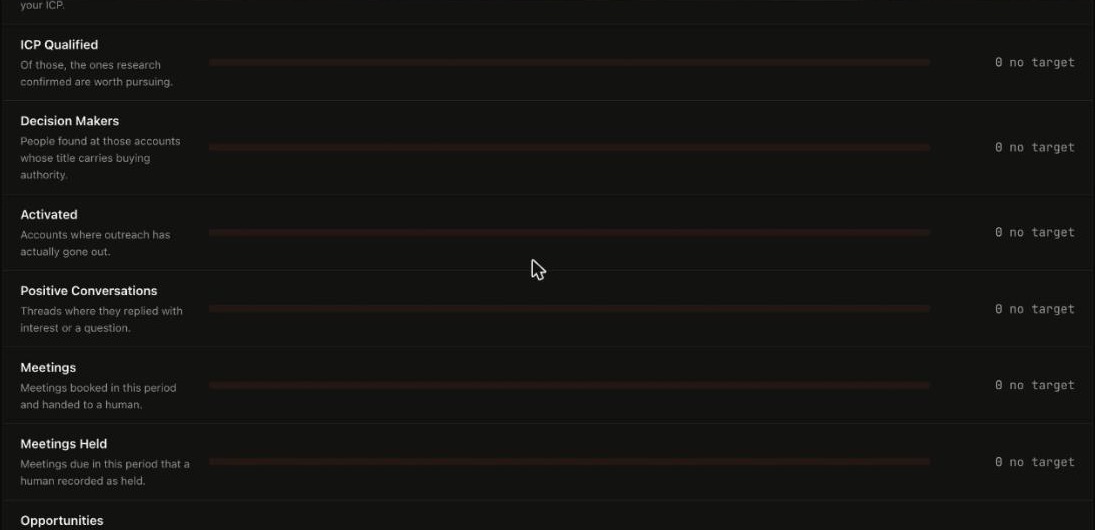
Record meeting outcomes as they happen. A meeting counts as held only when a person records it, so the loop that improves NORA's research runs on your notes.
What waits for a person during research?
Research and drafting can run on their own; the rest comes back to you on Review, under Waiting: "Nothing NORA holds moves until a person does."
Cost-cap exceptions. A run whose forecast crosses the cap will not start until somebody approves the overage. Each one is decided on that prospect's own page under Prospects.
Lead reviews. Next steps NORA queued before a lead moves.
Autonomy approvals. Actions above the autonomy level you set.
Sending is never part of research. The Settings card says it plainly for email: sent once a person approves.
What can't NORA research today?
Consumers. Discovery searches companies; with a consumer profile it does not run.
Stale reasons. A signal older than 30 days is not treated as a reason to write.
Your outside CRM. NORA's pipeline reads the workspace's own lead records. An outside CRM can be connected as a tool, but the pipeline does not sync with it.
Social messages. NORA sends email only. LinkedIn and X messages come from your templates, and a person sends them.
Frequently Asked Questions
How do you research accounts for outbound with AI?
Write a customer profile, score every company against it, and research only the accounts that fit. Collect dated buying signals with sources, build a dossier of why each fits and what to say, map the buying committee and qualify against clear questions before contacting anyone.
What buying signals does NORA look for?
Stated pain, funding, a new leader, hiring, a tech change and expansion, each with its source and date. Signals older than 30 days count as stale and sort to the bottom.
When does NORA reveal a contact?
Only for a company that scores 70 or more out of 100 against your customer profile. Below that, the contact is held, and a person can trigger the reveal from the approval queue.
Does an AI agent make up details about prospects?
NORA is built not to. Every fact a draft states about a prospect must trace to the research dossier or the company record, or the draft is refused.
Where should you start?
Start with the profile. Every score, signal and dossier NORA produces is measured against it, so an hour spent on Step 1 saves weeks of research on the wrong accounts. Then run one small search, read the Companies view row by row, and confirm or dismiss the signals before you research at volume.
Book a demo to watch NORA research accounts against your own customer profile.