
How to Run a Weekly Marketing Review with AI
To run a weekly marketing review with AI, review four things in the same order every week: what moved against the target, what is waiting on a person, what each channel owner did, and what happens next. Have the agents prepare the inputs, decide what waits on you, then set next week's plan and adjust what each agent may do alone. On Nagent, the team leads under MIRA, the AI Marketing Chief of Staff, supply the reports, and MIRA turns them into next week's plan.
What should a weekly marketing review cover?
A weekly review is short when its inputs arrive ready and its agenda never changes. Whether your team is people, AI agents or both, keep to five questions:
Did the number move? Progress against the one target the team is run against, from a source you can name.
What is waiting on a decision? Approvals, escalations and anything that failed.
What did each owner do? One summary per lane, not a list of every task.
What is next week for? A plan with an owner, a definition of done and a blocker for each item.
Who has earned more room, and who has lost it? With AI agents this question is new, and it is where most of the leverage sits.
The rest of this guide shows where each answer comes from on Nagent, and what the product does not do for you yet.
Where does MIRA sit in the team?
Nagent builds each department like a team you would hire: an AI chief of staff who owns the outcome, team leads who run one part of it, and sub-agents who do the specialist work. The team page sets out the model. In Marketing, which owns reach and pipeline cost:
Layer: AI chief of staff, Who: MIRA, What they bring to the review: The plan for next week, with an owner for each item
Layer: Team lead, Who: DRIS, organic visibility, What they bring to the review: Visibility reports and the actions each human lead should take
Layer: Team lead, Who: NIA, paid marketing, What they bring to the review: Proposed changes to your ad accounts, waiting for approval
Layer: Team lead, Who: HOOK, creative strategy (Beta), What they bring to the review: Briefs, hooks and scripts ready to review
Layer: Team lead, Who: Echo, reputation (Beta), What they bring to the review: Reputation scans, review reply drafts and a weekly mentions digest
Layer: Team lead, Who: MOXA, social media, What they bring to the review: Coming soon
Layer: Sub-agents, Who: Each lead's bench, What they bring to the review: The detailed work, handed back to their lead, never sideways
Requests move down this line and results come back up. You ask in MIRA's room, she hands each piece to the lead who owns it, the lead briefs its sub-agents, and one answer comes back with anything that needs a person waiting on a card. One message can pull in at most three more teammates, and work MIRA hands over runs under the receiving teammate's own level and budget. Asking another department, such as CREA's Content team for a blog post, is a written handoff to that room's lead, and the result returns to the thread that asked.
What does MIRA actually bring to the weekly review?
Be precise about this, because it shapes how you run the meeting.
What MIRA does. In the Marketing room, ask her what the week is for and she writes a plan: for each item, the owner, what done looks like and what it is waiting on. Ask who should do it, and she writes one task per owner on the team's board. She plans against the target the team set; with no target, she says so and plans in counts. A number appears in her reply only when a teammate's report, a connected account or the team record gave it, with where it came from.
She also chases without being asked. When something in the room has waited on a person for two days, she posts it once in the thread: "Still waiting on a human after 2d", followed by what it is.
What MIRA does not do today.
She does not post a weekly plan on her own. The Marketing room carries no prebuilt workflows, so there is no switch that makes her write next week's plan every Monday. The schedules that fire belong to workflows in the lead rooms (Step 1). Ask MIRA for the plan in the meeting instead.
The set-up helper is not a reporting tool. The box that reads "Ask MIRA about setting up" answers from set-up help notes and your set-up answers, not from your teams, runs, approvals or spend. For those, go to Approvals and the rooms.
So the weekly review on Nagent is a short loop: the leads report, you decide, MIRA plans.
How do you run a weekly marketing review with AI, step by step?
Step 1: Put each lead's weekly report on a schedule
Do this once. Each lead room carries prebuilt workflows, and several are built for a Monday. Open the room from Your teams, press the faces at the top to open the member list, choose Agents and tools, and switch on Keep running for the ones you want.
Room: DRIS team, Workflow: Weekly visibility report, Keep running: Mondays at 09:00
Room: DRIS team, Workflow: Weekly actions for your team leads, Keep running: Mondays at 09:00
Room: HOOK team, Workflow: Competitor ad scan, Keep running: Mondays at 09:00
Room: Echo team, Workflow: Weekly mentions digest, Keep running: Mondays at 09:00
Room: Echo team, Workflow: Reputation scan, Keep running: Mondays at 09:00
Each result posts in its room. Schedules arrive switched off and run in your workspace's time zone. You can also set one in a sentence in the room, such as "schedule Weekly visibility report every Friday at 4pm", and the lead replies with the next run. Turning a schedule on needs permission to set up the room. A workflow schedule is the one kind of schedule that starts runs on its own today, so put the weekly inputs here.
"Weekly actions for your team leads" is worth singling out: DRIS reads the week's search and AI answer visibility, then turns it into at most ten actions for your human leads, grouped by person, each with what to do, why and the page or answer it moves.
Step 2: Start with what happened while you were away
When you come back to Home after a day or more, the first card says what happened since your last visit: how much work ran and which agents ran it, how many approvals were made, what the workspace reached, and how much is waiting for your decision.
If you were away, you may already have had the Work is waiting for you email: once work has waited two hours or more, it names up to three items, at most one a day. Items you can approve carry an Approve link that opens a page showing exactly what will run; only the button on that page decides.
Step 3: Clear what is waiting on you
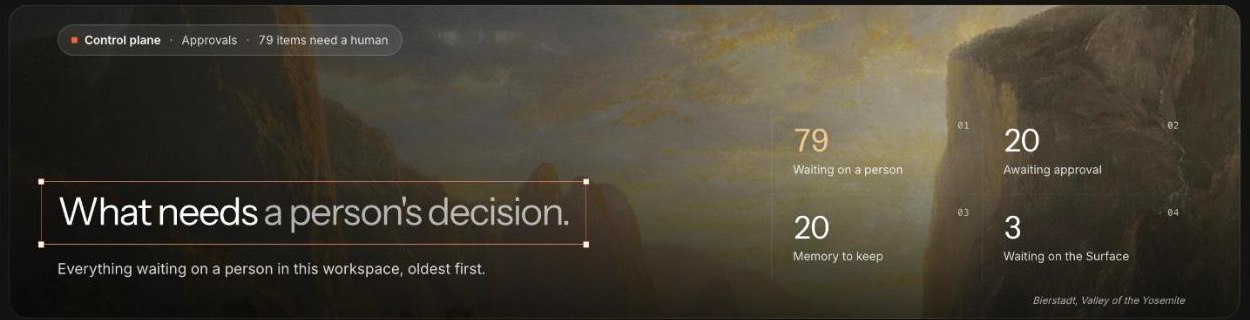
Open Approvals, in the Control plane. It is headed "What needs a person's decision." and counts what is waiting on a person, what is awaiting approval, the memory waiting to be kept and the work waiting on the Surface. Work through it before you read any report, so the agents are not blocked while you read.
Below the counts, filters split the list into All, Awaiting approval, Memory to keep, Waiting on the Surface, Escalations and Blocked decisions.
Pick a row; the detail opens on the right.
On an approval, press Approve or Reject.
Add a reason. It is optional, it is written to the record with your name on it, and agents read it before their next run.
A Waiting on the Surface row is a plan or draft a lead left on its team's board, and it says "Open the Surface board to approve it, or request changes". Escalations are things a team raised for a person; open each one and act on the thing itself. Blocked decisions are failed runs; open them to see what the agent was trying to do. A request nobody decides expires, high and critical risk after 24 hours and everything else after seven days, and an expired action never runs.
Step 4: Read what each lead did
Now read the reports, one lane at a time. Start with the results your Monday workflows posted in each lead room, then open each lead's own page.
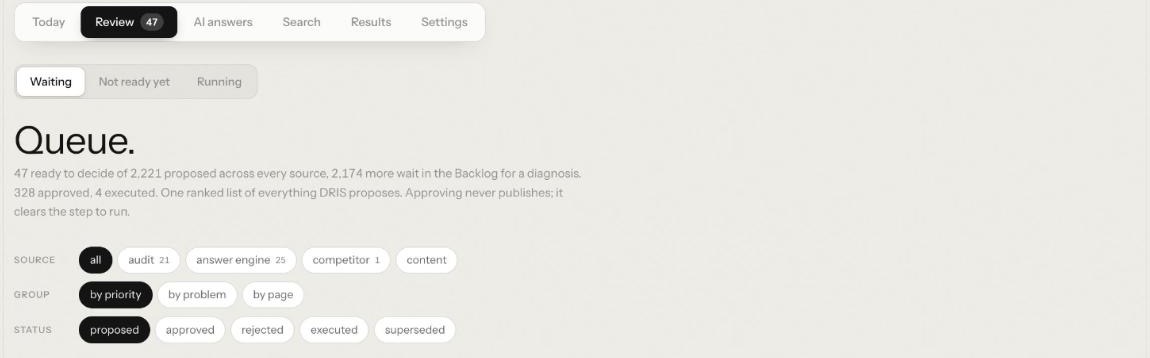
DRIS. Its Review tab is one ranked queue of everything DRIS proposes. Approving never publishes; it clears the step to run. Today says how many changes need you.
NIA. Her Today counts the changes waiting, what was spent and the conversions. Her Review tab opens on Approvals, "What waits for your yes.", where every change she would make to a live ad account waits for a person.
HOOK. Today counts what needs you, the creative bets in play and the winner rate from the last read.
Echo. In the Echo team room, the Echo view on the Team surface counts open cases, due commitments, pending decisions and stale sources, with what needs a person.
Step 5: Ask MIRA for next week's plan
In the Marketing room, ask:
@MIRA what should the marketing team focus on this week, and who should do it?
MIRA looks up what she needs, writes the plan and puts one task per owner on the board. The plan names what your workspace sells, and any active offering it leaves out is listed on its last line after Not in this plan yet:, so a gap is visible rather than silent.
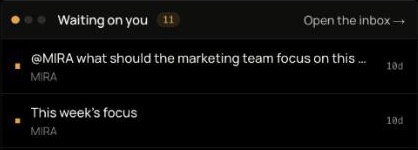
What she leaves for you shows on the room's Team surface, on the Board, under Waiting on you, with Open the inbox beside it.
Step 6: Settle disagreements in a huddle
When a question needs several leads at once, such as whether to move budget from paid search to new creative, press Huddle at the top right of the room. Write in one line what it should settle, untick anyone who should stay out, and press Start the huddle. The room's lead runs it, you are seated in it, and it ends with decisions and tasks on the board. Starting one needs the meetings write permission, which workspace admins hold.
Step 7: Record the decisions
When the review settles something, say it in the room and ask MIRA to record it, with who decided. It goes onto the team's decision log, which is append only, and the team's agents cite it back, so a settled question stays settled. When you set a lasting direction in a room, such as a channel to leave out, the lead offers a card that adds it to the team's charter; it is added only when a person taps it, every time.
Step 8: Adjust levels and budgets
End every review with trust. Agents are nominated, never promoted by the system: each night Nagent reads every agent's record, and one that has spent 30 days at its level with at least 25 approval cards decided and almost none dismissed is nominated. The nomination arrives in Approvals under Awaiting approval as "Promote" the agent "to" the next level, and a person decides.
The same nightly run sends a small sample of what agents did on their own back to a person as Was this right? items. They block nothing; dismissing one counts against the agent's record.
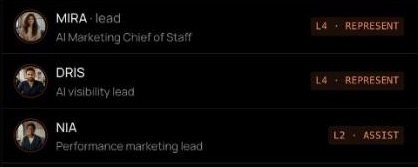
The Marketing room's roster shows each agent's level beside its name, so you can read the team at a glance. To move a level yourself, open the agent in the Agent Workbench. Promotion review moves it up one step and shows its evidence for the last 30 days; write why it is ready, then press Promote to the next level. Change level moves it down. On Enterprise, a raise to L5 also needs a second person.
Before you decide, the autonomy ledger, Governance in the Control plane, lists every agent with its trust, errors, blocks and autonomy, lowest score first. Check budgets in the same pass: each agent has a daily and monthly cap in credits, set on its Budget pane, and a budget breach drops the agent one level.
What does a weekly review agenda look like?
Copy this and keep it the same every week.
Minutes: 5, Item: What happened since last week, Where: Home, and the work-waiting email
Minutes: 10, Item: Clear approvals, escalations and failed runs, Where: Control plane, Approvals
Minutes: 15, Item: One lane at a time: visibility, paid, creative, reputation, Where: Lead room results, DRIS and NIA Review, HOOK Today, Echo view
Minutes: 10, Item: Next week's plan, with owners, Where: Marketing room
Minutes: 5, Item: Decisions recorded, levels and budgets adjusted, Where: Marketing room, Agent Workbench
Frequently Asked Questions
How do I run a weekly marketing review with AI agents?
Schedule each lead's weekly workflow, then review in a fixed order: what moved against the target, what waits on a person, what each lead did and what next week is for. Finish by adjusting what each agent may do on its own. On Nagent, the leads report and MIRA writes next week's plan.
What should a weekly marketing review include?
Progress against the one target, every decision waiting on a person, a summary per channel, next week's plan with an owner and blocker per item, and any change to how much each agent may do without asking.
Can an AI chief of staff send a weekly briefing on its own?
Not on Nagent today. MIRA writes the plan when you ask in the Marketing room, and the scheduled weekly reports come from workflows in the lead rooms, such as DRIS's weekly visibility report and Echo's weekly mentions digest. What MIRA does do unasked is post anything that has waited two days on a person.
How do I decide whether an AI agent gets more autonomy?
Look at its record: how many of its approval cards were decided, how many were dismissed, its errors and its trust. On Nagent the system nominates an agent after 30 days at its level with at least 25 cards decided and almost none dismissed, and a person decides.
Make the review a habit, not a meeting
A weekly marketing review with AI is mostly preparation you never have to do: the leads report on a schedule, and the meeting is the decisions only a person should make. Schedule the reports once, keep the agenda fixed, and let MIRA turn the outcome into next week's plan. Approvals and the Inbox, autonomy and governance and staying in the loop cover each screen in more detail.
Book a demo to see a weekly marketing review run with MIRA and her team leads.