
How to Use an AI Agent for Google Ads: Connect and Read
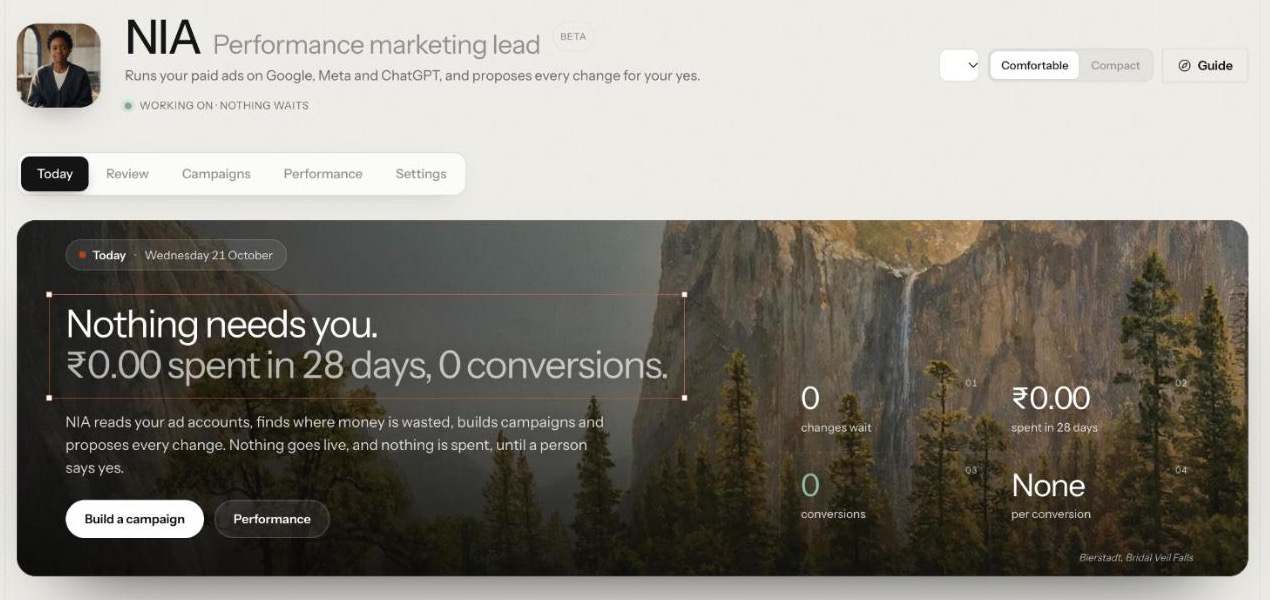
To use an AI agent for Google Ads, start by letting it read, not act. Connect the ad account through Google's consent screen, bring the numbers in, then ask plain questions about spend, results and waste and check the answers against what you know. Only then ask for proposals, and approve each one yourself. This guide walks through that first session with NIA, the performance marketing lead on Nagent's Marketing team.
What can an AI agent do in Google Ads today?
NIA is a team lead on Nagent's Marketing team, not a separate product, and she is in Beta. Her page sums her up in one line: "Runs your paid ads on Google, Meta and ChatGPT, and proposes every change for your yes." She reads your connected Google Ads account and answers questions about it in plain English: campaigns, ad groups, ads, keywords, search terms, spend, conversions, cost per conversion and return on ad spend.
From that read she can do two kinds of work:
Build campaigns from a brief. She writes the plan, and a chain of fixed checks decides whether it may go further: budget ceiling and pace, structure, copy safety, conversion tracking and duplicates. A campaign she builds is created paused.
Propose changes to live campaigns. Thirteen live actions cover pausing and resuming campaigns and keywords, raising and lowering budgets, setting a target CPA or a manual bid, adding keywords and negative keywords, editing ad copy and changing location targeting.
Every one of those changes waits for a person. NIA starts at L2 Assist, a level below the L3 her live changes need, so each proposal queues for approval, and installing the Marketing team cannot seat her higher. Her screens add "unless your autonomy level allows it" because a person can raise her level later. On day one, connecting her gives her eyes on the account, not hands on it.
Google Ads is one of three channels she works today, each through its own sub-agent. Meta ads (Facebook and Instagram) and ChatGPT ads are the other two, both in Beta. This guide covers Google Ads.
What do you need before you connect?
NIA in your workspace. She arrives with the Marketing team, or you can tick her alone at sign-up.
A Google account with access to the ad account you want to connect. You pick the account after Google's consent screen, so there is no ID to look up.
The right permission. Connecting an account and asking NIA both need permission to change integrations. Without it, NIA's screens tell you to ask a workspace admin.
Conversion tracking in Google Ads, if you want NIA to build lead or sales campaigns later. For those objectives she will not build without an enabled conversion action on the account, and the check names what is missing.
Someone who can approve. Every approval card names who can approve it. If nobody in the workspace holds that right yet, a workspace admin can grant it, so settle who that is before the first proposal arrives.
How do you connect Google Ads and get a first read, step by step?
Step 1: Hire NIA and set up with N
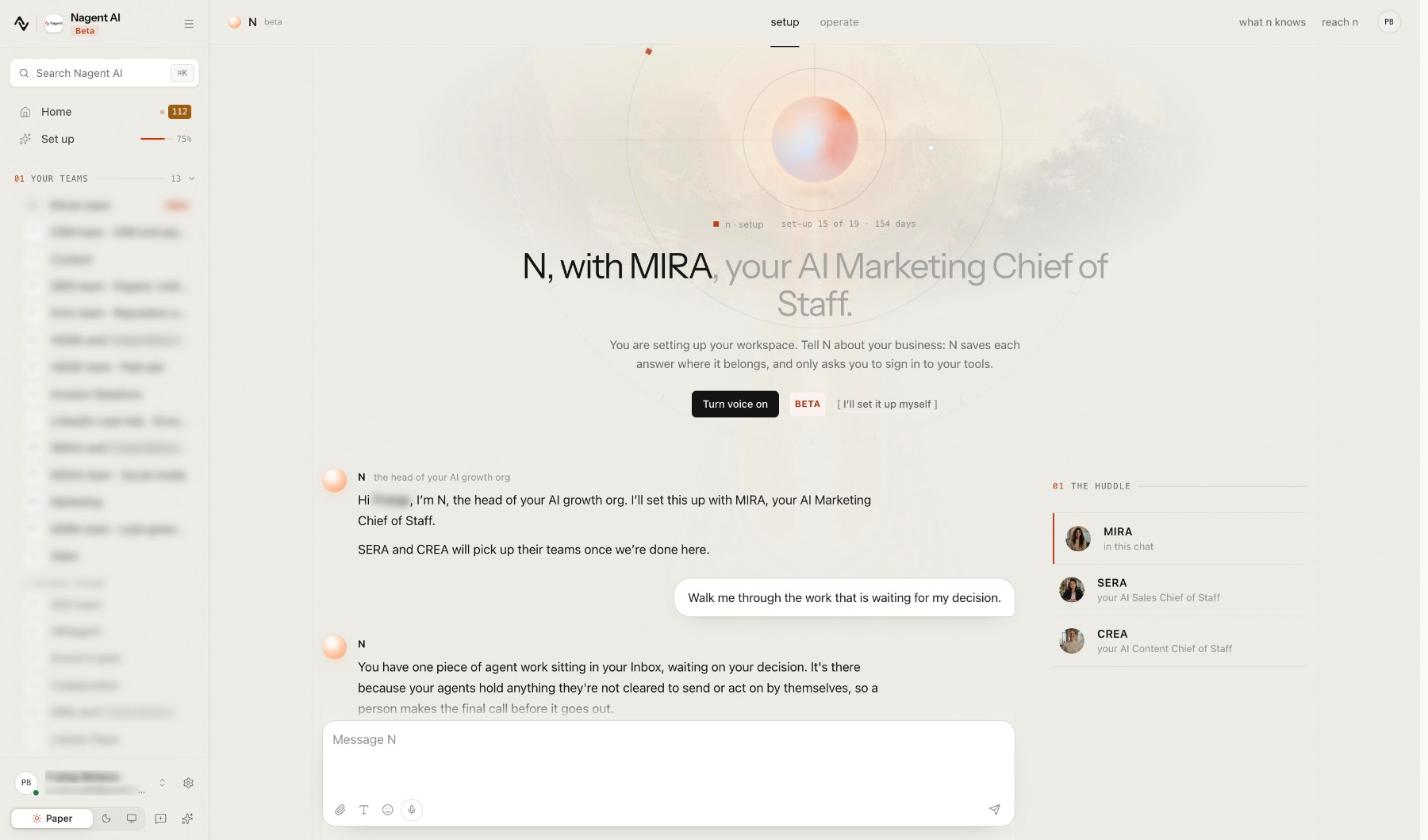
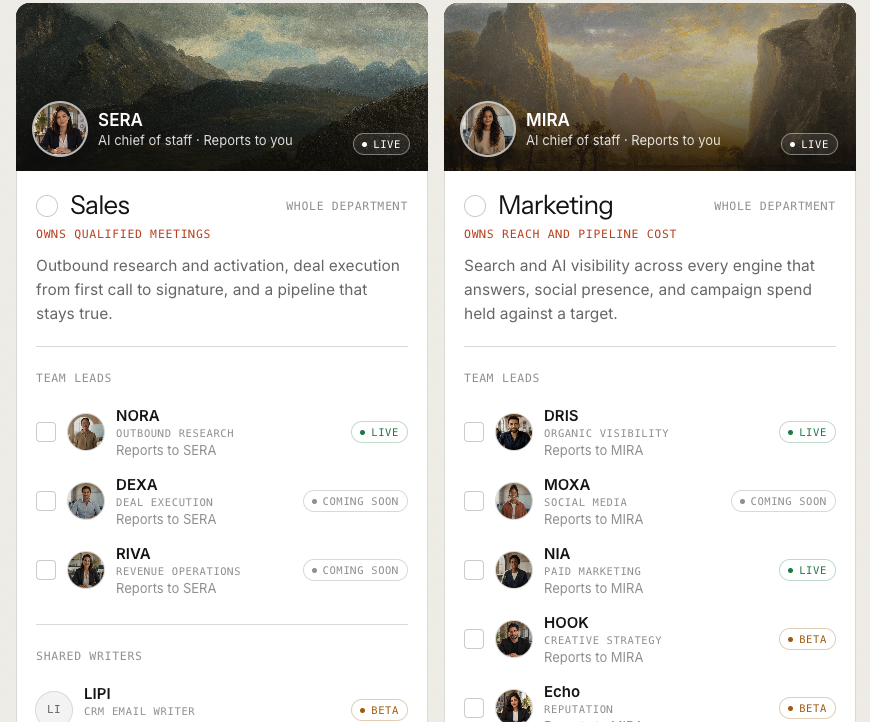
At sign-up, choose the Marketing card, marked Whole department, or tick NIA among its team leads. In the Marketing team she reports to MIRA, the AI Marketing Chief of Staff.
Set-up then runs in N · Setup, with N, the head of your AI growth org (Beta), and MIRA beside it. Tell N about your business. N saves each answer where it belongs and only asks you to sign in to your tools, and you can switch to doing it yourself at any point.
Step 2: Open NIA and find your way around
NIA's page has five tabs: Today, Review, Campaigns, Performance and Settings. Until an account is connected, Today reads "Connect an ad account." with a Connect Google Ads button.
The Guide button at the top right lists four first steps that tick off as you go: Connect Google Ads, Bring the numbers in, Read what NIA recommends, and Build a campaign with NIA.
Step 3: Connect the account in Settings
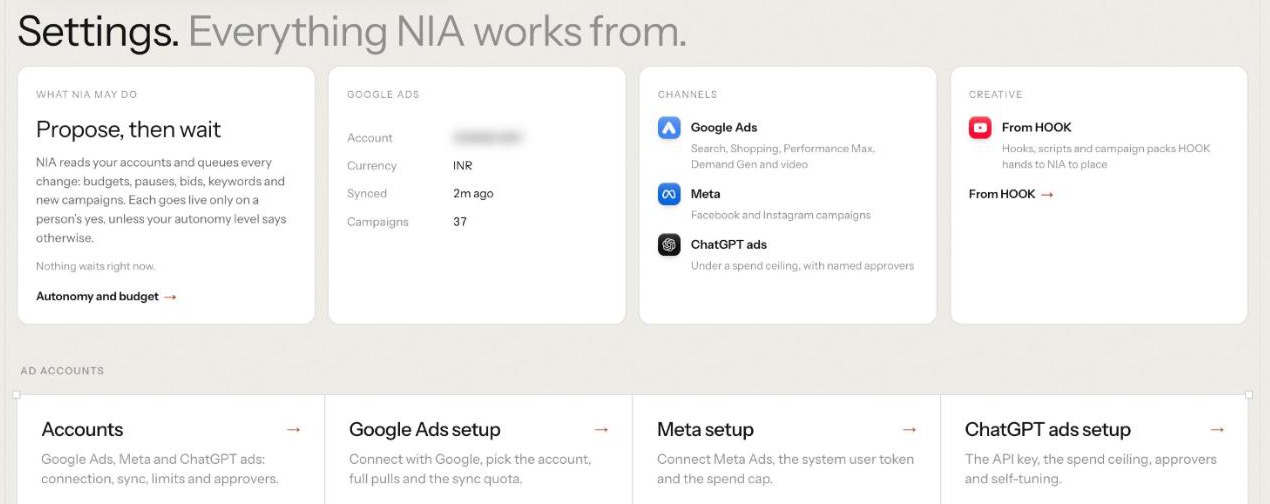
Open Settings, headed "Everything NIA works from." The top row says what NIA may do ("Propose, then wait"), shows the Google Ads account once one is connected, lists the channels and links the creative HOOK hands her. The row below holds Accounts, Google Ads setup, Meta setup and ChatGPT ads setup.
Open Accounts, headed "Where NIA reads and spends." Three rules sit at the top: NIA reads freely, proposes and never pushes, and your limits hold. On the Google Ads card, click Connect Google Ads. Google's consent screen opens. Sign in, approve access, and pick the account NIA should work on. If the login manages several, you choose one from a list.
If something goes wrong, the card says so plainly, for example that consent was denied and nothing was connected. Nothing in the account changes because you connected it. Changes only ever come later, as proposals you approve.
Step 4: Bring the numbers in
On the connected account's card, click Let NIA bring in the latest numbers. When it finishes, the card says how many campaigns and days of figures NIA brought in, with a link to see the campaigns, so you can check the list against Google Ads.
The card then shows Last good sync and a What NIA holds chart counting campaigns, ad groups, ads, keywords and search terms. If a sync fails, it says so and quotes what Google said.
For history and detail, click Full pull. It brings in ad groups, ads, keywords and search terms within Google Ads' daily operations limit; if it stops at the limit, run it again the next day. Once it is done, each sync brings in only what is new.
Step 5: Know what reads stored data
This is where most first sessions go wrong, so check it before you trust any answer:
Today, Performance, Recommendations and NIA's answers read the figures NIA has stored. If the pull covered only recent weeks, a question about last quarter will come back thin.
Empty windows say so. Performance reads "No numbers are stored for these dates yet" and offers Let NIA bring in these dates, which reads them from Google Ads without changing anything in the account.
Paused campaigns report zeros. A quiet account is not a finding, and NIA's own note says paused campaigns and test accounts report zeros.
If a number looks wrong, check Last good sync on the account card before you blame the agent.
Step 6: Read Today and Performance
Today opens with how many changes wait for you and the spend and conversions for the last 28 days. Below sit what NIA suggests, what waits for your yes, spend week by week, where the money goes by campaign and what NIA noticed.
Performance is the detail. Its four views are Trend, Search terms, Ads and pages and Audience.
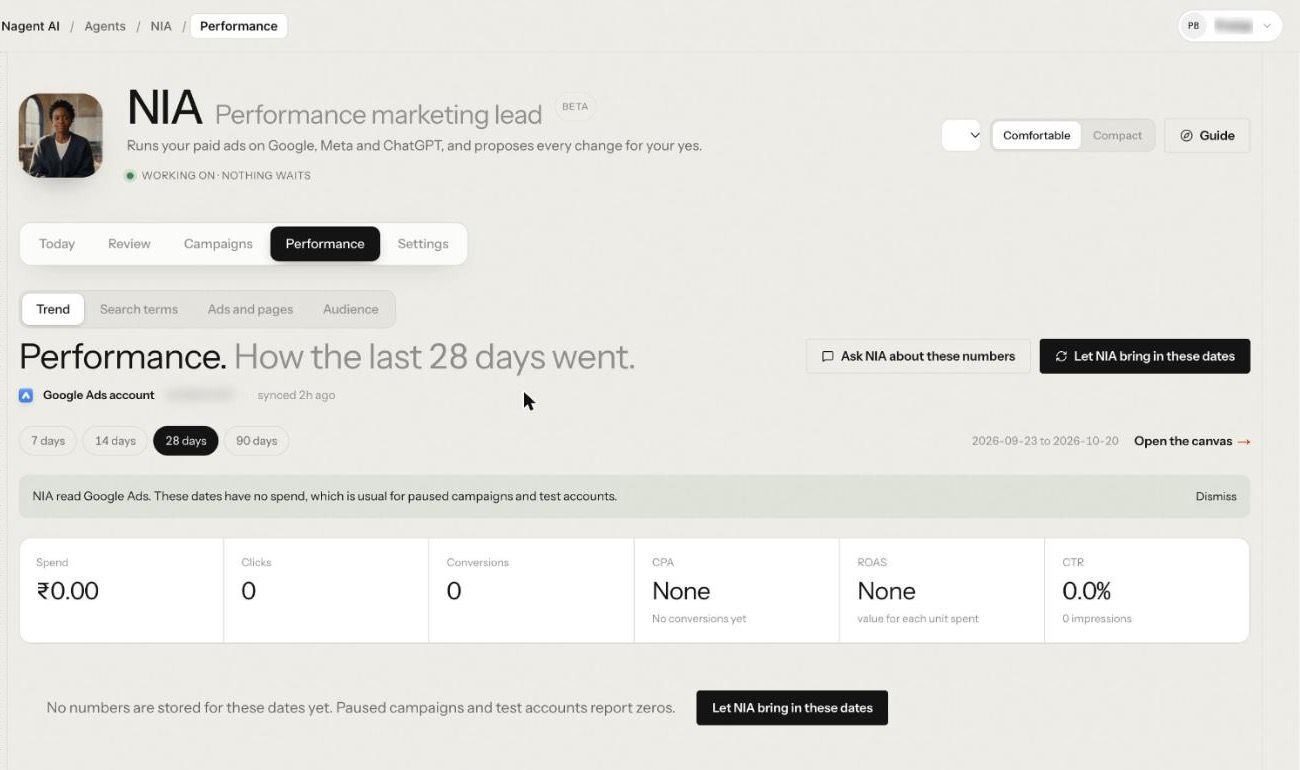
Trend gives spend, clicks, conversions, CPA, ROAS and CTR over 7, 14, 28 or 90 days, against the window before, and Open the canvas for the full charts.
Search terms shows what people typed and what it cost, filtered to No conversions or Converting, with Ask NIA to add these as negatives.
Ads and pages splits the window by ad group, ad and landing page.
Audience breaks results down by device, country, age, gender, day and hour.
Step 7: Ask your first questions
Every tab except Settings has an ask box at the foot, with suggestions that change with the tab: on Today, "How did spend go this week?"; on Performance, "Why did CPA rise this week?" and "Which search terms should be negatives?".
Start with questions you already know the answer to, such as spend by campaign over the last 28 days, and compare her answer with Google Ads. Once the numbers match, move to questions you can't answer quickly:
"Which search terms spent the most without converting?"
"Which campaigns lost the most return on ad spend against the period before?"
If NIA queues a change, it comes back as an approval card under the answer, and nothing runs until a person decides.
Step 8: Let NIA check the account
On Today, NIA suggests offers two things worth doing now. The first is Check the account: "I read every campaign and say what to pause, cut or move, for your yes." Press Let NIA do it, or open Recommendations under Review and press Let NIA check the account.
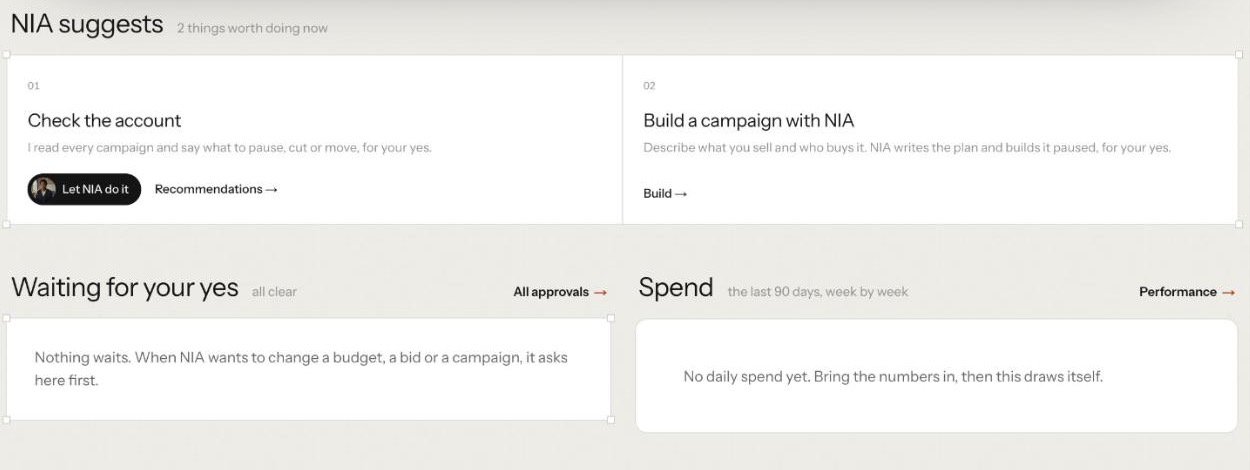
Recommendations first says whether the window can be trusted; if it is thin, it says "Read these with care". Then it lists recommended actions, bids and keywords, budget moves between campaigns, and advisories with nothing to apply. Each card shows the change before and after, why NIA wants it and the figures behind it.
Before proposing anything, NIA checks that the window is fresh and well covered, because stale or sparse data produces confident but wrong recommendations. A keyword pause has to clear a wasted-spend floor and a click floor, and each fix is validated as a dry run.
Step 9: Decide the first proposal
On a card, Let NIA do it asks you to confirm, and says nothing goes live without the approval engine: if your autonomy does not allow it, the change waits for your yes in Approvals, under Review.
Approvals lists what waits, by kind. Press Decide on a row. A drawer shows what the change is on, the change before and after, who proposed it, when it expires and its risk, then the Confirm before it runs card with Approve and Decline. Typing "approve" in chat does not approve anything; only those buttons do. Nothing reaches Google until a person approves it.
Recently decided, below, is the record afterwards: each change from the last 14 days, whether it went live, and who decided it.
What should you write down after the first read?
Leave a record you can compare against next month. Before you close the tab, note:
The window you read, and the time of the last good sync.
Spend, conversions and cost per conversion for the account and for your three biggest campaigns, as NIA reported them and as Google Ads shows them.
The waste NIA found: the search terms and keywords she flagged, and what you decided about each.
What you approved and what you declined, with your reason. Decided and declined cards are the record NIA's level is later judged on.
Next month, ask the same questions over the same length of window, and you will know whether it was the account or the approvals that moved.
Where does NIA sit in the team?
Nagent builds AI teams like a team you would hire: an AI Chief of staff who owns the outcome, team leads who run their part of it, and sub-agents who do the specialist work. See how a Nagent team is built. NIA is a team lead in Marketing:
MIRA, AI Marketing Chief of Staff, owns reach and pipeline cost
NIA, team lead, paid marketing
a Google Ads sub-agent
a Meta ads sub-agent (Beta)
a ChatGPT ads sub-agent (Beta)
DRIS, team lead, organic visibility
HOOK, creative strategy, and Echo, reputation, both Beta
MOXA, social media, coming soon
A request moves down the line and back up it. You ask the Marketing room in one line. MIRA decides who owns it and hands paid work to NIA. NIA breaks it down and gives each channel's part to that channel's sub-agent, which does it and hands the result back to her. She brings one answer back, with anything that needs a person waiting on a card, and you approve, edit or decline in the room where the work is.
Sub-agents hand work back to their lead, never sideways, and a message travels at most three hops, each checked against the receiving agent's budget. Organic search and AI answers belong to DRIS. New creative comes from HOOK (Beta): From HOOK, under Review, holds the packs HOOK makes for NIA to place. Asking another department, such as CREA's Content team, is a written handoff to that room's lead.
What will a first read not tell you?
Anything NIA has not stored. She answers from stored data. Bring the numbers in first, and run a full pull if you want history.
Meta and ChatGPT ads results. Each channel is connected on its own card under Settings, Accounts, and a Google Ads read covers Google Ads only. Reallocation, under Review, weighs Google Ads against Meta once both are connected.
Whether a change will work. A first read is a diagnosis. Proposals still need your judgement and your approval.
A finished campaign from one message. A new Google Ads campaign starts from Build under Campaigns, where NIA turns your brief into a plan you read before a person says yes.
Frequently Asked Questions
Can an AI agent manage my Google Ads account?
NIA can read the account, answer questions, build campaigns from a brief and propose changes. Every live change waits for a person, and campaigns she builds arrive paused, so decisions stay with your team.
Is it safe to connect Google Ads to an AI agent?
You grant access on Google's own consent screen, and connecting changes nothing in the account. NIA starts at a level below the one her live changes need, so every change she proposes waits in Approvals until someone who holds the approval right decides it.
What should I ask an AI agent about my Google Ads first?
Start with questions you can check, such as spend by campaign over the last 28 days, then move to waste: search terms that spent without converting, keywords with the worst cost per conversion, and campaigns whose return fell against the period before.
Why does NIA show no data after I connect?
Connecting does not copy data on its own. On the account card in Settings, Accounts, press Let NIA bring in the latest numbers, and Full pull for ad groups, ads, keywords and search terms. Paused campaigns and test accounts report zeros even after a sync.
Start with a read, then decide
The safest way to bring an AI agent into Google Ads is the order in this guide: connect, bring the numbers in, check them, ask about waste, then decide each proposal yourself. NIA is built for exactly that order, and the NIA guide covers building campaigns and the Meta and ChatGPT ads channels.
Book a demo to see NIA read your own Google Ads account.
AI agents for Media & Publishing
Continue learning
Agents that match this read.
AdMaker Alpha
Create cinematic high-engagement AI advertisements up to 15 seconds with automated scripting, storyboarding, visuals, motion planning, and video generation optimized for social media and performance marketing.
View agent CCampaign Hub
The Campaign Hub Agent powers marketing content automation by turning a basic brief into brand-aligned copy, CTAs, and static creatives at scale. No detailed prompting required, and Google Sheets integration enables effortless high-volume campaign creation.
View agent