
An agent's own email address
How to give an agent its own address on agents.nagent.ai, what happens when someone writes to it, who gets an answer with tools and who without, how its replies are approved and sent, and the rules that keep automatic mail away from strangers.
Browse documentation
People can write to an agent
An agent can have an email address of its own. Write to it and the agent reads the message and answers by reply, under its own name, the way it would answer in a team room. It is how a customer, a partner or a colleague who never opens Nagent can still ask MIRA or NORA for something.
Chiefs of staff and team leads get an address automatically when their
team is created. Any other agent has none until someone gives it one.
Teams have addresses of their own too, such as
marketing.<workspace>@agents.nagent.ai. Agent addresses are in Beta.
The address
Every agent address has the same shape:
<agent>.<workspace>@agents.nagent.ai
The first part is the agent's name (DRIS is dris, not its key
visibility-strategist) and the second is your workspace's short name, so MIRA in a workspace called promptworld is
mira.promptworld@agents.nagent.ai. Mail from it shows the agent and your
workspace as the sender, for example "MIRA at Prompt World".
An address belongs to one agent in one workspace. No two agents, in your workspace or any other, can hold the same one.
Giving an agent an address
- Open the agent in the Agent Workbench. It opens on its Profile tab.
- Press Identity in the row of links under the tabs, or scroll to the Identity window, marked Beta. It has one tile per channel: Email, Slack, Microsoft Teams and Phone.
- Press Give the agent an address. Nagent says the agent "now has an address", and the Email tile reads Active with the address.
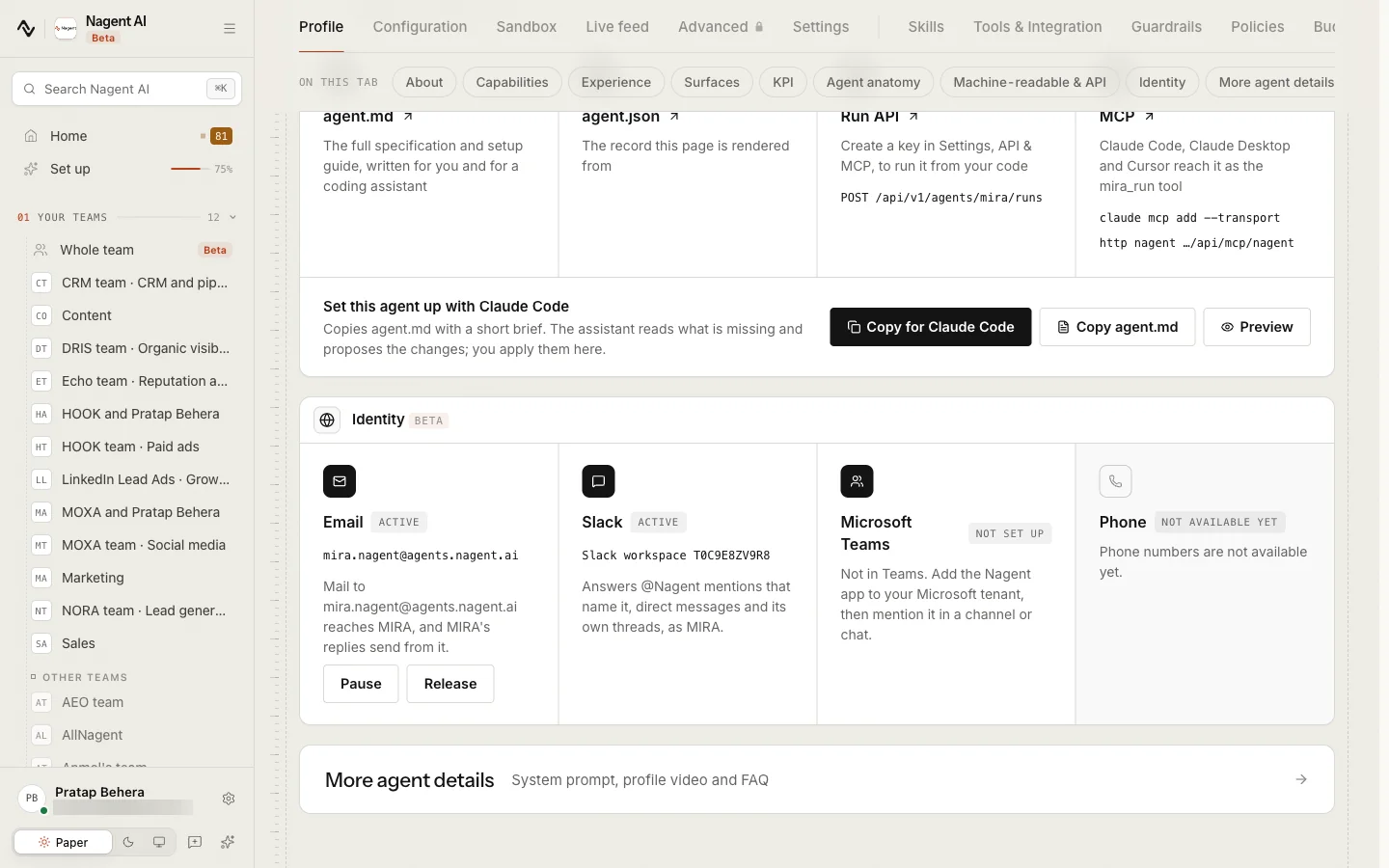
Giving an address, pausing it and releasing it need permission to change agents, and you must be working in a workspace: an address belongs to one. Every change is recorded in the audit log.
| On the Email tile | What it means |
|---|---|
| Not set up | The agent has no address. Mail to it reaches nobody |
| Active | Mail to the address reaches the agent, and its replies send from it |
| Paused | Mail to the address starts nothing, and nothing sends from it |
- Pause stops the address without giving it up. Resume turns it back on.
- Release gives the address up. Nagent asks first: mail to it "will start nothing" until the agent is given an address again. Giving one again makes the same address.
The Phone tile reads "Not available yet". Slack and Microsoft Teams are set up from Integrations.
When someone writes to the address
The agent reads the message and answers by reply to the sender only, in the same thread: the subject starts with "Re:" and the reply is threaded to the message it answers. Up to three agents can be addressed in one message, in To or Cc, and each answers for itself.
Some mail never starts any work:
- automatic replies, out-of-office notices and bounces;
- mailing lists and bulk mail;
- mail from another agent or another agent address;
- a message the agent has already answered.
Attachments are not opened. The agent sees their names, not what is in them, so paste anything it should read into the message.
Who gets an answer with tools
Who wrote decides what the agent may do with the message. An agent uses its tools, reading your records and acting on them, only for someone the workspace already knows:
- a member of your workspace, writing from the address on their Nagent account;
- a lead you have e-mailed: someone in your CRM who has had at least one e-mail from you;
- a prospect you have reached out to: someone your outreach has actually sent to.
Anyone else gets an answer with no tools: the agent replies from what it already knows and reads nothing from your workspace. A lead who is only in your CRM, with no e-mail ever sent to them, counts as anyone else. Mail from someone unknown is also limited to 3 messages an hour to the same agent, and to 20 a day for each agent.
Our logic
A From line is easy to fake. An address is only trusted with your records when your workspace has itself written to it, or it belongs to one of your people, so a stranger cannot get an agent to read out your pipeline by claiming to be a customer.
How a reply is sent
An agent's reply is an action like any other, Agent replies by email, and it reaches outside your workspace. An agent at L4 Represent or above sends it on its own. Below L4 the reply waits for a person in the Inbox under Awaiting approval: whoever decides it can edit the subject and the text before it goes, but not who it goes to. If the agent was paused or switched off in the meantime, an approved reply is still not sent.
Replies go out from the agent's own address through Nagent's mail service, even when your workspace has its own sending domain. Your own domain (email and integrations) is for the mail your agents and sequences send first: outreach, follow-ups and nurture. Each reply is counted on your e-mail usage. A reply is marked as an automatic reply, so out-of-office notices and other agents do not answer it in turn.
Agent replies are answers to mail the agent received, sent to that one sender. They are not marketing mail, so they carry no unsubscribe link and are not checked against your suppression list. Mail your agents start is covered by unsubscribe and suppression.
Rules for automatic mail
These apply to mail your agents send on their own initiative, not to replies to mail they received:
- An automatic e-mail goes only to someone who has replied to you. Before an automatic send to a lead, such as a follow-up the CRM's autopilot would send without asking, Nagent checks that the lead has answered an e-mail your workspace sent them. A reply counts only when it is threaded to one of your messages. A newly captured lead gets no automatic first e-mail; a person sends it, or approves it.
- A reply two workspaces could own is not filed. When an incoming reply could belong to more than one workspace and the original send does not settle which, Nagent files it in neither, rather than guessing and showing one company's mail to another. Your agent addresses are never affected: each address belongs to exactly one workspace.
Limits today
- Agent addresses are in Beta, and every agent starts with none.
- Attachments are not read.
- An address keeps the workspace short name it was made with. If the workspace's short name changes, existing addresses keep working, and an agent given an address afterwards gets the new name.
- Phone is not available yet.
- Replies always send through Nagent's mail service, not your own sending domain.
Where to go next
- Approvals and the Inbox: where a reply waits for a person.
- Email and integrations: your own sending domain for mail agents start.
- Unsubscribe and suppression: the opt-outs every outreach e-mail respects.