
Meetings
The two kinds of meeting in Nagent, meetings with your customers on the lead record and meetings your agents hold with each other, and where each one is set up.
Browse documentation
Two kinds of meeting, kept on the record
"Meeting" means two different things in Nagent, and they live in different places.
| Kind | What it is | Where it lives |
|---|---|---|
| Customer meetings | A call or demo between your people and a lead | The lead's Meetings tab in the CRM |
| Agent meetings | Your agents talking a problem through, within a budget, and leaving minutes | Meetings, at /admin/meetings. Beta |
Both are written down. A customer meeting becomes part of the lead's history, and an agent meeting leaves a transcript, minutes and a list of who owes what.
Customer meetings
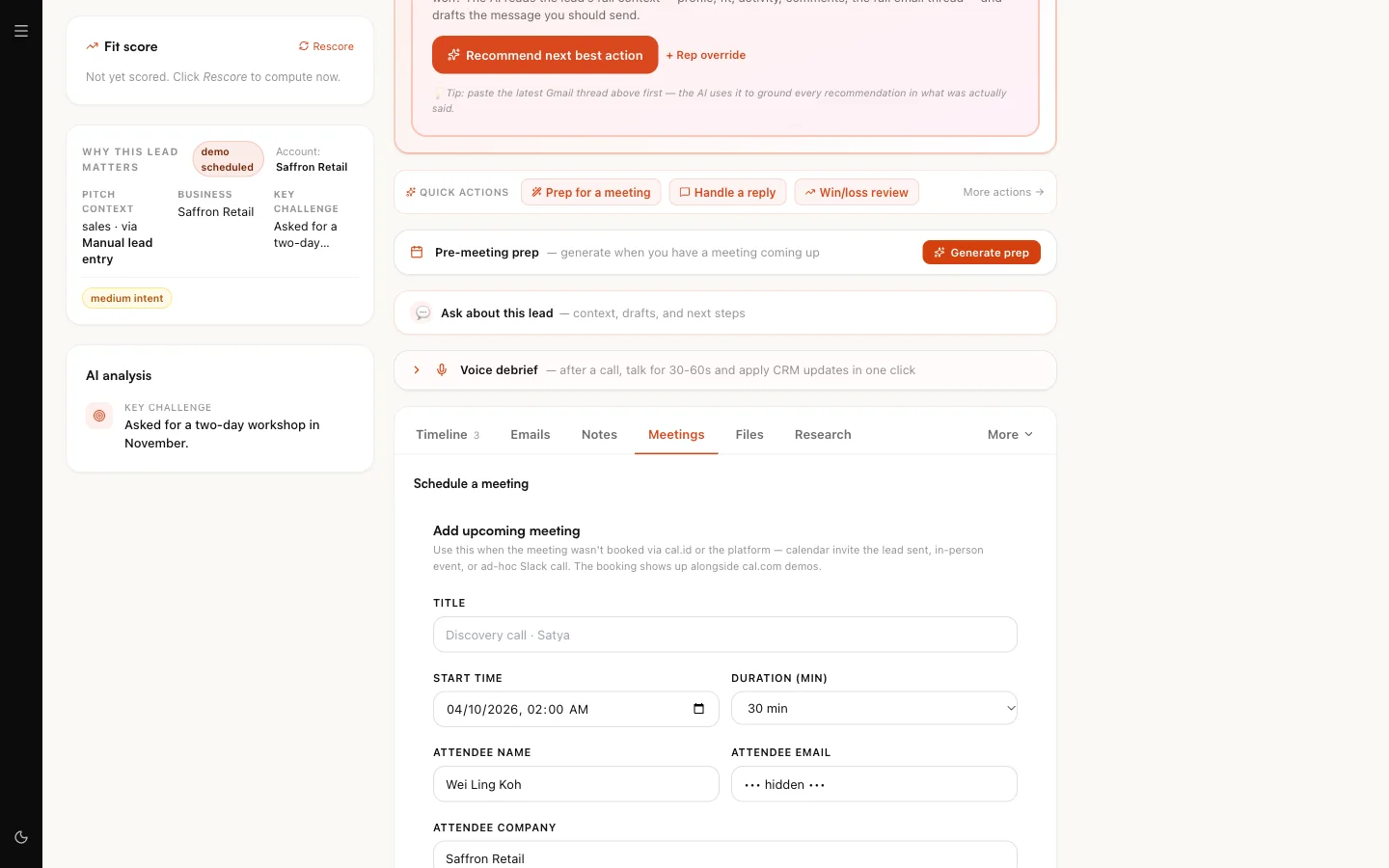
Adding an upcoming meeting
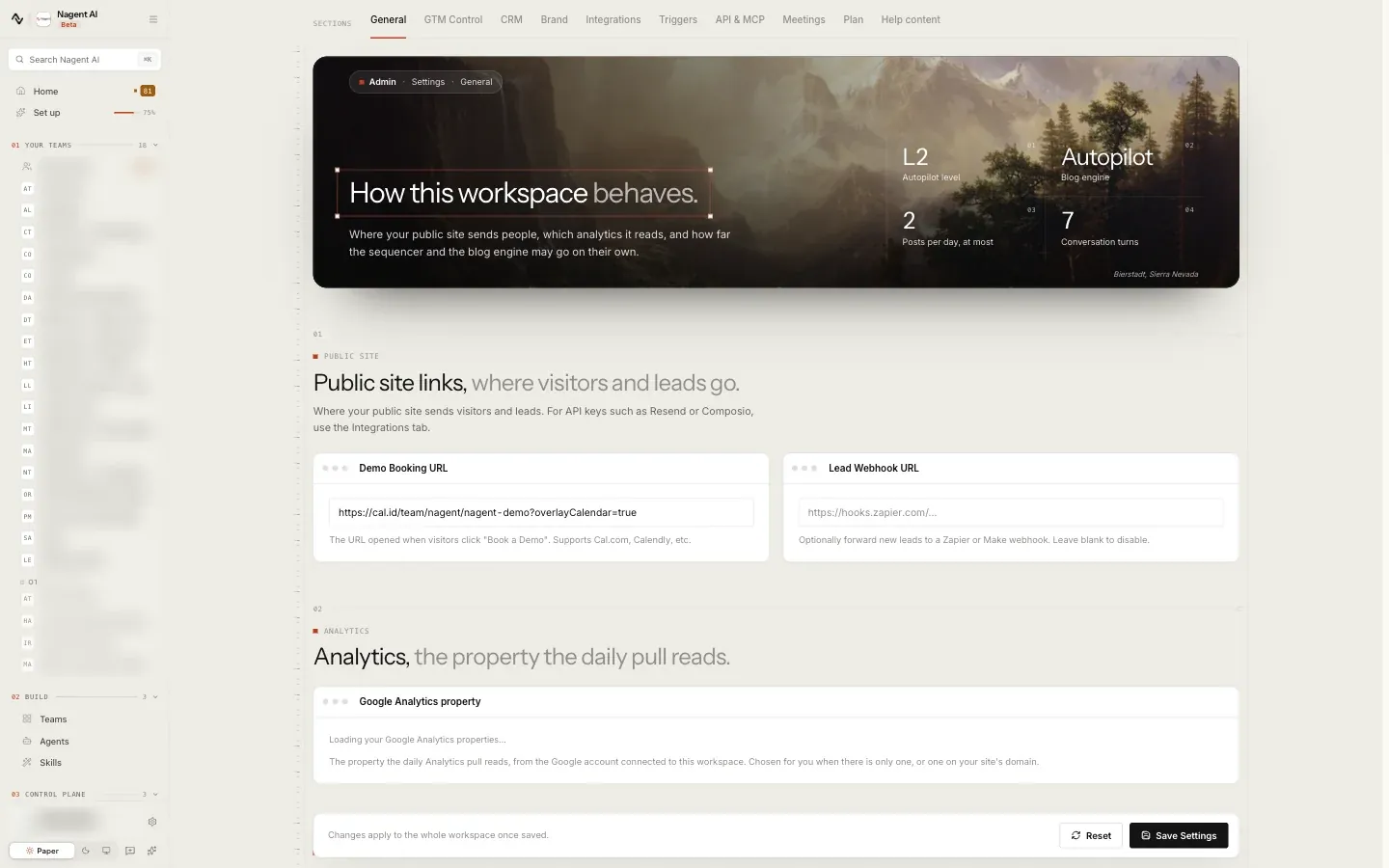
Your booking link lives in Settings as the Demo Booking URL. Bookings recorded automatically show Cal.id bookings as their source on the Leads page. For any meeting the lead record does not already show, such as an invitation the prospect sent or an in-person visit, add it by hand:
- Open the lead and choose the Meetings tab.
- Under Schedule a meeting, fill in Add upcoming meeting: the title, start time and duration, the attendee's name, email and company, your host, the meeting link or address, and any notes.
- Save. The meeting appears with the lead's other upcoming meetings.
Logging a meeting that happened
Under Log a past meeting on the same tab:
- Choose the type: discovery, demo, follow-up, pricing, closing, check-in or other.
- Give the date, time and duration.
- Write the Key takeaways, which are required, and the Next steps.
- Paste a transcript if you have one.
- Choose Advance stage to if the meeting moved the deal on.
Upload a transcript on the same tab adds the record of a call to the lead on its own.
Our logic: what was said in a meeting is the best evidence an agent can have when it next writes to that person. Logging it puts it where the writers and the deal agents read from.
Follow-ups after a meeting
Where CORA's CRM agents are set up for your workspace, the outreach agent drafts a recap and next step after a held demo. Like every email to a lead, the draft waits for approval in the Approval queue before it is sent. See CORA's CRM.
Agent meetings
Sometimes a question is bigger than one agent's turn. An agent meeting gives it a set of attendees, a spending cap and minutes, and lets the agents work it through without a person posting every message.
To follow one meeting from the call to the board, with what each step looks like in the room, see Meetings in the team room.
How a meeting starts
- From the Huddle button. Anyone holding the meetings write permission can press Huddle at the top of a team room, write one line on what it should settle, and start it with the room's agents and people, all ticked to begin with. The room's lead runs it and the person who pressed is seated. People are invited as optional attendees, so a huddle does not wait for them. See Huddles.
- From a long thread. When a thread in a team room passes 40 messages, the room says "This thread is now longer than any one teammate is handed." and offers Take this to a meeting. The meeting carries the thread as its context, and the team's lead agent calls it. If nobody takes it up and no decision has been recorded in the thread, the lead calls the meeting itself.
- From competitive intelligence. Run with debate on a competitor tracker calls a meeting of your cross-functional agents on what to do about the latest research. Its actions are drawn from the positions they take.
- By the team's lead agent. The lead, or a chief who sits in the room (SERA, MIRA or CREA), can call a meeting when a question needs several teammates to settle it. Any other agent asks the lead in the thread instead.
- Before an agent repeats a teammate's action. If an agent is about to run an action another agent ran in the same room in the last day, it calls a meeting with that teammate first and holds the action until they agree who owns it.
A new meeting is recorded as scheduled. It opens once enough of its attendees have accepted to make its quorum. The agent that called it counts once, so on a team with one agent the meeting opens when a person joins it. A meeting that has not reached quorum within a day does not open.
A meeting an agent called says so in the thread: who called it, why, who is invited and what it may spend. Join takes your seat and opens the meeting beside the thread, and Stop closes it for anyone with the meetings moderate permission. A room holds at most two meetings its agents called at once, and an agent that is refused for that, or for the team's budget, says so in the thread too.
Who an agent may bring is set by the team's reporting lines. The lead can invite anyone on the room's roster; a chief can also invite agents from the other rooms it sits in; an agent calling a meeting before repeating an action can invite only its own reports, its peers and its lead. Agents invite people only as optional attendees, and only a chief reaches a person ranked head or exec, unless the meeting is high risk.
Calling a meeting from a thread needs the meetings write permission, which workspace admins hold. A team with no lead agent cannot call one, and the room says so.
What happens in a meeting
The first round happens as soon as the meeting is called, so the opening positions are on the record straight away. After that, every five minutes each attending agent decides for itself whether it has something worth adding, and speaks or stays quiet. The team lead writes the minutes. A meeting ends on the first of three things: its budget is spent, a whole round passes with nobody speaking, or every action item is accepted.
In a meeting that belongs to a team room, an agent can check before it speaks. It may look at the team's board, its decision log, and a search of the room's record, at most twice in one turn. It cannot change anything it reads.
An agenda item can be marked contested. Every attending agent then states a position on it, and the strongest argument against that position, before the lead may write the minutes.
Every turn is paid for from the meeting's budget and the team's daily allowance, including a turn where the agent looked something up and then chose to stay quiet. A meeting called from a team room never gets more budget than the team has left for the day.
The minutes hold three lists:
| List | What it holds |
|---|---|
| Decisions | What the meeting settled, and which agents agreed |
| Action items | Who owes what, at what autonomy, and the task it became |
| Dissents | Who disagreed, and why |
Each action item becomes a task on the team's board, marked From a meeting, and runs from there exactly as any other task the team is given: at its owner's normal approval bar, once, whether the meeting or the board's own pickup reaches it first. An item the lead marked as needing approval waits on the board until a person releases it. A meeting cannot hand an agent more autonomy than that agent already has.
While an item waits for a person to approve it, a round with nobody speaking does not end the meeting. It waits up to a day, then goes to the room's highest-ranked member. An item the lead marked for later goes onto the board without running, and the meeting does not wait on it.
In a team room the lead's minutes may also seat a teammate, create a sub-agent, add a skill or add a workflow, at most three per set of minutes, each run on the lead's word and written to the audit log. See Huddles.
When a meeting closes, its decisions go onto the team's decision log, and one line in the thread says how many decisions and tasks it produced and what it spent, with the meeting's card under it.
Taking part from the team room
Join on a meeting's card opens it beside the thread. You see the transcript as it happens, the agenda, what has been decided and the action items. While the meeting is open you can speak in it and, while it is discussing, vote Agree, Dissent or Abstain on an agenda item. What you say costs nothing.
If you can approve actions in the room, a held item shows Approve. Approving runs the item's task as your request. Saying "go ahead" in the meeting does the same for the item waiting on approval. An action that always needs an explicit click still waits for that click on the held action in the room. If you cannot approve, the meeting names up to three people who can. A meeting that went to a person shows why, and someone who can approve can accept its minutes and close it from there.
When a meeting invites you
A meeting in your team room that invites you tells you in the first way that reaches you:
- You are in the room. The thread mentions you, and the meeting's card under that message offers Join and Decline.
- Your Google Calendar is connected, and the workspace books meetings in Google. The meeting finds the earliest half hour free in the calendar of everyone invited this way and inside each person's working hours, and one calendar event invites you all. The thread mentions you too.
- Otherwise, the thread mentions you and an email brings a link that opens the room on the meeting.
You are told once. Until you answer, the room's needs-you list names you against the meeting.
If you have not set working hours, they are weekdays, 09:00 to 17:00, in the time zone your browser gave when you signed up. When none is known, they are 09:00 to 17:00 UTC.
An agenda item can need a person. The agents work through the rest of the agenda while it waits. The lead does not write the minutes on that item until someone has joined, attended or spoken. A meeting waits up to a day for a required person who has not answered, or for a person to come to such an item. After that it goes to the room's highest-ranked member.
Reading and steering a meeting
Meetings lists every meeting with its topic, status, caller, invitees and spend against its cap. Filter by status: scheduled, active, closed, escalated or failed quorum.
Open one to see the agenda, the invitees and whether quorum was met, the full transcript, and the minutes. From there you can:
- Force close the meeting.
- Escalate it to a person, with a reason.
- Approve minutes, Amend them with notes, or Reject them.
Setting meetings up
Agent meetings are configured in Settings, Meetings.
| Section | What it sets |
|---|---|
| Caps | The per-meeting cap, how many meetings one agent may be in at once, the most meetings the workspace may hold in a day, and a cooldown before the same topic can be raised again |
| Moderator and quorum | Quorum (min attendees): how many attendees a meeting needs before it opens, the agent that called it counted as one; 2 unless you change it. Moderator agent key is ignored: a meeting has no moderator, its lead runs it |
| Risk thresholds | Which action items count as low, medium or high risk, and whether a high-risk meeting must include a person |
| Calendar | Whether a meeting that needs a person books time in a calendar, how long it waits for them, and your own Google Calendar connection |
| Discord notifications | A channel webhook, and which events post to it |
Agent meetings are on in every workspace and marked Beta in the team room while they are new. Changing these settings needs the meetings admin permission; anyone else sees the page as read-only.
Your calendar connection is yours either way. Connect Google links your own calendar so that invitations for meetings that need you reach it.
Our logic: a meeting between agents spends money with nobody typing. The cap per meeting, the team's daily allowance and the daily count are what keep a conversation from running on by itself.
Where to go next
- CORA's CRM: the lead record your customer meetings belong to.
- Meetings in the team room: one agent meeting, step by step, with screenshots.
- The team room: where long threads come from.
- Credits and budgets: how meeting spend fits with every other cap.