
Connecting an internal system
How a relay inside your network lets agents reach a core system, database, gateway or Bloomberg feed with no inbound port, and how to enrol, check and revoke it.
Browse documentation
A relay reaches what the internet cannot
Core banking, an internal gateway, a reporting database or a market data feed usually sits where no outside service can reach it, and should stay there. A relay is a small program your team runs inside that network. It connects out to the workspace and holds the connection open. When an agent calls one of the system's operations, the call travels down that connection, the relay makes it, and only the answer comes back.
- No inbound port. The relay only connects out, on HTTPS port 443.
- Your credentials stay with you. The relay holds the system's address, passwords and keys. The workspace never sees them.
- Your file decides what is reachable. The relay runs only the operations listed in its manifest, a file your team writes and keeps.
- Values can stay inside. With Tokenise, identifiers are swapped for tokens inside your network, and the key that reads them never leaves it.
- Each side keeps a record. The relay writes its own hash-chained log of every call, which your team can compare with the workspace's audit trail.
Internal systems are Beta, on the same plan as other connectors.
What your team needs
- A machine inside the network that can reach the system. Docker is the simplest. Kubernetes and a plain Linux VM with Node.js 22 work too; ask us for the full installation guide.
- Outbound HTTPS to the workspace's relay address and to the workspace itself. Through a forward proxy is fine. If the proxy inspects TLS, add both hosts to its bypass list: the relay proves who it is with its own certificate, and inspection breaks that.
- A data protection key, if any of its operations use Tokenise. Make one
with
openssl rand -base64 32and keep it in your secret store. Tokens made with it can be read only with it, so keep it as long as the data. - The manifest, below.
Adding an internal system
-
On Connectors, select Add an internal system.
-
Choose the System: Another internal system, a Gateway inside your network such as MuleSoft, SAP on premise, or Bloomberg market data (B-PIPE or Server API). Give it a Name and choose its Data protection. There is no address or credential to type.
-
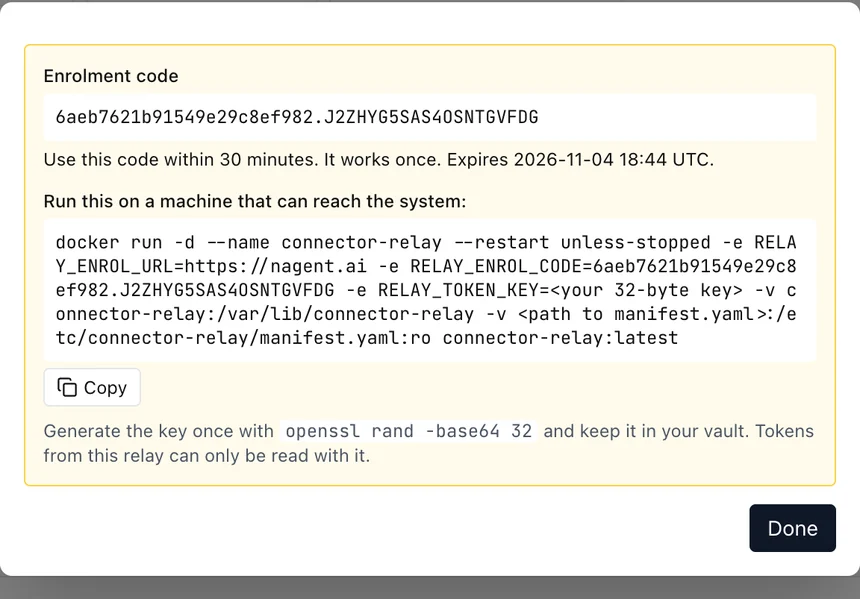
Select Create connector. The dialog shows an Enrolment code and the command that starts the relay with it. Copy both before you select Done: the code is shown once.
-
On the machine inside your network, put the manifest in place and run the command within 30 minutes, with your data protection key in place of
<your 32-byte key>. The code works once. -
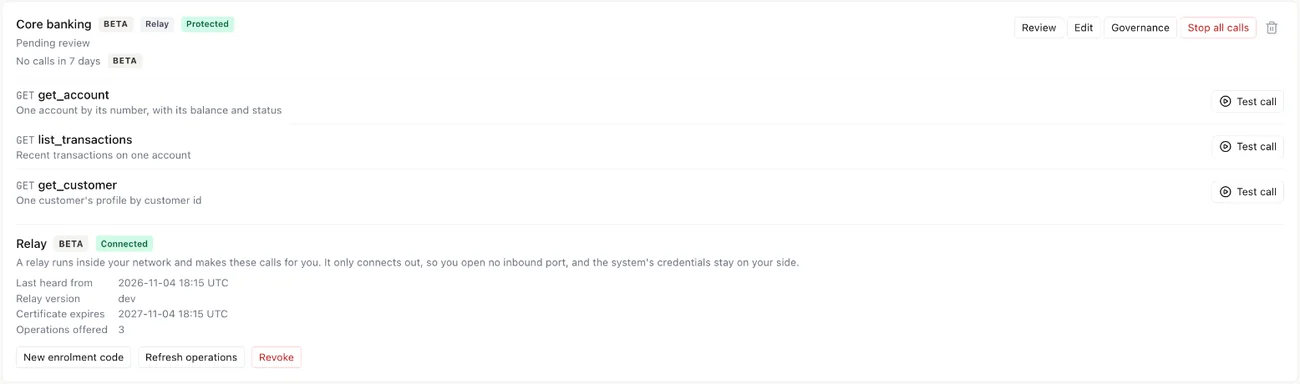
Within a few seconds the connector's Relay panel says Connected, with the relay's version, when its certificate expires, and how many operations it offers. The relay's operations become the connector's.
-
Select Review, confirm each operation as a read, an internal act or an external act, and Activate, as for any connector under review.
If the code expires first, select New enrolment code on the panel and run the command again with the new code.
The manifest
The manifest lists every operation the relay will run. Anything not in it cannot be called, and the relay refuses to start on any mistake, naming the line. A short example, for a REST service and a read-only database:
version: 1
dataProtection:
  mode: tokenise
databases:
  - name: loans
    driver: postgres
    urlEnv: LOANS_DB_URL
connectors:
  - slug: core-banking
    allowedHosts: [cbs.example.internal]
    auth:
      scheme: bearer
      secretEnv: CBS_TOKEN
    operations:
      - name: get_account
        type: rest
        method: GET
        description: One account by its number
        url: https://cbs.example.internal/v1/accounts/{accountId}
        params:
          - { name: accountId, in: path, type: string, maxLength: 32, required: true }
      - name: loans_for_customer
        type: sql
        database: loans
        description: Open loans for one customer
        sql: select id, amount, status from loans where customer_id = :customerId
        maxRows: 100
        params:
          - { name: customerId, type: string, required: true }
- slug is the connector's slug, shown on its row.
- Operations are REST, SOAP, SQL or Bloomberg, up to 40 per connector. Each declares its inputs; nothing else is accepted.
- Secrets are named, never written in the file:
secretEnvandurlEnvname environment variables you pass to the relay. - SQL runs one read-only statement with its inputs bound separately, never pasted in. Give the relay a login that can only read; it refuses to start with a login that can write, and every statement runs in a transaction that is always rolled back.
- dataProtection sets the least protection for every call. The workspace can ask for more, never less.
When the manifest changes, restart the relay, then select Refresh operations on the panel. A changed operation needs confirming again before agents can use it.
Bloomberg market data
The Bloomberg market data preset serves live data from your own B-PIPE or Server API installation: current values, end-of-day history and intraday bars. Your team builds the relay's Bloomberg image with Bloomberg's own library, and lists in the manifest the fields agents may ask for. The Desktop API that runs with a Bloomberg Terminal is not supported: its licence covers one person at a terminal.
For Bloomberg Data License, reached over the internet on your licence, use the data source instead.
The relay panel
| State | Means |
|---|---|
| Waiting for enrolment | A code is out and no relay has used it yet |
| Connected | The relay is connected and serving |
| Not connected | It was enrolled but is not connected now. A line below says why if it was turned away, for example "This relay's certificate has expired. Enrol it again." |
| Revoked | It was cut off, and cannot connect until it is enrolled again |
If a relay stops connecting, run its check command on the machine. It
tests the manifest, the key, the proxy and the connection, and names the
step that failed, such as tls-intercepted when a proxy is inspecting
TLS.
Revoking and enrolling again
Revoke on the panel cuts the relay off at once. Its connection closes, its certificate is refused from then on, and it stops trying. A relay also stops when its certificate expires, after a year, or when the connector is enrolled again elsewhere. You can stop it from your side at any time by stopping its container or service.
To enrol again, select New enrolment code, move the old identity aside on the machine (the folder named after the connector inside the relay's state directory), and start the relay with the new code. Enrolling again also cuts off the old relay. If a key or the state folder may have been copied, revoke and enrol again rather than reusing it.