
Market and regulatory data sources
How to give agents SEC filings, NSE announcements, company registry data, FIGIs and Bloomberg Data License, and how watches start an agent on each new filing.
Browse documentation
Data sources are ready-made connectors for public and licensed data
A data source is a connector made from a template for one data provider. You fill in a few fields, review its operations, and your agents can look up filings, announcements and identifiers. Its address and operations come from the template, so they cannot be edited afterwards; add it again from the template to change them.
On Connectors, select From a template and pick one under Data sources. Like any template it lands in review first.
The sources
| Source | What agents get | What you need |
|---|---|---|
| SEC EDGAR | US company filings, XBRL financial data and full-text search, and saving a filing to your knowledge base | No account. The SEC asks every caller to name an organisation and a contact email, which are sent with each request |
| NSE | Corporate announcements, results, board meetings, corporate actions, insider trading, offer documents and voting results from NSE's public feeds | No account |
| OpenFIGI | Tickers, ISINs and other identifiers mapped to FIGIs, the open identifiers Bloomberg data is keyed on | Nothing. An API key is optional and raises the rate limit |
| Bloomberg Data License | Reference and pricing data requested on your own licence | Your Bloomberg Data License client id and secret, token address and catalog id |
| data.gov.in company data | India's company master data, searched by CIN or name | Your data.gov.in API key and the dataset's resource id |
| Company registry (licensed provider) | Company, director and filing data, including MCA filings, from the registry provider you hold a licence with | Your provider's address and key, and where its company and filing records sit |
| Exchange data (licensed provider) | Announcements and filings from the exchange data provider you hold a licence with | The same, for that provider |
Licensed data stays in your workspace and is not shared outside it.
The public sources share a polite rate across the platform: SEC EDGAR five requests a second, NSE two a second, and OpenFIGI without a key 25 mappings a minute. A call above the rate waits its turn or is refused, rather than getting your address blocked by the provider.
On Bloomberg Data License, a data request may be billed to your licence, so it is an external act and waits for approval as such. Approving the same request twice sends it once. For live B-PIPE or Server API data from inside your network, use an internal system.
Watches
A watch checks a source on a schedule for new filings that match, saves each one to your knowledge base, and can start an agent on it. Watches are on SEC EDGAR, NSE and the licensed providers. They appear under Watches (Beta) on the source's row.
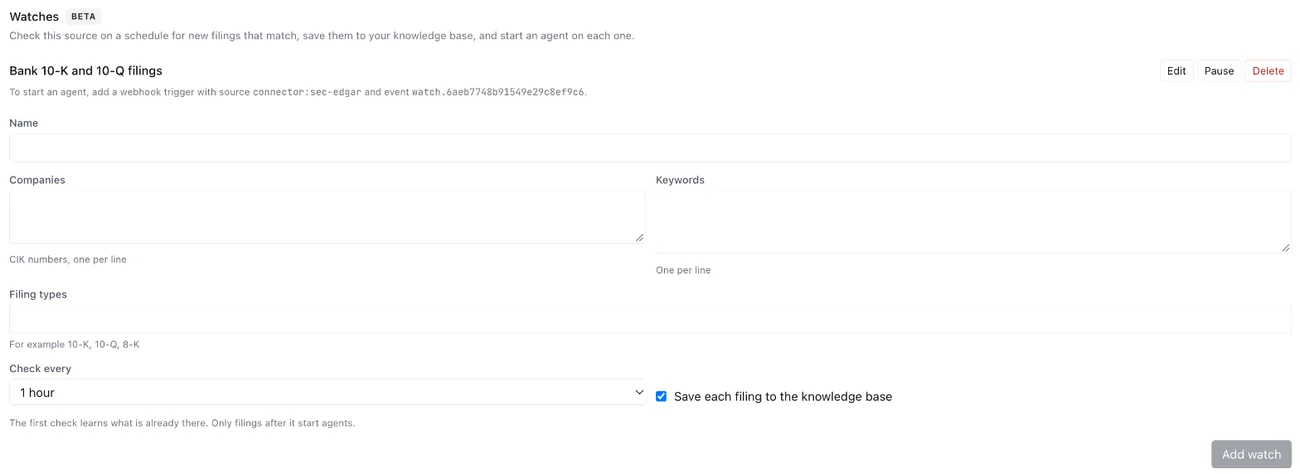
- Select Add watch and give it a Name.
- Under Companies, list what to follow, one per line: CIK numbers for SEC EDGAR, symbols for NSE, or the provider's company ids.
- Optionally add Keywords, and Filing types, such as
10-Kand8-Kfor the SEC, or ticks such as Financial results for NSE. - Choose Check every: 15 minutes, 1 hour, 6 hours or 1 day.
- Leave Save each filing to the knowledge base ticked to keep every match in the Knowledge Hub.
The first check learns what is already there, so only filings after it count as new. Each watch then shows when it last checked and how many it found, or why the check failed. Pause, Resume, Edit and Delete are on each watch.
To start an agent on each new filing, add a webhook trigger with the source
connector:<slug> and the event watch.<id>; the watch shows both. See
triggers and webhooks.
A source can carry up to 10 watches, each following up to 50 companies. For SEC EDGAR, name at least one company or keyword. A licensed provider's watches need its filing list set up in the template first.