
Adding a connector
How to add a connector by hand, from an OpenAPI, Swagger or RAML file, or from a Salesforce, SAP or other template, and what each field asks for.
Browse documentation
Three ways to add an API
On Connectors there are three ways to give agents an API. For what a connector is and how it goes live, see connectors.
| Button | Use it when | The connector starts |
|---|---|---|
| New connector | You know the few operations you want and can type them | Live |
| Import manifest | The API has an OpenAPI 3, Swagger 2.0 or RAML 1.0 file, or it is an MCP server | Pending review |
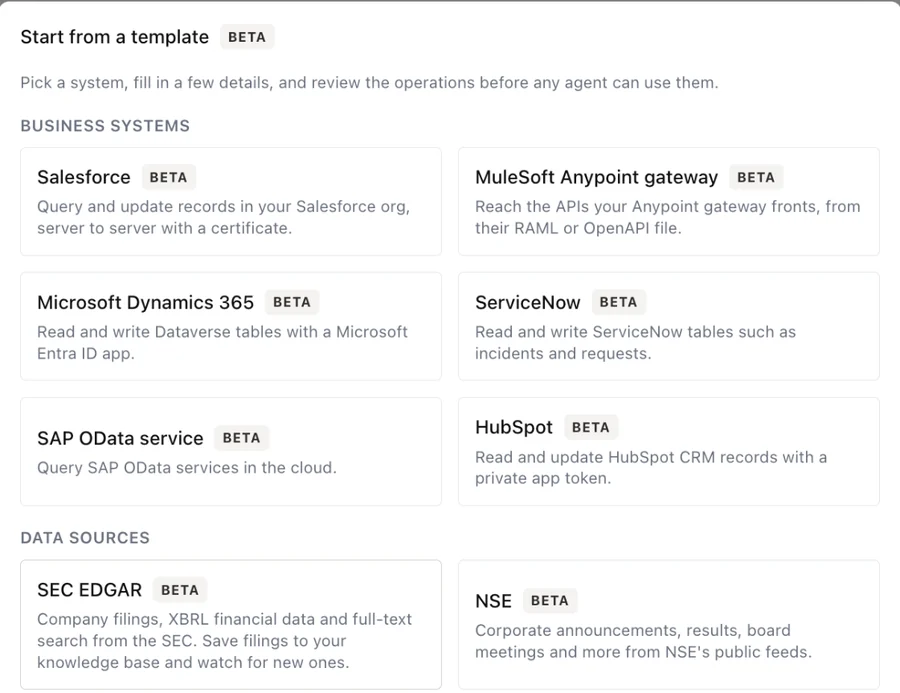
| From a template | It is Salesforce, MuleSoft, Microsoft Dynamics 365, ServiceNow, SAP or HubSpot | Pending review |
A system inside your network that the internet cannot reach takes a relay instead. See connecting an internal system.
New connector
The form asks for the following, top to bottom.
- Name is what the connector is listed under.
- Slug is the first half of every tool name the connector makes, so
it cannot be changed later. It takes letters, digits,
-and_. - Base URL must be an
https://address on port 443 that resolves to a public address. Put no user name or password in it; use the credential field. - Allowed hosts, one per line, limit where calls and token requests
may go. A line starting with
*.covers subdomains, not the host itself. The list must include the base URL's host. Leave it empty for no limit beyond the base URL. - Auth is how the connector signs in. See the next section.
- Environment is Sandbox or Live. It is a label: it shows on the row and is recorded with every call.
- Data protection decides which identifiers agents see. See protecting data.
- Inbound events lets the service send signed events back. See receiving events.
- Operations, below.
Every credential, key and secret header is encrypted when you save and is never shown again. To change one, paste a new value.
Signing in
| Auth | Sends |
|---|---|
| None | Nothing |
| Bearer token | An Authorization: Bearer header |
| Custom header | The credential in a header you name, such as X-Api-Key |
| Basic | user:pass, base64 encoded |
| OAuth2 client credentials | A client id and secret, exchanged for an access token at the token endpoint |
| OAuth2 JWT bearer | A token request signed with your private key, for a named user |
| OAuth2 authorization code | A person signs in once at the provider; the connector keeps the access it was granted |
For OAuth2 you also give the Token endpoint, the Client id, and if the provider needs them an Audience and Scopes. The token endpoint goes through the same address checks as the base URL, because your client secret is sent there. Under Client authentication you can sign the token request with a key (Signed JWT) instead of sending a secret.
For OAuth2 authorization code, copy the Redirect URI to register into the client's allowed redirect addresses at the provider, save the connector, then select Connect on its row and sign in. The row then says when it was connected.
Client certificates and signed requests
Some partners, most often banks and payment providers, ask for more than a credential. Both of these are Beta.
- Client certificate (mutual TLS): paste the certificate and its private key in PEM format. Add the partner's server CA if their certificate is not issued by a public authority. The form then shows when the certificate expires and asks you to renew it in its last 30 days.
- Request signing: tick Sign every request and choose the
signature type: an HMAC signature, a salted hash such as an
X-VERIFYheader, a detached JWS, or an RSA-SHA256 signature. Text to sign builds the string from parts such as{method},{pathAndQuery},{body}and{timestamp}, and each header row places{signature}where the partner expects it. Rotate secret on the row replaces the signing secret; the old one stops working at once, and the new one is shown once.
Secret headers are sent with every call and stored encrypted, such as a client id the partner treats as a secret. Static headers are fixed values that are not secret, such as a channel or version id.
Operations
Each operation becomes one tool. Nothing you do not declare here can be reached.
- Name, Method and Path, for example
GET /v1/tickets/{id}. A{placeholder}in the path must be declared in the input schema. - Description is what the model reads to decide when to call it. Write it for that reader: what it does and when to use it.
- Input schema, as JSON Schema, describes what the agent must send. It can be up to 4,000 characters.
- Body encoding (JSON or form) for POST, PUT and PATCH.
- Header params names inputs that are sent as headers.
- Idempotency header, for writes, carries a key so a repeated call is
not applied twice. It defaults to
Idempotency-Key. Tick No idempotency header if the API does not support one. - Treat as a write makes a GET wait for approval like any write, for the rare GET that changes something.
A call times out after at most 15 seconds.
Import manifest
Import manifest takes the API's description and creates one operation per entry. Paste the file under Paste file, or give its address under From a URL. It accepts OpenAPI 3.x and Swagger 2.0, as JSON or YAML, and RAML 1.0.
- A file can be up to 512 KB and describe up to 40 operations.
- Swagger's security definitions are not imported. Choose the sign-in method yourself, and add the credential on the review screen.
- Operations whose method is not supported are skipped, with a note.
- Headers the connector sets itself are removed from operations, with a note.
The third tab, MCP server, adds an MCP server by its address. Its tools become the connector's operations, and Refresh tools on the review screen picks up later changes.
Either way the connector lands in review, so nothing reaches an agent until you confirm or disable every operation.
From a template
From a template sets up a known system in a few fields. Every template asks for a name, a slug and an environment, which starts as Sandbox.
| Template | Signs in with | Asks for | Operations |
|---|---|---|---|
| Salesforce | A certificate (JWT bearer) or client credentials | Your My Domain, the API version, the consumer key, and the integration user and private key or the consumer secret | Query (SOQL), get, describe, create, update, and upsert by external id |
| MuleSoft Anypoint gateway | Client ID enforcement or OAuth 2.0 client credentials | The gateway address, the client id and secret and their header names, and the API's RAML or OpenAPI file. A client certificate is optional | Taken from the file you give it |
| Microsoft Dynamics 365 | A Microsoft Entra ID app | The environment host, tenant id, client id and client secret | List, get, create and update rows |
| ServiceNow | OAuth client credentials | The instance name, client id and client secret | List, get, create and update records |
| SAP OData service | A communication user, or OAuth client credentials | The service root address, the OData version, and the user name and password or OAuth client | Query an entity set, get one entity |
| HubSpot | A service key, or a legacy private app token | The service key or access token | List, get, search, create and update CRM objects |
Write operations from a template still need confirming in review. The same picker lists the data sources.
Receiving events from the service
Inbound events (Beta) lets a service tell your agents when something happens, such as a payment settling. Tick Receive events from this service and choose the Sender:
- Razorpay
- Timestamped signature (Stripe style)
- PhonePe (Authorization header) or PhonePe (X-VERIFY, older API). Check these settings against PhonePe's current documentation before going live.
- Custom, where you set the header, algorithm, encoding and the parts of the payload that are signed.
Enter the Signing secret the provider gave you. When you save a new one, the old one keeps working for 24 hours so no event is lost while you switch.
After saving, copy the Webhook URL into the provider's dashboard. Every
delivery is checked against its signature, and identifiers in it are
protected before any agent sees them. To start an agent on these events,
add a webhook trigger with the source connector:<slug>. See triggers
and webhooks.