
Approvals and audit for connectors
How to require one, two or three approvers on a connector's calls, set limits on what a call may carry, stop every call at once, and export a signed audit trail.
Browse documentation
Rules that hold whichever agent calls
An agent's level decides what it may do alone. See autonomy and governance. Some calls need a firmer rule than that, whoever makes them: a payment above a set amount needs two people, a transfer never goes above a limit. Those rules live on the connector, under Governance on its row. They apply to every agent that calls it.
The dialog lists the connector's operations, each with its own rules.
Approvers
Approvers is how many people must approve each call: none, 1, 2 or 3. The person who asked never counts, and no one approves the same call twice. While a call waits, its approval card says how far it has got, for example "Needs 2 approvers. 1 approved so far."
To ask for approvers only on large calls, give the Amount field, the field in the call that holds the amount, and a Threshold:
- A call above the threshold needs the approvers you set.
- A call at or below it follows the agent's usual rules.
- The amount is compared without its sign, so a reversal counts too.
- If the amount cannot be read, the call needs the approvers.
Leave the threshold blank to need the approvers on every call.
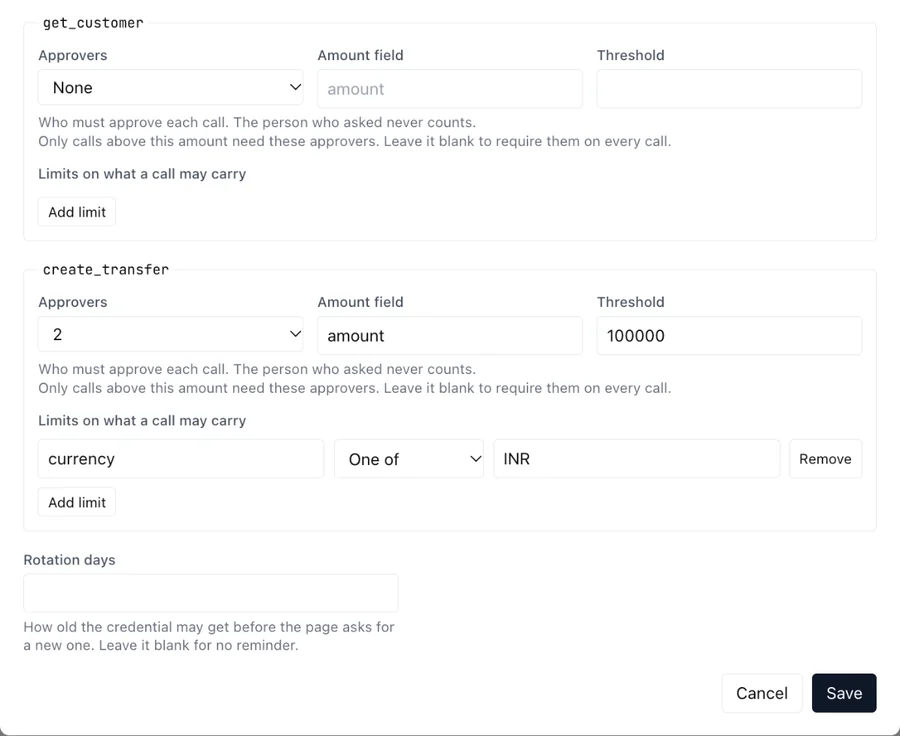
Limits on what a call may carry
Under Limits on what a call may carry, add a rule on any field of the call:
| Rule | Refuses a call when the field is |
|---|---|
| Max | Above the value |
| Min | Below the value |
| One of | Not one of the values you list, such as INR, USD |
A call that breaks a limit is refused outright, not sent for approval, and the refusal says which limit it broke. An operation can carry up to 10 limits.
An operation with rules cannot be renamed or removed until you clear them, so a rule is never dropped by accident.
Replacing credentials on time
Rotation days is how old the connector's credential may get. As the date nears, the row shows an amber note such as "Rotate the credential by 12 Nov 2026", and once it has passed, "Credential 95 days old, rotate now", until you paste a new one. Leave it blank for no reminder.
Stopping every call
Stop all calls on the row stops every call through the connector at once, including calls already queued and requests already approved. Give a reason; it is recorded with your name. The row shows Stopped, and pointing at it shows who stopped it and why.
Resume starts it again. Use Stop when something looks wrong and you want time to find out, rather than deleting the connector.
The audit trail
Every call a connector makes is recorded: when, which agent, which operation and host, the outcome and status, how long it took, any approval it carried, and how many identifiers were protected. What was sent and received is recorded only as a digest, never as content. Each row carries the hash of the one before it, so a row that is changed or removed breaks the chain. Changes to a connector, to its rules, and each reveal of a protected value are recorded beside the calls.
Exporting it
Export audit on Connectors
downloads the trail as one file, connector-audit-<n>.ndjson, with one
JSON record per line:
- A header naming the format,
connector-audit/v1, and the workspace. - The call rows, in order.
- The connector events, in time order.
- A signature line.
The signature line holds the SHA-256 of every byte before it, the counts, and an Ed25519 signature over all of that. A file that has been edited, cut short or added to fails the check.
One file holds up to 100,000 calls. A longer trail ends with
nextFromSequence on its signature line; to fetch the next part, open
the export address again with ?fromSequence= and that number. Each part
continues the chain of the one before, so a gap between parts shows.
Exporting needs its own permission, which none of the standard workspace roles include, and each export is itself recorded. Ask us to grant it to the people who send the trail to your security team.
Checking it
Someone who can export can also download the signing key's public half,
from /api/admin/integrations/connectors/audit/public-key on your
workspace's address. Give it to your security team to pin once; they can
then check every export against it with any Ed25519 library and no
software of ours. Ask us for
the verifier, a short script that checks the signature, the hash chain
and the continuation from the previous export.