
Protecting data in connector calls
How Mask and Tokenise keep account numbers, cards, PAN and Aadhaar away from agents, how response fields narrow what returns, and who may reveal a value.
Browse documentation
Agents can work with an identifier without seeing it
Many tasks need an agent to handle a customer's account or card without ever reading the number: look up a balance, then pass the same account to a transfer. Data protection on a connector does that. It runs on every answer before an agent sees it, and on every inbound event before an agent hears of it.
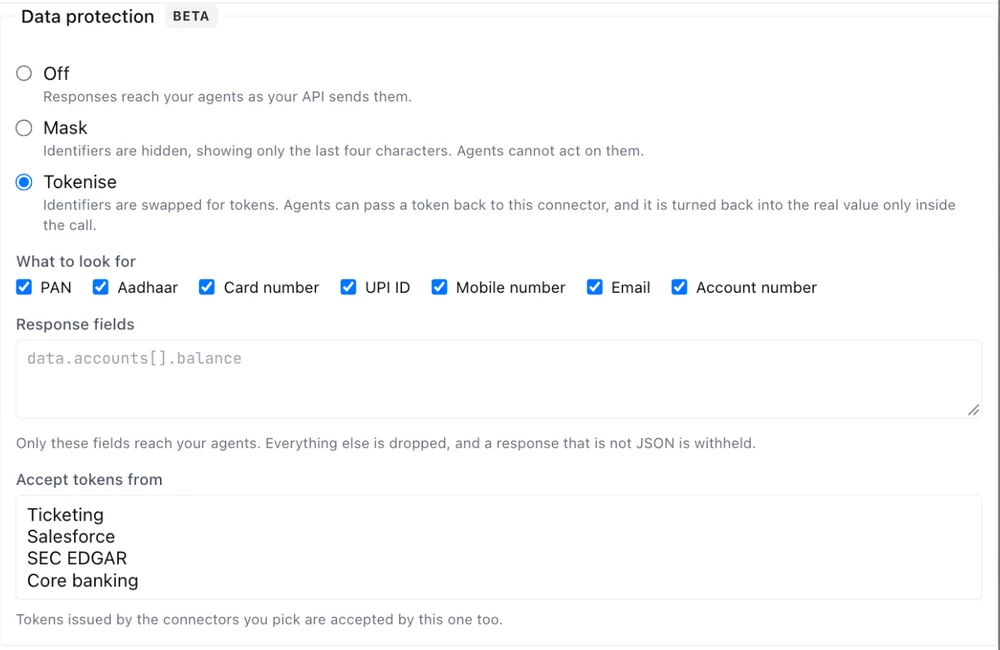
Set it under Data protection when you add or edit a connector. It is Beta.
| Mode | What agents see |
|---|---|
| Off | The answer as your API sends it |
| Mask | Each identifier hidden except its last four characters. Agents cannot act on a masked value |
| Tokenise | Each identifier replaced by a token. An agent can pass the token back to this connector, and it is turned back into the real value only inside the call |
New connectors start on Tokenise, whether you write them by hand, import them, use a template or add an internal system. A connector made before data protection existed reads as Off until you choose a mode. The Protected badge on a row means Mask or Tokenise is on.
What it looks for
Under What to look for, tick the kinds of identifier to protect. All are ticked by default.
| Kind | Found |
|---|---|
| PAN | Anywhere in the answer, by its shape |
| Aadhaar | Anywhere, by its shape and check digit |
| Card number | Anywhere, by its length and check digit |
| UPI ID | Anywhere, by its shape |
| Mobile number | Anywhere, by the shape of an Indian mobile number |
| Anywhere, by its shape | |
| Account number | Only in a field named for it, such as accountNumber, acctNo or beneficiaryAccount |
Account numbers have no shape of their own, so a bare run of digits elsewhere in an answer is left alone. If your API puts account numbers in fields with other names, list only the fields agents need under Response fields.
Response fields
Response fields turns the answer into an allowlist. Give one path per
line, for example data.accounts[].balance. Only those fields reach the
agent, everything else is dropped, and an answer that is not JSON is
withheld.
Use it for any answer that carries more than the agent needs. It is the strongest setting, because a field that never reaches the agent cannot leak from it.
Tokens across connectors
A token works only on the connector that issued it. If one system's account numbers are another system's input, for example a lookup on core banking and a transfer on the payments gateway, open the second connector and pick the first under Accept tokens from. That setting shows when the mode is Tokenise.
A connector refuses a token from any connector it does not accept.
Internal systems keep their own values
On an internal system, the relay inside your network does the protecting. The real values and the key that reads their tokens stay on your side. The workspace holds only the tokens, so those values can never be revealed in the workspace.
Revealing a value on an approval
When a call waiting for approval carries a protected value, its approval card lists it under Protected values. An approver can select Show last 4 or Show full value to check it before deciding.
- The value is shown on that card only and hidden again after 30 seconds.
- Each reveal is recorded with who did it and when, never with the value.
- Only someone who can approve that request may reveal its values, and the person who asked never can.
- Once the request is decided, its values can no longer be shown.
Revealing needs its own permission, which none of the standard workspace roles include. Ask us to grant it to the people who approve these calls.